
Pipedrive Marketplace: Best Apps to Boost Productivity
Overview
The Pipedrive Marketplace offers hundreds of integrations to extend your CRM’s power. From automating workflows to streamlining communication and analytics, these apps help you and your sales team work smarter — not harder.
This article lists top Pipedrive Marketplace apps that can significantly boost your productivity.
How to Access the Pipedrive Marketplace?
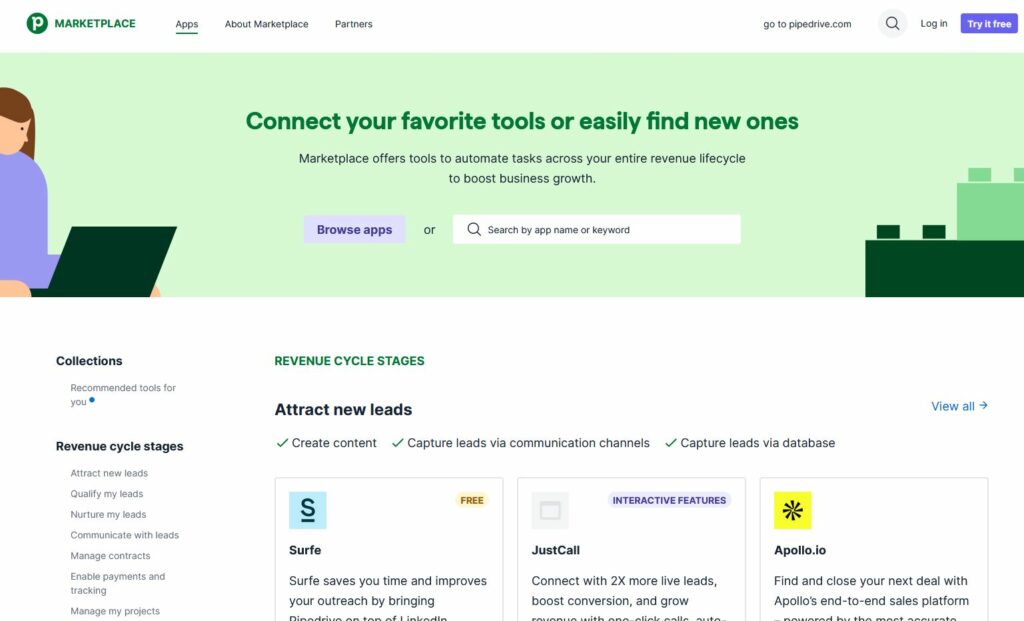
You can explore and install apps directly from:
https://www.pipedrive.com/en/marketplace
Or inside your Pipedrive account:
- Go to Tools & Integrations > Marketplace
- Use filters to browse by category (e.g., Communication, Reporting, Automation)
Top Recommended Apps by Category
1. Automation & Workflow
Zapier
- Automate tasks between Pipedrive and 5,000+ other apps.
- Example: Create a new Pipedrive deal when a Typeform is submitted.
Make (formerly Integromat)
- Build advanced workflows visually.
- Great for multi-step or condition-based automation.
2. Communication & Calling
JustCall
- Cloud phone system with call logging, SMS, and call recording.
- Logs calls and texts directly to Pipedrive.
Twilio SMS
- Send and receive text messages through Pipedrive deals and contacts.
- Ideal for quick client updates or alerts.
3. Email Marketing & Lead Nurturing
Outfunnel
- Syncs Pipedrive with marketing platforms like Mailchimp, ActiveCampaign, and HubSpot.
- Tracks email engagement and updates deals accordingly.
Mailigen
- All-in-one email marketing suite.
- Trigger campaigns based on deal stage, activity, or tags.
4. Analytics & Reporting
Databox
- Visual dashboard platform for KPIs.
- Connects Pipedrive with Google Analytics, Facebook Ads, and more.
Klipfolio
- Real-time dashboards with deeper customization.
- Combine CRM data with other sources like Excel or SQL.
5. Scheduling & Calendars
Calendly
- Automates meeting scheduling and eliminates back-and-forth emails.
- Syncs events and availability with your Pipedrive calendar.
Zoom Integration
- Schedule, track, and start Zoom meetings directly from deals or activities.
6. Invoicing & Payments
QuickBooks
- Create invoices and sync customer data automatically.
- View invoice status inside deals.
Xero
- Generate and send invoices from within Pipedrive.
- Track payment status alongside your pipeline.
Pro Tips for Choosing the Right App
- Start with one or two key bottlenecks. Is it scheduling, reporting, or email automation?
- Check app reviews and install stats. User feedback helps.
- Use free trials. Many apps offer limited-time free versions to test compatibility.
- Integrate across teams. Don’t just think sales — consider marketing, finance, and support.
Checklist: Before Installing Apps
| Step | Status |
|---|---|
| Identified team pain points | ☐ |
| Reviewed app documentation and pricing | ☐ |
| Tested app with free trial (if available) | ☐ |
| Confirmed compatibility with Pipedrive plan | ☐ |
| Trained team on app usage | ☐ |
How Does the Pipedrive Marketplace Improve Sales Team Productivity?
Why Does Reducing Tool Switching Matter for Sales Reps?
One of the biggest productivity drains in modern sales teams is the constant switching between tools. A sales rep might use Pipedrive to manage deals, then open Gmail for email, then switch to Google Calendar for scheduling, then jump into Slack for team updates, and finally navigate to DocuSign to send a contract. Each transition costs time and mental energy.
Fortunately, Pipedrive addresses this challenge head-on through its Marketplace integrations. By connecting these external tools directly into Pipedrive, reps can take actions — like sending an email, booking a meeting, or requesting a signature — without ever leaving the CRM. As a result, workflows become faster, data stays consistent across platforms, and teams experience less friction throughout the day.
Moreover, when data flows automatically between Pipedrive and connected apps, the risk of human error drops significantly. Contacts updated in Mailchimp sync to Pipedrive; meetings booked in Calendly appear as Pipedrive activities; signed documents from DocuSign attach directly to deals. This kind of real-time synchronization eliminates duplicate data entry and ensures everyone on the team has an accurate, up-to-date picture of every deal.
What Are the Best App Categories in the Pipedrive Marketplace?
The Pipedrive Marketplace organizes integrations into logical categories, making it easier to identify the right tools for your specific needs. Below is an overview of the major categories and the top apps within each.
| Category | Popular Apps | Primary Benefit |
| Automation | Zapier, Make (Integromat) | Reduce manual data entry |
| Communication | Slack, Microsoft Teams | Centralize team chat |
| Email Marketing | Mailchimp, ActiveCampaign | Sync contacts and campaigns |
| eSignature | DocuSign, PandaDoc | Close deals faster |
| Scheduling | Calendly, Acuity | Automate meeting booking |
| Analytics | Databox, Google Analytics | Deeper reporting |
| Accounting | QuickBooks, Xero | Invoice from deals |
| Project Mgmt | Trello, Asana | Track post-sale tasks |
Which Automation Apps Work Best With Pipedrive?
Automation is, without question, the single most impactful category in the Pipedrive Marketplace for boosting productivity. Apps like Zapier and Make (formerly Integromat) act as bridges between Pipedrive and thousands of other tools, allowing users to create automated workflows — called “Zaps” or “scenarios” — without writing a single line of code.
For example, a Zapier automation could trigger every time a new deal is added to Pipedrive, automatically creating a corresponding task in Trello, sending a welcome email through Mailchimp, and logging the contact in Google Sheets — all simultaneously. This kind of cross-platform automation transforms Pipedrive from a standalone CRM into the engine of a fully automated sales machine.
Additionally, Pipedrive’s own built-in automation tools (available on Professional plans and above) allow users to set up triggers and actions natively within the platform. Combined with Zapier or Make, these tools create a layered automation strategy that saves hours each week per rep.
How Do Communication Apps Enhance Team Collaboration in Pipedrive?
Sales is a team sport, and therefore communication tools are a critical component of any Pipedrive-powered stack. The Slack integration for Pipedrive is among the most popular in the Marketplace, and for good reason. When connected, Pipedrive can send automatic Slack notifications when deals move between stages, when new leads are assigned, or when high-value opportunities reach a critical threshold.
Similarly, Microsoft Teams users can integrate directly with Pipedrive to receive deal updates and activity reminders within their existing communication workflow. This means sales managers stay informed in real time, without needing to log into Pipedrive separately to check on pipeline progress.
In addition to team messaging, Zoom’s integration with Pipedrive allows reps to start video calls directly from a deal or contact record. The meeting details — including the link, time, and attendees — are automatically logged as a Pipedrive activity. Subsequently, after the call, any notes taken can be synced back, keeping the deal record complete and accurate.
What Are the Top Pipedrive Marketplace Apps for Closing Deals Faster?
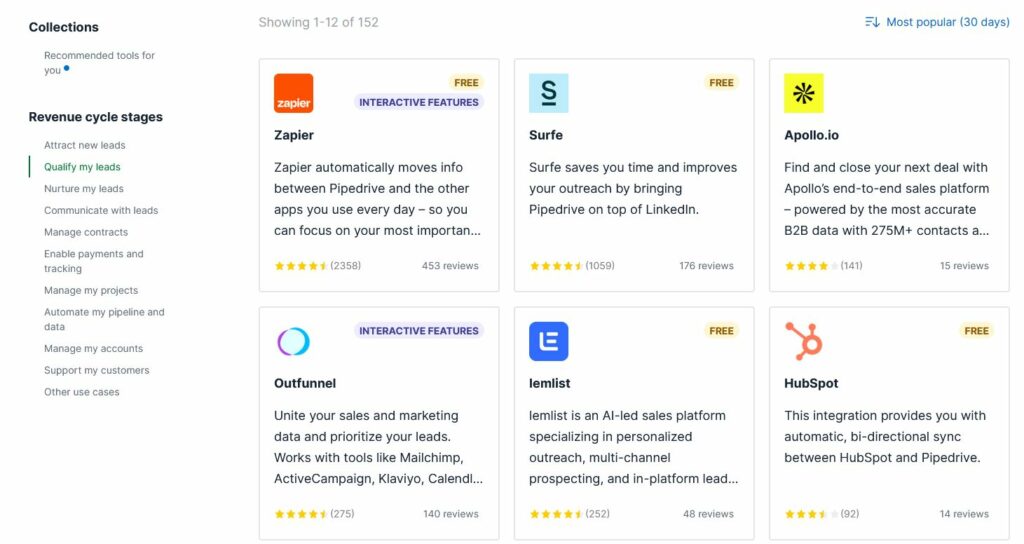
While all productivity improvements ultimately contribute to faster deal closing, some Pipedrive Marketplace apps are specifically designed to accelerate the final stages of the sales process. The table below highlights the top-rated apps across key functions.
| App Name | Category | Key Feature | Best For |
| Zapier | Automation | Connect 5,000+ apps | Workflow automation |
| Slack | Communication | Real-time messaging | Team collaboration |
| Trello | Project Mgmt | Visual board sync | Task tracking |
| DocuSign | eSignature | In-deal signing | Contract closing |
| Zoom | Meetings | One-click call start | Video sales calls |
| Calendly | Scheduling | Auto booking links | Meeting scheduling |
| Mailchimp | Email Marketing | Campaign sync | Email outreach |
| QuickBooks | Accounting | Invoice from deals | Finance tracking |
Why Is DocuSign One of the Most Valuable Pipedrive Integrations?
When a deal reaches the proposal or contract stage, speed is essential. The DocuSign integration for Pipedrive allows sales reps to send contracts for electronic signature directly from within a Pipedrive deal. Rather than downloading a PDF, emailing it separately, and then manually following up, the entire signature process is handled in one place.
Furthermore, once a document is signed, DocuSign automatically updates the deal status in Pipedrive and attaches the signed document to the relevant record. This level of automation not only saves time but also creates a clean, auditable paper trail for every deal. For teams closing high volumes of deals, this integration alone can save multiple hours per week.
PandaDoc is another excellent alternative for teams that need more advanced document customization, including quotes, proposals, and interactive pricing tables — all synchronized with Pipedrive deal data.
How Does Calendly Eliminate Scheduling Friction for Sales Teams?
Scheduling meetings is one of the most time-consuming and frustrating parts of the sales process. The back-and-forth of finding a mutually available time slot can delay a deal by days. The Calendly integration with Pipedrive solves this elegantly by allowing reps to share a personalized booking link directly from a deal or contact in Pipedrive.
When a prospect books a meeting through Calendly, the event is automatically created as a Pipedrive activity, linked to the correct contact and deal. Consequently, no manual entry is required, and the rep receives a timely reminder before the call. This seamless scheduling experience makes a strong impression on prospects and ensures no follow-up meeting falls through the cracks.
Moreover, Calendly’s round-robin scheduling feature integrates beautifully with Pipedrive for teams with multiple reps, distributing inbound meeting requests evenly and keeping workloads balanced.
How Do Email Marketing Integrations Extend Pipedrive’s Reach?
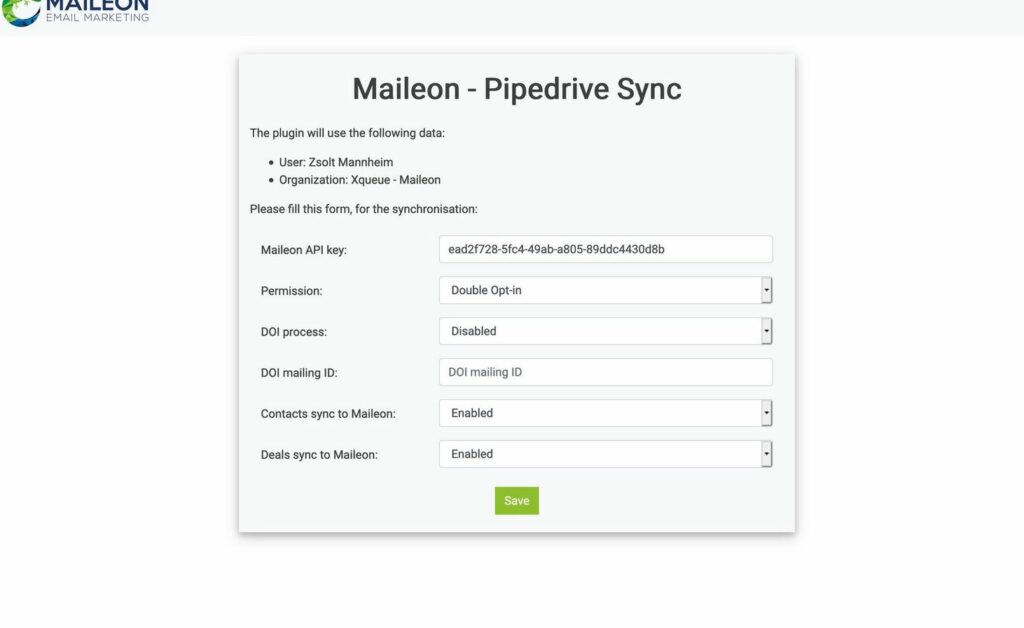
What Role Does Mailchimp Play in a Pipedrive-Powered Sales Process?
Email marketing and CRM are natural partners, and the Mailchimp integration for Pipedrive makes this partnership seamless. When connected, Pipedrive contact lists can be synced directly to Mailchimp audiences, ensuring that email campaigns are always targeting the most current and accurate set of leads and customers.
For instance, when a lead is added to Pipedrive at the top of the funnel, they can be automatically enrolled in a Mailchimp nurture sequence. As they progress through the Pipedrive pipeline, their status in Mailchimp can update accordingly — removing them from nurture sequences and adding them to customer lists once a deal is won. This tight integration ensures that marketing and sales are always aligned.
Additionally, Pipedrive users can see email engagement data — opens, clicks, and unsubscribes — directly on contact records, giving reps valuable context before making a call or sending a follow-up. In turn, this data-driven approach leads to more personalized outreach and higher conversion rates.
How Does ActiveCampaign Integration Differ From Mailchimp in Pipedrive?
While Mailchimp is ideal for straightforward email campaigns, ActiveCampaign offers more sophisticated marketing automation and CRM features that pair powerfully with Pipedrive. The ActiveCampaign integration enables advanced lead scoring, behavior-based email triggers, and detailed contact segmentation — all synced with Pipedrive.
For example, when a prospect opens three emails in a row and clicks a pricing link, ActiveCampaign can automatically increase their lead score and notify the assigned Pipedrive rep with a task to follow up. This kind of intelligent automation ensures that reps focus their attention on the hottest leads at exactly the right moment. As a result, conversion rates improve and no warm lead goes unnoticed.
How Can Analytics and Reporting Apps Strengthen Pipedrive Insights?
What Does Databox Add to Pipedrive’s Native Reporting?
Pipedrive includes solid built-in reporting features, but for teams that need more granular, customizable dashboards, Databox is an outstanding Marketplace addition. Databox connects to Pipedrive and pulls deal, activity, and pipeline data into visually rich dashboards that can be shared across the team in real time.
Furthermore, Databox supports goal tracking, allowing managers to set targets for individual reps and monitor progress daily. When combined with data from other connected tools — such as website traffic from Google Analytics or ad performance from Facebook Ads — Databox becomes a single source of truth for the entire revenue operation. This cross-platform visibility is invaluable for making data-driven decisions quickly.
Why Should Pipedrive Users Consider Google Analytics Integration?
Understanding how website visitors convert into Pipedrive leads is a powerful capability. The Google Analytics integration for Pipedrive enables businesses to track the customer journey from the first website visit all the way through to a closed deal. By connecting these two data sources, marketing teams can identify which traffic sources, landing pages, and campaigns drive the highest-quality leads into the Pipedrive pipeline.
Consequently, marketing budgets can be allocated more intelligently — doubling down on channels that generate revenue and cutting those that produce low-quality leads. This alignment between marketing data and sales outcomes is one of the most strategically valuable capabilities available through the Pipedrive Marketplace.
What Should You Take Away From Exploring the Pipedrive Marketplace?
In conclusion, the Pipedrive Marketplace is far more than a list of add-ons — it is the key to unlocking Pipedrive’s full potential as the central hub of your sales and business operations. By thoughtfully selecting and connecting the right integrations, teams can dramatically reduce manual work, accelerate deal cycles, and maintain tighter alignment between sales, marketing, and operations.
Throughout this article, we have seen how Pipedrive integrates with automation tools like Zapier to eliminate repetitive tasks, communication platforms like Slack and Zoom to keep teams connected, scheduling tools like Calendly to remove friction from the booking process, and eSignature apps like DocuSign to close deals with speed and confidence. Additionally, email marketing integrations with Mailchimp and ActiveCampaign ensure that Pipedrive-powered sales processes are always supported by intelligent, data-driven outreach.
Ultimately, the most productive Pipedrive users are those who view the Marketplace not as an optional extra, but as an essential part of their sales infrastructure. Start by identifying the two or three biggest time drains in your current process, then explore the Pipedrive Marketplace to find integrations that solve those specific challenges. As your team grows and your processes mature, you can continue layering in additional apps to build a fully optimized, Pipedrive-centered tech stack that scales with your ambitions.
Whether you are a startup building your first sales process or an established business looking to optimize an existing one, Pipedrive and its Marketplace give you the tools to work smarter, close faster, and grow with confidence.
Final Thoughts
The Pipedrive Marketplace is more than just a collection of tools — it’s a sales productivity ecosystem. The right integrations can transform how your team works and closes deals. Explore, experiment, and empower your CRM with the apps that work best for your goals.
Frequently Asked Questions
The Pipedrive Marketplace itself is free to browse and access. However, many third-party apps available through the Marketplace have their own subscription fees or pricing tiers. Some apps offer free plans or trial periods, so it is always worth testing an integration before committing to a paid tier. Pipedrive does not charge additional fees for connecting apps through its Marketplace.
Installing an app is straightforward. First, navigate to the Marketplace section within your Pipedrive account. Then, search for the app you want, click on it, and follow the on-screen authorization steps. Most integrations require you to log in to your third-party account and grant Pipedrive permission to sync data. Once connected, the integration typically begins working immediately without requiring any technical setup.
Most Marketplace integrations are available across all Pipedrive subscription plans, including Essential, Advanced, Professional, Power, and Enterprise. That said, a small number of advanced integrations or native features — such as smart email BCC or workflow automations — may require higher-tier plans. It is advisable to check the specific requirements of each app before installation.
Small businesses typically benefit most from automation and communication tools. Zapier is ideal for connecting Pipedrive with hundreds of other apps without writing code. Calendly removes the back-and-forth of scheduling, while Mailchimp helps nurture leads with email campaigns. DocuSign accelerates the contract process, and Slack keeps the team aligned on every deal. Together, these apps create a lean but powerful sales stack around Pipedrive.
Recommended:
- How Should You Structure Your CRM Team for Maximum Success?
- Using Salesforce to Build a 360° Customer View
- What Should Investors Know About Salesforce Stock?
- What KPIs Should Every Business Track in Their CRM System?
- What is CRM Database?
- How Can CRM Analytics Transform Your Salesforce Experience?
- CRM Management
- Getting Started With Pipedrive
- What is Pipedrive CRM?
- Choosing the best low-cost CRM
- Top Microsoft Dynamics Alternatives and Competitors
- CRM Cost Comparison of Top Platforms
