Website Accessibility Guidelines: WCAG 2.2 and the ADA

Website accessibility guidelines are the technical rules that make a site usable by people with visual, hearing, motor and cognitive disabilities. The reference document is the Web Content Accessibility Guidelines (WCAG) 2.2, published by the W3C. In the United States, the Department of Justice treats WCAG as an established resource for ADA compliance, though it does not name a single mandatory technical standard for private businesses. This guide explains how the guidelines are organized, what they require in practice, where U.S. law stands, and how a business can test and prioritize its own site.
TL;DR
- WCAG 2.2 is organized into four principles (perceivable, operable, understandable, robust), 13 guidelines and testable success criteria at levels A, AA and AAA.
- Level AA is the practical target for most business sites and the level cited in current U.S. government rules.
- The ADA applies to the websites of state and local governments (Title II) and public-facing businesses (Title III), but the DOJ does not mandate one technical standard.
- Automated scanners find only part of the problems. A clean report does not prove a site is accessible, so manual and keyboard testing remain necessary.
- Start with the checks that block the most users: color contrast, alt text, keyboard navigation, captions and labeled forms.
Table of Contents
- What website accessibility guidelines actually cover
- The four principles of web accessibility
- How guidelines, success criteria and levels fit together
- What the ADA requires of a business website
- Practical checks that cover the most ground
- Testing: what automated tools can and cannot do
- A prioritized path for a small or mid-sized business
- Our perspective: accessibility is an engineering and strategy decision
- How Solution4Guru can help
- FAQ
- Sources
What website accessibility guidelines actually cover
The terms “guidelines” and “standards” are often used interchangeably. WCAG is formally a set of recommendations, but its success criteria are written to be testable, which is why regulation, purchasing and contractual agreements can reference them. In practice, WCAG functions as the standard.
WCAG does not stand alone. The W3C Web Accessibility Initiative also develops the Authoring Tool Accessibility Guidelines (ATAG) and the User Agent Accessibility Guidelines (UAAG), which work in conjunction with WCAG. ATAG concerns the tools used to create content, such as content management systems. UAAG concerns browsers and media players. For a business owner, WCAG is the document that matters most, but ATAG explains why the choice of CMS or page builder affects how accessible the finished site can be.
WCAG 2.2 is also designed to apply to different web technologies, now and in the future, on any kind of device. That means the same criteria apply to a desktop checkout page, a mobile booking form and a single-page application.
The four principles of web accessibility
Every WCAG requirement sits under one of four principles. The W3C published the current version, WCAG 2.2, on December 12, 2024. The principles are as follows.
- Perceivable. Content must be detectable by at least one sense. Text alternatives for images, captions for video and sufficient color contrast belong here.
- Operable. The interface and navigation must be usable. Every function must work from a keyboard, users need enough time, and focus must be visible.
- Understandable. Information and interface operations must be comprehensible. Clear labels, predictable navigation and helpful error messages belong here.
- Robust. Content must be interpreted reliably by assistive technologies, and it should remain accessible as technologies and user agents evolve. Valid markup and correct names, roles and values for custom components serve this principle.
The W3C’s explanatory material makes the stakes plain: if any one of the four foundations is not met, users with disabilities can be effectively excluded from the experience. A site with excellent contrast but a mouse-only menu fails just as completely for a keyboard user.
How guidelines, success criteria and levels fit together
Under the four principles, WCAG 2.2 lists 13 guidelines, each divided into testable success criteria. Each criterion carries one of three conformance levels.
| Level | What it means | Typical use |
|---|---|---|
| A | The lowest level. Removes the most severe barriers. | Minimum baseline, never a stopping point |
| AA | Addresses the broadest set of common barriers. | Target for most business and government sites |
| AAA | The highest level. Some criteria cannot be met for all content. | Selected pages or features, not a whole-site goal |
Two practical points follow. First, conformance is measured against success criteria, which pass or fail. WCAG contains no percentage threshold, so the “20% rule” that sometimes appears in search results is not a WCAG requirement or a universal legal test. Second, levels are cumulative: claiming AA means meeting every Level A and Level AA criterion.
WCAG 2.2 also added criteria aimed at mobile users, people with low vision and people with cognitive or motor disabilities, including a minimum target size for pointer inputs of 24 by 24 CSS pixels. Teams still working to WCAG 2.1 should review the differences, because current government rules and the latest W3C version do not point to the same edition.
What the ADA requires of a business website
The ADA does not contain a line-by-line technical specification for websites. The DOJ’s guidance states that the ADA applies to the websites of state and local governments (Title II) and public-facing businesses (Title III), requiring effective communication and non-discrimination. The same guidance does not mandate a single technical standard, but it identifies WCAG and Section 508 as established resources for providing accessible online services.
For private businesses, the practical reading is straightforward. WCAG 2.x Level AA is the benchmark that courts, plaintiffs, settlement agreements and procurement teams most often use, so it is the sensible target.
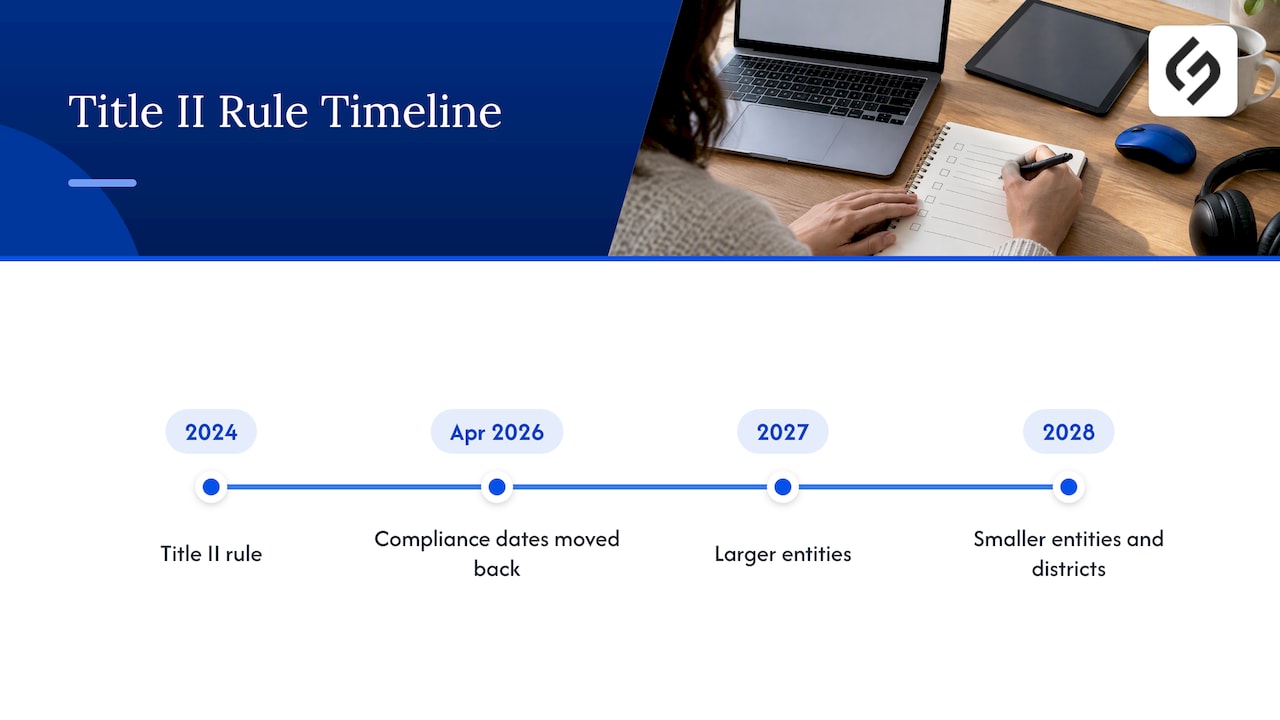
State and local governments face a specific rule. The DOJ’s 2024 Title II rule requires web content and mobile apps to meet WCAG 2.1, Level AA unless an exception applies. In April 2026 the Department published an Interim Final Rule that moved the compliance dates back, as described in its small entity compliance guide: to 2027 for larger entities and 2028 for smaller ones and special districts. Businesses that sell to public agencies should expect those buyers to ask for conformance statements and test evidence.
Transactional sites carry extra exposure. An online registration or payment form that a screen reader user cannot complete is the type of barrier that generates complaints. Organizations that collect sign-ups from families, for example, can see how ADA and privacy duties meet in ADA and COPPA registration forms for youth programs.
How requirements differ outside the U.S.
Because the audience of many sites crosses borders, it helps to know that rules differ. The W3C’s policy overview notes that listed policies cover different sectors and cite different WCAG versions. The U.S. ADA is a non-discrimination law covering public and private sectors. Canada’s Accessible Canada Act covers government and federally regulated bodies and is based on WCAG 2.0 AA.
In the European Union, the European Accessibility Act (Directive 2019/882) took effect on June 28, 2025 and sets accessibility requirements for digital services and products, including e-commerce, banking and transport information. A U.S. company selling online to EU consumers should confirm with counsel whether the Act reaches its store. The W3C argues that harmonizing standards reduces the burden of maintaining different versions of content for different jurisdictions, which is one more reason to build to a single, recent WCAG level.
Practical checks that cover the most ground
The DOJ’s web guidance lists the barriers that most often block users and the fixes that address them. Those fixes are a sound first pass for any site.
Color contrast and color cues
Text must stand out from its background, and color alone should never carry meaning. A red border that marks an invalid field needs an accompanying text message or icon. WCAG sets numeric contrast ratios for AA, so check design tokens, button states and placeholder text against them, not just body copy.
Text alternatives
Every informative image needs descriptive alt text that conveys its purpose. Decorative images should carry empty alt attributes so screen readers skip them. Charts and infographics need a text summary or data table. Images of text, such as a banner with the offer baked into the pixels, should be avoided.
Keyboard access
Put the mouse aside and work through the site with Tab, Shift+Tab, Enter, Space and the arrow keys. Every menu, modal, carousel and form control must be reachable and operable. Focus must always be visible and never hidden behind a sticky header or cookie banner. Keyboard traps, where focus enters a widget and cannot leave, are among the most serious failures.
Video and audio
Synchronized captions are required for prerecorded video with sound, and transcripts help audio-only content. Autoplaying media with sound should be stoppable.
Forms
Each field needs a programmatically associated label, not just placeholder text. Errors must be identified in text, tied to the field and explained in terms a user can act on. Required fields should be indicated in more than color.
Structure and robustness
Use real headings in a logical order, landmarks for page regions, native buttons and links instead of clickable divs, and ARIA only where native HTML cannot do the job. Custom components such as date pickers and accordions need correct names, roles and states.
Testing: what automated tools can and cannot do
Automated checkers are fast and repeatable, and they catch missing alt attributes, empty buttons, low contrast and some labeling errors. The W3C maintains a list of test tools with consistent WCAG 2.2 ACT rule implementations, a useful filter when choosing software.
However, the DOJ cautions that a clean report from such software does not guarantee a site is free of accessibility barriers. Tools cannot judge whether alt text is meaningful, whether a reading order makes sense or whether an error message is helpful. A workable testing program combines several layers.
- Automated scan of templates and key pages, run on every release.
- Keyboard-only walkthrough of the main journeys: navigation, search, forms and checkout.
- Screen reader pass on the same journeys, using the reader common on your users’ platforms.
- Zoom and reflow check at 200 percent and on a narrow mobile viewport.
- Review by people with disabilities for high-traffic or high-risk flows.
Record the results. A dated audit with remediation tickets is more useful in a complaint or procurement review than a badge or an overlay widget that claims compliance.
A prioritized path for a small or mid-sized business
Full remediation can look overwhelming, so sequence it by user impact and by business risk.
- Inventory the journeys that earn revenue: lead forms, checkout, booking, account login and support.
- Fix blockers first: keyboard traps, unlabeled form fields, missing alt text on functional images and inaccessible modals.
- Repair the design system: contrast values, focus styles, target sizes and error patterns. One component fix improves every page that uses it.
- Caption and transcribe the video library, starting with the most viewed.
- Document the work with an accessibility statement that explains the standard targeted, known gaps and a contact channel.
- Build it into maintenance so new content and releases do not reintroduce failures. Our website maintenance checklist places accessibility checks in the daily-to-annual cycle.
If a redesign is already on the roadmap, accessibility is cheapest when it enters at the start. The audit-driven website redesign checklist walks through each phase with SEO and WCAG 2.2 checkpoints. Accessible patterns also depend on interface decisions, so it helps to understand how UX and UI work differ before assigning ownership.
Our perspective: accessibility is an engineering and strategy decision
We see the same pattern in many audits. Accessibility problems rarely come from one careless page. They come from a template, a plugin or a design component copied across hundreds of pages, and nobody owns the standard. That is why we treat WCAG as a design-system requirement and a release criterion, not a one-time cleanup before a deadline.
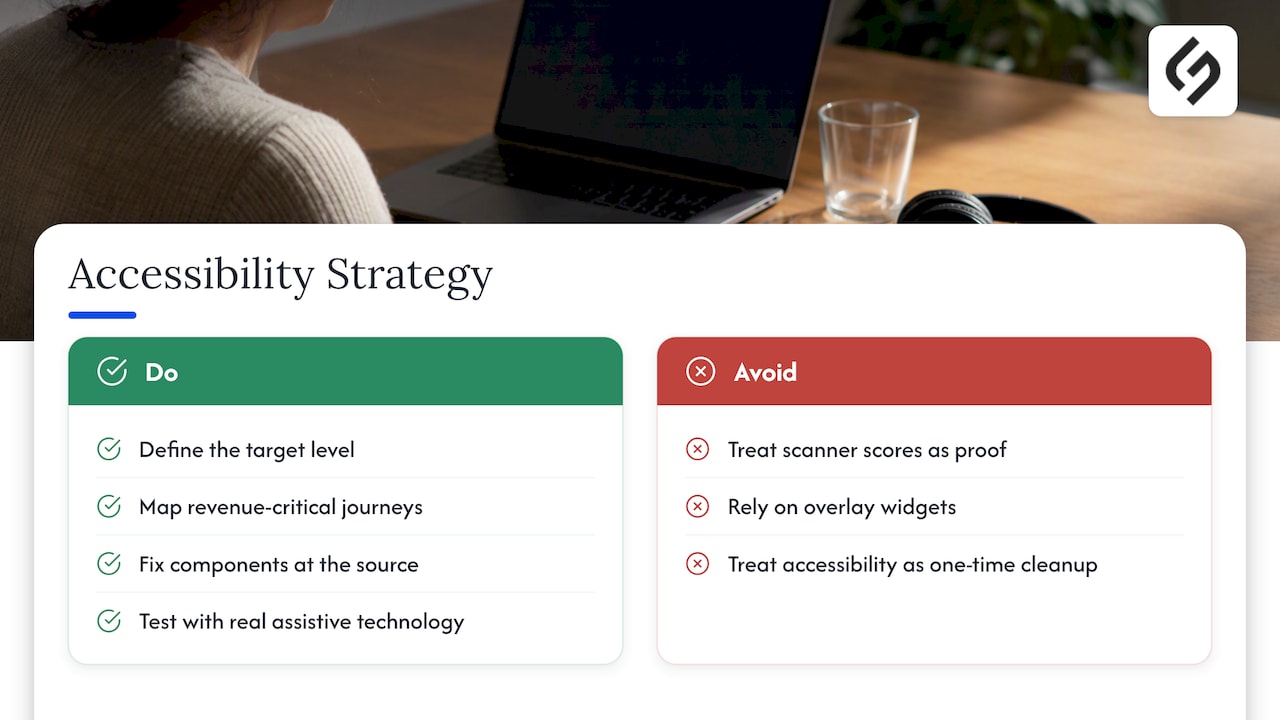
We also advise clients to resist two shortcuts. The first is relying on a scanner score as proof of compliance, which the DOJ itself warns against. The second is installing an overlay widget and considering the matter closed. Neither replaces fixing markup, content and interaction design. A strategy-first approach means defining the target level, mapping the revenue-critical journeys, fixing components at the source and testing with real assistive technology.
Accessibility also overlaps with work businesses already fund. Clear headings, descriptive link text, fast pages and well-structured content serve search engines and users with disabilities alike. Teams that budget for SEO and UX can fold WCAG 2.2 into the same workstream and avoid paying for the same pages twice.
How Solution For Guru can help
If your team needs an accessibility-minded build or remediation, our custom web development, UI/UX design and SEO services are built around your business model and workflows, not templates. We start with an audit of your key journeys, fix issues at the component level and set up the maintenance routines that keep the site conforming. For CRM-connected forms and portals, our HubSpot and integration services can apply the same standards to the forms and landing pages your marketing team publishes.
FAQ
The four principles are perceivable, operable, understandable and robust. Together they require that users can detect content, operate the interface, comprehend information and rely on assistive technologies to interpret the page. If one principle fails, users with disabilities can be effectively excluded.
The ADA applies to state and local government sites under Title II and to public-facing businesses under Title III, requiring effective communication and non-discrimination. The DOJ does not mandate a single technical standard, but it points to WCAG and Section 508 as established resources. Most organizations target WCAG 2.x Level AA.
No. WCAG evaluates conformance through success criteria that pass or fail, with no percentage threshold, and no universal legal rule sets one. If a vendor cites a percentage, ask which standard, version and level it refers to.
WCAG 2.2 Level AA is the sensible target for a new or redesigned site, because it is the latest W3C version and includes the earlier 2.1 criteria. Government-facing work may specify WCAG 2.1 AA, as the DOJ Title II rule does, so check the contract or rule that applies to you.
Sources
- Web Content Accessibility Guidelines (WCAG) 2.2, W3C
- Introduction to Understanding WCAG 2.2, W3C WAI
- W3C Accessibility Standards Overview, W3C WAI
- Web Accessibility Laws & Policies, W3C WAI
- Why Standards Harmonization is Essential to Web Accessibility, W3C WAI
- ACT Rules Implementation in Test Tools and Methodologies, W3C WAI
- Guidance on Web Accessibility and the ADA, ADA.gov
- Fact Sheet: New Rule on the Accessibility of Web Content and Mobile Apps, ADA.gov
- Small Entity Compliance Guide for Web Content and Mobile Apps, ADA.gov
- Accessibility of products and services, EUR-Lex