Interactive Website Features That Drive Engagement in 2026

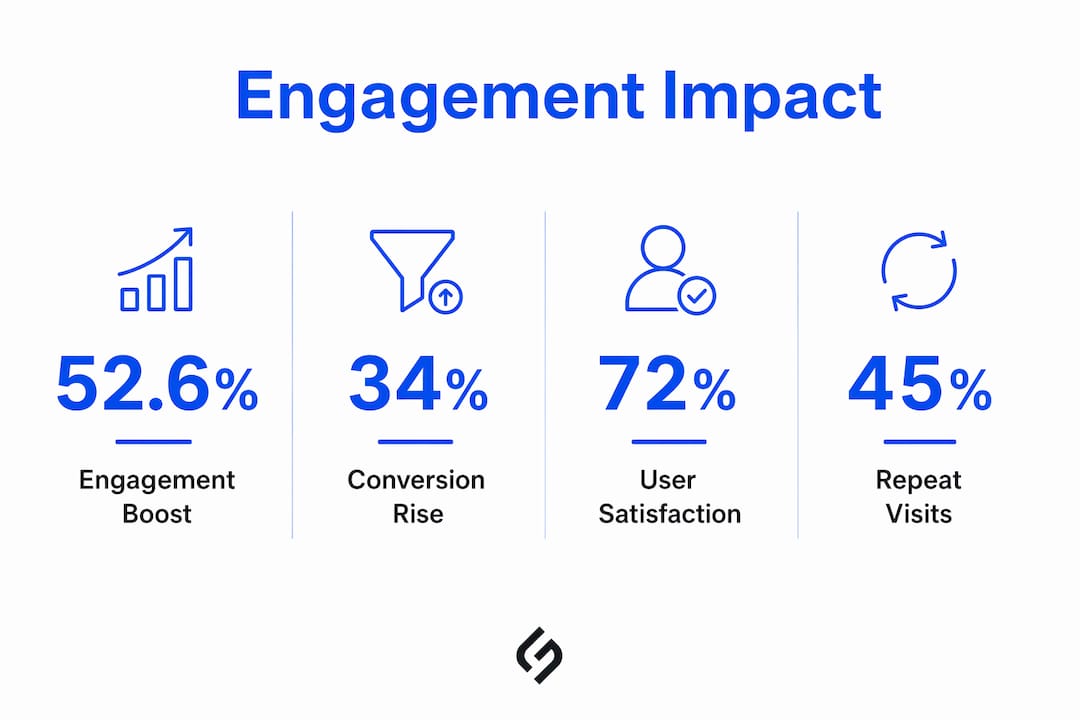
The most effective interactive website features in 2026 include quizzes, calculators, scroll-triggered animations, live chat, gamification elements, personalization tools, interactive maps, dynamic forms, hover effects, and user-generated content displays. Together, these elements boost engagement by 52.6% compared to static sites, turning passive visitors into active participants who click, explore, and convert. Platforms like Ceros, Shorthand, Outgrow, MailerLite, and involve.me have made building these experiences more accessible than ever, whether you write code or not.
The core shift is straightforward: static pages broadcast; interactive pages converse. When a visitor adjusts a pricing calculator, completes a product quiz, or watches content animate as they scroll, they are no longer an observer. They are invested. That investment translates directly into longer sessions, lower bounce rates, and higher conversion rates.
Key interactive features to know:
- Quizzes and surveys for lead qualification and personalized recommendations
- Interactive calculators for real-time ROI, pricing, or savings estimates
- Scroll-triggered animations and parallax effects for immersive storytelling
- Live chat and AI chatbots for instant support and friction reduction
- Interactive maps and directories for location-based exploration
- Dynamic forms with real-time validation to reduce abandonment
- Gamification elements such as badges, points, and leaderboards
- Hover effects and microinteractions for subtle, responsive feedback
- Shoppable videos and image galleries for product discovery
- User-generated content displays including reviews, ratings, and comments
- Personalization and customization options that adapt content to each visitor
- Interactive storytelling and guided tours for narrative-driven experiences
- Collapsible menus, accordions, and FAQ sections for organized, accessible content
- Filterable and searchable content for efficient browsing
What are the most impactful interactive website features?
Every feature below addresses a specific gap between what static sites deliver and what users actually want. The goal is not decoration. It is participation.
Quizzes and surveys
Quizzes convert passive reading into active decision-making. A visitor who answers five questions about their business size and goals is far more engaged than one who skims a product page. Outgrow and involve.me both specialize in lead-generation quizzes and calculators, offering over 1,000 pre-built templates with customizable branding, real-time analytics, and embed options for websites, landing pages, and chatbots. Surveys serve a different purpose: they collect first-party data that feeds segmentation, product development, and personalization engines. MailerLite integrates survey and quiz tools directly with email sequences, so a completed quiz can trigger a tailored follow-up automatically.
Interactive calculators
Calculators deliver immediate, personalized value. A mortgage calculator, an ROI estimator, or a shipping cost tool answers the visitor’s exact question without requiring them to contact sales. That real-time feedback is what makes calculators so effective at moving visitors toward a decision. Outgrow covers this category well, with sliding bars, conditional fields, and Zapier integrations that connect calculator outputs to CRM workflows.

Videos and image galleries
Video backgrounds and interactive galleries do something static images cannot: they show a product or atmosphere in motion. Full-width video backgrounds capture attention immediately, while scroll-triggered video playback, as seen on Webflow’s own site, creates a sense of narrative pacing. Image galleries become genuinely engaging when hover effects reveal product details, pricing, or a quick-add button without requiring a full page load. For teams building immersive editorial content, Shorthand enables scrollytelling with embedded audio and video that triggers on scroll, without writing a single line of code.
Live chat and chatbots
Live chat widgets reduce friction at the exact moment a visitor is most likely to leave. During checkout confusion or a product comparison, a real-time response can be the difference between a conversion and a bounce. AI-powered chatbots extend this capability around the clock, handling common questions, qualifying leads, and routing complex inquiries to human agents. The key is placement: a chat widget that appears after a visitor has spent 60 seconds on a pricing page is far more useful than one that fires on page load.
Interactive maps and directories
Interactive maps let visitors explore locations, service areas, or project sites on their own terms, zooming, panning, and clicking rather than reading a static address list. For businesses with multiple locations or geographic service coverage, a well-built map transforms a data table into an explorable experience. Mapbox API supports highly customized map implementations beyond standard options, and several no-code tools integrate directly with WordPress, Wix, and Squarespace for straightforward deployment.
Scroll-triggered animations and reactive effects
Scroll-triggered animations are among the most effective tools for building immersive narratives on a single page. Rather than relying on one dramatic visual moment, the best interactive sites layer subtle reveals, parallax depth effects, and content transitions that unfold as the visitor scrolls. Apple’s product pages are a well-known example: features animate into view as users explore, creating a guided experience without a single click required. Parallax scrolling, where background elements move at a different rate than foreground content, adds perceived depth and keeps visitors scrolling to see what comes next.

Dynamic sliders and carousels
Carousels organize serial content, such as case studies, product lines, or team members, into a browsable format without overwhelming the page. Horizontal scrolling galleries, as used by Dribbble and Superside, give visitors a sense of discovery. The critical design decision is whether the carousel auto-advances or requires user input. Auto-advancing carousels often reduce engagement because visitors feel the content is moving past them. User-controlled sliders, by contrast, put the visitor in charge, which tends to increase time on page.
Searchable and filterable content
Filterable content grids are standard on e-commerce sites but underused on service and portfolio sites. When a visitor can filter case studies by industry, budget, or service type, they find relevant examples faster and stay on the page longer. Instant filtering, where results update without a page reload, is the expected standard. Any delay or full-page refresh breaks the experience and signals an outdated technical implementation.
Collapsible menus and accordions
Accordions solve a specific UX problem: how to present dense information without overwhelming the visitor. FAQ sections, pricing breakdowns, and feature lists all benefit from a collapsible format that lets visitors expand only what they want to read. From an accessibility standpoint, accordions built with proper ARIA attributes and keyboard navigation support are compliant with WCAG guidelines, making them usable for visitors who rely on screen readers or keyboard-only navigation.
FAQ accordions
FAQ accordions deserve separate attention because they serve both UX and SEO goals simultaneously. A well-structured FAQ section reduces support volume, keeps visitors on the page longer, and provides structured data markup opportunities that can earn featured snippet placement in search results. The UX design principles behind effective accordions are straightforward: clear question labels, concise answers, and a visual indicator showing which sections are open.
Gamification elements
Badges, points, progress bars, and leaderboards borrow mechanics from games to motivate continued engagement. A progress bar on a multi-step form tells the visitor how far they have come and how close they are to finishing, which reduces abandonment. Loyalty programs that award points for purchases, reviews, or referrals create a feedback loop that brings visitors back. For learning platforms and community sites, leaderboards surface top contributors and give other users a goal to work toward.
Interactive forms with real-time validation
Standard forms collect data. Interactive forms have a conversation. Real-time validation, where the form confirms a correctly formatted email address or flags an error before the visitor hits submit, removes the frustration of submitting a form only to receive a generic error message. Conditional logic takes this further: showing or hiding fields based on previous answers keeps the form focused and reduces the perceived length. Platforms like Typeform guide users one question at a time, which consistently improves completion rates compared to traditional multi-field layouts.
User-generated content features
Reviews, ratings, comments, and community forums are among the most trusted content on any site because they come from real users rather than the brand itself. Displaying star ratings on product pages, enabling photo reviews, and surfacing community Q&A sections all build credibility with new visitors who are still evaluating whether to trust the brand. Moderation tools and spam filtering are necessary infrastructure for any site that opens these channels, but the engagement and trust benefits justify the operational overhead.
Personalization and customization options
Personalization adapts what a visitor sees based on their behavior, location, or stated preferences. A returning visitor who previously browsed enterprise pricing should not land on a generic homepage. Dynamic content blocks, recommendation engines, and geolocation-based content all contribute to an experience that feels relevant rather than generic. Spotify’s approach, where the entire interface adapts to a user’s listening history, is the high-end example. For most business sites, even basic personalization, such as showing industry-specific case studies to visitors from a known company, produces measurable improvements in engagement.
Interactive storytelling and guided tours
Scrollytelling, where a narrative unfolds as the visitor scrolls through a long-form page, is particularly effective for complex products, brand stories, and editorial content. Ceros and Shorthand both enable this format without requiring developer involvement, shifting the creative bottleneck from technical implementation to content strategy. Guided product tours, which walk new users through key features step by step, reduce time-to-value for SaaS products and reduce support requests from confused new users.
Hover effects and microinteractions
Microinteractions are the smallest unit of interactivity: a button that ripples on click, an icon that transforms when selected, a navigation item that shifts color on hover. Individually, each one is minor. Collectively, they signal that the site is alive and responsive, which builds trust and encourages further exploration. CSS transitions and transforms handle most hover effects without JavaScript overhead, keeping performance impact minimal. Product thumbnails that zoom slightly on hover, images that reveal descriptive text, and buttons that change state on interaction all fall into this category.
How do you layer interactive features without hurting usability?
The most common mistake in interactive web design is treating features as independent additions rather than parts of a coherent experience. Adding a quiz here, a parallax section there, and a chatbot in the corner produces a cluttered, slow, and confusing site. The better approach is layering.
Interactivity should transform passive audiences into active participants by rewarding user actions thoughtfully, not just add decoration. The most effective interactive sites combine layered micro-animations, scroll-triggered reveals, and responsive cursor effects to build immersive narratives rather than relying on single dramatic features.
Start with a clear content strategy. Every interactive element should serve a defined purpose: a calculator reduces sales friction, a quiz qualifies leads, a scroll animation guides attention. If you cannot articulate what a feature does for the visitor, it probably does not belong on the page.
Performance is the constraint that most teams underestimate. Heavy 3D effects, particle trails, and complex animations can degrade Core Web Vitals scores, which directly affects search rankings and user experience on slower connections. The fix is not to avoid animation entirely but to use CSS keyframe animations and transitions rather than JavaScript-heavy libraries wherever possible, and to lazy-load interactive components that are not immediately visible.
Pro Tip:
Always include a prefers-reduced-motion media query in your CSS. Users with vestibular disorders or motion sensitivity rely on this setting, and respecting it is both an accessibility requirement under WCAG 2.1 and a signal of thoughtful engineering. Graceful degradation means the site still works and communicates clearly when animations are disabled.
Accessibility cannot be an afterthought. All interactive elements need keyboard navigation support, appropriate ARIA labels for screen readers, and sufficient color contrast. An accordion that only works with a mouse excludes a meaningful portion of your audience. Testing with tools like axe or WAVE before launch catches the majority of compliance issues before they become problems.
No-code platforms have genuinely changed what is possible without a development team. Shorthand and Ceros enable complex scrollytelling and rich media experiences through drag-and-drop editors, which means the bottleneck has shifted from technical implementation to content quality and strategic clarity. That shift is worth taking seriously: a beautifully animated page with weak content will not retain visitors any longer than a static one.
Which tools actually help you build interactive features?
Choosing the right platform depends on what you are building, who is building it, and how much ongoing maintenance the team can support. The categories below reflect genuinely different use cases.
1. For immersive scrollytelling and editorial content:
- Ceros and Shorthand are the leading no-code options for brands and publishers that need rich, scroll-driven experiences. Both support embedded video, animated transitions, and interactive data visualizations without requiring developer involvement. Shorthand is particularly strong for long-form editorial content, while Ceros suits marketing teams building campaign microsites.
2. For lead generation and data-driven interactivity:
- Outgrow covers quizzes, assessments, calculators, polls, and recommendation tools under one platform, with over 1,000 pre-built templates and advanced analytics including real-time conversion tracking. involve.me takes a similar approach, integrating with CRM, CDP, and marketing automation tools to feed quiz and survey data directly into existing workflows. MailerLite adds email sequence integration, so a completed quiz can trigger a personalized follow-up automatically.
3. For front-end development teams:
- CSS transitions, transforms, and keyframe animations handle the majority of microinteractions and hover effects without JavaScript overhead. For more complex scroll-based animations, libraries like GSAP (GreenSock Animation Platform) are widely used and well-documented. The WordPress Interactivity API, introduced in WordPress core, enables developers to build interactive components with minimal JavaScript while maintaining strong performance scores.
4. For maps and location features:
- Mapbox API supports highly customized interactive maps beyond what standard implementations offer. For simpler use cases, several no-code map tools integrate directly with WordPress, Wix, and Squarespace.
5. For real-time and back-end interactivity:
- Node.js supports real-time features like chat, notifications, and collaborative tools. Firebase provides real-time database capabilities and authentication without managing server infrastructure. Stripe Elements builds secure, interactive payment forms with real-time validation.
When evaluating any tool, prioritize these criteria: performance impact on Core Web Vitals, accessibility compliance, integration with your existing CRM or analytics stack, and the realistic skill level of whoever will maintain it. A developer-heavy solution that requires ongoing custom code is a liability if the team changes. A no-code platform with limited customization may not meet brand or technical requirements at scale. Checking how a tool affects your site’s search visibility is also worth the time, and SEO analysis tools can surface performance and indexability issues before they compound.
For teams building on WordPress or custom stacks, the web development fundamentals behind interactive features, including event listeners, DOM manipulation, and API calls, are worth understanding even if a no-code tool handles the implementation. That foundational knowledge makes troubleshooting faster and tool selection more informed.
Key Takeaways
Interactive website features consistently outperform static alternatives in engagement and conversion, but only when implemented with clear purpose and technical discipline.
| Point | Details |
|---|---|
| Engagement lift is measurable | Interactive content boosts engagement by 52.6% compared to static sites, with direct effects on conversion rates. |
| Purpose drives results | Every interactive element should reward a specific user action; decoration without function reduces usability. |
| Layer, do not stack | Combining micro-animations, scroll reveals, and hover effects creates immersive experiences; adding features without a plan creates clutter. |
| Performance is non-negotiable | Heavy animations harm Core Web Vitals; use CSS transitions and lazy loading to keep interactive sites fast. |
| No-code tools shift the bottleneck | Platforms like Ceros, Shorthand, Outgrow, and involve.me make advanced interactivity accessible; the constraint is now content strategy, not technical skill. |
The real challenge with interactive web design is not the technology
Most conversations about interactive web design focus on which features to add. The harder question is which ones to remove.
Every interactive element on a page competes for the visitor’s attention and the browser’s resources. A site that loads a parallax hero, a chatbot, a quiz widget, a video background, and a gamified loyalty module on the same page is not delivering a rich experience. It is delivering a slow, confusing one. The sites that consistently perform well, in both user engagement and search rankings, tend to be the ones that made deliberate choices about what to leave out.
The trend toward micro-interactions combined with scrollytelling is worth paying attention to precisely because it solves this problem. Instead of adding discrete features, it integrates interactivity into the content itself. The scroll is the navigation. The animation is the explanation. The hover effect is the call to action. That integration produces experiences that feel cohesive rather than assembled.
No-code platforms have lowered the barrier to entry significantly, and that is genuinely good for the industry. But it has also produced a wave of sites where the technology is impressive and the content strategy is thin. A beautifully animated page that does not answer the visitor’s question will not retain them. The teams that get the most out of interactive features are the ones that start with a clear understanding of what the visitor needs at each stage of the page, and then choose features that serve those needs specifically.
For businesses planning a site build or redesign, the future of web development increasingly favors sites that combine performance, accessibility, and purposeful interactivity. Getting all three right simultaneously is the actual challenge, and it requires both technical competence and content clarity working together.
FAQ
Interactive website features are elements that respond to user actions, such as clicking, scrolling, or hovering, to create a dynamic, two-way experience rather than a static one-way broadcast.
Interactive content boosts engagement by 52.6% compared to static sites, which translates directly into higher conversion rates by keeping visitors engaged longer and guiding them toward action.
Quizzes, calculators, and assessments built with platforms like Outgrow or involve.me are among the most effective lead-generation tools, because they deliver personalized results in exchange for contact information.
Use CSS transitions and keyframe animations instead of JavaScript-heavy libraries for most effects, implement lazy loading for off-screen components, and always test Core Web Vitals scores after adding new interactive elements.
Not always. No-code platforms like Ceros, Shorthand, MailerLite, and involve.me enable complex interactive experiences without coding, though developer involvement is still valuable for custom integrations and performance optimization.