Understanding Technical SEO: A 2026 Practical Guide

TL;DR:
- Technical SEO involves optimizing a website’s backend to enable search engines to crawl, index, and rank pages effectively. Principles like Core Web Vitals, mobile-first indexing, and HTTPS are essential in 2026, with most tasks requiring no advanced coding. Regular audits improve rankings by fixing crawl, speed, and structured data issues, making technical SEO a vital foundation for visibility in both traditional and AI search systems.
Technical SEO is defined as the practice of optimizing a website’s backend infrastructure so search engines can crawl, index, and rank its pages efficiently. Understanding technical SEO is the prerequisite for every other SEO effort. Without it, even exceptional content stays invisible. Google’s Core Web Vitals, mobile-first indexing, and HTTPS are the three non-negotiable standards in 2026. The good news for digital marketing professionals and website owners is that most technical SEO tasks require no advanced coding. A solid CMS with the right plugins handles the majority of foundational fixes.
What are the core components of technical SEO?
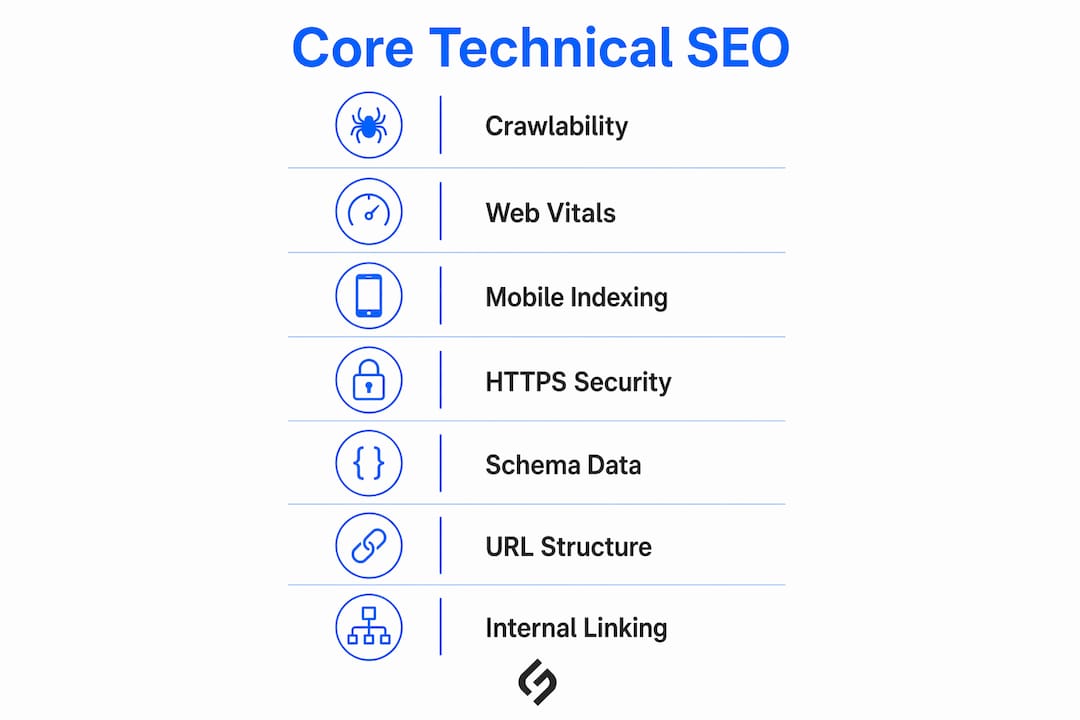
Technical SEO covers eight distinct areas. Each one affects how search engines interact with your site, and each one carries real ranking consequences.
Crawlability and indexability
Crawlability and indexability are related but not the same. First of all, сrawlability means a search engine bot can access and read your pages. Indexability means Google can store and rank those pages. A page can be crawlable but still excluded from the index.

The most common source of confusion is the robots.txt file. Robots.txt controls crawler access but does not control indexing. If you block a page in robots.txt and it has external links pointing to it, Google can still index it. To prevent indexing, you must place a noindex meta tag directly on the page. Mixing up these two mechanisms is one of the most frequent and costly technical SEO errors.
Pro Tip: Audit your robots.txt file first. Confirm it does not accidentally block your most important pages, then check that noindex tags are only on pages you genuinely want excluded.
Core Web Vitals and site speed
Google’s Core Web Vitals measure three specific user experience signals: Largest Contentful Paint (LCP), Interaction to Next Paint (INP), and Cumulative Layout Shift (CLS). These metrics are drawn from real Chrome user data, not lab simulations. Sites failing Core Web Vitals rank lower and are indexed less frequently. That is a direct, measurable ranking penalty.
LCP measures how fast the main content loads. INP measures how quickly the page responds to user input. CLS measures how much the layout shifts unexpectedly during load. Passing all three signals to Google that your site delivers a reliable experience.
Mobile-first indexing
Google indexes the mobile version of your site first. 64% of global web traffic is mobile in 2026. That figure alone explains why a poor mobile experience damages rankings regardless of how well your desktop site performs. Responsive design, legible font sizes, and touch-friendly navigation are not optional features. They are baseline requirements for competitive search visibility.
HTTPS and site security
HTTPS is a confirmed ranking factor. Sites still running on HTTP display a “Not Secure” warning in Chrome, which increases bounce rates and erodes user trust. Installing an SSL certificate and redirecting all HTTP traffic to HTTPS is one of the fastest technical fixes with measurable impact.
Schema markup and structured data
Schema markup uses JSON-LD code to tell Google exactly what type of content a page contains. Pages with schema markup are more likely to appear in rich results and AI-generated answer features. This matters more in 2026 than in any prior year because AI search features now pull heavily from structured, machine-readable content.
URL structure, XML sitemaps, and redirects
Clean, descriptive URLs help both users and crawlers understand page content before clicking. XML sitemaps act as a direct map for Google, listing every page you want indexed. Redirect chains, where one URL redirects to another, which redirects again, slow crawlers and dilute link equity. Keep redirect chains to a single hop wherever possible.
Internal linking and site architecture
Internal linking with a maximum of three clicks from the homepage improves crawler efficiency and ranking potential. Pages buried deeper than three clicks receive lower crawl priority. That means Google visits them less often and indexes updates more slowly. A flat site architecture, where most pages are reachable in two or three clicks, gives every page a fair shot at ranking.
| Component | Purpose | Ranking impact |
|---|---|---|
| Crawlability | Allows bots to access pages | High: blocked pages cannot rank |
| Indexability | Allows pages to appear in search results | Critical: unindexed pages are invisible |
| Core Web Vitals | Measures real user experience signals | High: direct ranking factor |
| Mobile-first indexing | Sets mobile as primary index version | High: affects all rankings |
| HTTPS | Secures data and signals trust | Medium-high: confirmed ranking factor |
| Schema markup | Helps Google understand content type | Medium: improves rich result eligibility |
| Internal linking | Distributes crawl budget and authority | Medium: affects crawl depth and equity |
How to perform a practical technical SEO audit
A technical SEO audit identifies what is broken, what is underperforming, and what to fix first. Google Search Console and PageSpeed Insights identify most common errors quickly, even for beginners. Both tools are free and require no technical background to read.
Follow this sequence for an effective audit:
- Check indexing status. Open Google Search Console and review the Coverage report. Identify any pages marked as “Excluded” or “Error” that should be indexed.
- Review robots.txt. Confirm the file does not block critical pages or your XML sitemap.
- Test Core Web Vitals. Use PageSpeed Insights to measure LCP, INP, and CLS for both mobile and desktop versions of your key pages.
- Verify HTTPS. Check that all pages load over HTTPS and that HTTP versions redirect correctly.
- Audit internal links. Identify orphan pages (pages with no internal links pointing to them) and pages buried beyond three clicks.
- Check canonical tags. Confirm that canonical URLs are correctly configured and point to the preferred version of each page.
- Submit your XML sitemap. Verify it is submitted in Google Search Console and contains only indexable pages.
Common issues found during audits include:
- Crawl blocks caused by overly restrictive robots.txt rules
- Noindex tags left on pages after development or staging
- Redirect chains with three or more hops
- Missing or misconfigured canonical tags
- Pages with Core Web Vitals scores in the “Poor” range
- Mixed content warnings on HTTPS pages (HTTP images or scripts embedded on secure pages)
Fixing critical crawl and Core Web Vitals issues generates ranking improvements within 2–8 weeks. Prioritize crawl and indexing errors first, then performance, then schema and structured data.
Pro Tip: Fix crawlability and indexing issues before producing new content. Publishing new pages onto a broken technical foundation wastes your content budget entirely.
What are the most common beginner mistakes in technical SEO?
Technical SEO for beginners carries a reputation for complexity that is largely undeserved. Most setup tasks require no advanced coding and can be completed through CMS plugins in platforms like WordPress, Shopify, or Webflow. The real challenge is not technical difficulty. It is knowing which mistakes to avoid.
The most frequent beginner errors include:
- Confusing robots.txt with noindex tags. Blocking a page in robots.txt does not remove it from Google’s index if external links point to it. Blocking indexing requires a noindex meta tag placed directly on the page.
- Leaving noindex tags on live pages. Developers often add noindex tags during staging and forget to remove them before launch.
- Misconfigured canonical tags. Incorrect canonical URLs cause Google to ignore the tag entirely and index the wrong page version.
- Redirect chains. Each additional redirect hop slows crawlers and reduces the link equity passed through the chain.
- Mixed content on HTTPS pages. Embedding HTTP resources on an HTTPS page triggers browser warnings and undermines the security signal.
- Ignoring mobile usability. Assuming desktop performance translates to mobile is a consistent ranking mistake.
The most effective approach for beginners is to address one category at a time. Crawl and index issues first, then performance, then structured data. Trying to fix everything simultaneously leads to errors and missed priorities. Steady, sequential progress yields results faster than scattered effort.
Pro Tip: After fixing canonical tags, verify them in Google Search Console’s URL Inspection tool. Also confirm your XML sitemap is referenced in robots.txt so crawlers find it immediately.
How does technical SEO influence AI search systems in 2026?
Technical SEO now directly affects visibility in AI-generated search features, not just traditional blue-link results. Pages that rank in AI-powered features consistently meet technical SEO standards: fast loading, schema markup, and strong E-E-A-T indicators. This is a structural shift in how search works.
Google’s AI systems rely on the same crawl and index infrastructure as classic search. A site with crawl blocks, slow load times, or missing schema gives AI systems less data to work with. The result is lower citation frequency in AI overviews and answer features.
“Good technical SEO increases the likelihood your content is cited in AI-generated answers and overviews. Sites with schema markup, fast load times, and clean indexing consistently appear more often in AI-powered search features than technically deficient sites.”
Schema markup is the single most direct bridge between your content and AI citation. When Google’s systems can identify that a page is a product, article, FAQ, or how-to guide, they can surface it in the right context. Without schema, that classification depends on inference, which is less reliable.
Pro Tip: Add FAQ schema to your most important pages. FAQ schema increases the chance that your content appears in AI-generated answers and voice search results, two of the fastest-growing search surfaces in 2026.
Mobile-first indexing also feeds directly into AI search. If your mobile experience is poor, Google’s AI systems see a degraded version of your site as the primary signal. That reduces both ranking potential and AI citation likelihood simultaneously. Addressing mobile usability and responsive design is no longer a secondary concern.
Key Takeaways
Technical SEO is the foundational layer that determines whether search engines and AI systems can find, read, and rank your content. Without it, every other SEO investment underperforms.
| Point | Details |
|---|---|
| Crawlability vs. indexability | Robots.txt controls access; noindex tags control whether pages appear in search results. |
| Core Web Vitals matter | LCP, INP, and CLS are direct ranking signals based on real user data, not estimates. |
| Mobile-first is the baseline | Google indexes the mobile version first; poor mobile performance damages all rankings. |
| Audit before you publish | Fix crawl and index errors before producing new content to avoid wasted effort. |
| Schema accelerates AI visibility | Pages with structured data appear more often in AI-generated answers and rich results. |
Why I think most marketers underinvest in technical SEO
After working across dozens of websites, the pattern is consistent: marketers invest heavily in content and paid media, then wonder why organic traffic stalls. The answer is almost always a technical issue sitting quietly in the background. A misconfigured canonical tag, a robots.txt rule blocking a key section, or a Core Web Vitals score in the “Poor” range. None of these are visible to the naked eye, but all of them suppress rankings.
The good news is that technical SEO does not require a developer on retainer. A focused audit using Google Search Console and PageSpeed Insights, followed by a prioritized fix list, produces real results within weeks. I have seen sites recover significant organic traffic simply by correcting indexing errors that had been present for months.
The habit that separates effective practitioners from the rest is iterative auditing. Running a technical audit once and moving on is not a strategy. Search engines update their crawl behavior, sites accumulate new pages, and plugins introduce new conflicts. Monthly or quarterly audits catch problems before they compound. Pairing that discipline with a solid understanding of common SEO mistakes turns technical SEO from a one-time project into a durable competitive advantage.
How Solution For Guru supports your technical SEO foundation
Technical SEO improvements are inseparable from the quality of your website’s underlying code and architecture. A well-built site makes every technical fix easier and every ranking gain more durable.
Solution For Guru works with digital marketing professionals and website owners to build and audit web infrastructure that meets 2026 search standards. From web development fundamentals that support clean crawlability, to SEO integration and CRM connectivity, the team addresses the technical layers that content strategies depend on. If your site has unresolved crawl issues, Core Web Vitals failures, or schema gaps, Solution4guru’s digital services provide a direct path to resolution. Explore the full range of services at solution4guru.com to see how technical and marketing infrastructure work together.
FAQ
Technical SEO is the process of optimizing a website’s backend so search engines can crawl, index, and rank its pages. It covers site speed, mobile usability, HTTPS, schema markup, and URL structure.
No. Most technical SEO tasks can be completed through CMS plugins without writing code. Prioritizing crawlability and indexing fixes is the most effective starting point for beginners.
Fixing critical crawl and Core Web Vitals issues typically produces ranking improvements within 2–8 weeks. More complex structural changes may take longer to reflect in search results.
Robots.txt tells crawlers which pages to access or skip. A noindex meta tag tells Google not to include a specific page in its index. Blocking a page in robots.txt alone does not remove it from the index if external links point to it.
Pages with schema markup are more likely to appear in AI-generated answers and rich results because structured data helps Google’s systems classify and surface content accurately. FAQ and article schema are particularly effective for AI citation visibility.