Custom Software vs Off the Shelf: The Decision Guide

TL;DR:
- Off-the-shelf software is ideal for commodity functions, offering quick deployment and lower initial costs. Custom development suits unique processes and provides ownership of intellectual property, enabling competitive differentiation. A hybrid approach often combines the speed of off-the-shelf products with tailored features to meet specific organizational needs.
If speed and cost control are your top priorities, off-the-shelf software is usually the right call. If your workflows are genuinely unique, your competitive advantage depends on proprietary processes, or you need integrations that no packaged product supports cleanly, custom development can deliver better value over time.
Use this quick matrix to map your situation before reading further:
- Buy off-the-shelf when: your function is a commodity (HR, basic CRM, accounting), your deployment timeline is short, and your budget for initial development is limited.
- Build custom when: the software itself is part of your product, your regulatory environment demands non-standard controls, or packaged tools require extensive configuration that approaches building your own solution.
Mini decision matrix:
| Priority | Recommended path |
|---|---|
| Lowest upfront cost | Off-the-shelf |
| Fastest deployment | Off-the-shelf |
| Exact process fit | Custom |
| Competitive differentiation | Custom |
| IP ownership | Custom |
| Standard integrations | Off-the-shelf |
| Proprietary data model | Custom |
Three immediate next steps regardless of which path you choose:
- Document your functional requirements in writing before talking to any vendor.
- Run a total cost of ownership (TCO) estimate across a three-year window, not just year one.
- Shortlist two or three vendors or SaaS trials and run a structured fit-gap analysis against your requirements.
Table of Contents
- What is custom software vs. off-the-shelf software?
- What do you actually get with off-the-shelf software?
- What does building custom software actually cost you?
- Which organizations should build and which should buy?
- How do costs and timelines actually compare?
- How does the custom development process work?
- What are the integration, security, and compliance risks?
- What should you ask vendors before signing anything?
- What do real build-vs-buy outcomes look like?
- What is the right decision for your organization?
- Key Takeaways
- The build-vs-buy decision is more nuanced than most guides admit
- Solution4guru builds the software your business actually needs
- Useful sources
- FAQ
What is custom software vs. off-the-shelf software?
Custom software (also called bespoke or tailored software) is purpose-built for a single organization. A development team designs, codes, and deploys it to match your specific processes, data model, and integration requirements. Nobody else runs the same codebase. Examples include a proprietary underwriting engine, a logistics dispatch platform built around your carrier contracts, or a patient intake system designed for a specific clinical workflow.
Off-the-shelf software (also called commercial packaged software or, in SaaS form, commercial off-the-shelf, COTS) is a product built for a broad market and licensed to many customers simultaneously. Salesforce, QuickBooks, ServiceNow, and Zendesk are all off-the-shelf products. You configure them; you do not own the underlying code.
The naming variants matter in contracts. “Bespoke,” “tailor-made,” and “purpose-built” all describe the same category. “Packaged,” “commercial,” “SaaS,” and “COTS” all describe the other. IP and licensing arrangements differ materially between the two, so the label you use in a procurement document has legal weight.
Common off-the-shelf categories include CRM (Salesforce, HubSpot), ERP (SAP, NetSuite), helpdesk (Zendesk, Freshdesk), and HR platforms (Workday, BambooHR). Common custom outcomes include proprietary pricing engines, unique multi-system integrations, regulated-data workflows, and customer-facing products where the software is the differentiator.
What do you actually get with off-the-shelf software?
The real advantages
Off-the-shelf solutions typically deliver faster deployment and lower upfront costs than custom development, which is why they dominate commodity business functions. A mid-market company can be live on a SaaS CRM in days, not months. Vendor-managed updates mean your team does not carry patching responsibility. Broad feature sets, built from feedback across thousands of customers, often cover use cases you have not yet encountered.
The vendor ecosystem also matters. Established platforms come with certified implementation partners, training libraries, and user communities. That reduces onboarding friction and gives your team a support network beyond the vendor’s own help desk.
What does building custom software actually cost you?
The case for building
Custom software provides a tight fit to company processes and can enable competitive differentiation when packaged products cannot match required workflows. When your process is the product — when the way you handle data, route decisions, or serve customers is what separates you from competitors — a packaged tool that forces you into its logic actively undermines your advantage.
Ownership of intellectual property is a concrete benefit that compounds over time. With custom software, the codebase is an asset on your balance sheet. You can modify it, license it, or transfer it without vendor permission. Scalability is also on your terms: you add capacity, features, or integrations when your business needs them, not when the vendor’s roadmap allows.
Custom software is not just a technology choice — it is a strategic decision about where your organization wants to own its future. When the software encodes your competitive advantage, handing that to a vendor’s product roadmap is a structural risk, not a cost saving.
Which organizations should build and which should buy?
The answer depends on five variables: organization size, growth stage, industry requirements, regulatory constraints, and the degree to which the software itself is a source of competitive differentiation.
| Scenario | Recommended choice | Rationale |
|---|---|---|
| Startup needing CRM or helpdesk fast | Off-the-shelf | Speed and cost efficiency outweigh fit |
| Mid-market firm with standard HR/payroll | Off-the-shelf | Commodity function; no differentiation value |
| Regulated healthcare workflow (HIPAA) | Custom or hybrid | Standard platforms may not meet specific control requirements |
| Fintech with proprietary pricing logic | Custom | Core IP; packaged tools cannot replicate the logic |
| E-commerce with standard catalog | Off-the-shelf | Shopify or similar covers most requirements |
| Logistics firm with unique dispatch rules | Custom | Workflow is the competitive differentiator |
| Enterprise needing ERP + custom module | Hybrid | Buy core, build the differentiating layer |
| Company with legacy system integrations | Custom or hybrid | Off-the-shelf connectors may not support legacy protocols |
How do costs and timelines actually compare?
Upfront cost and deployment time
Off-the-shelf SaaS products typically charge per user per month, with setup and configuration costs that vary by platform complexity. Enterprise platforms (ERP, ITSM) often require paid implementation services on top of licensing. Custom development costs depend on scope, team composition, and geography. Offshore development models can reduce labor costs significantly, but they introduce governance and quality-management demands that require active oversight from your side.
Deployment timelines differ substantially:
- Off-the-shelf: — days to weeks for SaaS configuration; weeks to months for enterprise platform implementations with data migration and integrations.
TCO checklist
Total cost of ownership over three years is the right comparison unit. Use this checklist when building your model:
Off-the-shelf TCO components:
- Per-user or per-seat licensing fees (annual or monthly)
- Implementation and configuration services
- Integration development (connectors, middleware, API work)
- Training and change management
- Customization fees for features outside standard configuration
- Annual price escalation clauses in the contract
- Data migration costs if you switch vendors
Custom software TCO components:
- Initial development cost (design, build, QA, deployment)
- Infrastructure and hosting (cloud compute, storage, CDN)
- Ongoing maintenance and security patching
- Feature development and iteration cycles
- Internal product ownership staffing
- Disaster recovery and backup infrastructure
- Third-party library and dependency licensing
Timeline callout: plan for an MVP in months three to six, a first major iteration in months nine to twelve, and a stable maintenance cadence by month eighteen. Budget for maintenance at a portion of the initial development cost per year, recognizing that ongoing spend is necessary to maintain and evolve the software.
How does the custom development process work?
When you commission custom software, you are not just buying code. You are entering a structured delivery process with defined phases, deliverables, and governance checkpoints. Understanding what to expect at each stage protects your investment.
Practical governance
Change control is the discipline that prevents scope creep. Every requirement change after sign-off should go through a formal change request process that assesses cost and timeline impact before approval. Acceptance criteria, written before development begins, define what “done” means for each feature. Without them, disputes about whether a feature is complete are almost inevitable.
Versioning and release cadence should be agreed upfront. A well-documented web development process with staged releases and measurable KPIs materially improves delivery predictability.
Maintenance checklist
- Defined SLA for bug fixes (critical, high, medium, low severity tiers)
- Monthly security patching schedule
- Quarterly dependency and library audits
- Monitoring and alerting configuration (uptime, error rates, performance)
- Backup and recovery testing cadence
- Named support contact and escalation path
What are the integration, security, and compliance risks?
Integration complexity is one of the most underestimated costs in both paths. Off-the-shelf platforms advertise native connectors, but those connectors often cover only the most common use cases. Legacy systems, proprietary data formats, and non-standard APIs frequently require custom middleware regardless of which path you choose.
Integration checklist
- Inventory every system the new software must connect to before procurement.
- Confirm API availability, authentication method (OAuth, API key, SAML), and rate limits for each connection.
- Identify data mapping requirements: field-level transformations, format conversions, and deduplication rules.
- Assess middleware needs: will you need an integration platform (iPaaS) or custom connectors?
- Plan for remote access and compatibility challenges in distributed or hybrid environments.
- Document data ownership and portability rights in every vendor contract.
What should you ask vendors before signing anything?
Vendor evaluation is where most procurement mistakes happen. A polished demo is not evidence of delivery capability. Use a structured checklist to test expertise, experience, and trustworthiness before contracting.
Contract red flags
- Missing or ambiguous IP assignment language (for custom builds, you must own the code outright).
- SLAs defined by response time only, with no resolution time commitments.
- No disaster recovery or business continuity plan.
- Warranties limited to “commercially reasonable efforts” with no defined remedies.
- Payment terms tied entirely to milestones the vendor controls.
Questions to ask in vendor meetings
- What is your process for managing scope changes after requirements sign-off?
- How do you handle a situation where the project is running behind schedule?
- Who specifically will be working on our project, and what is their availability?
- What does your handover process look like at project end?
- How do you manage third-party dependencies and open-source licensing?
Procurement process recommendation: structure the engagement as a fixed-scope discovery phase first, with a defined deliverable (requirements document and architecture proposal). Pay for that phase separately. Use the output to issue a more precise statement of work for the build phase, with milestone-based payments tied to accepted deliverables.
What do real build-vs-buy outcomes look like?
Off-the-shelf: faster to value for a commodity function
A professional services firm needed a client portal and project management system. The team evaluated custom development but found that a configured combination of a SaaS project management platform and a document-sharing tool covered 85% of their requirements within four weeks of setup. Integration with their existing billing system required a custom connector, which took three weeks to build. Total deployment: seven weeks. The firm avoided a six-month custom development timeline and redirected that budget to client-facing work.
Key success factors: the firm’s requirements were largely standard, they accepted workflow adjustments where the platform’s logic differed from their existing process, and they negotiated data portability rights into the contract from day one.
Transferable lesson: when your requirements map cleanly to a packaged product’s core feature set, the speed and cost advantages of off-the-shelf are real. The risk is underestimating integration work and assuming configuration is free.
Custom build: differentiation that packaged tools could not deliver
A logistics company needed a dispatch and routing system that incorporated proprietary carrier rate tables, real-time capacity data from multiple sources, and a customer-facing tracking interface. No off-the-shelf platform supported the combination. The company commissioned a custom build, starting with an MVP covering the core dispatch workflow. The MVP went live in four months. Two subsequent iterations added the customer portal and rate optimization engine over the following eight months.
The system became a direct source of competitive advantage: the routing logic reduced average delivery cost per shipment and became a selling point with enterprise clients. The codebase is owned outright by the company.
Key success factors: clear acceptance criteria for each phase, an internal product owner who managed the development relationship, and a disciplined MVP-first approach that kept the initial scope contained.
- Iterative releases with defined KPIs at each phase prevented scope creep.
- The internal product owner reduced miscommunication between business stakeholders and developers.
- Ownership of the IP gave the company flexibility to extend the system as the business grew.
What is the right decision for your organization?
Off-the-shelf software is the right default for commodity functions. If the process you are automating is not a source of competitive advantage, buying a proven platform is faster, cheaper in year one, and lower risk operationally. The caveat is TCO: model three years of licensing, integration, and customization costs before committing.
Custom development is the right choice when the software encodes your competitive advantage, when regulatory requirements exceed what packaged platforms support, or when the long-term cost of licensing and vendor dependency exceeds the cost of building and owning. The discipline required to succeed is front-loaded: clear requirements, a scoped MVP, and a governance model that controls scope and validates delivery at each milestone.
A hybrid approach, buying core modules off-the-shelf and building custom adapters or differentiating features on top, often delivers the best of both. Many organizations running enterprise ERP or CRM platforms extend them with custom-built modules for the workflows that genuinely differentiate their business.
Prioritized next steps:
- Write down your functional requirements before speaking to any vendor. A documented requirements exercise produces better procurement outcomes than opinion-based selection.
- Run a three-year TCO model for both paths, including integration, maintenance, and licensing escalation.
- For off-the-shelf: shortlist two or three platforms and run structured trials with real data and real users.
- For custom: issue a fixed-scope discovery engagement before committing to a full build contract.
- In either case, confirm IP rights, data portability, and support SLAs in writing before signing.
Key Takeaways
The core principle in the custom software vs. off-the-shelf decision is this: buy when the function is a commodity and speed matters; build when the software is your competitive advantage and you need to own the outcome.
| Point | Details |
|---|---|
| Default to off-the-shelf for commodity functions | Faster deployment and lower upfront cost make packaged software the right starting point for standard business functions. |
| Build custom when differentiation is at stake | Custom development pays off when the software encodes proprietary workflows, requires unique integrations, or is itself a product. |
| Model three-year TCO, not year-one cost | Hidden licensing, integration, and customization fees make off-the-shelf more expensive over time than the initial price suggests. |
| Start custom projects with a scoped MVP | An MVP-first approach controls scope creep, accelerates time-to-value, and reduces the risk of cost overruns. |
| Solution4guru for custom builds and integrations | Solution4guru delivers custom web development, integrations, and MVP projects for organizations that need a reliable technical partner. |
The build-vs-buy decision is more nuanced than most guides admit
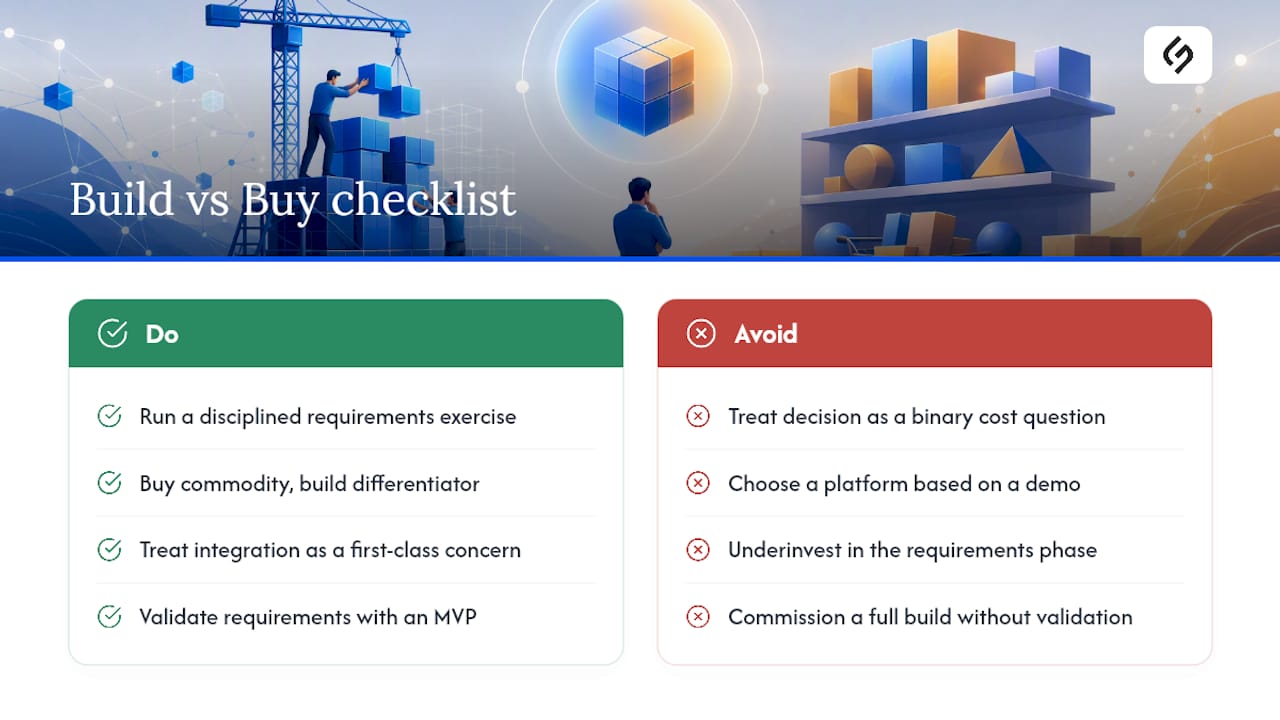
The conventional framing of custom software vs. off-the-shelf treats it as a binary cost question. It is not. The more important question is: where does your organization’s competitive advantage actually live, and are you protecting it with your software choices?
Most organizations underinvest in the requirements phase and overpay for the consequences. They select a packaged platform based on a demo, discover the integration work was not scoped, and spend the next two years paying for customizations that bring them close to what a well-scoped custom build would have delivered at comparable total cost. The off-the-shelf path is genuinely faster and cheaper when the fit is real. When the fit is forced, the economics reverse.
The other underappreciated risk is on the custom side: organizations that commission a full build without validating requirements with real users. An MVP is not a compromise. It is the most reliable way to learn whether your requirements are correct before you have spent the full budget finding out they were not.
What actually works in practice is a hybrid posture: buy the commodity, build the differentiator, and treat the integration layer between them as a first-class engineering concern rather than an afterthought. Organizations that get this right tend to have one thing in common: they ran a disciplined requirements exercise before making any vendor or build decision.
Solution For guru builds the software your business actually needs
When the off-the-shelf options do not fit and the stakes are too high for a generic implementation, Solution4guru provides custom web development, API integrations, MVP builds, and ongoing maintenance for U.S. organizations that need a reliable technical partner. The work covers the full delivery cycle: requirements and architecture, iterative development with defined acceptance criteria, QA, deployment, and post-launch support.
Whether you are replacing a packaged platform that no longer fits, building a proprietary workflow from scratch, or extending an existing system with custom integrations, Solution4guru structures engagements to protect your investment: fixed-scope discovery phases, milestone-based payments, and IP assignment in every contract. The starting point is a free requirements review where the team maps your priorities to the right technical approach.
Start with a free requirements review or visit Solution4guru to see the full range of services.
Useful sources
- Custom Software vs Off-the-Shelf: What’s Best for Your Business in …
- 5 advantages of custom software vs. off-the-shelf software
- Security and Compliance in ITSM: What You Need to Know – Solution for Guru
- How to Choose CMS: Select the Best System for Your Business – Solution for Guru
FAQ
Custom software is purpose-built for one organization and owned outright by that organization; off-the-shelf software is a commercial product licensed to many customers simultaneously, with the vendor retaining ownership of the codebase.
Off-the-shelf is the right default for commodity functions where speed and cost matter most. Custom development is the better choice when the software encodes a proprietary workflow, requires unique integrations, or is itself a competitive differentiator.
Bespoke software is another term for custom or tailor-made software: it is designed and built specifically for one client’s requirements. The key difference from off-the-shelf is that the client owns the IP and the codebase is not shared with other organizations.
A scoped MVP typically takes three to six months from requirements sign-off to initial production release; a full custom build with multiple integrations and regulatory requirements can take six to eighteen months depending on scope and team size.
Choose custom development when your workflows cannot be replicated by a packaged product without significant modification, when IP ownership is strategically important, or when the three-year TCO of licensing and integration fees for an off-the-shelf platform exceeds the cost of building and owning the system outright.
Recommended
- Cloud vs On-Premise ManageEngine ITSM: Which Should You Choose? – Solution for Guru
- On-Premise vs Cloud ITSM: Choosing Between ManageEngine and Freshservice Architectures – Solution for Guru
- ManageEngine vs Freshservice: Which ITSM Platform Should Your Business Choose? – Solution for Guru
- Automating Software License Tracking with ITSM Solutions: How Can You Take Control? – Solution for Guru