Top Free Business Automation Tools for SMBs: 12 Picks

TL;DR:
- Free business automation tools like Zapier, Make, and n8n offer SMBs powerful workflows without cost, but choosing the right one depends on your process type and volume. Start small with a single high-error task, measure usage, and expand cautiously to avoid hitting free-tier limits and maintenance complexities. Scaling effectively requires treating automation as a governed system, monitoring limits, and planning for eventual upgrades or professional implementation.
The strongest free business automation tools available right now are Zapier, Make, n8n, IFTTT, HubSpot Free CRM, Mailchimp, Brevo (Sendinblue), and Trello with Butler. Each fits a different business profile, and knowing which one matches your operation saves weeks of trial and error.
- Zapier — Best for non-technical teams connecting popular SaaS apps. Free plan covers basic Zaps but task limits apply as volume grows; watch for the cap on monthly runs.
- Make (formerly Integromat) — Best for visual, multi-step workflows. No time limit on the free plan, with access to 3,000+ integrations; limits apply per monthly operations count.
- n8n — Best for technical teams that need custom logic. Self-hosted option is free with no per-task pricing; the cloud free tier has workflow and run limits.
- IFTTT — Best for simple, single-trigger automations and IoT connections. Free tier covers a handful of applets.
- HubSpot Free CRM — Best for sales and marketing teams that need contact management plus basic email automation at zero cost.
- Mailchimp — Best for small email lists. Free plan caps contacts and monthly sends, making it ideal for early-stage campaigns.
- Brevo (Sendinblue) — Best for businesses that send daily emails. Free tier allows 300 emails per day with unlimited contacts, which is a meaningful advantage over most competitors.
- Trello with Butler — Best for project and task automation. Butler provides roughly 250 automation runs per month on the free plan, enough for lightweight process management.
Some vendors now offer full-feature free plans that expose core capabilities rather than stripped-down trials, which means SMBs can build real workflows before spending a dollar.
Table of Contents
- The best free automation tools, organized by business function
- How to choose the right free automation tool for your business
- Quick automations you can set up today with free tools
- Expert recommendations for scaling automation safely
- Key Takeaways
- The real lesson from watching SMBs automate
- When professional implementation makes sense for your automation stack
- Further reading and authoritative sources
- FAQ
The best free automation tools, organized by business function
Choosing the right tool is easier when you match it to the job it needs to do. The categories below reflect how most small businesses actually divide their work: connecting apps, sending emails, managing contacts, tracking projects, and handling support.
Workflow and connector platforms
These tools sit at the center of your automation stack. They move data between apps and trigger actions across your entire software environment.
| Tool | Best for | Free-tier limits | Integrations | Ease of use | Upgrade trigger / entry price | Hosting |
|---|---|---|---|---|---|---|
| Zapier | Non-technical SaaS users | Limited tasks/month, limited Zaps | 7,000+ apps | No-code | Monthly task cap exceeded / — | SaaS |
| Make | Visual multi-step workflows | Operations cap/month, no time limit | 3,000+ apps | No-code, visual | Operations cap / — | SaaS |
| n8n | Technical teams, custom logic | Self-hosted: unlimited; Cloud: workflow + run limits | 400+ native nodes | No-code + JS/Python | Cloud run limits / self-hosted is free | SaaS + self-hosted |
| IFTTT | Simple triggers, IoT | Limited applets on free | 700+ services | No-code | Applet count / — | SaaS |
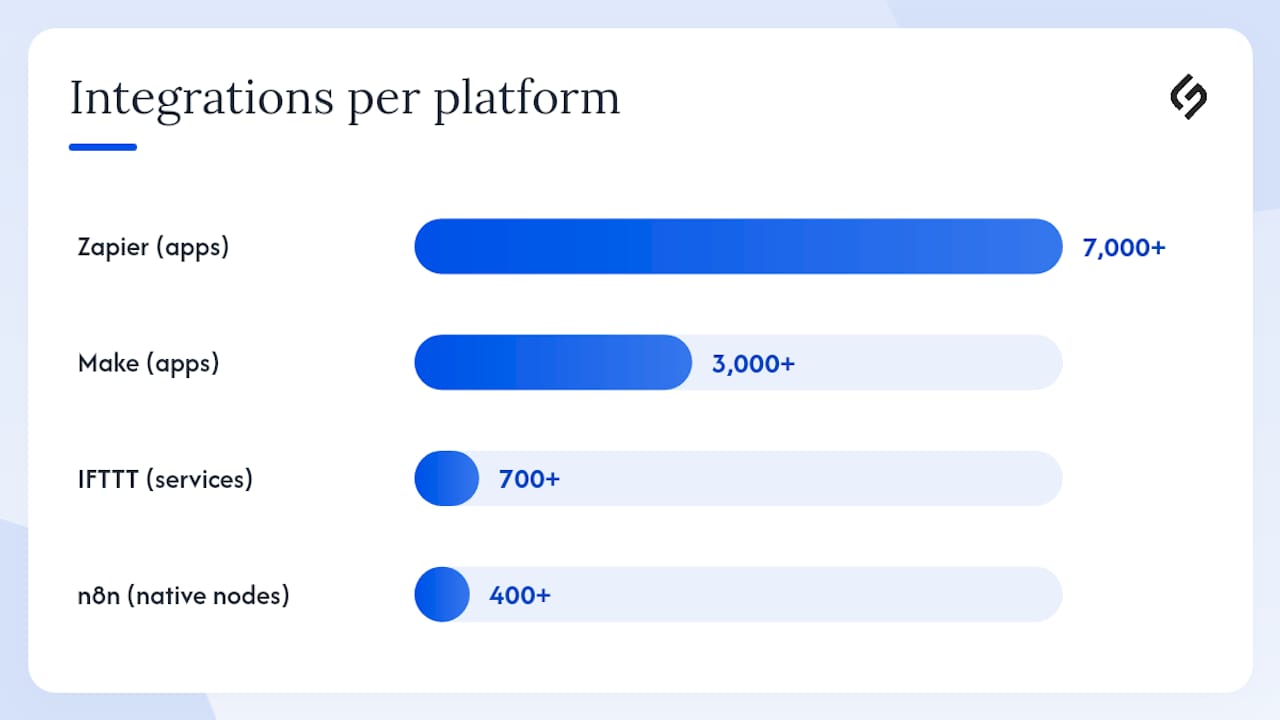
Zapier connects more apps than any other platform in this category. The free plan works well for testing and low-volume processes, but businesses with even moderate automation needs tend to hit the monthly task ceiling faster than expected.
Make takes a visual, canvas-based approach that makes complex, branching workflows easier to build and audit. The free plan carries no expiration date, which is genuinely useful for teams that want to prototype before committing.
n8n blends a visual builder with the ability to insert JavaScript or Python directly into nodes. That composable approach suits teams that need the speed of drag-and-drop plus the flexibility of custom logic, without commissioning a full engineering project. Self-hosted deployment eliminates per-task fees entirely.
IFTTT handles simple, one-trigger-one-action rules and IoT device connections better than any other free option. It is not the right tool for multi-step business workflows, but for connecting a smart device to a Slack channel or a form to a Google Sheet, it remains the fastest path.
Email and marketing automation
| Tool | Best for | Free-tier limits | Ease of use | Upgrade trigger | Hosting |
|---|---|---|---|---|---|
| Mailchimp | Small email lists, beginners | Contact cap + monthly send cap | No-code | List or send limit hit | SaaS |
| Brevo (Sendinblue) | Daily email senders | 300 emails/day, unlimited contacts | No-code | Daily send cap | SaaS |
| Mautic | Self-hosted marketing automation | Unlimited (self-hosted) | Requires CLI comfort | Ops overhead grows | Self-hosted |
Mailchimp remains the most recognized name in free email marketing. Its free plan suits businesses with a small, stable list that sends occasional campaigns. Once contact counts or send volume climb, the upgrade cost becomes significant.
Brevo offers a more generous daily send allowance with unlimited contacts on its free tier, making it the better choice for businesses that email frequently but keep their list manageable. The 300-emails-per-day limit is the primary constraint to plan around.
Mautic is open-source and fully self-hosted, which means no subscription fees and no contact caps. The tradeoff is real: production deployment requires command-line comfort, ongoing patching, and attention to security updates. For a technically capable team, it is a powerful option; for everyone else, the operational overhead outweighs the cost savings.
CRM and contact management
HubSpot Free CRM is the default recommendation for SMBs that need contact management, deal tracking, and basic email automation without paying. The free tier is genuinely functional, not a stripped-down trial. It includes contact records, pipeline views, email templates, and basic sequences. The upgrade trigger is usually advanced reporting, custom properties, or marketing automation depth. For a practical guide to getting more from CRM automation, the principles apply directly to HubSpot’s free tier setup.
Project and task automation
Trello with Butler brings rule-based automation directly into project boards. Butler can move cards, assign members, set due dates, and trigger notifications based on board activity. At roughly 250 automation runs per month on the free plan, it handles lightweight process management without any integration layer. For teams that need automated task assignments across a broader project management system, the task assignment automation guide covers the underlying logic that applies to Trello and similar tools.

Open-source and self-hosted options
Beyond n8n and Mautic, platforms like xavvy offer self-hosted free plans alongside hosted tiers with limits on active workflows and monthly runs. The appeal is no per-task pricing, which matters once automation volume scales. The real cost, however, is not the subscription fee you avoid. Self-hosted tools require VPS hosting, regular backups, security patching, and ongoing maintenance, all of which consume time or money. That tradeoff is worth it for teams with devops capacity; it is a liability for teams without it.
Pro Tip: Before committing to a self-hosted platform, estimate your monthly server and maintenance hours. If that time costs more than the SaaS subscription you are avoiding, the self-hosted route is not actually free.
How to choose the right free automation tool for your business
The wrong tool choice costs more than a subscription fee. It costs the hours spent rebuilding workflows on a different platform six months later. These questions cut through the noise.
Start with your process, not the platform
- List your top three repetitive processes. Pick the ones that consume the most time or generate the most errors. Data entry, lead follow-up, and invoice notifications are common starting points.
- Estimate monthly run volume. Count how many times each process fires per month. A form that receives 50 submissions daily generates 1,500 runs per month. That number determines which free tier you will exhaust first.
- List your must-have app connections. Check that the tool you are evaluating actually connects to your CRM, email platform, and project management app. Integration count alone is misleading; the specific connectors matter.
- Identify who will maintain the workflows. A non-technical team needs a no-code SaaS platform. A team with a developer on staff can consider self-hosted options or tools like n8n that support custom code.
- Decide on data residency requirements. Businesses in regulated industries or with strict data policies may need self-hosted options to keep data off third-party servers.
Red flags to watch before committing
- “Unlimited free” claims with hidden per-action caps. Read the pricing page carefully. Many platforms advertise unlimited workflows but charge per task execution above a threshold.
- No logging or rollback. If a workflow breaks and you cannot see what happened or revert a bad run, debugging becomes a serious operational problem.
- Missing connectors for your core stack. A tool with 7,000 integrations is useless if it does not connect your specific ERP or e-commerce platform.
- No multi-user support on the free tier. Solo-use free plans create bottlenecks when more than one person needs to build or monitor workflows.
Pro Tip: Use Requex to run anonymous, accountless webhook tests before setting up a full platform account. It lets you validate that your trigger and payload work correctly, so you measure real monthly run estimates before locking into a free-tier limit.
For a broader look at why automating business processes pays off at the operational level, the strategic case is worth reviewing before selecting tools.
Quick automations you can set up today with free tools
These templates are high-impact and low-effort. Each can be running within a few hours using only free-tier accounts.
1. New lead to CRM contact
Tools: Typeform or Google Forms + Zapier or Make + HubSpot Free CRM
- Create a form with lead fields (name, email, company, interest).
- In Zapier or Make, set the form submission as the trigger.
- Map form fields to HubSpot contact properties.
- Add a second action: send a welcome email from HubSpot or Mailchimp.
- Test with a live submission and confirm the contact appears in HubSpot.
Free-tier cost: Counts as one task per submission in Zapier; one operation in Make. Low-volume lead forms stay well within free-tier limits.
2. Form submission to Slack alert and Trello card
Tools: Google Forms + Make (or Zapier) + Slack + Trello
- Set Google Forms submission as the trigger in Make.
- Add a Slack action: post a message to your #leads or #support channel with the form data.
- Add a Trello action: create a card in your intake list with the submitter’s name and details.
- Set a Butler rule in Trello to assign the card to the on-call team member automatically.
- Run a test submission and verify both the Slack message and Trello card appear.
Free-tier cost: Two operations per submission in Make. Butler counts one automation run per card creation.
3. Daily email digest of new CRM activity
Tools: HubSpot Free CRM + Zapier (or Make) + Gmail
- In Zapier, set a scheduled trigger for 8:00 AM daily.
- Pull new HubSpot contacts or deals created in the last 24 hours via the HubSpot action.
- Format the data into a summary using Zapier’s Formatter tool.
- Send the summary to your sales team via Gmail.
- Monitor for a week to confirm delivery and adjust the filter if needed.
4. Abandoned cart email sequence
Tools: E-commerce platform (Shopify, WooCommerce) + Brevo (Sendinblue)
- Connect your store to Brevo using the native plugin or webhook.
- Create a Brevo automation workflow triggered by “cart abandoned.”
- Set a one-hour delay, then send a reminder email with the cart contents.
- Add a second email at 24 hours with a soft incentive if the cart is still open.
- Monitor open and click rates in Brevo’s free analytics dashboard.
Free-tier cost: Brevo’s 300-emails-per-day limit is the constraint. For stores with fewer than 300 daily cart events, this runs entirely free.
5. Webhook proof-of-concept test
Before building any of the above automations on a live account, use Requex to fire test webhooks anonymously. Paste the Requex endpoint into your form or trigger, submit a test payload, and inspect the data structure. This step prevents wasted free-tier runs during development.
Expert recommendations for scaling automation safely
The most common mistake SMBs make with automation is treating each workflow as an isolated tool rather than part of a connected system. As the number of active workflows grows, so does the risk of data leaks, broken triggers, and runaway processes that consume free-tier limits overnight.
The recommended approach is to treat automation as a control plane: a single management layer where all workflows are visible, monitored, and governed. In practice, this means keeping all automations in one platform where possible, naming workflows consistently, logging every run, and setting up failure alerts before a broken workflow causes a customer-facing problem.
Composable automation — mixing visual no-code builders with small JavaScript or Python snippets — is the most practical architecture for SMBs that need flexibility without full engineering projects. It lets non-technical staff build and maintain the majority of workflows, while a developer can extend specific nodes with custom logic when the visual builder hits its limits. This approach, championed by platforms like n8n, avoids the false choice between “easy but limited” and “powerful but complex.”
The self-hosted vs. SaaS decision deserves more scrutiny than most guides give it. Self-hosted tools eliminate subscription fees, but the hidden costs are real: VPS or cloud server costs, time spent on backups, security patching, and version upgrades. For a team without dedicated devops capacity, those costs often exceed the SaaS subscription they were trying to avoid. The cloud solutions tradeoff is worth mapping explicitly before committing to a self-hosted deployment.
A practical governance checklist for scaling safely:
- Centralize all workflows in one platform or a documented registry.
- Set failure alerts for every critical workflow (lead capture, payment notifications, support tickets).
- Log run counts weekly to anticipate free-tier limits before they hit.
- Review and archive unused workflows quarterly to reduce noise and maintenance burden.
- Document each workflow’s trigger, actions, and owner so that staff turnover does not create orphaned automations.
Pro Tip: Map your highest-volume processes first. A single form that fires 50 times per day consumes 1,500 monthly runs. Identify those processes before building, and you will know exactly which free tier you will outgrow and when.
For teams evaluating sales-specific automation alongside these workflow tools, the top sales automation platforms analysis provides a useful comparison of where free CRM automation ends and dedicated sales tooling begins.
Key Takeaways
The most effective approach to free business automation is to match each tool to a specific business function, map monthly run volumes before committing, and treat all workflows as a governed system rather than isolated fixes.
| Point | Details |
|---|---|
| Match tool to function | Use workflow connectors for app integration, dedicated tools for email, CRM, and project automation. |
| Watch free-tier limits | Map monthly run volume before building; Brevo’s daily email limit and Trello’s free plan automation run limits are common ceilings. |
| Self-hosting has hidden costs | Server, backup, and security maintenance often cost more than the SaaS subscription they replace. |
| Start with one process | Build one automation, measure its run count over a period, then expand based on actual usage data. |
| Solution4guru for complex builds | When integrations span multiple platforms or require custom API work, Solution4guru’s automation and integration engineering services reduce implementation risk. |
The real lesson from watching SMBs automate
Most small businesses underestimate how quickly free-tier limits become a constraint, and they overestimate how much automation they need on day one. The teams that get the most value from free tools are the ones that start with a single, high-error process, automate it completely, and measure the result before touching anything else. The temptation to automate everything at once is understandable, but it produces a tangle of half-built workflows that nobody fully understands six months later.
The other pattern worth noting: the self-hosted route sounds financially attractive until the first security patch or server migration lands on someone’s calendar. For most SMBs, the SaaS free tier is genuinely the right starting point. Self-hosting makes sense when data residency is a hard requirement or when volume is high enough that subscription costs become material. Not before.
The tools covered here are capable enough to run real business processes at zero cost. The constraint is almost never the tool. It is the clarity of the process being automated.
When professional implementation makes sense for your automation stack
Free tools take you far, but there is a point where complexity outpaces what a free tier and a few hours of setup can handle. Multi-platform integrations that span a CRM, an e-commerce system, a payment processor, and a support desk require more than a visual workflow builder. Self-hosted deployments need someone who can manage infrastructure without creating security gaps. And when automation breaks at scale, the cost of a broken workflow often exceeds what a professional implementation would have cost upfront.
Solution4guru works with SMBs at exactly that inflection point. The services most relevant to readers of this article include automation assessment (identifying which processes to automate and in what order), integration engineering (connecting systems that do not have native connectors), and workflow monitoring setup (so broken automations surface before they cause customer-facing problems). For businesses evaluating their broader digital transformation and automation roadmap, a free consultation is the practical next step. Reach out to discuss your current stack and where automation can deliver the clearest return.
Further reading and authoritative sources
These resources support the claims in this article and provide useful next steps for deeper research.
- Make — Visual AI Automation Platform: Official documentation for Make’s free plan, integration library, and visual workflow builder. Start here to understand what the free operations limit covers.
- n8n — Composable Automation: The n8n project site covers both self-hosted setup and cloud options, including the composable no-code-plus-code approach discussed in the expert section.
- Mautic on GitHub: The official README for Mautic’s open-source marketing automation platform, including installation requirements and maintenance notes.
- Requex Automation: Documentation for anonymous, accountless webhook testing. Useful for validating automation payloads before committing to a platform account.
- Operational Efficiency Checklist for SMBs: A practical SMB-focused checklist that complements the governance and scaling guidance in this article.
- Openweavr — Self-Hosted AI Workflow Automation: Covers the real costs and tradeoffs of self-hosted automation, including hosting, backups, and security operations.
FAQ
HubSpot offers a genuinely functional free CRM tier that includes basic email sequences, contact management, and pipeline automation. Advanced marketing automation features, custom reporting, and higher send limits require a paid plan.
The most widely used business process automation tools include Zapier, Make, n8n, and HubSpot for workflow and CRM automation, alongside Mailchimp and Brevo for email marketing. Each covers a different layer of the automation stack.
Common examples include routing new form submissions into a CRM and sending a Slack alert (Zapier or Make), triggering an abandoned cart email sequence (Brevo), automating Trello card creation from incoming support requests (Butler), and syncing new contacts across platforms without manual data entry.
Zoho Flow is Zoho’s integration and workflow automation platform. It offers a free trial and paid plans; it connects to many apps including Google Workspace and ChatGPT. It is not a permanently free tool in the same way HubSpot’s CRM tier or Brevo’s email plan are, but it is worth evaluating for teams already using the Zoho ecosystem.
The clearest upgrade triggers are hitting monthly task or run limits, needing multi-user access, requiring advanced error logging, or connecting apps that are not available on the free tier. Mapping your highest-volume processes before building, as outlined in this article, lets you forecast that moment before it becomes an operational problem.
Recommended
- How to Set Business Goals: A Practical SMB Guide – Solution for Guru
- Digital Solutions for SMEs: Your 2026 Action Playbook – Solution for Guru
- What Remote Access Software Should SMBs Choose for Maximum Efficiency? – Solution for Guru
- Understanding Why Automate Business Processes for Growth – Solution for Guru