Automation Examples for SMBs: Lead Routing, Invoices, Quick Wins

Automation now touches nearly every function of a business, from routing sales leads to flagging a machine before it fails. Organizations that combine AI, IoT, and robotics at scale report average labor productivity gains near 40%, and smaller firms are catching up fast using low-code tools. This guide walks through concrete examples by department, the evidence behind the gains, and how to pick your first project.
TL;DR:
- Agentic AI pilots in customer operations delivered 20% to 40% time savings and 30% to 50% backlog reductions when teams redesigned workflows instead of automating old ones.
- Prioritize frequent processes with repetitive handoffs, measurable costs or errors, and compatible systems; map exceptions and remove needless steps before building automation.
- Form to CRM lead capture can launch in days, while invoice scanning and approval typically take one to three weeks, depending on approval complexity.
- Set a success metric and run a pilot for two to four weeks; use specialists for sensitive data or projects spanning more than two systems.
Table of Contents
- 1. Automation Examples Across Every Business Function
- 2. The Business Case: Benefits and Headline Statistics
- 3. Choosing Which Process to Automate First
- 4. Quick Wins and Implementation Patterns for SMBs
- 5. Real Build Examples and Proof Points
- 6. Task Automation, Process Redesign, or Agentic AI: What Fits Your Workflow
- Partner With Us to Build Your Automation Roadmap
- FAQ
- Sources
1. Automation Examples Across Every Business Function
Automation rarely lives in one department. It tends to spread once a team sees a workflow that used to take hours resolve itself in minutes, so the most useful way to understand business process automation is function by function.
Sales.
Lead routing and qualification rules can score incoming leads and assign them to the right rep the moment a form is submitted, removing the manual triage that used to happen once a day. Quote-to-cash automation pulls pricing rules and approval chains into a single workflow so a quote becomes a signed order without a chain of emails. Pipeline alerts flag deals that have gone quiet for a set number of days, prompting a follow-up before a prospect is lost. Our Pipedrive automation examples for sales teams walk through several of these patterns in detail, and the Salesforce workflow automation examples page covers similar builds for teams on that platform.
Marketing.
Trigger-based email sequences respond to a download or a cart abandonment within minutes instead of a weekly batch send. Lead scoring models combine website activity and form data so marketing hands sales only the contacts worth a call. Content scheduling and social posting tools queue a month of output in a single sitting.
Customer support.
Ticket triage automation reads incoming requests and tags them by urgency and topic before a human ever opens the inbox. Auto-resolution flows answer common questions (password resets, order status, return policy) without a live agent, often cutting response time from hours to seconds for routine cases. Satisfaction surveys trigger automatically after a ticket closes, feeding a dashboard instead of a spreadsheet.
HR.
Employee onboarding workflows generate accounts, send welcome documents and schedule orientation meetings the day an offer is accepted. PTO and timesheet approvals route through a manager automatically based on policy rules, removing the back-and-forth of paper forms. Candidate screening tools filter resumes against role criteria before a recruiter spends time reading them.
Finance and accounts payable.
Invoice capture tools read a PDF or scanned bill, extract the vendor, amount and due date, and route it for approval without manual data entry. Expense report automation matches receipts to card transactions and flags policy violations automatically. Our guide to AI document processing versus traditional OCR explains how these extraction tools differ from older scanning software.
Procurement and inventory.
Reorder triggers watch stock levels and generate purchase orders once inventory drops below a threshold, preventing stockouts without a weekly manual count. Vendor comparison tools pull quotes from multiple suppliers into one view for faster sourcing decisions.
Operations and manufacturing.
Predictive maintenance alerts use sensor data to flag a machine likely to fail before it actually breaks down, shifting maintenance from reactive to scheduled. Quality inspection systems use computer vision to catch defects on a production line faster and more consistently than a visual check alone.
Two project types show how the scaling path works in practice:
- A form-to-CRM lead workflow. A web form feeds directly into a CRM, assigns an owner and sends a notification, all without anyone touching a spreadsheet. This is a days-long build most SMBs can run themselves with a low-code connector.
- Invoice OCR tied to an approval email. A scanned invoice is read automatically, and an approval request lands in the right inbox with the extracted details attached. This typically takes one to three weeks depending on how many approval tiers exist.
Two larger projects show what scaling looks like:
- ERP-driven replenishment, where inventory systems automatically trigger purchase orders across multiple warehouses based on live demand data.
- AI-assisted quality inspection, where computer vision models flag defects on a production line in real time, feeding directly into a manufacturing execution system.
2. The Business Case: Benefits and Headline Statistics
Automation pays off in a handful of measurable ways: faster throughput, fewer errors, lower cost per transaction, and the ability to handle more volume without adding headcount at the same rate. Each example above maps to one or more of these outcomes.
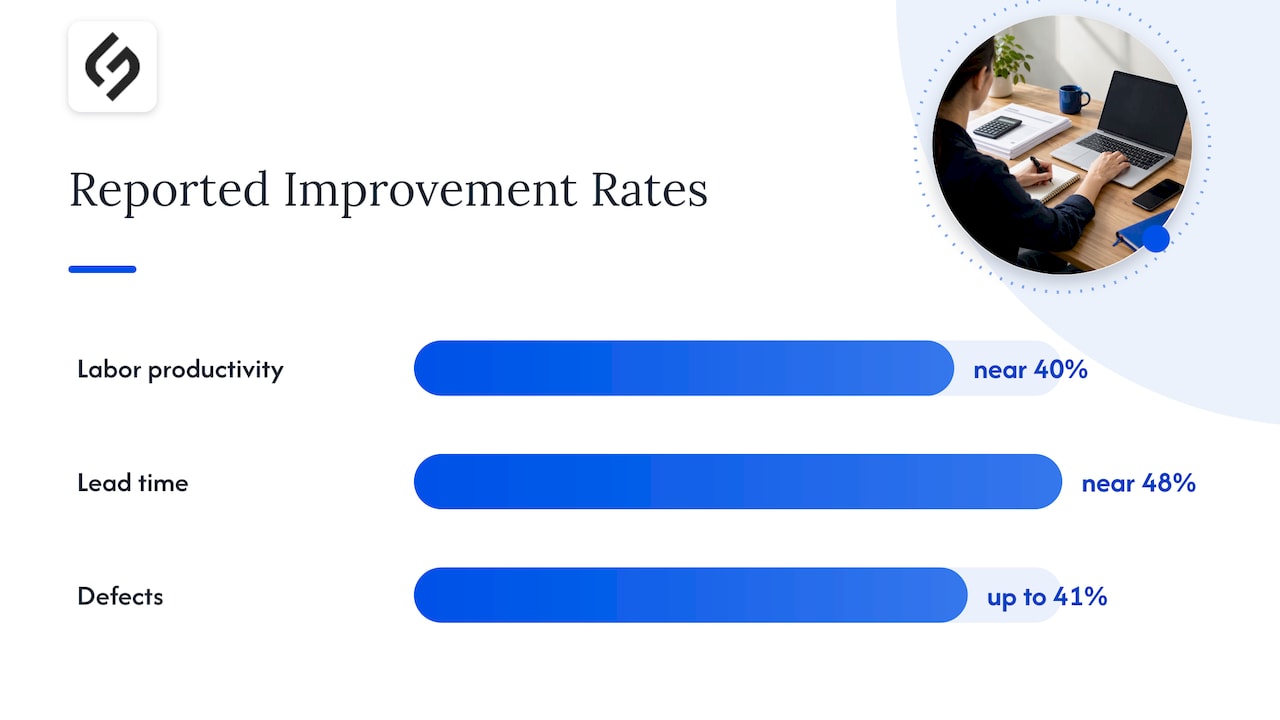
Manufacturing sites in the Global Lighthouse Network, which combine AI, IoT and robotics rather than deploying a single tool, report average labor productivity gains near 40%, lead-time reductions near 48%, and defect reductions up to 41%. Those numbers come from large industrial operations, but the underlying pattern, that converged technologies beat isolated pilots, applies at smaller scale too.
Smaller firms are seeing similar directional gains. An OECD survey of small and medium enterprises found that 31% now use generative AI in some part of their operations.
For customer operations specifically, McKinsey’s research on agentic AI found pilots achieving 20 to 40% time savings and 30 to 50% backlog reductions when the workflow itself was redesigned around automation rather than just layered on top of the old process.
A realistic SMB benefit category breakdown looks like this:
- Productivity: fewer manual handoffs mean staff spend time on judgment calls instead of data entry.
- Quality: automated checks catch errors a tired reviewer might miss.
- Lead time: approvals and replenishment happen in hours instead of days.
- Cost: fewer repeat touches per transaction lowers the effective cost of each one.
- Resilience: a documented workflow survives a staff absence better than a process that lives in one person’s head.
An invoice OCR workflow, for example, tends to shrink AP processing time meaningfully once the extraction and approval steps are connected end to end, though the exact percentage depends heavily on invoice volume and approval complexity.
3. Choosing Which Process to Automate First
The biggest mistake we see is automating a process that was broken to begin with, which just makes the broken version run faster. A simple scoring framework helps avoid that trap.
Before committing budget to a project, check each candidate process against these signals:
- Frequency: how often does this task run? Daily and weekly tasks pay back faster than quarterly ones.
- Repetitive manual steps: count how many times data gets copied, re-typed or re-checked by hand.
- Error rate: processes with frequent mistakes benefit most from consistent, rule-based execution.
- Cross-team handoffs: workflows that bounce between departments often hide the most wasted time.
- Measurable KPIs: pick a process where you can already track a number (processing time, error count, cost per unit) so improvement is provable.
- Ease of integration: favor processes where the systems involved already talk to each other or connect through common tools.
Once a candidate process scores well on most of these, a short sequence keeps the project low-risk: map the current steps exactly as they happen today, eliminate the obvious waste (duplicate approvals, unnecessary CC’s, manual re-entry), pilot the automated version with a small group, measure the result against the baseline, and only then scale it to the full team.
Pro Tip: Automate only after streamlining. If your invoice approval process has three people signing off on every bill regardless of amount, fix that rule first. Automating three unnecessary approvals just gets you the same bottleneck at higher speed.
Mapping first also surfaces exceptions early. A process that looks simple on paper (approve expense report, pay vendor) often has five variations once you watch it happen for a week, and those variations are exactly what a poorly scoped automation will choke on.
4. Quick Wins and Implementation Patterns for SMBs
Most SMBs do not need a six-month transformation project to see results. A handful of starter projects deliver value in days to weeks using tools most teams already have access to.
- Form to CRM lead capture: a web form connects directly to a CRM with a low-code connector, typically a few days of setup.
- Invoice OCR to AP approval: document AI reads a bill and routes it for sign-off, usually one to three weeks depending on approval complexity.
- Scheduling automation: booking tools sync calendars and send reminders automatically, often live within a day.
- Simple customer self-service flows: a chatbot or help center answers the most common five to ten questions before a ticket is ever created, typically two to four weeks to tune well.
Our small business workflow automation guide covers several peripheral wins achievable in the four to eight week range, and our Zapier workflow examples page shows concrete templates for the connector-based projects above. For marketing-specific automation sequencing, this SMB automation guide walks through email and content scheduling patterns that pair well with the CRM examples here.
The common tool patterns behind these projects are low-code connectors for simple data movement, document AI or OCR for anything involving paper or PDFs, workflow engines for multi-step approvals, and CRM-native rules for anything sales-related.
Bring in an integrator or agency once a project needs custom API work, touches sensitive data, or spans more than two systems.
| Project | Typical effort | Core tool pattern |
|---|---|---|
| Form to CRM lead capture | Days | Low-code connector |
| Invoice OCR to approval | 1 to 3 weeks | Document AI |
| Scheduling automation | Under 1 week | Calendar integration |
| Customer self-service flow | 2 to 4 weeks | Workflow engine or chatbot |
Before launching any pilot, align stakeholders on which KPI defines success (processing time, error rate, ticket volume), set a defined pilot window of two to four weeks, and agree in advance on what “good enough to scale” looks like.
5. Real Build Examples and Proof Points
Seeing an automation pattern applied to an actual business makes it easier to judge whether it fits your own operation. A few patterns we have implemented for clients show the range:
- A services firm replaced manual lead intake with a form-to-CRM workflow paired with automatic owner assignment, cutting the lag between form submission and first contact from a full business day to under an hour.
- A retail client connected invoice scanning to an approval workflow, removing manual data entry for the majority of incoming vendor bills and shortening the approval cycle.
- A sales team on Pipedrive automated follow-up reminders and deal-stage alerts, reducing the number of deals that went untouched for more than a week.
For readers who want to see the tool-level detail behind builds like these, our Salesforce automation examples and Pipedrive automation examples pages walk through specific configurations step by step, and our AI document processing comparison breaks down the extraction technology behind the invoice example above.
6. Task Automation, Process Redesign, or Agentic AI: What Fits Your Workflow
Automating a single task speeds up one step. Redesigning a process rethinks the whole sequence, which is where the larger gains usually live. Agentic AI orchestration goes further still, letting a system handle an entire workflow with minimal human steering. McKinsey’s research found agentic pilots cutting customer operations backlogs by 30 to 50% once the workflow was reimagined rather than just sped up.
A workflow with heavy coordination overhead and constant exceptions is usually a redesign candidate, not a task-automation one. Our rule of thumb: if you are automating a task, ask whether redesigning the process around it would double the payoff instead.
Partner With Us to Build Your Automation Roadmap
We build automation involving CRM integrations, AI-driven document processing, workflow automation, and custom connectors between business systems. Rather than handing over a generic template, our work starts from actual workflows and existing tools to create effective automation solutions.
Relevant services include process automation, CRM and SaaS integrations, AI and automation solutions for document processing, approvals, and custom workflows, and platform implementation and data migration.
If any of the examples above sound like a process your team is still running by hand, our services page outlines how we scope these projects, and you can reach out through our main site to start a project discovery conversation.
FAQ
Common examples include lead routing and CRM updates in sales, invoice capture and approval in finance, ticket triage in customer support, and employee onboarding workflows in HR. Manufacturing adds predictive maintenance and automated quality inspection, both of which rely on sensor data and computer vision rather than manual checks.
Gains vary widely by process and industry, but manufacturing sites combining AI, IoT and robotics report average labor productivity gains near 40%. For customer operations, agentic AI pilots have shown 20 to 40% time savings when the workflow is redesigned alongside the automation.
Start with a process that runs frequently, involves repetitive manual steps, and already has a measurable baseline, like lead intake or invoice processing. Map the current steps, remove obvious waste, then pilot the automation before rolling it out to the whole team.
No. An OECD survey found that among small and medium enterprises already using generative AI, 65% reported increased employee performance, and smaller tools like form-to-CRM connectors can be live within days.
We scope and build automation projects around a client’s existing tools and workflows rather than a fixed template, covering CRM integrations, AI document processing, and HubSpot-based workflow automation. Pricing depends on project scope and is available on request through our services page.
Sources
- Global Lighthouse Network 2025 — World Economic Forum
- Generative AI and the SME Workforce — OECD (2025)