Digital Solutions for SMEs: Your 2026 Action Playbook

TL;DR:
- Replacing manual invoicing with cloud accounting software offers fast cash flow visibility for small businesses. Starting with one focused tool and measuring outcomes helps SMEs adopt digital solutions effectively. Solution4guru provides end-to-end support for successful digital transformation beyond initial pilots.
The single best first move for most U.S. small and medium-sized businesses is to replace manual invoicing with cloud accounting software — tools like QuickBooks Online or Xero connect directly to your bank, cut invoice processing time, and give you real-time cash flow visibility within days of setup. From there, a simple CRM and one automation layer cover the majority of operational friction points most owners face.
Three actions you can take in a short timeframe:
- Sign up for a free trial of a cloud accounting platform and connect your business bank account (day 1–3).
- Set up a basic CRM (HubSpot’s free tier works for most service businesses) and import your existing customer list (week 1–2).
- Automate one repetitive task — appointment reminders, invoice follow-ups, or lead intake forms — using a self-service tool like Zapier or Make (week 2–4).
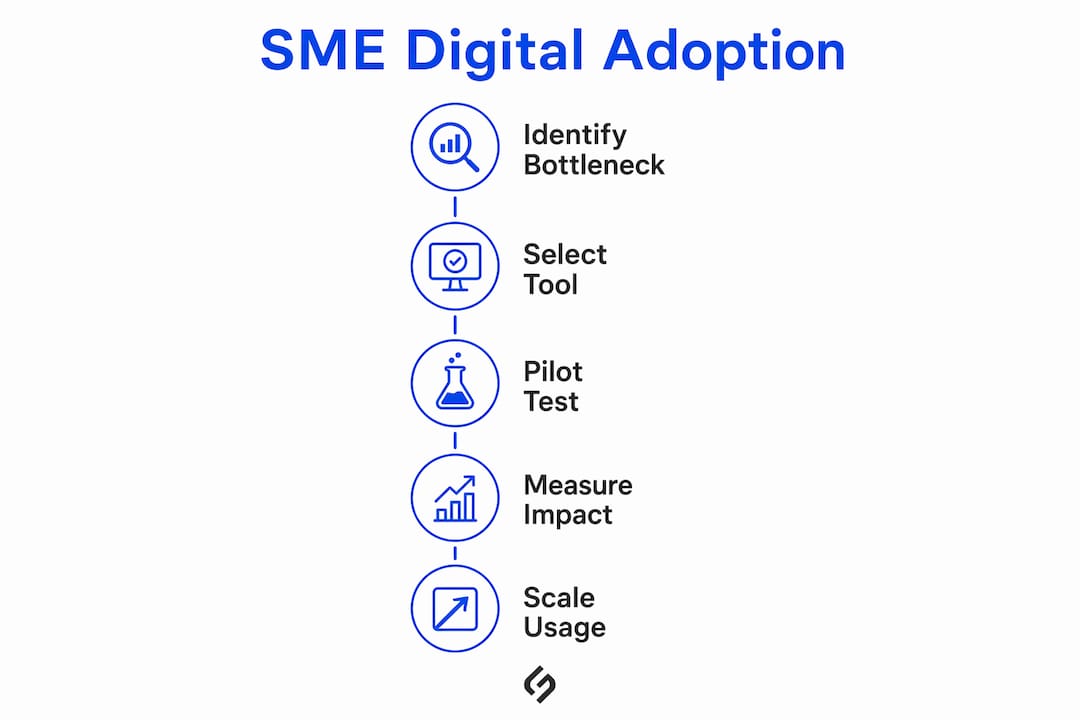
90-day action plan: Assess your biggest operational bottleneck → pilot one tool that addresses it → measure time saved and revenue impact.
Pro Tip: Favor freemium or self-service trials over demo-heavy sales processes. Modern SME software is designed to be adopted in hours, not weeks. If a vendor requires three calls before you can try the product, that friction rarely improves after you sign.
Table of Contents
- What do digital solutions for SMEs actually include?
- Which digital tool categories give SMEs the fastest results?
- What are the primary benefits of digital tools for SMEs?
- What are the biggest adoption challenges, and how do you overcome them?
- How do you implement digital solutions step by step?
- How do you evaluate and choose the right vendor?
- What is the right quick-start toolset for most U.S. SMEs?
- What U.S. legal and compliance requirements apply to digital solutions?
- How can SMEs build the digital skills to use these tools effectively?
- Real-world outcomes: how U.S. SMEs have used digital tools
- Key Takeaways
- The gap between digital ambition and digital execution
- How Solution4guru helps SMEs move from pilot to production
- Useful sources
- FAQ
What do digital solutions for SMEs actually include?
“Digital solutions for SMEs” refers to cloud-based software, SaaS platforms, and technology services that replace or automate manual business processes — covering everything from accounting and customer management to marketing, security, and e-commerce. For U.S. small and medium-sized businesses, the practical scope spans eight core categories.
Categories covered in this guide include:
- Cloud accounting and finance — invoicing, expense tracking, payroll, bank reconciliation
- CRM and sales automation — contact management, pipeline tracking, email sequences
- E-commerce and point-of-sale (POS) — online storefronts, payment processing, inventory sync
- Collaboration and productivity — project management, file sharing, team communication
- Digital marketing and analytics — SEO, paid ads, email campaigns, web analytics
- Process automation — workflow triggers, data entry elimination, cross-app integrations
- Cybersecurity and backup — endpoint protection, password management, cloud backup
- ERP-lite and inventory management — order tracking, supplier management, multi-location stock
This guide focuses on practical adoption for small to medium businesses operating in the United States.
Which digital tool categories give SMEs the fastest results?
Cloud computing, collaboration platforms, and supply chain management tools are impactful technology categories for SMEs looking to absorb operational shocks and adapt quickly. Here is how each major category translates into a concrete business outcome.
| Category | Example Tools | Primary Use Case | Best Fit |
|---|---|---|---|
| Cloud accounting | QuickBooks Online, Xero | Automate invoicing, reconcile bank feeds daily | All SMEs |
| CRM | HubSpot, Zoho CRM | Track leads, automate follow-ups | Service, B2B |
| E-commerce / POS | Shopify, Square | Sell online or in-store with synced inventory | Retail, food |
| Collaboration | Google Workspace | Shared docs, video calls, project boards | All teams |
| Marketing / analytics | Mailchimp, Google Analytics 4 | Email campaigns, traffic and conversion tracking | All SMEs |
| Automation | Zapier, Make | Connect apps, eliminate manual data entry | All SMEs |
| Cybersecurity | Bitdefender, 1Password | Endpoint protection, password vaults | All SMEs |
| ERP-lite / inventory | Cin7, Lightspeed | Multi-location stock, purchase orders | Retail, wholesale |
Pro Tip: Start by solving one high-friction bottleneck — invoicing, booking, or inventory — rather than replacing every system at once. A single well-adopted tool delivers more value than five half-used ones.
For service businesses, a CRM with built-in email automation is often the highest-ROI starting point. Retailers typically see faster returns from a POS system that syncs inventory to an online store. Multi-location operators benefit most from an ERP-lite layer that consolidates stock visibility. The right category depends on where your business loses the most time or revenue today.
What are the primary benefits of digital tools for SMEs?
Cloud software and automation deliver five measurable benefits for small businesses: faster operations, improved cash flow, better customer experience, data-driven decisions, and the ability to scale without proportional headcount growth.
- Time savings: Centralizing cloud storage and document management eliminates hours spent searching for files and chasing version-controlled documents — a direct productivity gain for lean teams.
- Improved cash flow: Cloud accounting tools reduce days sales outstanding (DSO) by automating invoice delivery, payment reminders, and bank reconciliation.
- Better customer experience: CRM and marketing automation keep follow-ups consistent and personalized, even when the owner is not at their desk.
- Scalability: SaaS platforms grow with the business — adding users, locations, or transaction volume without replacing the underlying system.
- Data-driven decisions: Web analytics, CRM dashboards, and accounting reports surface trends that manual spreadsheets obscure.
- Resilience: Cloud-based operations let teams work from anywhere and recover quickly from hardware failures or disruptions.
The OECD’s analysis of SME digitalization confirms that digitalization strengthens SME resilience and competitiveness — though it also highlights that skills gaps and adoption barriers remain real obstacles for many businesses. Understanding those barriers is the next step.
What are the biggest adoption challenges, and how do you overcome them?
Budget constraints, skill gaps, and integration complexity are the three most common reasons SME digital adoption stalls. Each has a practical workaround.
- Limited budget: Start with freemium tiers. Many SME-focused platforms now offer free or low-cost starter plans that require no credit card, letting you validate value before committing.
- Staff skill gaps: Choose tools with in-app tutorials and a strong knowledge base. Allocate two hours per week for the first month to structured learning — not one-time training sessions that employees forget.
- Data migration and integrations: Prioritize tools that connect via standard APIs or pre-built connectors (Zapier, Make, native integrations). Avoid platforms that require custom development to share data with your existing stack.
- Vendor lock-in: Before signing, confirm you can export your data in a standard format (CSV, JSON). Ask vendors for a data-portability sample during the trial.
- Cybersecurity concerns: A basic security checklist covers most early-stage risks: regular backups, strong passwords, and endpoint protection are the foundation before adding any new online tool.
- Change resistance: Involve one or two team members in the pilot selection process. Ownership of the choice reduces resistance to adoption.
Pro Tip: Avoid all-in-one platforms that bundle 15 features when you only need three. Feature bloat increases the learning curve and slows adoption. A focused tool that does one thing well — and connects cleanly to your other apps — almost always outperforms a sprawling suite in the first 12 months.
How do you implement digital solutions step by step?
A five-step roadmap — assess, prioritize, pilot, train and iterate, measure and scale — gives most U.S. SMEs a structured path from zero to operational within 90–180 days.
- Assess (weeks 1–2): Map your current workflows. Identify the top three time drains or revenue leaks. Document which processes are manual, which are duplicated, and where data lives in silos.
- Prioritize (week 3): Rank pain points by business impact and ease of fix. Pick one category to pilot first — the one where a tool can show measurable results within 30 days.
- Pilot (weeks 4–8): Deploy a single tool on a free trial or low-cost starter plan. Limit the pilot to one team or one process. Set 3–5 success metrics before you start.
- Train and iterate (weeks 6–12): Run short, role-specific training sessions (30–60 minutes). Collect feedback weekly and adjust configuration. Do not add a second tool until the first is stable.
- Measure and scale (months 3–6+): Review metrics against baseline. If ROI is clear, expand to additional users, locations, or categories. If not, adjust the tool configuration or reconsider the category.
| Step | Typical Duration | Pilot Cost Range | Scale Cost Range |
|---|---|---|---|
| Assess | 1–2 weeks | — | — |
| Prioritize | 1 week | — | — |
| Pilot | 4–8 weeks | —–$150/month | — |
| Train and iterate | 4–8 weeks | —–$500 (internal time) | — |
| Measure and scale | Ongoing | — | — |
Success metrics to track during the pilot:
- Invoice processing time (hours per week)
- Days sales outstanding (DSO)
- Lead-to-customer conversion rate
- Customer response time (hours)
- Employee hours saved per week
- System uptime and error rate
U.S. small businesses should also check for state and local digital adoption incentive programs — some states offer grants or tax credits for technology investments, analogous to programs like Canada’s CDAP. The Small Business Administration (SBA) and your local Small Business Development Center (SBDC) are the best starting points for identifying available funding.

How do you evaluate and choose the right vendor?
Prioritize scalability, transparent pricing, integration depth, security standards, and responsive support — in that order. A tool that is affordable today but forces a costly migration in 18 months is not a bargain.
Vendor must-have checklist:
- Free trial or freemium tier available without a sales call
- Pricing published openly on the website (no “contact us for pricing” for starter plans)
- Standard integrations with tools you already use (accounting, CRM, email)
- Data export available in a standard format at any time
- SOC 2 Type II or equivalent security certification for any tool handling customer or financial data
- SLA with defined uptime guarantees and support response times
- Clear upgrade path with no forced annual contract for pilots
Red flags to watch for:
- Demo-heavy sales process with no self-service trial
- Pricing that changes significantly after the first contract renewal
- Poor or outdated integration documentation
- No in-app onboarding or help center
- Vague answers about data ownership or portability
Questions to ask vendors:
- What is your uptime SLA, and what is the remediation process if you miss it?
- Can I export all my data at any time, and in what format?
- What integrations do you support natively, and which require a third-party connector?
- What does your support response time look like for the plan I am considering?
- What happens to my data if I cancel?
For CRM scalability specifically, confirm that the platform can handle your projected contact volume and pipeline complexity before you commit. Migrating CRM data after 12 months of use is expensive and disruptive.
What is the right quick-start toolset for most U.S. SMEs?
For the majority of U.S. small businesses, a practical starting stack covers five categories: cloud accounting, a basic CRM, scheduling or booking software, one automation layer, and cloud backup. This covers the highest-ROI use cases without overcomplicating the tech environment.
- Cloud accounting: QuickBooks Online or Xero — both offer free trials, bank feed sync, and invoicing automation. The Canadian Chamber of Commerce’s digital tools guide identifies these as the most practical starting points for SME finance.
- CRM: HubSpot (free tier) or Zoho CRM — contact management, email sequences, and pipeline tracking without upfront cost.
- Scheduling / booking: Calendly or Acuity Scheduling — eliminates back-and-forth email for appointments and integrates with Google Calendar and Zoom.
- Automation: Zapier or Make — connect your accounting, CRM, and email tools with pre-built workflows. No coding required.
- Cloud backup: A dedicated backup solution protects against ransomware, accidental deletion, and hardware failure. This is non-optional once any business data moves online.
- AI chatbot (optional): For businesses with high inbound inquiry volume, an AI chatbot for small business can handle FAQs and lead qualification around the clock, reducing the load on staff.
The buying posture matters as much as the tool selection. Run every pilot on a free trial. Track ROI with a handful of simple metrics tied to business outcomes like invoice processing time, payments timing, and lead conversion rate. Require vendors to provide a data-export sample before you commit to a paid plan.
What U.S. legal and compliance requirements apply to digital solutions?
U.S. SMEs adopting digital tools must account for a patchwork of federal and state regulations, particularly around data privacy, payment processing, and industry-specific rules.
Data privacy: There is no single federal consumer data privacy law in the United States as of 2026. Instead, a growing set of state laws governs how businesses collect, store, and use personal data. California’s Consumer Privacy Act (CCPA) is the most comprehensive and applies to many businesses that serve California residents, regardless of where the business is headquartered. Virginia, Colorado, Connecticut, and Texas have enacted similar laws. If your digital tools collect customer data — and virtually all CRM, e-commerce, and analytics tools do — you need a privacy policy, a data processing agreement with each vendor, and a process for honoring data deletion requests.
Payment processing: Any business accepting card payments must comply with the Payment Card Industry Data Security Standard (PCI DSS). Most modern POS and e-commerce platforms (Shopify, Square, Stripe) handle PCI compliance at the platform level, but the business owner remains responsible for not storing raw card data outside those systems.
Industry-specific rules: Healthcare businesses using digital tools that touch patient data must comply with HIPAA. Financial services firms face SEC and FINRA requirements. Businesses in food service, childcare, or legal services face additional state-level licensing and record-keeping obligations that extend to digital records.
The practical step is to confirm that every vendor you pilot has signed a Business Associate Agreement (BAA) if you are in healthcare, and a Data Processing Agreement (DPA) for any tool handling personal customer data. This is general information, not legal advice — confirm your specific obligations with a qualified attorney or compliance professional.
How can SMEs build the digital skills to use these tools effectively?
Technology adoption fails more often from skill gaps than from poor tool selection. A structured approach to digital literacy pays dividends across every tool category.

The most effective starting point is role-specific training rather than company-wide sessions. A bookkeeper needs 90 minutes on QuickBooks reconciliation; a sales rep needs 60 minutes on CRM pipeline management. Broad “here is our new software” meetings rarely produce lasting competency.
Most leading SaaS platforms provide free certification programs. HubSpot Academy, Google’s Skillshop, and QuickBooks Training cover the most common SME tools at no cost. Assigning one team member per tool as the internal “champion” — responsible for staying current on updates and answering peer questions — reduces dependence on vendor support and builds institutional knowledge.
For owners who want a broader foundation, the SBA’s free online learning center and SCORE’s mentorship network offer practical digital business courses. The World Economic Forum’s 2025 analysis of small businesses in the digital economy highlights that access to training and peer networks is one of the strongest predictors of successful technology adoption.
Allocate a recurring block — even 30 minutes per week — for the team to explore new features, review platform updates, and share what is working. Consistent, low-intensity learning compounds faster than periodic intensive training.
Real-world outcomes: how U.S. SMEs have used digital tools
The pattern across successful SME digital adoptions is consistent: one focused pilot, a measurable outcome, then expansion.
A regional accounting firm moved from emailed spreadsheets to a cloud-based project management platform and shared document system. Over time, the time spent on internal status updates dropped significantly and client deliverable deadlines became more trackable in real time. The firm then added a CRM to manage client renewals, using the same adoption sequence: pilot with one team, measure, then expand.
A local retail business with two locations adopted a cloud POS system (Lightspeed) that synced inventory across both stores and connected to an online Shopify storefront. The owner eliminated the manual daily stock count that had consumed significant morning time and gained visibility into which products were moving fastest at each location. Online sales, which had been zero, became a meaningful revenue channel within a few months.
A solo service provider — a freelance marketing consultant — replaced a manual invoicing process with QuickBooks Online and a Calendly booking link. Invoice delivery time dropped from two to three days after project completion to same-day. Late payments fell because automated reminders replaced the awkward follow-up email the owner had been avoiding.
These outcomes are not exceptional. They reflect what happens when a business picks the right tool for a specific bottleneck, runs a focused pilot, and measures the result. The OECD’s research on SME digitalization confirms that adoption barriers are real but surmountable — and that the businesses that succeed tend to start small and build systematically.
Key Takeaways
Adopting digital solutions for SMEs works best when you start with one high-friction bottleneck, pilot a freemium tool, measure 3–5 business outcomes, and scale only after the first tool is stable.
| Point | Details |
|---|---|
| Start with cloud accounting | Replace manual invoicing first — it delivers cash flow visibility and time savings within days. |
| Use freemium trials | Most leading SME platforms offer free tiers; validate ROI before committing to a paid plan. |
| Follow the five-step roadmap | Assess, prioritize, pilot, train, measure — each step has a defined timeline and cost range. |
| Address compliance early | Confirm data privacy agreements (DPA/BAA) with every vendor before storing customer data. |
| Solution4guru for implementation | Solution4guru provides assessment, integration, and automation services for SMEs ready to scale beyond the pilot stage. |
The gap between digital ambition and digital execution
The most common mistake SME owners make is treating digital adoption as a technology decision when it is actually an operational change management challenge. Picking the right tool is the easy part. Getting a team of five or fifteen people to change how they work every day — that is where most implementations quietly fail.
What actually works is narrowing the scope aggressively at the start. Not “we are going digital,” but “we are fixing how invoices get sent and tracked, and nothing else changes for 60 days.” That specificity is what separates businesses that see measurable ROI from those that spend money on software licenses and revert to spreadsheets.
The second underestimated factor is measurement. Businesses that define success metrics before the pilot — invoice processing time, DSO, lead conversion rate — make better decisions about whether to expand, adjust, or abandon a tool. Businesses that skip this step tend to keep paying for tools they have stopped using because no one can articulate why they are not working.
Solution4guru’s experience across web development, CRM integration, and automation projects points to the same conclusion: the businesses that get the most from digital tools are the ones that treat the first 90 days as a structured experiment, not a permanent commitment.
How Solution For guru helps SMEs move from pilot to production
Most SME owners can set up a free trial. Fewer can connect that trial to their existing systems, configure it for their specific workflow, and build the measurement layer that tells them whether it is working. That gap between “we signed up” and “this is running reliably” is exactly where Solution4guru operates.
Solution4guru provides end-to-end implementation support for U.S. small and medium-sized businesses: technology assessment, CRM and SaaS integrations, web development, AI and automation setup, and cybersecurity hardening. The agency’s approach is built around the same roadmap outlined in this guide — assess the bottleneck, pilot the right tool, measure the outcome, then scale. No long-term retainer required to get started.
For businesses ready to move beyond the pilot stage, the Solution4guru services page covers the full range of integration and digital transformation support available. If your priority is the customer-facing side — website performance, web development fundamentals, or digital marketing growth — those are covered as well. Book a free consultation to get a specific recommendation for your business’s current stage.
FAQ
Cloud accounting, CRM, collaboration platforms, and basic automation tools deliver the highest ROI for most small businesses. Cloud-based tools for document storage, invoicing, and customer management are the most practical starting points.
Examples include QuickBooks Online for invoicing, HubSpot for customer relationship management, Shopify for e-commerce, Zapier for workflow automation, and Bitdefender for endpoint security. Each addresses a specific operational bottleneck without requiring technical expertise to set up.
Definitions vary across frameworks, but a widely used model covers process transformation (automating workflows), business model transformation (shifting to digital revenue streams), domain transformation (entering new markets via technology), and cultural transformation (building digital-first ways of working). Most SMEs start with process transformation.
A focused pilot typically runs 4–8 weeks, with training and iteration extending to 12 weeks. Full scaling across multiple tools or teams generally takes 3–6 months, depending on integration complexity and team size.
Solution4guru provides assessment, CRM and SaaS integration, web development, AI and automation setup, and cybersecurity hardening for U.S. SMEs. The agency offers a free consultation to identify the right starting point for your business’s current stage.