How Do You Successfully Manage Large Enterprise Projects in Zoho Projects?

Enterprise projects operate on a completely different scale from standard team work. They involve hundreds of tasks, dozens of stakeholders across multiple departments, complex interdependencies, strict compliance requirements, and budget oversight that demands real-time accuracy. Most project management tools buckle under this weight — generating data chaos rather than clarity, and forcing project managers to spend more time administering the system than leading the work.
Zoho Projects takes a fundamentally different approach. Built to scale from small team sprints to organization-wide program management, it provides the structured framework, automation capabilities, and cross-functional visibility that enterprise projects demand. This guide explores how to unlock that full enterprise potential — covering portfolio management, resource planning, risk tracking, governance, and the integration strategies that keep large, distributed teams genuinely aligned.
Table of contents
Quick Summary
- Zoho Projects supports enterprise-scale project management through portals, project templates, Gantt charts, milestones, and resource management modules.
- Large enterprise projects require structured work breakdown structures (WBS), dependency mapping, and milestone governance — all native to Zoho Projects.
- Resource management in Zoho Projects prevents overallocation and provides real-time capacity visibility across multi-team enterprises.
- Risk and issue tracking features allow project managers to log, monitor, and escalate problems before they derail timelines.
- Advanced reporting and dashboards give executives and PMOs the visibility they need without requiring manual status reports.
- Partnering with Solution for Guru accelerates enterprise Zoho Projects implementation and maximizes ROI.
70% of enterprise projects fail to meet original goals, per PMI’s Pulse of the Profession
200K+ businesses worldwide use Zoho Projects to manage their work
$97 – Maverage cost of a failed large IT project, per McKinsey research
What Makes Zoho Projects the Right Platform for Enterprise-Scale Work?
Zoho Projects: Enterprise Project Management at Scale

Zoho Projects is a cloud-based project management platform developed by Zoho Corporation, designed to handle the full complexity of enterprise work environments. Beyond simple task tracking, it provides Gantt charts with dependency mapping, resource allocation dashboards, timesheets, bug tracking, document management, budget tracking, and a robust API for custom integrations — all inside a single, unified platform.
For enterprise teams specifically, Zoho Projects delivers portal-level management — a layer above individual projects that lets program managers oversee multiple concurrent projects, allocate shared resources, and track cross-project progress from a single dashboard. This architecture makes Zoho Projects genuinely suited for the complexity, scale, and governance requirements that define large enterprise environments.Explore Zoho Projects →
According to PMI’s 2025 Pulse of the Profession report, organizations that invest in robust project management practices waste 28 times less money than those that don’t. The difference between project management as an administrative burden and project management as a strategic capability often comes down to the platform at the center of it — and Zoho Projects positions itself firmly in the latter category.
Throughout this article, we’ll return consistently to Zoho Projects as the operational backbone for enterprise project execution. Each strategy, framework, and best practice connects directly to features and workflows available within the platform — so you can move from reading to implementation immediately.
How Do You Build a Scalable Project Structure for Large Enterprises in Zoho Projects?
What Is a Work Breakdown Structure — and Why Does It Matter at Enterprise Scale?
A Work Breakdown Structure (WBS) is the foundational architecture of any large project. It decomposes a complex project into progressively smaller, manageable components — from high-level phases down to individual tasks — creating a clear hierarchy that every stakeholder can understand and navigate.
In enterprise environments, a poorly structured WBS leads directly to scope creep, missed dependencies, and accountability gaps. Conversely, a well-designed WBS gives project managers a reliable map of all the work required, and gives team members clarity about exactly what they own. According to the Project Management Body of Knowledge (PMBOK Guide), a WBS is considered a mandatory input for effective project schedule development in complex projects.
Zoho Projects supports WBS natively through its task hierarchy system. Project managers structure work across multiple levels:
- Milestones — high-level project checkpoints that mark the completion of major phases
- Task Lists — logical groupings of related tasks, equivalent to WBS work packages
- Tasks — individual units of work with owners, due dates, and effort estimates
- Subtasks — granular action items beneath tasks, enabling detailed execution tracking without cluttering the top-level view
This four-level hierarchy scales effectively to projects with thousands of tasks, while maintaining clarity at every level of the organization — from executive sponsors reviewing milestones to individual contributors managing their daily subtask lists.
How Do You Use Zoho Projects’ Gantt Chart for Enterprise Dependency Management?
Enterprise projects inevitably involve complex task dependencies — work that cannot begin until other work completes, activities that must run in parallel, and critical paths that determine the earliest possible project completion date. Managing these dependencies manually in spreadsheets is not just inefficient; it’s genuinely dangerous. A single overlooked dependency can cascade into weeks of schedule slippage.
Zoho Projects’ Gantt chart solves this directly. The interactive Gantt view allows project managers to:
- Define finish-to-start, start-to-start, finish-to-finish, and start-to-finish dependency types between any tasks
- Visualize the critical path — the sequence of dependent tasks that determines the project’s minimum duration
- Apply lead and lag times to model realistic transitions between dependent activities
- Use baseline tracking to compare the original plan against actual progress at any point in the project
- Enable auto-scheduling, which automatically recalculates downstream task dates when an upstream task shifts
Auto-scheduling deserves particular emphasis in enterprise contexts. On large projects with hundreds of dependencies, a single date change can affect dozens of subsequent tasks. Zoho Projects’ auto-scheduling propagates these changes instantly and accurately — a capability that saves project managers hours of manual recalculation per week on complex programs.
How Should You Organize Multiple Enterprise Projects Within a Single Portal?
Large enterprises rarely run a single project in isolation. Typically, they manage a portfolio of concurrent projects competing for shared resources, budget, and executive attention. Zoho Projects’ portal architecture addresses this reality directly.
A portal represents the organization’s top-level workspace, containing all active projects. Within that portal, program managers leverage several structural tools:
- Project Templates: Standardize repeating project types (product launches, IT deployments, compliance audits) so every new project begins with an established, approved structure rather than a blank canvas.
- Portfolio Dashboard: The portal-level dashboard aggregates status, milestone completion rates, and resource utilization data across all active projects — giving PMO leaders a single-pane-of-glass view of the entire project portfolio.
- Cross-Project Task Dependencies: Zoho Projects supports dependencies between tasks in different projects, enabling accurate scheduling for programs where deliverables from one project feed the start of another.
- Global Search and Reporting: Portal-level search surfaces tasks, documents, and discussions from across all projects simultaneously — a critical capability when stakeholders need to locate information quickly without knowing which specific project contains it.
Enterprise Tip: Create standardized project templates in Zoho Projects for each major project type your organization runs. Consistently structured projects are dramatically easier to manage, report on, and audit than ad-hoc structures — and templates enforce governance standards automatically.
How Does Zoho Projects Handle Resource Management Across Large Enterprise Teams?
Why Does Resource Management Become Critical at Enterprise Scale?
Resource overallocation is one of the most common and costly failures in enterprise project management. When team members are simultaneously committed to multiple projects with conflicting deadlines, quality drops, timelines slip, and burnout follows. According to Gallup’s workplace research, unreasonable workloads represent the top driver of employee burnout — and in project-driven organizations, that workload comes directly from resource planning failures.
Zoho Projects addresses this with a dedicated Resource Management module that gives project managers real-time visibility into every team member’s allocation across all concurrent projects. Rather than discovering overallocation after commitments have already been made, managers identify and resolve conflicts proactively during the planning phase.
What Does Zoho Projects’ Resource Utilization View Show You?
The Resource Utilization view in Zoho Projects provides a color-coded, time-phased view of every team member’s workload. Project managers gain immediate visibility into:
- Available capacity vs. assigned hours across any date range
- Overallocation flags — highlighted in red when a team member’s assigned hours exceed their available working hours in a given period
- Cross-project workload distribution — showing how each team member’s time divides across multiple concurrent projects
- Skill-based filtering — allowing managers to identify available team members with specific competencies when reassignment is needed
This visibility transforms resource conversations from reactive firefighting to proactive planning. When a new enterprise project begins, the project manager immediately identifies which team members have genuine capacity, which are already at risk of overallocation, and which will require additional resources or timeline adjustments before work begins.
How Do Timesheets in Zoho Projects Support Enterprise Accountability?
Enterprise organizations — particularly those in professional services, government contracting, or regulated industries — require accurate time tracking for billing, compliance, and project cost management. Zoho Projects’ integrated timesheet module meets these requirements directly, without requiring a separate time-tracking application.
Key timesheet capabilities within Zoho Projects include:
- Task-level time logging: Team members log hours directly against specific tasks, creating an auditable record of where time was actually spent vs. estimated.
- Timesheet approval workflows: Managers review and approve submitted timesheets before they feed into billing or payroll systems — a governance control critical for enterprise accuracy.
- Budget vs. actual tracking: Zoho Projects compares estimated project hours against logged actual hours in real time, flagging projects at risk of cost overrun before they exceed budget.
- Integration with Zoho Books and Zoho Invoice: For organizations using Zoho’s finance suite, approved project timesheets flow directly into invoicing and cost reporting, eliminating manual data transfer between systems.
Enterprise Tip: Enforce weekly timesheet submission deadlines in Zoho Projects using automated reminders. Real-time budget vs. actual data is only valuable when team members log time consistently — and automated reminders remove the reliance on manual follow-up from project managers.
How Do You Manage Risk and Issues Effectively in Zoho Projects?

What Is the Difference Between a Risk and an Issue in Enterprise Project Management?
Enterprise project managers frequently blur the distinction between risks and issues — a confusion that leads to reactive rather than proactive management. A risk is a potential future event that might negatively impact the project; an issue is a problem that has already occurred and currently affects project execution. Managing them requires different processes, different escalation paths, and different documentation.
In practice, strong enterprise project governance requires dedicated tracking for both categories. Zoho Projects supports issue tracking natively through its integrated bug and issue tracker, which allows teams to:
- Log issues with severity ratings (critical, major, minor) and link them directly to affected tasks
- Assign issues to responsible team members with due dates for resolution
- Track issue status through a configurable workflow (open → in progress → resolved → closed)
- Generate issue aging reports that flag unresolved items by duration and severity
For risk management, project managers extend Zoho Projects’ custom fields and status workflow capabilities to create a risk register — logging potential risks with probability ratings, impact assessments, and mitigation owners. While Zoho Projects doesn’t include a dedicated risk register module as a standalone feature, its flexible custom fields and reporting make it straightforward to build a robust risk tracking system within the platform.
How Do You Build an Effective Escalation Process in Zoho Projects?
Enterprise projects involve multiple escalation tiers: team-level issues that project managers resolve directly, program-level blockers that require executive attention, and portfolio-level risks that demand board or steering committee involvement. Without a clear escalation process embedded in the project management system, critical issues stay buried at the wrong level far too long.
Here’s a practical escalation architecture using Zoho Projects features:
- Use task priority flags (low, medium, high, critical) to indicate severity at the task and issue level — establishing a shared language across the team.
- Configure automated alerts in Zoho Projects that notify the project manager immediately when any issue reaches “critical” status.
- Create a dedicated “Escalated Items” task list within each project where critical issues move when they exceed the project manager’s resolution authority.
- Link milestone gates to escalation reviews — build a formal checkpoint into each project milestone where the PM reviews all open critical issues before the phase advances.
- Use Zoho Projects’ status reports to communicate escalated items to executive sponsors, attaching direct task links that give leadership immediate access to the full issue detail.
Common Mistake: Many enterprise teams log risks and issues in Zoho Projects but fail to assign a specific owner and resolution due date to each item. An issue without an owner and a deadline is merely a complaint — not a managed problem. Always enforce these two fields as mandatory when creating issues.
How Do You Generate Executive-Level Reporting and Dashboards in Zoho Projects?
What Reporting Capabilities Does Zoho Projects Provide for Enterprise PMOs?
Executive stakeholders in large enterprises need project health data delivered clearly, consistently, and without requiring them to navigate complex project management interfaces. The PMO’s role — and Zoho Projects’ reporting capabilities — address this need directly.
Zoho Projects provides a comprehensive reporting suite that includes both standard and custom reports. Key report types available to enterprise teams include:
| Report Type | What It Shows | Primary Audience |
|---|---|---|
| Task Status Report | Open, in-progress, overdue, and completed tasks across any date range | Project managers, team leads |
| Milestone Report | Milestone completion status vs. planned dates across all projects | Program managers, PMO |
| Resource Utilization Report | Hours logged vs. available capacity per team member across projects | Resource managers, PMO |
| Budget vs. Actual Report | Planned cost vs. actual logged hours and expenses per project | Finance, project sponsors |
| Timesheet Summary | Hours logged by team member, project, and task within any period | HR, billing, compliance |
| Overdue Tasks Report | All tasks past their due date, sorted by project and severity | Project managers, executives |
| Custom Dashboard | User-configured widgets combining any metrics in a single view | C-suite, PMO directors |
| Project Health Summary | Red/amber/green status rollup across all portfolio projects | Executive sponsors, board |
How Do You Build an Executive Dashboard in Zoho Projects?
Custom dashboards in Zoho Projects allow PMO leaders to assemble the exact combination of metrics that enterprise executives need — without requiring them to run individual reports manually. A well-designed executive dashboard typically includes:
- A project health grid showing red/amber/green status for all active projects at a glance
- A milestone burndown tracking how many milestones across the portfolio are on track, at risk, or missed
- A resource utilization chart showing overall capacity consumption across the enterprise
- An overdue task count by project — immediately flagging which projects need intervention
- A budget consumption gauge showing actual vs. planned spend at the portfolio level
Furthermore, Zoho Projects integrates with Zoho Analytics for organizations that need deeper, cross-functional reporting. Zoho Analytics pulls data from Zoho Projects and combines it with CRM, finance, and support data — enabling genuinely comprehensive operational reporting that goes far beyond what any single project management tool can provide in isolation.
How Do Automated Status Reports Reduce PMO Overhead?
One of the most time-consuming activities in enterprise project management is assembling and distributing status reports. Project managers frequently spend three to five hours per week writing status updates — time that adds no direct value to project execution.
Zoho Projects eliminates most of this overhead through automated status report scheduling. Project managers configure the content, format, and distribution list for status reports once, and Zoho Projects generates and sends them automatically on the defined schedule — daily, weekly, or at milestone completion. Recipients receive a consistent, accurate project snapshot directly in their inbox without any manual effort from the project team.
According to research from McKinsey Global Institute, knowledge workers spend approximately 19% of their workweek searching for information and communicating status. Automated Zoho Projects reporting directly reduces this burden — returning those hours to productive project work.
How Do You Implement Project Governance and Compliance in Zoho Projects?
What Does Enterprise Project Governance Require?
Enterprise project governance defines who makes decisions, who approves changes, what standards all projects must follow, and how compliance is documented and audited. Without governance, large projects drift — scope expands without authorization, timelines shift without documented reasons, and accountability becomes ambiguous when things go wrong.
Zoho Projects supports governance through several interlocking features that enforce structure without creating unnecessary bureaucracy:
- Role-Based Access Control (RBAC): Define precisely what each user role can view, create, edit, or delete within any project. Executives receive read-only access to dashboards; team members access only their assigned tasks; project managers control the full project configuration.
- Blueprint Workflow Automation: Blueprint enforces process compliance by defining mandatory steps between task status transitions. For example, a task cannot move from “In Review” to “Approved” without a designated reviewer completing a checklist — automatically enforcing your governance standards at every project stage.
- Document Version Control: Zoho Projects’ document management module tracks all file versions with timestamps and editor records, providing a complete audit trail for regulated industries that require document control compliance.
- Change Log: Every modification to a task — including status changes, date adjustments, reassignments, and comment additions — records automatically with a timestamp and user attribution, creating a permanent audit trail.
How Does Zoho Projects Support Agile Governance for Enterprise Scrum Teams?
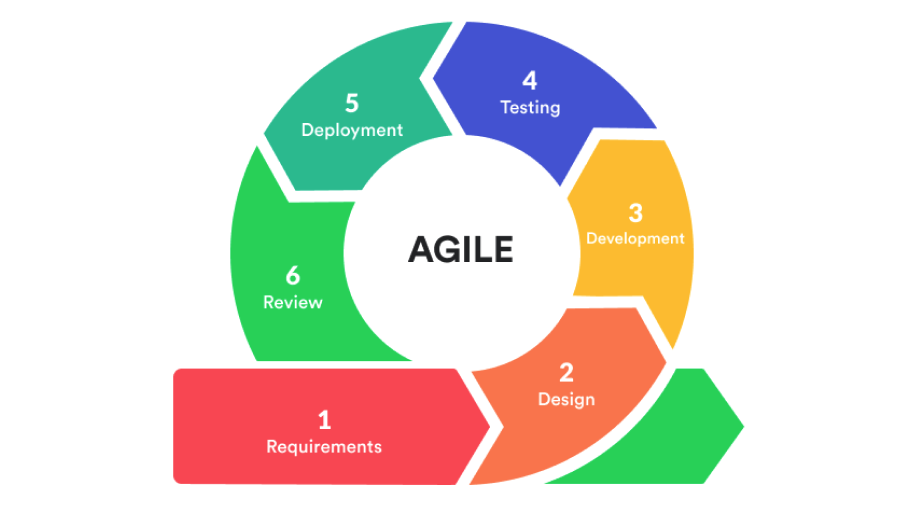
Many enterprise organizations run hybrid project environments — some teams follow traditional waterfall governance while others operate in Agile sprints. Zoho Projects natively supports both methodologies within the same portal, allowing enterprise PMOs to govern diverse teams without forcing a single methodology across the organization.
For Agile teams, Zoho Projects provides:
- Sprint Planning boards where teams organize tasks into time-boxed sprints with clear capacity limits
- Backlog management with priority ordering and story point estimation
- Burndown and burnup charts that track sprint progress in real time
- Sprint velocity reporting that helps teams improve estimation accuracy over successive sprints
- Epic-level tracking that connects individual sprint tasks to larger strategic objectives
Consequently, a large enterprise can run its IT delivery teams in Agile sprints within Zoho Projects while simultaneously managing its infrastructure rollout and compliance projects using traditional waterfall Gantt planning — all within the same portal, under unified governance and reporting.
Enterprise Tip: Use Zoho Projects’ Blueprint feature to enforce phase-gate reviews at each project milestone. Requiring a formal review and digital sign-off before a project advances to the next phase adds governance discipline without creating paperwork overhead — the entire process happens within Zoho Projects, with a complete audit trail.
What Integrations Make Zoho Projects More Powerful for Enterprise Use?
Which Enterprise Integrations Does Zoho Projects Support Natively?
Enterprise environments never operate on a single platform. A robust project management tool must connect cleanly with the other enterprise systems — ERP, CRM, ITSM, communication, and finance platforms — that the organization already runs. Zoho Projects addresses this through an extensive native integration library and an open API.
| Integration Category | Supported Platforms | Enterprise Use Case |
|---|---|---|
| Communication | Slack, Microsoft Teams, Zoho Cliq | Real-time project notifications; task creation from chat |
| CRM | Zoho CRM, Salesforce | Link project deliverables to CRM deals and client accounts |
| Finance | Zoho Books, Zoho Invoice, QuickBooks | Timesheet-to-invoice automation; project cost tracking |
| Development / ITSM | GitHub, GitLab, Bitbucket, Jira | Link code commits and pull requests to Zoho Projects tasks |
| Document Management | Google Drive, OneDrive, SharePoint, Dropbox | Attach cloud documents directly to tasks and milestones |
| Analytics | Zoho Analytics, Google Data Studio | Cross-system operational reporting and executive dashboards |
| Automation | Zoho Flow, Zapier, Make (Integromat) | Custom workflow automation between Zoho Projects and any app |
| HR / Identity | Zoho People, Okta, Azure AD (SSO) | Single sign-on; employee directory sync for resource management |
How Do You Use Zoho Flow to Automate Enterprise Project Workflows?
Zoho Flow extends Zoho Projects’ native automation beyond what Blueprint and built-in triggers can achieve, enabling complex, multi-app workflows that respond to project events in real time. For enterprise teams, this opens up powerful automation possibilities:
- When a milestone completes in Zoho Projects → automatically create a follow-up project using an approved template
- When a task exceeds its due date by 48 hours → send an escalation notification to the department head via Microsoft Teams
- When a new Salesforce deal closes → automatically generate a client onboarding project in Zoho Projects using a standardized template
- When a GitHub pull request merges → automatically update the linked Zoho Projects development task to “Complete”
These automations eliminate the manual handoffs that slow enterprise projects down — particularly at the boundaries between departments and systems. Furthermore, they enforce consistency: every trigger executes the same workflow, every time, without relying on individual team members to remember multi-step processes.
What Are the Key Takeaways for Enterprise Teams Adopting Zoho Projects?
Managing large enterprise projects demands more than a sophisticated task list. It requires a platform that handles structural complexity, enforces governance, provides real-time resource visibility, tracks risks proactively, and delivers executive-grade reporting — all without requiring a team of administrators to maintain it. Zoho Projects delivers on all of these dimensions.
The most important insight from this guide is that Zoho Projects’ enterprise value is cumulative: each capability — WBS structuring, Gantt dependency mapping, resource utilization tracking, Blueprint governance, automated reporting — compounds when used together. Teams that adopt Zoho Projects incrementally, starting with basic task management and progressively unlocking its advanced features, consistently achieve better outcomes than those who either use it superficially or try to implement everything at once without a structured rollout plan.
Specifically, enterprise teams that use Zoho Projects’ Blueprint feature to enforce phase-gate governance report significantly fewer scope creep incidents than those relying on manual approval processes. Similarly, organizations that use the Resource Utilization module proactively — rather than discovering overallocation after commitments have been made — experience lower rates of team burnout and missed deadlines. And those that connect Zoho Projects with Zoho Analytics for cross-functional reporting consistently deliver stakeholder communications faster, with less manual effort.
The bottom line: Zoho Projects is not simply a project management tool that happens to scale to enterprise size. It’s a platform designed from the ground up to address the specific challenges of large, complex, multi-team project environments. Organizations that invest in learning and properly configuring its enterprise capabilities gain a genuine competitive advantage — faster project delivery, better resource utilization, tighter governance, and clearer stakeholder communication at every level. Start building your enterprise project management capability in Zoho Projects today.
Frequently Asked Questions About Managing Enterprise Projects in Zoho Projects
Zoho Projects’ Enterprise plan supports unlimited users and unlimited projects within a single portal — making it genuinely scalable to organizations of any size. Large enterprises with hundreds of team members and dozens of concurrent projects face no platform-imposed ceiling on project count, task volume, or user seats. The Enterprise plan also includes the full feature set — Blueprint automation, resource management, portfolio dashboards, advanced custom reports, and all integrations — without per-feature add-on costs. For organizations with multiple distinct business units requiring separate governance structures, Zoho supports multiple portal configurations, each with its own user permissions, project templates, and reporting hierarchy. Pricing scales on an annual per-user basis, and Zoho regularly updates its enterprise tier features, so reviewing the official Zoho Projects pricing page is recommended before finalizing your plan selection.
Yes — Zoho Projects supports SAML-based Single Sign-On through Zoho’s identity management layer (Zoho Directory), which integrates with enterprise identity providers including Microsoft Azure Active Directory, Okta, OneLogin, and Google Workspace. SSO allows enterprise team members to authenticate with Zoho Projects using their existing corporate credentials, eliminating the need for separate Zoho passwords and enabling IT departments to manage access centrally through their existing identity management infrastructure. Additionally, Zoho Directory supports multi-factor authentication enforcement, IP-based access restrictions, and session management policies — providing the security controls that enterprise IT security teams require. For organizations migrating from legacy systems, Zoho’s enterprise support team provides dedicated implementation assistance for SSO configuration, reducing setup friction considerably.
Why Do Enterprise Teams Choose Solution for Guru to Implement Zoho Projects?
Deploying Zoho Projects at enterprise scale involves far more than activating a subscription. Configuring the portal architecture requires expertise and careful planning. Project templates should be built to match your governance standards. Blueprint workflows need to be set up for each project type. ERP and CRM systems must be integrated properly. Organizations also need to train hundreds of users. Reporting frameworks should be established to meet the needs of executive stakeholders. Each of these tasks requires experience, expertise, and careful attention to your organization’s specific context.
That’s precisely where Solution for Guru delivers exceptional, measurable value. As a specialized digital solutions partner with deep Zoho ecosystem expertise, Solution for Guru guides enterprise organizations from initial implementation through full operational maturity. Here’s what partnering with them provides:
- ✔ Custom template and Blueprint development: Their specialists build project templates and Blueprint governance workflows tailored to your specific project types — product launches, compliance programs, IT deployments, or whatever defines your enterprise project portfolio.
- ✔ Executive dashboard configuration: They build the portfolio dashboards and automated reporting that give your PMO and executive sponsors the visibility they need without manual report assembly.
- ✔ Change management and training: Large-scale platform adoption succeeds or fails based on user buy-in. Solution for Guru provides structured training programs, user guides, and adoption support that drive genuine, lasting behavioral change across enterprise teams.

In short, Solution for Guru transforms Zoho Projects from a platform you’re licensed to use into a strategic capability your entire enterprise relies on. The difference between a mediocre deployment and an exceptional one isn’t the software — it’s the expertise behind its implementation.Partner With Solution for Guru →
Recommended:
- How Can You Integrate Zoho Projects with Slack, Microsoft Teams, and Email to Maximize Team Productivity?
- PMP Certification: Is It Worth It in 2026?
- Project Performance Analytics: Driving Data-Backed Decisions in Project Management
- Zoho Projects Data Structure
- KPIs Every U.S. Project Manager Should Track
- How Can You Automate Task Assignments and Notifications in Project Management?
- How Does Time Tracking and Billing Automation Transform Project Management?
- Resource Allocation and Capacity Planning in Project Management: How Do You Build Teams That Consistently Deliver?
- How Project Management Improves ROI for U.S. Businesses
- Most In-Demand Project Management Skills in the U.S. Job Market
- Zoho Projects Implementation for Software Development Teams
- Zoho Projects + Zoho CRM: Managing Sales-to-Project Workflows
- Using Zoho Projects for Agile Development
- Zoho Projects Architecture and Workflow Model
- What Essential Skills Do Successful Project Managers Need to Master?
- How Can AI Transform Project Management for Modern Teams?