Pipedrive AI Sales Assistant: What It Actually Does and How to Make It Useful
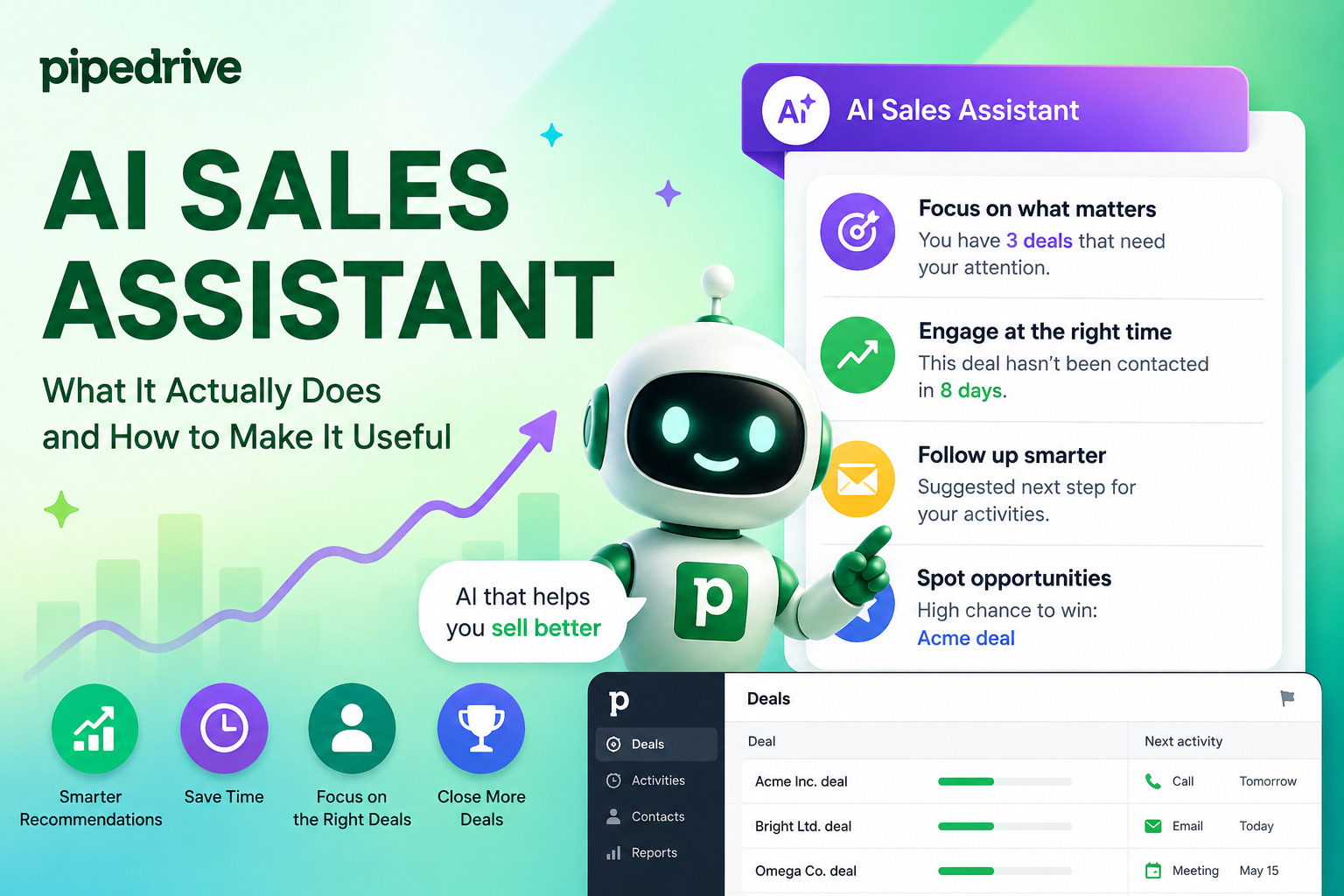
Artificial intelligence promises a lot in sales — smarter pipelines, faster deals, and fewer missed opportunities. But when a CRM adds an “AI assistant,” it’s fair to ask: does it genuinely help, or is it just a chatbot with a sales badge? In this article, we break down exactly what Pipedrive’s AI Sales Assistant does, how it performs in real workflows, and — critically — where its limitations lie.
Whether you’re evaluating Pipedrive for the first time or trying to squeeze more value out of your existing account, this guide gives you an honest, practical picture of the tool.
Table of contents
Quick Summary
| Feature | What It Does | Plan Required |
|---|---|---|
| AI Sales Assistant | Insights, deal summaries, next-action prompts | Premium and above |
| Win Probability Predictions | Scores each deal’s likelihood to close | Premium and above |
| Next-Best-Action Recommendations | Suggests the most valuable step for each deal | Premium and above |
| AI Email Generator | Writes outbound emails from short prompts | Premium and above |
| AI Email Summarization | Condenses long email threads | Premium and above |
| Smart App Recommendations | Suggests marketplace integrations | All plans |
| Pipedrive Pulse (lead scoring) | AI-ranked lead prioritization | Closed beta |
Bottom line: Pipedrive’s AI capabilities are genuinely useful for pipeline management, deal health tracking, and email efficiency — but most features require the Premium plan ($49/user/month) or higher.
What Is Pipedrive, and Why Does the AI Layer Matter?

Pipedrive is a sales-focused CRM built for small and mid-sized businesses. Founded in 2010, it now serves over 100,000 companies worldwide and has earned a reputation for its clean pipeline view and ease of use. Traditionally, it wins on simplicity — reps log activities, move deals through stages, and managers monitor progress without drowning in complexity.
The AI layer changes that proposition significantly. Rather than passively recording what already happened, the AI Sales Assistant actively analyzes patterns in your data and tells you what to do next. It connects to your deals, contacts, activities, and communication history — then surfaces recommendations, alerts, and summaries directly inside the CRM interface.
Why does this matter for modern sales teams?
Salespeople spend a significant portion of their day on non-selling tasks: updating records, writing follow-up emails, deciding which deal to prioritize. AI directly targets that time cost. According to a US Chamber of Commerce study, 86% of small business owners who use AI tools report operating more efficiently as a result. Pipedrive’s own data shows that companies using the Sales Assistant close three times more deals than those that don’t.
Furthermore, the assistant builds on OpenAI’s language models and integrates with Pipedrive’s native data, meaning it understands your specific pipeline rather than giving generic advice. Importantly, Pipedrive does not use customer data to train AI models — a meaningful privacy safeguard for businesses handling sensitive client information.
How Does Deal Health Prediction Actually Work?
What does Pipedrive’s win probability engine analyze?
Win probability is the cornerstone of Pipedrive’s AI layer. The system continuously analyzes each open deal and assigns a likelihood score based on historical patterns from your own account. It compares current deal attributes — stage, age, activity frequency, contact responsiveness — against past deals you’ve won or lost with similar characteristics.
This is more useful than it might sound. Rather than relying on a rep’s gut instinct, the system applies consistent logic across your entire pipeline. A deal that looks promising on paper but shares traits with dozens of previously lost opportunities will receive a lower win score — surfacing a blind spot the rep may have missed.
The assistant also tracks deal velocity. When a deal exceeds the average time you typically spend on comparable opportunities, the system flags it as at risk. This “deal rotting” alert prompts reps to either re-engage or re-evaluate, preventing deals from quietly stalling in the pipeline.
What triggers a deal health alert?
Pipedrive’s notification system monitors several conditions simultaneously:
- No scheduled activity: Deals without a next task get flagged immediately
- Exceeded stage duration: Deals lingering longer than your historical average trigger a warning
- Final-stage urgency: Deals approaching the close stage receive priority nudges
- Better opportunity alerts: The AI compares open deals against attributes of past wins and highlights higher-probability alternatives the rep may be neglecting
Consequently, sales managers gain visibility into which deals need intervention without manually auditing the entire pipeline. The system acts like a quiet operations coordinator, catching problems before they become losses.
What Are Next-Action Recommendations, and Do They Help?
How does Pipedrive decide what to recommend?
Next-action recommendations go beyond simple reminders. The AI Sales Assistant analyzes deal context — communication history, stage, last activity, deal value — and then suggests the most impactful move for each opportunity. Suggestions typically include scheduling a follow-up call, sending a specific type of email, or reassigning a deal to a rep whose profile better matches the account.
The “better opportunity” feature deserves special attention here. When a rep focuses heavily on a single deal, the system cross-references that deal’s win probability against other open opportunities. If another deal scores significantly higher and sits unattended, the assistant flags it as a better use of the rep’s time. This prevents the common trap of over-investing in a low-probability deal while a high-value one quietly cools.
Are the recommendations genuinely useful in practice?
The recommendations work best when you feed the system consistent, quality data. The more activities your team logs, and the more accurately deals move through pipeline stages, the better the AI performs. Teams that use Pipedrive loosely — logging minimal activities, rarely updating deal stages — will find the recommendations generic and less actionable.
Additionally, the assistant connects to Pipedrive’s Knowledge Base. When reps ask how to set up an automation, build a report, or configure a pipeline stage, the AI retrieves answers directly from official documentation. This reduces the time spent searching for help and keeps users moving forward without leaving the CRM.
How Do Pipedrive’s AI Email Features Improve Sales Communication?
What can the AI email generator actually produce?
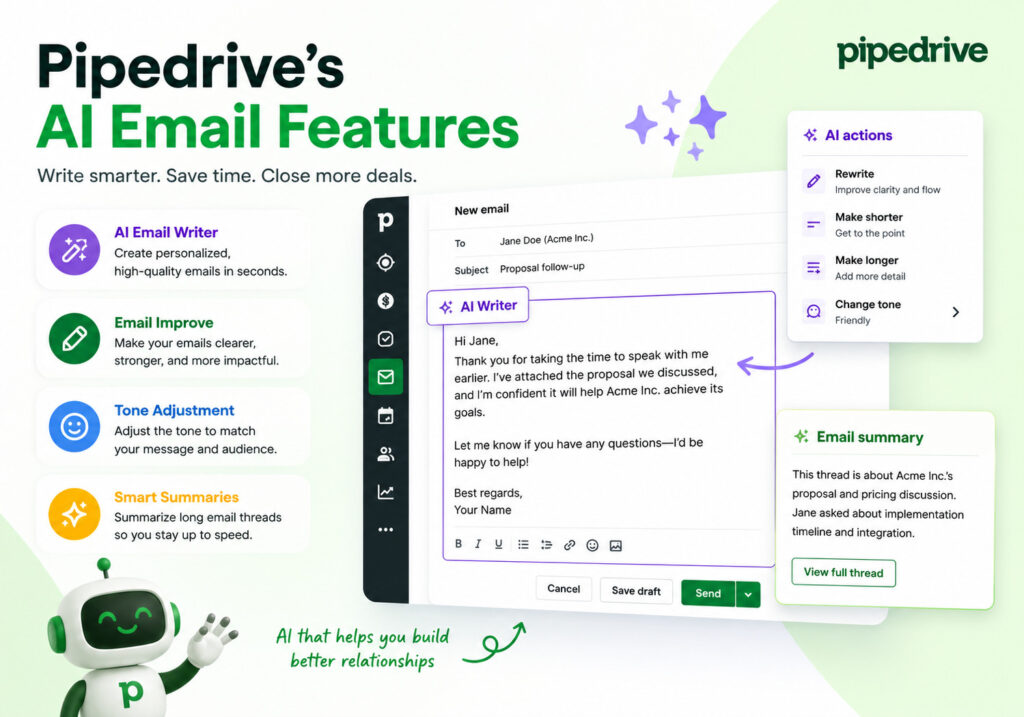
Pipedrive’s AI email generator creates draft outbound emails from short prompts. A rep types a brief description — specifying the email’s purpose, tone, and desired length — and the tool generates a complete draft within seconds. Critically, the system applies language matching to maintain each rep’s individual writing style, so emails don’t sound like generic templates.
This feature serves several practical purposes:
- Reduces the time spent staring at a blank compose window
- Helps junior reps produce polished, professional outreach
- Maintains consistent tone across a team’s communication
- Speeds up follow-up cycles, which directly improves response rates
Furthermore, the email summarization tool tackles inbox overload. Long email threads — common in complex B2B sales with multiple stakeholders — get condensed into a short summary that captures the key information: who said what, what was agreed, and what the prospect’s current sentiment appears to be. This allows reps to re-enter a conversation confidently without re-reading 40 emails.
What are the email feature’s limitations?
The AI email tools work within the confines of the data available in Pipedrive. They don’t pull in external signals — social media activity, news about the prospect’s company, or real-time engagement data — unless you connect third-party integrations. Additionally, the summarization tool currently handles summaries up to 300 characters in certain contexts, which may feel restrictive for complex deals.
For teams running high-volume outbound sequences, Pipedrive’s native email tools work best in combination with its Campaigns feature (available separately) rather than as a standalone outreach engine.
What Are the Practical Limitations of Pipedrive’s AI?
Where does the AI Sales Assistant fall short?
Honest evaluation requires acknowledging the gaps. Pipedrive’s AI is genuinely useful — but it operates within clear constraints that every buyer should understand before committing.
| Limitation | Detail |
|---|---|
| Plan requirement | AI features require Premium ($49/user/month) or Ultimate plans |
| Data dependency | Recommendations improve only with consistently logged activity data |
| No external data | AI doesn’t pull in web signals, news, or social data natively |
| Summarization limits | Email summaries have character constraints in some contexts |
| Pulse still in beta | Lead scoring (Pipedrive Pulse) remains in closed beta as of 2024–2025 |
| Voice input variability | Voice-to-text queries work but may require editing for complex requests |
Does the AI replace human judgment?
No — and it’s designed not to. Pipedrive’s AI augments rep decision-making rather than replacing it. The system surfaces patterns and probabilities, but closing a deal still requires human relationship-building, negotiation, and contextual judgment that no algorithm currently replicates.
Moreover, the AI learns from your account’s own historical data. A newly onboarded team, or a company that recently shifted its sales motion, will need several months of consistent activity before the recommendations become highly accurate. Teams expecting instant intelligence from day one should temper those expectations.
How Can Teams Set Up Pipedrive AI for Maximum Impact?

What configuration steps actually improve AI performance?
Getting the most from Pipedrive’s AI requires intentional setup, not just activation. Follow these steps to build a strong foundation:
- Accept AI Beta terms: An account admin must accept Pipedrive’s AI Beta Terms of Service before the Sales Assistant becomes available to the team
- Standardize pipeline stages: The AI uses stage data to assess deal health — inconsistent stage labeling produces inconsistent recommendations
- Log all activities consistently: Every call, email, and meeting logged gives the AI more signal to work with
- Set deal values accurately: Win probability calculations factor in deal value, so blank or placeholder values distort scoring
- Enable AI notifications: Turn on the full notifications feed so the team receives deal alerts, activity reminders, and “better opportunity” prompts in real time
- Use natural language prompts: The assistant understands conversational queries — ask “How is my pipeline performing this month?” or “Which deals are at risk?” rather than searching through menus
How should sales managers use the AI for team oversight?
Sales managers gain particular value from the performance tracking features. The AI tracks individual rep activity, monitors lost-deal rates by pipeline stage, and identifies which team members show the highest drop-off patterns. Rather than reviewing deal-by-deal manually, managers can prompt the assistant to surface performance summaries and flag the areas needing coaching.
Forecasting becomes more reliable as well. Instead of building spreadsheets from CRM exports, managers can ask the Sales Assistant directly where the team stands against targets, compare performance across time periods, and identify the gaps that need closing before month-end.
How Does Pipedrive AI Compare to Alternatives?
How does Pipedrive’s AI stack up against other CRM AI tools?
It’s worth situating Pipedrive’s AI within the broader CRM market. The table below compares the major players on key AI capabilities:
| Feature | Pipedrive AI | Salesforce Einstein | HubSpot AI | Zoho Zia |
|---|---|---|---|---|
| Win probability scoring | ✅ | ✅ | ✅ | ✅ |
| Next-action recommendations | ✅ | ✅ | Partial | ✅ |
| AI email generation | ✅ | ✅ | ✅ | ✅ |
| Email summarization | ✅ | ✅ | ✅ | Partial |
| Conversational AI assistant | ✅ | ✅ | ✅ | ✅ |
| Lead scoring | Beta | ✅ | ✅ | ✅ |
| Data privacy (no model training) | ✅ | Partial | Partial | Partial |
| Pricing accessibility | Mid-range | Enterprise-heavy | Mid-range | Budget-friendly |
Pipedrive holds a strong position in the mid-market: its AI features are more accessible and easier to configure than Salesforce Einstein, while its CRM foundation remains cleaner and more sales-focused than HubSpot. For small and mid-sized sales teams, it delivers a compelling combination of usability and genuine AI value.
Conclusions: Is Pipedrive’s AI Sales Assistant Worth It?
Pipedrive has built an AI layer that genuinely earns its place in the product. The deal health predictions, next-action recommendations, and email tools address real pain points that sales teams face daily: unclear pipeline priorities, slow follow-up cycles, and inconsistent communication quality.
Notably, the system respects data privacy by not training AI models on your customer data — a meaningful differentiator compared to several competitors. And because the AI draws on your own historical data, it becomes increasingly accurate as your team builds a consistent activity record inside Pipedrive.
That said, the AI isn’t magic. It rewards teams that use the CRM consistently and configure it thoughtfully. Teams that log activities irregularly or use pipeline stages loosely will see only a fraction of the potential value. Furthermore, the best features sit behind the Premium plan, so budget evaluation is essential.
For small and mid-sized sales teams ready to move beyond basic CRM usage, Pipedrive’s AI Sales Assistant offers a practical, accessible path to smarter pipeline management — especially when the setup is handled by experts like Solution for Guru who can align the platform’s capabilities with your specific sales process.
Frequently Asked Questions
No. The core AI Sales Assistant, win probability predictions, AI email generator, and AI email summarization tools require the Premium plan or higher, which starts at $49 per user per month. Smart app recommendations and the AI-powered marketplace search are available to all Pipedrive users regardless of plan. Pipedrive offers a 14-day free trial, allowing teams to test the Premium AI features before committing.
Pipedrive takes a clear position on data privacy: it does not permit third parties — including its AI subprocessor OpenAI — to use customer data to improve or train AI models. Pipedrive also commits to not using customer data to train its own models without explicit permission. The Sales Assistant accesses your account data (deals, contacts, activities) solely to generate relevant responses for your team. For transparency, the assistant displays the sources behind each answer in a dedicated “Sources” tab.
The AI builds accuracy over time by learning from your account’s historical data. Teams that actively log all calls, emails, and meetings — and consistently move deals through accurately labeled pipeline stages — typically see meaningful improvement in recommendation quality within two to three months of consistent usage. A newly created account or one with sparse activity history will produce more generic recommendations initially. This is precisely why working with an implementation partner like Solution for Guru accelerates time-to-value: clean, structured data from day one gives the AI better signals to work with from the start.
What Does Working with Solution for Guru Bring to Your Pipedrive Setup?
Why do businesses partner with a certified Pipedrive expert?
Activating Pipedrive is straightforward. Configuring it so that the AI performs at its best — with clean pipeline stages, properly mapped deal attributes, and the right automation triggers — takes expertise that most in-house teams don’t have time to develop.
Solution for Guru is a certified Pipedrive partner that specializes in CRM implementation, optimization, and sales process design. Rather than leaving teams to figure out configuration on their own, Solution for Guru brings a structured methodology that translates your specific sales workflow into a Pipedrive setup that the AI can actually learn from.

What specific benefits does the partnership offer?
Working with Solution for Guru delivers measurable advantages across the implementation journey:
- Faster onboarding: Expert-led setup compresses weeks of trial-and-error configuration into a structured process, getting your team productive faster
- Pipeline architecture that AI can use: Solution for Guru designs stage structures, deal fields, and activity types that feed clean, consistent data into Pipedrive’s AI engine — directly improving the quality of recommendations
- Custom automation design: Beyond the AI tools, the team builds workflows that automate repetitive tasks and trigger the right notifications at the right moments
- Training tailored to your team: Rather than generic platform walkthroughs, Solution for Guru trains your reps on the specific workflows and AI prompts relevant to your sales motion
- Ongoing optimization: As your sales process evolves, Solution for Guru adjusts your Pipedrive configuration to match — ensuring the AI continues to surface accurate, relevant insights over time
- Integration support: Many Pipedrive users gain significant value from connecting the CRM to tools like Apollo.io, LinkedIn Sales Navigator, or email platforms. Solution for Guru manages those integrations cleanly, preventing data duplication and sync errors
In short, Solution for Guru reduces the gap between what Pipedrive’s AI promises and what it actually delivers in your specific environment. The platform is powerful — but it performs best when it’s set up by someone who understands both the technology and your sales goals.
Recommended:
- Pipedrive Campaigns Add-on vs Dedicated Email Marketing Tools
- Pipedrive for B2B vs B2C
- Pipedrive CRM Onboarding and Staff Training: How to Achieve 90%+ Adoption Rates
- Calculating the ROI of Pipedrive CRM
- Connecting Creatio with Marketing Automation Tools
- Best Mortgage CRM Systems for Loan Officers
- Best Automotive CRM Systems in 2026: Top Solutions for Dealership Growth
- Traditional CRM vs Social CRM: Which Approach Wins in 2026?
- How Does Creatio Support Omnichannel Marketing Automation?
- What Are the Best Integrations for Creatio CRM in the U.S. Tech Stack?
- Troubleshooting and Common Issues in monday.com CRM
- How Do You Set Up Salesforce and Outlook Integration the Right Way?
- Zoho CRM Implementation Guide for Enterprises
- 5 Essential Pipedrive CRM Features for Successful Sales