How Does AI-Powered Customer Support Work With Salesforce Einstein?
Customer expectations keep rising, while support teams face growing ticket volumes and tighter budgets. Artificial intelligence offers a practical way to close that gap by classifying cases, suggesting answers, and handling routine questions without delay. This article shows how Salesforce Einstein works in real support operations, how it connects to the Salesforce platform, and how teams can roll it out with confidence.
Table of contents
What Is the Quick Summary of Salesforce Einstein in Customer Support?
The table below answers the main questions before the detailed sections begin.
| Question | Short Answer |
| What is Einstein for Service? | A set of AI features inside Salesforce Service Cloud that predict, recommend, and draft support work. |
| Is Einstein still current? | Yes, although Salesforce now positions it as part of Agentforce Service, the next generation of Einstein for Service |
| What can it do? | Classify and route cases, recommend articles and replies, summarize conversations, and power autonomous service agents |
| Who benefits most? | Support teams with steady case volume, a knowledge base, and clean customer data |
| Main risk | Poor data and weak knowledge content produce weak AI results |
| Cost | AI features start at higher editions and often add usage-based charges, so teams should confirm current prices with Salesforce |
How Is Salesforce CRM Related to AI-Powered Customer Support?

Support AI needs context, and context lives in the CRM. Salesforce CRM stores customer profiles, case history, orders, and conversations in one place, so Einstein can draw on that data instead of guessing. In other words, the CRM supplies the facts, and the AI turns those facts into predictions and suggestions.
Moreover, Salesforce builds support tools directly on that shared platform. Service Cloud, now branded Agentforce Service, uses the same data model as sales and marketing. Consequently, a support agent sees purchase history and open opportunities next to the current case, and the AI uses the same view. This connection explains why Einstein in Action differs from a standalone chatbot: it works inside the system where the customer record already lives.
What Will This Article Explain?
This guide explains what Einstein offers for support, how the product name has evolved, and how each feature works in daily operations. Next, it covers data readiness, trust, pricing, and a rollout plan. Finally, it shows how an implementation partner such as Solution for Guru can reduce risk and speed up results.
Why Are Support Teams Turning to AI?

How Fast Is AI Adoption Growing in Service?
Adoption has accelerated sharply. According to coverage of the Salesforce-commissioned State of Service: AI Agents Edition by CX Foundation, 66% of customer service organizations now use at least one AI agent, up from 39% in 2025. The study surveyed 3,075 customer service professionals worldwide. The same coverage reports that customer satisfaction ranks as the top metric that AI improves, ahead of productivity, handle time, retention, and response time.
Because Salesforce commissioned the study, readers should treat it as a vendor-sponsored view of the market. Even so, the direction matches what many service leaders report: teams adopt AI to answer faster and to free agents for complex work.
Which Problems Does AI Solve for Support Teams?
Support teams face recurring problems that AI addresses directly. In particular, AI helps with the following:
- Slow first responses caused by manual triage
- Agents who search several systems for one answer
- Inconsistent replies across channels and shifts
- Repetitive questions that consume skilled agents’ time
- Missing documentation after a case closes
As a result, teams can reduce routine load and focus human effort on cases that need empathy and judgment.
Is Salesforce Einstein Now Called Agentforce?
How Did the Product Names Change?
Many readers feel confused by the naming, so a short clarification helps. Salesforce introduced Einstein as its AI brand years ago, then added generative AI and autonomous agents under the Agentforce name. According to Salesforce‘s Trailhead training, Agentforce Service is the next generation of what Salesforce previously called Einstein for Service. G2 also lists Service Cloud as Agentforce Service, formerly Salesforce Service Cloud.
Do the Einstein Features Still Matter?
Yes. The classic predictive capabilities, such as case classification and article recommendations, still appear in Salesforce’s own list of service AI features. Therefore, a team that searches for Einstein for Service still finds relevant guidance, and the skills transfer directly to Agentforce. The table below shows how the two generations relate.
| Generation | Typical Capability | Example |
| Predictive AI (classic Einstein) | Predicts or recommends based on past data | Suggests the most likely case priority |
| Generative AI | Drafts text from context | Writes a reply or a work summary for the agent to review |
| Agentic AI (Agentforce) | Acts on behalf of the team within set limits | Resolves a routine inquiry and escalates the rest |
Which Einstein Features Help Support Agents Most?
How Does Case Classification Save Time?
Case classification predicts fields such as priority, reason, or type from the customer’s subject and description, according to Salesforce‘s Trailhead module. Agents no longer pick these values by hand, and the data stays consistent. Salesforce also describes case routing, which uses classification to send each case to the right rep, agent, or queue. Together, these features shorten the time between a customer’s message and the right person reading it.
How Do Article and Reply Recommendations Work?
Article recommendations suggest relevant knowledge articles to reps who work on open cases. Reply recommendations analyze chat transcripts and suggest relevant replies during chat and messaging. In addition, Salesforce’s service features page states that Einstein recommends knowledge articles that were attached to similar past cases and shows them where reps work. Because the suggestions appear inside the case screen, agents do not switch tools.
What Do Service Replies and Work Summaries Add?
Generative features go a step further. Service replies use generative AI to draft courteous replies that reps can review, edit, and post. Work summaries draft a summary, the issue, and the resolution from a rep-customer chat. As a result, agents spend less time typing and more time solving problems, and the case record stays complete.
| Feature | What It Does | Agent Benefit |
| Case classification | Predicts priority, reason, or type | Less manual data entry |
| Case routing | Sends cases to the right queue or agent | Faster first contact |
| Article recommendations | Suggests relevant knowledge articles | Quicker answers |
| Reply recommendations | Suggests replies during chat | Consistent responses |
| Service replies | Drafts replies for review | Faster writing |
| Work summaries | Summarizes the issue and resolution | Cleaner case history |
| Knowledge creation | Drafts articles from work in progress | A growing knowledge base |
| Next-best action | Recommends offers and actions | Better service and sales moments |
How Do AI Agents Handle Customers Directly?
What Can an Agentforce Service Agent Do?
An Agentforce Service agent handles customer inquiries autonomously across chat, messaging, voice, and self-service portals, and it escalates to human reps with context, according to Salesforce‘s Trailhead description. Salesforce’s features page adds that the agent uses conversational language matched to the brand’s voice and grounds answers in Knowledge. Therefore, the quality of the knowledge base directly shapes the quality of the answers.
How Do Humans Stay in Control?
Salesforce states that leaders can monitor AI agents and human reps in real time, step into conversations, and transfer cases. This oversight matters because customers should always reach a person when the AI cannot help. A sound design therefore defines clear escalation rules, such as sentiment thresholds, high-value accounts, or sensitive topics.
- Define which topics the AI can handle on its own.
- Set escalation triggers for angry or confused customers.
- Pass the full conversation context to the human agent.
- Review transcripts weekly and correct weak answers.
Why Does Customer Data Quality Decide AI Success?
How Does Data 360 Support AI?
Salesforce describes Data 360 as the layer that builds a unified, real-time customer profile and grounds AI responses in accurate customer context. In practice, the AI can only use what the CRM holds. When customer records contain duplicates, outdated contacts, or missing fields, the AI produces weaker suggestions.
What Should Teams Clean Up Before Launch?
Before teams switch on AI, they should audit the basics. A short checklist prevents the most common failures:
- Merge duplicate accounts and contacts.
- Standardize case fields such as type, priority, and reason.
- Review knowledge articles for accuracy and remove outdated ones.
- Close or archive old cases that distort training data.
- Confirm that permissions limit who can see sensitive records.
Furthermore, a team should document its own support processes first. AI automates a process, but it cannot fix a confusing one.
How Does a Knowledge Base Improve AI Answers?

Knowledge sits at the center of support AI. Salesforce states that Knowledge forms the basis for trusted Agentforce responses for customers and reps, and that Enterprise Knowledge, powered by Data 360, connects third-party knowledge sources into Salesforce. Accordingly, teams that invest in articles see better results from every AI feature.
Good articles share several traits. They answer one question, use plain language, and include a clear owner and review date. Salesforce also offers knowledge creation, which drafts articles from work in progress, so agents can quickly turn a solved case into a new article. Over time, this cycle grows the knowledge base without a separate writing project.
| Knowledge Practice | Why It Helps the AI |
| One topic per article | Gives the AI a precise source to cite |
| Clear titles and summaries | Improves matching to customer questions |
| Owner and review date | Prevents outdated answers |
| Feedback from agents | Flags weak or missing articles |
| Drafts from solved cases | Fills gaps found in real conversations |
How Can Teams Trust AI With Customer Data?
Trust remains the top concern for service leaders, since customer conversations contain personal information. Salesforce frames its AI offering as a combination of CRM, AI, data, and trust, and it markets built-in safeguards for its generative features. However, Salesforce’s feature page does not describe the safeguards in detail, so teams should review the current security documentation and ask their account team specific questions before connecting sensitive data.
- Data access: confirm which fields the AI can read and which it cannot.
- Retention: ask how long the platform stores prompts and responses.
- Review: keep humans in the loop for refunds, legal topics, and complaints.
- Auditing: log AI actions so the team can investigate mistakes.
- Compliance: check regional privacy rules, such as the GDPR, before launch.
In addition, teams should tell customers when they talk to an AI agent. Transparency builds trust and reduces frustration when the AI hands the conversation to a person.
How Much Does Salesforce AI for Support Cost?

Pricing changes often, and Salesforce does not publish every rate in one place. A July 2026 analysis by eesel AI lists approximate Service Cloud edition prices per user per month on annual billing, and it says it drew them from Salesforce’s pricing page. The author could not verify the figures independently, so treat the table as a rough guide and confirm current prices with Salesforce.
| Edition | Approx. Price per User per Month | Notes |
| Starter Suite | $25 | Entry bundle for small teams |
| Pro Suite | $100 | Annual contract |
| Enterprise | $175 | AI for service first appears at this tier |
| Unlimited | $350 | Expanded limits and support |
| Agentforce 1 Service | $550 | Includes a large Flex Credits allowance per year |
The same analysis reports that Agentforce usage draws on Flex Credits, and that Salesforce bills one agent type per resolution. Because Salesforce does not list a flat per-conversation price, teams cannot forecast AI consumption cost from the pricing page alone. For that reason, a pilot with real volumes gives the most reliable estimate.
How Can a Team Roll Out Einstein in 90 Days?
A phased plan limits risk and shows value early. Follow these steps:
- Days 1 to 15: Audit data, define goals, and choose 2 or 3 metrics, such as first response time and resolution time.
- Days 16 to 30: Clean case fields, improve top knowledge articles, and configure classification and routing.
- Days 31 to 60: Turn on article and reply recommendations for a pilot group, and collect agent feedback.
- Days 61 to 90: Add generative replies or a service agent for one low-risk topic, set escalation rules, and review results weekly.
After day 90, the team should expand one use case at a time. Each expansion should earn its place with measured results.
How Does AI Support Customers Across Several Channels?
Which Channels Can AI Cover?
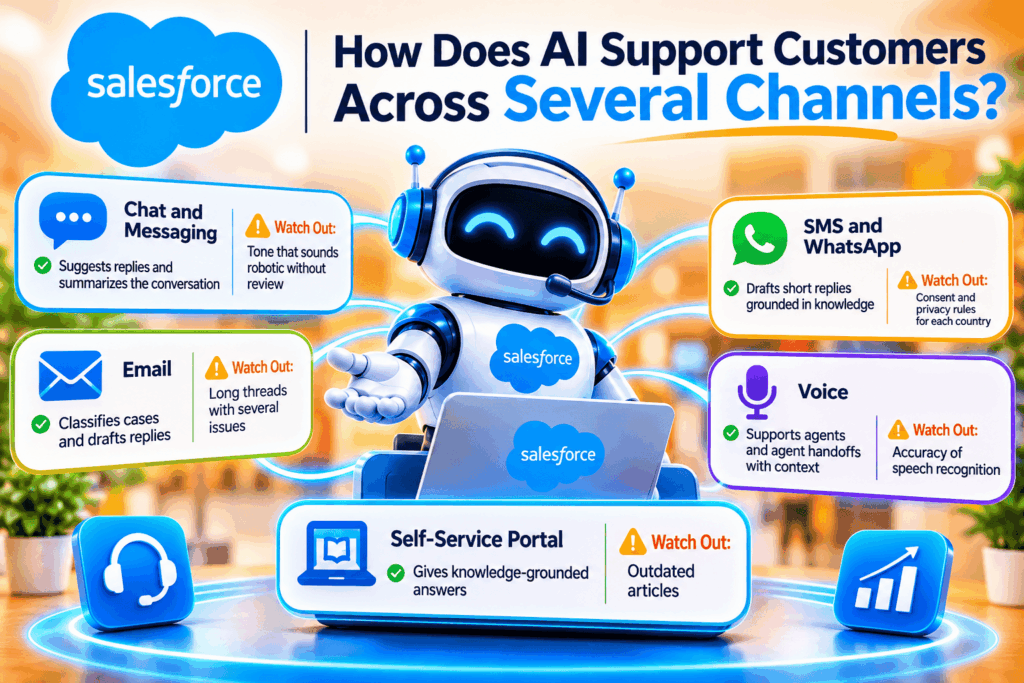
Customers rarely stay in one channel. They start in a chat window, continue by email, and sometimes finish on the phone. Salesforce states that its AI-generated replies work for SMS, WhatsApp, and other channels, and that reps can send them with one click or edit them first. In addition, the Agentforce Service agent handles inquiries across chat, messaging, voice, and self-service portals. Because every channel feeds the same CRM record, the next agent sees the full history, and the customer doesn’t repeat the story.
How Does a Service Rep Assistant Guide Agents?
Salesforce also describes a Service Rep Assistant that creates step-by-step action plans from case data, engagement history, and Knowledge. This feature helps newer agents by showing them what to do next instead of leaving them to search. Meanwhile, experienced agents save time on routine steps and focus on the customer’s emotional state.
| Channel | How AI Helps | Watch Out For |
| Chat and messaging | Suggests replies and summarizes the conversation | Tone that sounds robotic without review |
| Classifies cases and drafts replies | Long threads with several issues | |
| SMS and WhatsApp | Drafts short replies grounded in knowledge | Consent and privacy rules for each country |
| Voice | Supports agents and agent handoffs with context | Accuracy of speech recognition |
| Self-service portal | Gives knowledge-grounded answers | Outdated articles |
How Can Supervisors and Managers Use AI Insights?
What Can Leaders Learn From Service Data?
AI doesn’t just help front-line agents. It also gives managers a clearer picture of the operation. Salesforce lists service metrics that provide insights into contact center operations and customer signals. It also lists conversation mining, which turns conversation data into service insights, though that feature requires the Service Intelligence SKU rather than the Einstein for Service SKU. Managers should therefore check licensing before planning around it.
How Does Incident Management Reduce Repeat Contacts?
Large outages create waves of identical cases. Salesforce describes incident management as a way to share service disruptions and resolutions with stakeholders, and with Agentforce it can delegate tasks, notify customers, and track progress. Its features page also mentions proactive incident broadcast alerts that reduce inbound cases. As a result, customers learn about a known problem before they contact support, and agents avoid answering the same question hundreds of times.
- Group related cases under one incident record.
- Notify affected customers early and clearly.
- Give agents one approved message to share.
- Close the incident and update the knowledge base afterward.
Which AI Use Cases Should a Support Team Start With?
How Do Teams Rank Use Cases by Value and Risk?
Not every AI feature suits every team on day one. A sensible approach ranks each use case by the value it delivers and the risk it carries. Low-risk features that assist agents, such as article recommendations and case classification, usually come first, because a human still reviews the output. Higher-risk features, such as autonomous answers to customers, come later, after the knowledge base proves reliable.
| Use Case | Value | Risk | Suggested Order |
| Case classification and routing | High | Low | First |
| Article recommendations | High | Low | First |
| Work summaries | Medium | Low | Second |
| Reply recommendations and service replies | High | Medium | Second |
| Autonomous service agent for simple topics | High | Medium to high | Third |
| Autonomous agent for sensitive topics | Variable | High | Last, if at all |
How Should Teams Prove the Return on Investment?
Leaders should connect AI results to business outcomes. For example, a team can compare the hours that agents spend on classification and note-taking before and after launch. It can also track how many repeat contacts the knowledge base prevents. Then, the team can weigh those savings against license, usage, and implementation costs. This discipline keeps the project honest, and it gives executives the evidence they need to approve further investment in Salesforce CRM.
Which Metrics Show That AI Support Works?
Teams should measure outcomes, not activity. The following metrics give a balanced view of quality, speed, and cost.
| Metric | What It Reveals |
| First response time | How quickly customers receive help |
| Average handle time | How efficiently agents resolve cases |
| Resolution rate by AI | How many inquiries the AI closes without a human |
| Escalation rate | How often the AI hands off to a person |
| Customer satisfaction | Whether customers feel better served |
| Knowledge article usage | Which articles help and which need work |
Teams should compare these numbers against a baseline from before the rollout. Without a baseline, nobody can prove improvement.
Which Mistakes Should Teams Avoid With Support AI?

- Launching on dirty data: weak records create weak suggestions.
- Skipping the knowledge base: the AI needs accurate articles to cite.
- Removing humans too early: keep an easy path to a live agent.
- Ignoring agent feedback: agents spot AI errors first, so they should have a simple way to report them.
- Chasing every feature: start with the use cases that match the biggest pain points.
In short, careful scope and steady review beat a fast, broad launch.
What Are the Conclusions About AI-Powered Customer Support With Salesforce Einstein?
Salesforce Einstein shows that AI in support works best when it sits inside the system of record. Case classification, routing, recommendations, generative replies, and autonomous agents all rely on the customer data and knowledge that live in Salesforce CRM. Moreover, the move from Einstein for Service to Agentforce Service extends the same idea: the AI acts on trusted data, and humans keep control.
Nevertheless, success depends on preparation. Teams need clean data, a strong knowledge base, clear escalation rules, and measured pilots. Pricing also needs careful review, because AI features start at higher editions and often add usage-based charges. To move forward, teams should start with one use case, measure the result, and expand step by step. Finally, a partner such as Solution for Guru can guide that journey on Salesforce CRM and help the support team reach results sooner.
What Are the Most Frequently Asked Questions About Salesforce Einstein in Customer Support?
Not exactly. Einstein is Salesforce‘s long-running AI brand, while Agentforce is the newer name for its generative and agentic offerings. Salesforce’s training materials describe Agentforce Service as the next generation of Einstein for Service, so the two overlap closely.
No. AI handles routine inquiries and assists agents, but human agents still manage complex, emotional, and high-value cases. Salesforce itself highlights monitoring, intervention, and escalation to reps, which shows that people remain part of the design.
A team should clean its CRM data, standardize case fields, and review its knowledge articles. It should also define goals, escalation rules, and metrics. A short pilot with a small agent group then reveals problems before a wider launch.
What Are the Benefits of Cooperation With Solution for Guru?
Why Does an AI Support Project Need Implementation Support?
Salesforce offers many AI options, and the choices can overwhelm a busy support team. Solution for Guru helps businesses navigate those choices. The company specializes in CRM and software implementation, and it works with platforms such as Salesforce CRM. A partner brings structure, speed, and experience that an internal team often lacks during a first AI project.

How Does Solution for Guru Close Common Implementation Gaps?
| Common Gap | How Solution for Guru Helps |
| Unclear AI goals | Defines use cases and success metrics tied to real support pain points |
| Messy CRM data | Plans and supports data cleanup and migration |
| Weak knowledge base | Structures knowledge so AI features can use it well |
| Complex configuration | Configures Service Cloud features, routing, and escalation rules |
| Low agent adoption | Provides training so agents trust and use the tools |
| No ongoing improvement | Supports review cycles and expansion as the team learns |
What Results Can Businesses Expect?
- Faster launch: a guided plan shortens the time from licensing to real use.
- Cleaner data: accurate records improve every AI suggestion.
- Lower risk: an experienced consultant catches design mistakes early.
- Better adoption: trained agents use the AI features daily.
Businesses that want to explore this option can visit the Solution for Guru website and discuss their support goals with the team.
Recommended:
- Is Bigin by Zoho CRM the Right CRM for Real Estate Agents?
- How monday CRM Dashboards Help Sales Managers
- How Does monday CRM Help Manage Customer Relationships?
- Top Integrations for Bigin by Zoho CRM
- Why Startups Choose Bigin Over Complex CRM Platforms
- How Can You Improve CRM Proficiency Across Your Organization in 7 Ways?
- How to Track Sales KPIs in monday CRM: What Should You Measure and How Do You Set It Up?
- How Can monday.com CRM Improve Sales Team Productivity?
- Email Integration in Bigin: Gmail and Outlook for Small Business Sales
- How Does monday CRM Work?
- How Do Bigin’s Automation Features Save Time for Growing Teams?
- What Is monday CRM? A Complete Guide to monday.com CRM
- Bigin Mobile App Review: Managing Sales on the Go
- CRM Proficiency Is the New Digital Literacy: Do You Agree?
- Bigin by Zoho CRM Pricing Explained: Is It Worth It?
- Using Creatio to Standardize Business Processes Across Departments
- Best Pipedrive Reports for Sales Managers
- Pipedrive Insights Explained: How Sales Reporting Works
- Pipedrive Automation Examples for Sales Teams
- Pipedrive Sales KPIs: 15 Metrics Every Team Should Track
- How Pipedrive AI Helps Sales Teams Save Time
- CRM Roles 101: From CRM Administrator to CRM Developer