Audit Driven Website Redesign Checklist: Phase by Phase SEO & WCAG 2.2

A successful website redesign follows seven phases: discover, plan, design, build, test, launch, and monitor. This checklist gives the exact actions to complete in each phase, from auditing current performance and setting SMART goals to protecting SEO rankings, hitting Core Web Vitals targets, and meeting WCAG 2.2 accessibility standards before and after launch.
TL;DR:
- Proper URL mapping and a comprehensive redirect plan are essential to prevent loss of organic traffic and ranking drops after launch.
- Achieving Core Web Vitals targets, especially LCP under 2.5 seconds and CLS below 0.1, is critical for maintaining search rankings and user experience.
- Early dependency mapping and testing for integrations like CRM and payment systems help avoid delays caused by overlooked blockers.
- Conducting detailed audits, content inventories, and user research establishes clear goals and scope, reducing scope creep and project delays.
- Incorporating WCAG 2.2 accessibility standards into design and development reduces retrofitting costs and enhances usability for all users.
Table of Contents
- 1. Discovery and Audit: Benchmarks, Research and Competitive Review
- 2. Goals, Scope and Stakeholder Alignment
- 3. Information Architecture and URL Strategy
- 4. Design Deliverables and Prototype Testing
- 5. Content Checklist: Inventory, Metadata and Structured Data
- 6. Development Checklist: Staging, Integrations and Backups
- 7. SEO and Performance: Redirects, Core Web Vitals and Optimization
- 8. Accessibility Checklist: WCAG 2.2 Essentials
- 9. Testing and Quality Assurance Before Launch
- 10. Launch and Post-Launch Monitoring Plan
- 11. Lessons From Running Website Redesigns
- How a Digital Agency Supports a Managed Redesign
- FAQ
- Sources
1. Discovery and Audit: Benchmarks, Research and Competitive Review
Every redesign we plan starts with a baseline. Without one, there is no way to prove the new site performs better than the old one, and stakeholders end up arguing opinions instead of comparing data.
The audit phase has three jobs: capture performance benchmarks, inventory existing content, and surface what users actually struggle with. Analytics tell you what happened; user research tells you why.
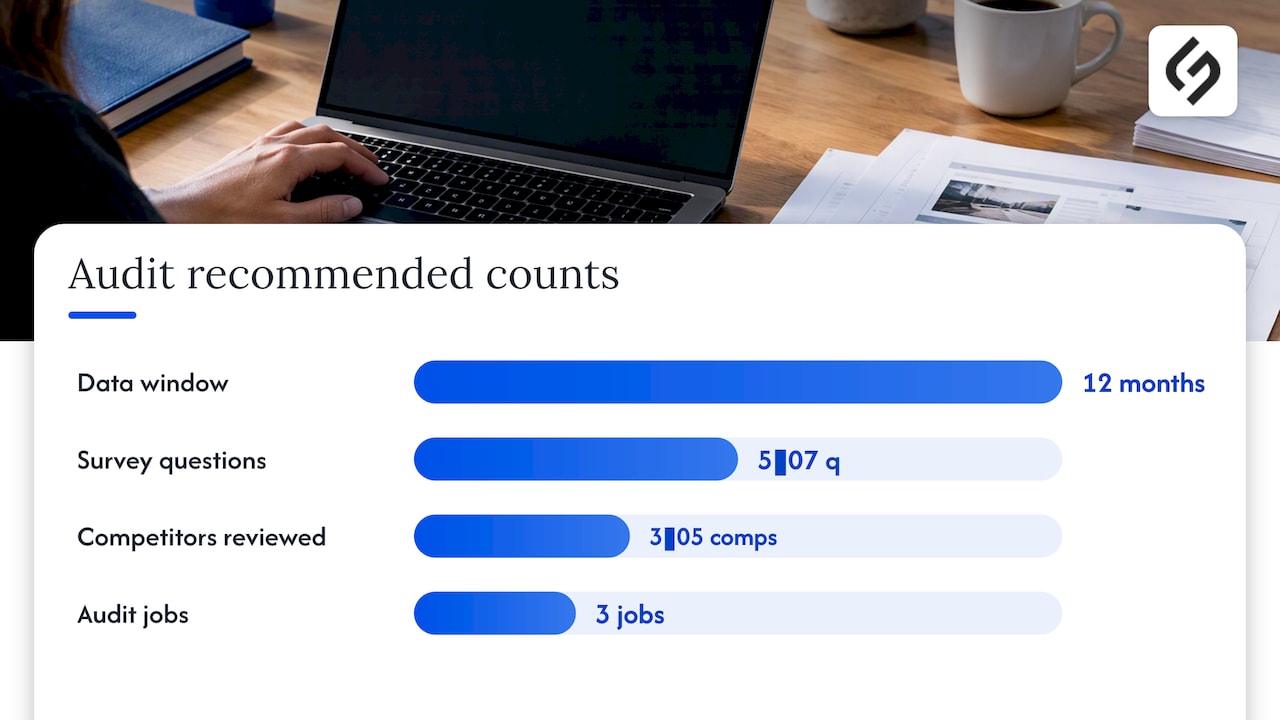
Start by pulling traffic by channel, top landing pages, conversion funnel drop-off points, bounce rate, and average session duration for at least the past twelve months. These numbers become your “before” snapshot and your post-launch comparison point. Then run a lightweight content inventory: list every URL, its traffic, its business value, and a keep, update, or delete decision for each.
- Pull core KPIs: traffic by channel, top landing pages, funnel drop-off, bounce rate, and session duration.
- Inventory content: tag every page as keep, update, merge, or delete based on traffic and business value.
- Mine support tickets and search queries: look for recurring complaints or confusion that point to usability gaps.
- Run a short user survey: five to seven questions on what visitors are trying to accomplish and where they get stuck.
- Review session recordings: watch a sample of recent sessions on your highest-traffic pages for rage clicks and dead ends.
- Audit competitors: note navigation patterns, page speed, and content depth on three to five direct competitors.
2. Goals, Scope and Stakeholder Alignment
Audit data only matters once it becomes a goal someone is accountable for. This phase turns findings into SMART objectives (specific, measurable, achievable, relevant, time-bound) and locks the scope before design work begins.
A vague goal like “improve the website” invites scope creep. A SMART version reads closer to “reduce Largest Contentful Paint to 2.5 seconds or less on the top five funnel pages within 90 days of launch,” which gives developers a target and gives stakeholders a way to measure success.
Scope definition prevents the single most common cause of redesign delays: new requests appearing mid-project.
- Write SMART goals tied directly to audit KPIs, including a target metric and a deadline.
- Define scope boundaries: which pages, templates, languages, and third-party integrations are in or out.
- Set content migration rules: what gets rewritten, what gets ported as-is, and who owns each decision.
- Establish a sign-off workflow: name the approvers, the acceptance criteria for each phase, and how change requests get evaluated.
Treat scope as a signed document, not a conversation. Every addition after sign-off should go through the same change request process, with a clear owner and a timeline impact noted before it gets approved.
3. Information Architecture and URL Strategy
Information architecture is where SEO equity gets protected or lost. A redesign that reshuffles navigation without mapping old URLs to new ones is the fastest way to tank organic traffic, so this phase deserves more rigor than most teams give it.
- Build the new sitemap based on user research and content inventory findings, grouping pages by intent rather than internal department structure.
- Map every old URL to a new destination, including consolidated or merged pages, and keep this 301 redirect map as a living spreadsheet throughout the project.
- Assign page templates to each content type and flag which existing pages will be merged, archived, or removed entirely.
- Decide content ownership for each template so there is no ambiguity about who writes, approves, and maintains it post-launch.
- Verify canonical tag logic for any pages with near-duplicate content or multiple URL variants.
- Confirm hreflang tags if the site serves multiple languages or regions, so search engines serve the correct version to each audience.
- Prepare the new XML sitemap for submission once the site goes live, and remove any stale sitemap references from the old structure.
4. Design Deliverables and Prototype Testing
Design work stalls when developers have to guess at spacing, states, or interaction rules. A documented design system removes that guesswork and gives stakeholders something concrete to review instead of abstract mockups.
Define tokens for color, typography, and spacing first, then build a component inventory covering every reusable element: buttons, forms, cards, navigation states, and error messages. Document breakpoints for mobile, tablet, and desktop so responsive behavior is specified, not improvised later.
Interactive prototypes earn their cost on conversion-critical paths. If checkout, lead forms, or account signup are part of the redesign, build clickable prototypes and test them with real users before a single line of production code gets written. Catching a confusing checkout flow in a prototype costs an afternoon. Catching it after launch costs a quarter of lost conversions.
- Define design tokens: colors, type scale, spacing units, and breakpoints documented in one shared file.
- Build a component inventory covering every reusable UI element and its states (default, hover, error, disabled).
- Prototype conversion-critical flows: checkout, lead capture, account creation, and any multi-step forms.
- Prepare a design-to-dev handoff packet: specs, accessible component variants, exported assets, and acceptance tests developers can check work against.
Pro Tip: Validate prototypes with five to eight real users per critical flow before development starts; that sample size catches most usability issues without delaying the schedule.
5. Content Checklist: Inventory, Metadata and Structured Data
Content decisions made during the audit phase now become writing assignments, and this is where SEO visibility either transfers cleanly or quietly erodes.
Every page from the content inventory needs a final classification: keep as-is, update, merge into another page, or remove with a redirect. Assign each decision to a writer or editor with a deadline, and track status in the same spreadsheet used for the redirect map so nothing falls through.
Metadata deserves the same rigor as the visible copy. Rewrite title tags and meta descriptions for any page whose intent or URL changes, and plan structured data where it applies, including FAQ schema for question-and-answer content and product schema for e-commerce listings.
- Finalize content decisions: keep, update, merge, or remove, with a named owner and deadline for each.
- Rewrite metadata: title tags and meta descriptions for every page whose URL, topic, or intent shifts.
- Plan structured data: FAQ schema, product schema, or article schema where the content type supports it.
- Sample live pages after migration: spot-check a cross-section of new URLs to confirm content, metadata, and canonical tags match the plan.
- Confirm redirects fire correctly for every removed or merged page, with no redirect chains longer than one hop.
6. Development Checklist: Staging, Integrations and Backups
The build phase is where a well-planned redesign can still fail if deployment and integration testing get rushed. A staging environment with a temporary, non-indexed URL is non-negotiable. It lets the full team review real pages before anything touches production, and it gives you a safe place to test deploy and rollback procedures before launch day arrives.
- Set up staging on a password-protected or noindexed temporary URL, and confirm the deploy pipeline works in both directions, forward and rollback.
- Test every integration end to end: CRM, analytics, payment providers, and email services, using real test transactions rather than assuming connections carried over.
- Verify CRM and analytics data flow between the new site and existing systems; our guide to integrating CRM with a website and SEO walks through the verification steps in more depth.
- Confirm SSL configuration and basic Content Security Policy rules are active on staging before launch, not added afterward.
- Schedule automated backups on a recurring cadence, and confirm a restore actually works, not just that a backup file exists.
- Set a performance budget per template, not per page, so build teams stay accountable for page weight, script count, and load time on every template type.
Dependency mapping belongs in this phase too. List which integrations, approvals, and content deliverables block other work, so a delayed API credential does not silently stall the entire build.
7. SEO and Performance: Redirects, Core Web Vitals and Optimization
SEO preservation during a redesign comes down to two things: a complete redirect map and measurable performance targets. Skip either one and rankings slip, sometimes for months.
Before launch, run a full crawl of the old site and confirm every indexed URL has a 301 destination mapped. Orphaned high-value pages, meaning pages with existing traffic or backlinks that get no redirect, are the single most common cause of post-redesign ranking drops.
Performance targets should be explicit, not aspirational. **Core Web Vitals set three thresholds measured at the 75th percentile: Largest Contentful Paint (LCP) at 2.5 seconds or faster, Interaction to Next Paint (INP) at 200 milliseconds or faster, and Cumulative Layout Shift (CLS) at 0.1 or lower. Meeting these on both mobile and desktop should be a launch requirement, not a post-launch nice-to-have.
Business-focused performance guidance points to a few recurring culprits worth checking on every template: unnecessary redirects and slow Time to First Byte, both of which directly hurt LCP.
- Build and verify the 301 redirect map against a full pre-launch crawl, confirming no high-traffic page is left without a destination.
- Optimize images with modern formats and proper sizing before upload, not after a performance audit flags them.
- Minimize third-party scripts, auditing each one for actual business value against its load time cost.
- Reserve space for lazy-loaded images and ads to prevent layout shift as content loads in.
- Reduce redirect chains and TTFB issues, particularly on templates serving the highest-traffic pages.
8. Accessibility Checklist: WCAG 2.2 Essentials
Accessibility is not a final-week add-on. Building it into design and development checkpoints costs far less than retrofitting it after launch, and it protects both usability and legal exposure.
WCAG 2.2 organizes requirements into testable success criteria across four principles: perceivable, operable, understandable, and robust content. Run a prioritized AA-level pass covering color contrast ratios, alt text on every meaningful image, visible keyboard focus states, descriptive link text, and clearly labeled form fields with error guidance.
WCAG 2.2 also introduced criteria worth adding to any redesign checklist specifically: Focus Not Obscured, which ensures a sticky header or chat widget never hides the element currently in keyboard focus, Target Size, which sets minimum tap target dimensions, and accessible authentication for sites with login flows.
- Run an automated accessibility scan early and often, then follow it with a manual keyboard-only pass across core templates.
- Check contrast ratios on all text and interactive elements against AA thresholds.
- Verify focus is never obscured by sticky headers, modals, or chat widgets.
- Confirm tap targets meet minimum size on mobile layouts, particularly for navigation and form controls.
- Test forms with a screen reader to confirm labels, errors, and instructions are announced correctly.
9. Testing and Quality Assurance Before Launch
Pre-launch QA has one job: catch the failures that would otherwise show up in a customer’s inbox or a support queue. A functional matrix covering every core flow across major browsers and devices is the fastest way to find them before anyone else does.
- Test core flows (contact forms, checkout, login, site search) across the browser and device combinations your analytics show real visitors use.
- Validate analytics and tracking: confirm every goal and event fires correctly, cross-domain tracking still works if applicable, and staging traffic is excluded from production data.
- Run a focused usability test with a handful of participants on the two or three most important user journeys.
- Collect final sign-off from each stakeholder against the acceptance criteria defined back in the scope phase.
Pro Tip: Build your QA matrix from actual analytics data on browser and device share rather than a generic checklist; testing devices nobody uses wastes time you need elsewhere.
10. Launch and Post-Launch Monitoring Plan
Launch day works best as a short, ordered runbook rather than a flurry of simultaneous changes.
- Freeze content on the old site 24 to 48 hours before launch to prevent last-minute mismatches between staging and production.
- Deploy to production, accounting for DNS propagation time if the domain or hosting is changing.
- Run smoke tests immediately: homepage load, core forms, checkout, and the top five landing pages by traffic.
- Monitor closely for the first 30, 60, and 90 days, tracking traffic, conversions, Core Web Vitals, and server error logs, with alert thresholds set in advance so a regression gets caught the same day it happens.
- Set rollback triggers: define in advance which metric drops (traffic, conversion rate, error rate) would justify reverting to the previous site, and who has authority to make that call.
Our real-time analytics and reporting approach applies the same logic post-launch: dashboards that flag a problem the day it starts, not the month a stakeholder finally asks why traffic dropped.
11. Lessons From Running Website Redesigns
The redesigns that slip their timeline almost always trace back to one thing: an unmapped dependency. A content approval nobody flagged as blocking, an API credential that took three weeks to issue, a stakeholder who went on leave during the only sign-off window. Dependency mapping and clear stakeholder governance at the start prevent most of this.
The second recurring lesson is that integration testing done early catches regressions that QA alone misses. Testing a CRM or payment connection against real data before the final week of a project, rather than assuming it carried over cleanly, has repeatedly kept launch dates intact on projects we have run, including the kind of platform rebuild described in our HubSpot website partnership work.
— Vadim
How a Digital Agency Supports a Managed Redesign
Running every phase of this checklist in-house takes real bandwidth, and most teams are doing it alongside their regular workload. A full-service agency can handle the full scope as one engagement: custom web development, UI/UX design, SEO preservation, CRM and third-party integrations, and the measurement setup that tells you whether the new site is actually working once it is live.

A discovery call is where we review your current audit data, confirm goals and scope, and outline a realistic timeline before any design work starts. If you are planning a redesign and want a team that handles the technical details, from redirect mapping to Core Web Vitals targets, explore our services and request a proposal.
FAQ
What are the steps to a website redesign?
A full redesign moves through seven phases: discovery and audit, goal setting and scope, information architecture, design, development, testing, and launch with post-launch monitoring. Each phase has its own checklist, and skipping the audit or SEO mapping steps is the most common cause of post-launch problems.
What to do before website redesign?
Before any design work starts, audit current performance (traffic, conversions, top pages), inventory all existing content, and gather user research through surveys, support tickets, or session recordings. This baseline data shapes your goals and prevents the redesign from being guided by opinion instead of evidence.
How much does a full website redesign cost?
Cost depends heavily on scope: the number of templates, integrations, content volume, and whether custom development or a theme-based build is involved, so there is no single industry figure that applies universally. Agencies typically provide a project quote after a discovery call once scope and goals are defined.
Will I lose Google ranking if I redesign or redevelop my website?
Rankings can drop if URLs change without proper 301 redirects, if content is removed without replacement, or if page speed regresses after launch. A complete redirect map, a pre-launch crawl to catch orphaned pages, and Core Web Vitals targets met before launch are the main safeguards against ranking loss.
What are Core Web Vitals and why do they matter for a redesign?
Core Web Vitals are three measurable thresholds: LCP at 2.5 seconds or faster, INP at 200 milliseconds or faster, and CLS at 0.1 or lower, each measured at the 75th percentile of real user data. Meeting these targets on the new site protects both user experience and the performance signals search engines consider.