Get ROI in 4–8 Weeks with Value First Automation for Small Businesses
The most effective path for most small businesses is a value-first, phased marketing automation strategy: choose a manageable platform class rather than the one with the longest feature list, then automate a single high-intent workflow before adding anything else. The immediate next step is to map that one workflow, whether it is a welcome series or an abandoned cart sequence, and start a trial or request a consultation. The sections ahead walk through use-case pathways, feature priorities, pricing, integrations, and a realistic implementation roadmap.
TL;DR:
- Small businesses should focus on automating one high-intent workflow, like a welcome series or abandoned cart sequence, before expanding to additional automations.
- Prioritize platform features such as easy-to-use automation builders, templates, segmentation, CRM integration, and revenue-focused reporting based on your specific use case.
- Be aware that pricing often increases significantly as your contact list grows, so estimate long-term costs during trials and ask vendors about upgrade triggers upfront.
- Ensure your data is clean and integrations are verified before automating, since messy data can cause messaging errors and reduce campaign effectiveness.
- Expect measurable results within four to eight weeks of launching a well-built automation, and avoid launching multiple automations simultaneously to prevent process bloat.
Table of Contents
- Which Marketing Automation Approach Fits Your Business Type
- What Features Actually Matter for a Small Team
- How Pricing Scales as Your Contact List Grows
- Fix Your Data Before You Automate Anything
- A Practical Rollout Plan From Plan to Payoff
- What to Ask Vendors Before You Commit
- What Most Small Businesses Get Wrong About Automation
- How We Help You Put This Roadmap Into Action
- FAQ
- Sources
Which Marketing Automation Approach Fits Your Business Type
Not every small business needs the same platform, and the biggest mistake we see is choosing software before defining the use case. Most small businesses fall into one of five practical buckets, each with different capability priorities and a different first automation to build.
Starter email-only businesses are typically solo operators or very small teams that need list building and basic nurture sequences without much complexity. The priority here is simplicity: a clean editor, prebuilt templates, and a straightforward automation builder. The first automation to build is a welcome series that triggers the moment someone joins a list.
CRM-first B2B lead nurture fits teams with a sales process and a pipeline to manage, where marketing and sales need to share data. These businesses should prioritize platforms with native or well-supported CRM connectivity and lead-scoring rules. Comparative analysis of platforms in this category finds that ActiveCampaign often offers deeper automation at a lower SMB-friendly price, while HubSpot is broader and better suited for B2B teams that want an integrated CRM. The first automation worth building is a lead-scoring handoff that alerts sales once a prospect crosses an engagement threshold.
E-commerce businesses need email and SMS working together around purchase behavior. Cart abandonment, post-purchase follow-up, and win-back sequences matter more here than broad content marketing features. The first automation to prioritize is an abandoned cart flow, since it tends to convert faster than any other sequence a small online store can set up.
WordPress and site-driven businesses often already have a website generating form submissions and need automation that connects cleanly to that stack. Industry roundups aimed at small businesses consistently point to starting with welcome flows, abandoned cart recovery, and lead-nurturing sequences as the fastest path to measurable results. For a site-first business, the first automation is usually a form-triggered nurture sequence tied to whatever content or offer brought the visitor in.
Transactional and budget-conscious businesses, such as local service providers or appointment-based businesses, benefit most from a platform that can send both transactional and marketing messages without paying for two separate tools. Market summaries note that transactional-email-capable platforms provide better value where order confirmations and shipping notifications must be combined with marketing, which matters for a business watching every line item. The first automation here is a booking or appointment follow-up sequence.
Use this short checklist to find your starting bucket:
- If you have no CRM and under a few hundred contacts, start in the starter email-only bucket.
- If your sales team manually tracks leads in spreadsheets, you likely need CRM-first automation.
- If you sell products online and cart abandonment is a known problem, prioritize e-commerce flows.
- If your website already generates form submissions you are not following up on consistently, start with site-triggered nurture.
- If you need both transactional and marketing messages, weigh platforms that combine the two before paying for separate tools.
Once you know your bucket, the next decision is which specific capabilities matter inside that category, which is where feature evaluation comes in.
What Features Actually Matter for a Small Team
A long feature list means little if your team cannot use it without a dedicated administrator. The features worth paying attention to fall into six groups: the automation builder itself, templates and prebuilt flows, segmentation and personalization, CRM connectivity, SMS and transactional support, and reporting that ties activity back to revenue.
- Automation builder: Look for a visual, drag-and-drop canvas that lets you build a two-step sequence without reading documentation first.
- Templates and prebuilt flows: Pre-built welcome, cart abandonment, and re-engagement templates save setup time and reduce the chance of starting from a blank screen.
- Segmentation and personalization: The ability to split contacts by behavior or attributes, and preview how dynamic content changes for different segments.
- CRM connectivity: Native integration or a well-documented two-way sync, not a one-way export that breaks when a record changes.
- SMS and transactional support: Useful mainly for e-commerce and appointment-based businesses, less critical for pure B2B lead generation.
- Reporting and attribution: Basic open and click data is standard, but revenue-linked reporting is what actually tells you whether an automation paid for itself.
During a trial, manageability is something you can test directly rather than guess at. Build a two-step automation from scratch and time how long it takes. Preview how dynamic content renders for two different segments. Check how many prebuilt templates are available for your specific use case, not just the total template count the vendor advertises.
Advanced features like AI-generated subject line suggestions or multi-touch attribution modeling are worth paying for once you have more than one active automation running and enough volume to make the data meaningful. Before that point, they tend to add cost without adding decisions you can actually act on.
Pro Tip: Build your first automation in the trial environment before comparing pricing. A platform that looks simple in a demo video can still take hours to configure for your actual use case.
How Pricing Scales as Your Contact List Grows
Pricing is where small businesses most often get surprised, usually because the quote they saw assumed a contact count or feature set they outgrow within a year. Marketing automation pricing typically breaks into three bands: free or entry-level plans in the $9 to $30 per month range, mid-tier plans from $50 to $150 per month, and enterprise plans at $200 or more per month. Entry-level plans usually cap your contact list and limit automation complexity, while advanced segmentation, multi-step automation, and dedicated support tend to sit behind the mid-tier and enterprise bands.
One in a review dataset of small-business buyers skews heavily toward platforms with a high share of small-company reviewers, which G2’s pricing research notes as a pattern worth checking before you commit, since a platform’s overall star rating can be inflated or deflated by a mismatch between your business size and its typical customer base.
Pricing surprises often arise from several factors including how platforms price based on the number of contacts, limits on the number of emails you can send monthly, and additional costs for features such as SMS credits, dedicated IPs, or extensive API use.
The most reliable way to avoid a surprise bill is a simple 12-month cost projection: estimate your contact list size at launch, your expected growth rate, and which tier that growth will push you into by month six and month twelve. During any trial, ask the vendor directly what the next tier costs and what specifically triggers the upgrade, since that answer tells you more about long-term cost than the advertised starting price ever will.
Fix Your Data Before You Automate Anything
Automation amplifies whatever is already true about your data. Clean data makes a workflow look effortless; messy data makes the same workflow send the wrong message to the wrong person, and the failure often shows up weeks after launch rather than on day one.
Before building your first automation, verify these integrations are actually working, not just connected:
- CRM sync: Confirm that a new contact created in your marketing platform appears correctly in your CRM within minutes, with the right fields mapped. Our Zoho CRM and marketing automation integration guide walks through common mapping pitfalls for teams making this connection for the first time.
- E-commerce platform: Test that a sample purchase or cart abandonment event fires the expected trigger within your automation tool, not just in your store’s own dashboard.
- Website forms: Submit a test form entry and confirm it lands in the right list with the right tags, not in a generic catch-all.
- Analytics: Check that campaign links carry UTM parameters that show up correctly in your analytics platform, so you can later tie automation activity to actual revenue.
Alongside integration checks, run through a short data-hygiene checklist: deduplicate contact records so the same person is not counted or messaged twice, assign canonical IDs so records merge correctly across systems, confirm consent records are current and exportable for compliance purposes, and validate that event tracking fires consistently across browsers and devices before you rely on it.
The most common failure mode is a duplicate or outdated contact record triggering the same automation multiple times, which looks like a technical bug but is almost always a data problem traced back to an incomplete sync. Test for this in a pilot by seeding a handful of test contacts through every entry point, including manual CRM entry, website form, and purchase, then confirming each one only receives the sequence once. Our guide on integrating CRM with website and SEO data covers the tracking validation step in more depth for teams combining multiple data sources.
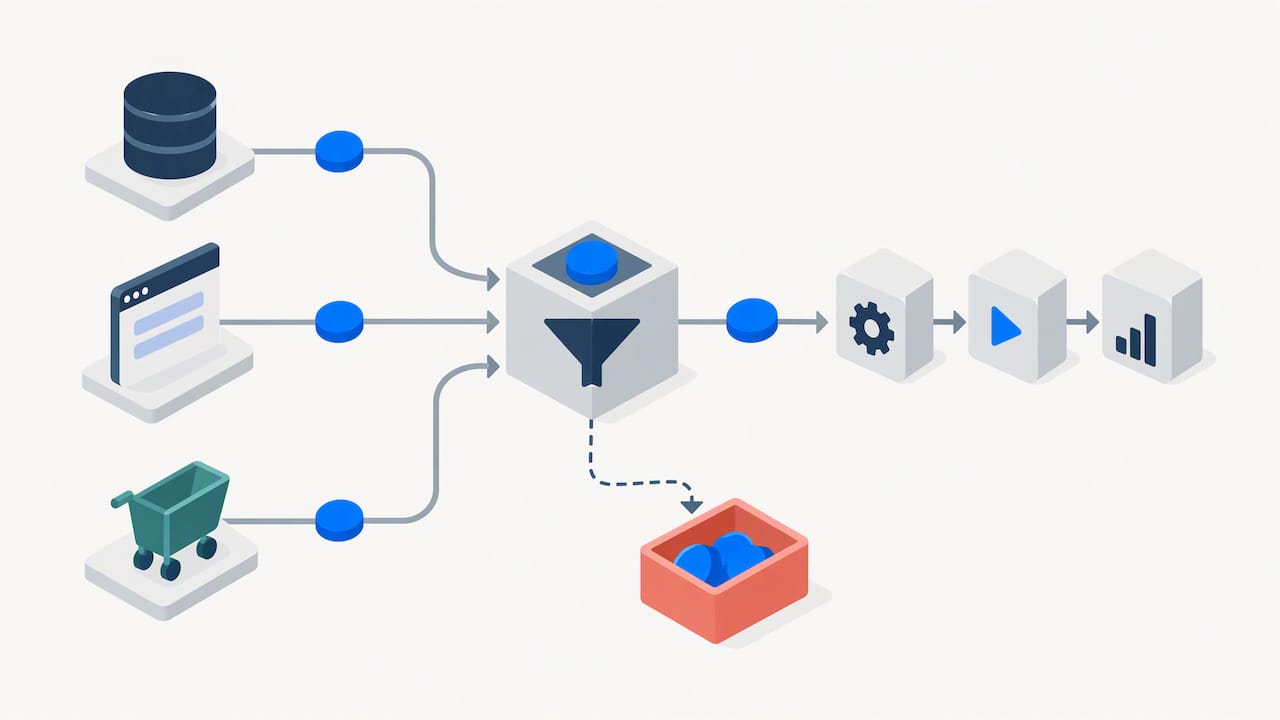
Pro Tip: Run your pilot with ten real contacts, not fake test accounts. Real behavior surfaces data problems that synthetic test data rarely catches.
A Practical Rollout Plan From Plan to Payoff
A phased rollout keeps a small team from drowning in half-finished automations. The structure that tends to work, based on the implementation work we do with clients, follows four stages: plan, build, test, and measure, then expand.
The plan stage means picking exactly one workflow and defining the KPI that will tell you whether it worked, such as reply rate for a lead-nurture sequence or recovered-cart revenue for an e-commerce flow. Skipping this step is the single biggest reason automations stall, because a team without a defined KPI cannot tell whether a slow result is a problem or just normal variation.
The build stage pairs a template with your verified integration, using the data-hygiene checks from the previous section as a gate before launch, not an afterthought. This is where a consultation on CRM and SaaS integrations or a Pipedrive automation setup can shorten the build significantly for teams without in-house technical staff.
The test and measure stage runs the automation against the KPI defined in the plan stage, typically for two to four weeks depending on your sales cycle length, before making any changes. Resist the urge to tweak the workflow daily. A short, stable test window produces more trustworthy data than constant adjustment.
The expand stage turns a proven workflow into a repeatable playbook, then moves to the next highest-priority automation identified in your original use-case mapping.
For most small businesses, the first three automations worth prioritizing are a welcome or onboarding sequence, a cart abandonment or lead-scoring handoff depending on business type, and a re-engagement sequence for contacts who have gone quiet. Realistic time-to-value for a single well-built automation is measurable within four to eight weeks of launch, not immediately, and expecting faster results than that is a common source of premature platform switching.
- Map one workflow and one KPI before evaluating any software.
- Pair a template with a verified integration rather than building from scratch.
- Hold a stable test window of two to four weeks before judging results.
- Turn the first success into a documented playbook before adding a second automation.
Phased implementations focused on high-intent triggers avoid process bloat and deliver faster return on the work already invested, because validating one workflow end-to-end before expanding keeps a small team from managing five half-finished sequences at once.
Our own client engagements typically begin with a scoped consultation to map that first workflow, followed by HubSpot implementation or CRM integration work depending on the platform chosen, and ongoing administration once the first automation is live. The case-study pattern we see across clients is consistent: businesses that automate one workflow fully before adding a second reach measurable ROI faster than those that try to launch several sequences simultaneously.
What to Ask Vendors Before You Commit
A demo is designed to show you the platform at its best, so the questions you ask matter more than the questions the sales rep volunteers to answer. Five criteria should guide the decision: how well the platform fits your specific business type, how easy it is for your team to operate without ongoing technical support, how deep the integration options actually go beyond a logo on a partner page, how predictable the total cost will be as you grow, and how responsive support is when something breaks.
Ask these questions directly during any demo or trial:
- What is the typical implementation timeline for a business our size, from signup to first live automation?
- What data migration support is included, and is it self-service or hands-on?
- Are there API rate limits, and what happens if we exceed them?
- What SLA do you offer for email deliverability, and how is it enforced?
- What exactly triggers an upgrade to the next pricing tier?
Watch for a few red flags during your trial period. A vendor that cannot give a direct answer on data migration support, a demo that avoids showing the automation builder in detail, or a sales process that pushes you toward annual commitment before you have tested a single live automation are all signs worth taking seriously.
- Confirm the platform’s core strength matches your use-case bucket, not just its marketing claims.
- Test the automation builder yourself before taking a sales rep’s word on ease of use.
- Ask about upgrade triggers in writing, not just verbally during a call.
What Most Small Businesses Get Wrong About Automation
The most common mistake we see is a business buying a platform before mapping a single workflow, which leads to months of underused software and a renewal decision made out of inertia rather than results. The rule of thumb we give clients deciding between doing it themselves and hiring an integrator is simple: if your team cannot describe the exact trigger, delay, and message sequence for your first automation on a whiteboard, bring in help before buying software, not after. Platform choice matters less than most buyers assume; workflow clarity matters more. The client work referenced throughout this guide reflects patterns we see repeatedly across small-business engagements, and readers can review the integration and CRM playbooks linked above for more specific tactics.
— Vadim
How We Help You Put This Roadmap Into Action
Mapping your first workflow, choosing the right platform class, and connecting it cleanly to your CRM and website are exactly the stages where a scoped consultation shortens the path to a working automation. We provide CRM and SaaS integrations, HubSpot implementation, and ongoing administration built around the specific workflow and business model you bring to us, not a generic template.
A free consultation covers mapping your first automation, reviewing your current CRM and website setup for data-hygiene gaps, and recommending a platform class suited to your use case. From there, the next step is implementation and integration support through our full range of services, scoped to get your first workflow live and measurable.
FAQ
What is the best marketing automation for small business right now?
There is no single best platform for every small business, since the right choice depends on whether your priority is CRM-integrated lead nurture, e-commerce flows, or simple email sequences. Comparative analysis finds ActiveCampaign strong on automation depth and value, while HubSpot suits B2B teams wanting an integrated CRM, so the better question is which use-case bucket matches your business first.
How much does marketing automation software cost for a small business?
Marketing automation pricing typically falls into three bands: entry-level plans around $9 to $30 per month, mid-tier plans from $50 to $150 per month, and enterprise plans at $200 or more per month. Costs scale with your contact list size and send volume, and add-ons like SMS or dedicated IP addresses are usually billed separately.
What should a small business automate first?
The highest-value first automations are a welcome or onboarding sequence, an abandoned cart flow for e-commerce businesses, or a lead-scoring handoff for B2B teams with a sales pipeline. Roundups aimed at small businesses consistently recommend starting with these high-impact flows rather than building several sequences at once.
How long does it take to see results from marketing automation?
A single well-built automation typically becomes measurable within four to eight weeks of launch, once it has run through a stable test window long enough to judge against its KPI. Expecting faster results is a common reason small businesses switch platforms before giving a workflow a fair test.
Does Solution4Guru help implement marketing automation platforms?
Yes, we provide HubSpot implementation, CRM and SaaS integration, and ongoing administration services scoped around the specific workflow a business wants to automate first. Services and scope details are available on our services page.
Sources
- Email Marketing Pricing: How to Avoid Overpaying in 2026
- HubSpot vs Marketo vs ActiveCampaign 2026 Compared | BizTechScout