Salesforce Digital Experience: The Admin’s Setup Guide

Salesforce Experience Cloud is the product that creates branded, CRM-connected digital experience sites for customers, partners, and employees. Before you build anything, three decisions determine your trajectory: enable Digital Experiences in Setup, choose Lightning Web Runtime (LWR) as your template platform, and map your user personas to the correct license type. Miss the first step and every site creation attempt will fail with a “site not found” error. Miss the third and you will be retrofitting access models mid-project.
Quick-start checklist before you touch Experience Builder:
- Go to Setup → Digital Experiences → Settings and check “Enable Digital Experiences” — this is the global switch that unlocks all site creation
- Choose a domain prefix (it cannot be changed after saving)
- Decide LWR vs Aura (LWR is the right default for any new site)
- Map your user types to license tiers (Customer Community, Partner Community, or Employee Community)
- Plan your custom domain DNS change at least 48 hours before activation to allow SSL provisioning
Two risk items to flag now: custom domain DNS propagation typically takes 24–48 hours, and activating a site takes it live immediately with no built-in staging toggle, so plan your activation window carefully.
Key Takeaways
Salesforce Experience Cloud sites deliver the most value when LWR is chosen as the rendering platform, Data Cloud identity resolution is configured before personalization is enabled, and external user flows are tested in sandbox before any production activation.
| Point | Details |
|---|---|
| Enable Digital Experiences first | The global setting in Setup must be on before any site can be created or previewed. |
| Choose LWR by default | LWR sites render 2–3 times faster than Aura and support LWC natively for new builds. |
| Plan licenses before design | Map each user persona to Customer Community, Partner Community, or Employee Community before building. |
| Configure Data Cloud identity rules | Without matching rules, personalization stays siloed to a single Salesforce record. |
| Solution4guru for partner support | Solution4guru provides implementation, LWC development, Data Cloud design, and admin training for Experience Cloud projects. |
Table of Contents
- What is a Salesforce digital experience, and how does it differ from Community Cloud?
- What use cases and business benefits justify building an Experience Cloud site?
- How does Experience Cloud fit into Customer 360, Data Cloud, and Agentforce?
- What are the core building blocks of an Experience Cloud site?
- How do you create, configure, and activate your first Experience Cloud site?
- Which license types and access models should you plan before designing the site?
- How do you apply branding, audience targeting, and personalization to your site?
- How does site performance work, and what API options are available?
- What operational and governance controls do you need before going live?
- When should you build in-house, and when should you hire a Salesforce partner?
- A practitioner’s note on the mistakes that cost admins the most time
- How Solution4guru helps you build and sustain Experience Cloud sites
- Sources
- FAQ
What is a Salesforce digital experience, and how does it differ from Community Cloud?
Experience Cloud is the modern name for what Salesforce previously called Community Cloud. The rebranding reflects a broader scope: today’s platform covers not just community portals but customer help centers, partner portals, B2B account sites, learning hubs, marketing microsites, and embedded experiences dropped inside third-party pages.
A Digital Experience site is a configurable collection of pages, components, and data connections built on top of your Salesforce org. It is not a separate application. It reads and writes to the same objects, records, and sharing rules your internal users work with, which is what makes it genuinely CRM-connected rather than just a styled web page.
Platform fundamentals at a glance:
- LWR (Lightning Web Runtime): The modern, recommended rendering engine. Faster page loads, full Lightning Web Component (LWC) support, and the foundation for headless patterns.
- Aura: The legacy runtime. Still supported and still required for a small set of older templates, but not the right choice for new builds.
- Experience Builder: The drag-and-drop UI where you assemble pages, set navigation, apply themes, and configure component visibility.
- Workspaces: The admin console inside a site where you manage members, moderation, dashboards, and settings.
- Hosted URL vs custom domain: Every site gets a Salesforce-hosted URL at creation. A custom domain (e.g., help.yourcompany.com) requires a separate DNS and SSL configuration step in Setup.
The core integration point is your Salesforce org’s data model. Cases, contacts, accounts, knowledge articles, and custom objects are all available to surface on a site without any middleware, which is the platform’s primary advantage over standalone portal tools.
What use cases and business benefits justify building an Experience Cloud site?
The most common deployments fall into five categories, each with a distinct business driver.
Customer help centers let end users submit cases, search knowledge articles, and track resolution status without calling support. Self-service deflection reduces inbound ticket volume, which lowers cost-per-contact for support teams.
Partner portals built on the Partner Central template give channel partners a single place for deal registration, lead distribution, MDF requests, and co-branded collateral. Partner relationship management (PRM) on Experience Cloud connects directly to the Opportunity object, so pipeline data stays in one system.
B2B customer portals expose order history, invoices, contracts, and account data to business buyers. These sites reduce the volume of “where is my order” inquiries and give account managers more time for strategic work.
Learning hubs use Experience Cloud’s content and community features to deliver onboarding, certification prep, and product training. Embedding quizzes and progress tracking inside the same org where you track customer records creates a unified view of engagement.
Embedded experiences place Experience Cloud components inside third-party sites or mobile apps via the Connect REST API, so a company’s existing web presence can surface Salesforce-powered case submission or account data without a full portal migration.
Experience Cloud’s integration with Customer 360 and Data Cloud reduces operational costs and increases personalization consistency across all of these touchpoints. Agentforce Service extends the value further by routing routine inquiries to AI agents directly on the site, shifting resolution away from human queues.
How does Experience Cloud fit into Customer 360, Data Cloud, and Agentforce?
Experience Cloud does not operate in isolation. Its value scales directly with how well it is connected to the rest of your Salesforce org and, increasingly, to Data Cloud and Agentforce.
Customer 360 as the data foundation. Sales Cloud, Service Cloud, Marketing Cloud, and Commerce Cloud all write to shared objects. An Experience Cloud site consumes that data natively. A customer logging into your help center sees their own cases, orders, and entitlements because the site reads the same records your service agents see. Building a unified 360-degree customer view in your core org is therefore a prerequisite, not an optional enhancement.
Data Cloud for unified profiles and personalization. Data Cloud ingests data from multiple sources, resolves identity across them, and creates a unified customer profile. Without configuring identity resolution rules in Data Cloud, personalization on an Experience Cloud site stays siloed to whatever is in a single Salesforce record. With those rules in place, the site can serve content, recommendations, and offers based on a customer’s full behavioral and transactional history. Salesforce guidance on digital transformation is explicit: breaking down data silos with Data Cloud must come before layering AI or personalized experiences on top.
Agentforce for AI-driven self-service. Agentforce Service can handle large volumes of routine inquiries through AI agents surfaced directly on an Experience Cloud site. A customer asking a billing question or requesting a return can get a resolution without a human agent ever entering the conversation. Successful agentic implementations require cross-functional teams and ongoing tuning after initial deployment — the AI does not run itself. Plan for a dedicated owner who monitors agent performance and refines responses over time. For more on how AI is transforming Salesforce CRM workflows, the operational patterns translate directly to Experience Cloud deployments.
Practical integration notes:
- Use zero-copy patterns where available to avoid duplicating data between Data Cloud and your org
- Configure Data Cloud data streams and identity resolution rules before enabling personalization on the site
- Agentforce agents are configured in the Agent Builder and then surfaced via an embedded component on Experience Cloud pages
- Marketing Cloud Personalization (formerly Interaction Studio) can also serve real-time recommendations on Experience Cloud pages as an alternative or complement to Data Cloud
What are the core building blocks of an Experience Cloud site?
Every Experience Cloud site is assembled from the same set of platform pieces. Understanding what each one does prevents the most common configuration mistakes.
Templates and rendering platforms
Templates are the starting point for every new site. Salesforce provides pre-built templates for the most common use cases:
- Customer Service (LWR): The recommended starting point for help centers and self-service portals
- Partner Central (Aura): The standard template for PRM and channel partner portals; note this is still Aura-based
- Build Your Own (LWR): A blank canvas for custom designs; requires more front-end work but gives full layout control
- Microsites (LWR): Lightweight, marketing-focused sites with minimal CRM integration
LWR is the modern default for new builds. It renders faster, supports LWC natively, and is the foundation for headless consumption patterns. Aura remains supported and is still the only option for Partner Central and a handful of legacy templates, but Salesforce’s development investment is clearly concentrated on LWR.
Pro Tip: If your use case is a partner portal and you are locked into Partner Central (Aura), consider whether a custom Build Your Own LWR site with PRM objects configured manually might give you better long-term performance and flexibility.
Experience Builder, Workspaces, and components
Experience Builder is where pages are assembled. You drag standard and custom components onto page layouts, configure their properties, set audience visibility rules, and preview the site as an external user. The header, footer, navigation menu, and global theme are all set here.
Workspaces is the administrative layer. From Workspaces you manage member profiles, moderation queues, dashboards, email notifications, and site settings. Think of Builder as the design surface and Workspaces as the control panel.
Custom components are Lightning Web Components deployed to your org via Salesforce DX (the sf CLI). They appear in the Experience Builder component palette once deployed and can be dropped onto pages like any standard component. This is where most of the custom functionality in a mature site lives.
How do you create, configure, and activate your first Experience Cloud site?
A basic site can be created in roughly 30 minutes. Full configuration — content, permissions, integrations, and branding — typically takes days to weeks depending on complexity. The sequence below covers the exact path from zero to activated site.
Step-by-step setup sequence
Enable Digital Experiences. Go to Setup → Digital Experiences → Settings, check “Enable Digital Experiences,” and save. The developer documentation covers this exact path. Choose your domain prefix carefully — it is permanent and becomes part of every site URL in your org.
Create a new site. From Setup, go to All Sites → New. Select your template (Customer Service LWR for most help center builds), give the site a name, and click Get Started. Salesforce provisions the site and opens Experience Workspaces.
Configure Workspaces. In Workspaces, set the site’s login and registration pages, assign member profiles, configure the sharing model, and set email notification templates. This is also where you enable self-registration if your use case requires it.
Build in Experience Builder. Open Experience Builder from Workspaces. Set your theme (logo, colors, fonts), configure the header and navigation, and add components to pages. Use the Audience panel to assign conditional component visibility based on profile, custom fields, or locale.
Set up your custom domain. Go to Setup → Domains and add your custom domain. Salesforce will provision an SSL certificate. Plan for 24–48 hours of DNS propagation time before the domain resolves correctly. Do not schedule activation until the domain is fully propagated.
Run a permission check. Log in as an external test user (use the “Preview as Member” function in Builder or create a test community user). Confirm the user sees exactly the records and pages they should — and nothing more.
Activate the site. In Workspaces, click Activate. The site goes live immediately. There is no built-in staging environment separate from your sandbox, so always complete full testing in a sandbox org before activating in production.
Common pitfalls:
- Forgetting to enable Digital Experiences globally before attempting to create a site (the option simply will not appear)
- Choosing a domain prefix without checking for conflicts with existing sites in the org
- Activating in production before testing external user flows in a sandbox
- Skipping the sharing model configuration, which leaves external users unable to see records
Pro Tip: Create a dedicated test community user in your sandbox with the exact profile and license type your real users will have. Test every page, every component, and every record access scenario as that user before touching production.
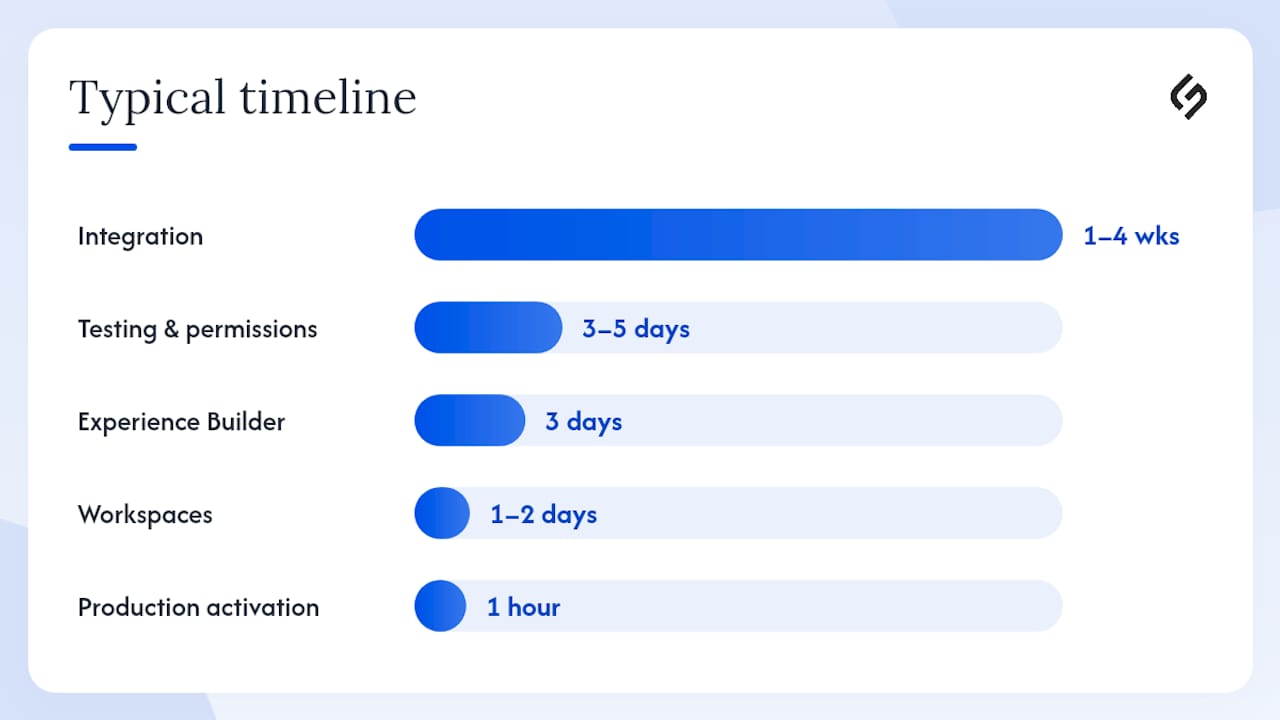
Typical timeline
| Phase | Estimated Duration |
|---|---|
| Enable Digital Experiences and create site | 30 minutes |
| Workspaces configuration (profiles, sharing, login) | 1–2 days |
| Experience Builder (pages, components, branding) | 3 days |
| Custom domain DNS and SSL setup | 1–2 days (plus propagation) |
| Integration and data wiring | 1–4 weeks |
| Testing and permission validation | 3–5 days |
| Production activation | 1 hour (plan the window) |
Which license types and access models should you plan before designing the site?
License planning is the most consequential decision you make before design begins. The wrong license type either blocks users from seeing records they need or grants access that violates your data governance policy.
The four primary license types:
- Customer Community: Read and create access to standard objects; suited for self-service portals where customers submit cases and search knowledge. Lower cost per user.
- Customer Community Plus: Adds sharing rules and reports; suited for portals where customers need to see account-level data or collaborate with other users.
- Partner Community: Full CRM access for channel partners; supports deal registration, lead management, and opportunity collaboration. Higher cost, but necessary for PRM use cases.
- Employee Community: For internal users who need a portal experience rather than full Salesforce UI access; common for HR portals and intranet-style sites.
Access model mechanics:
- External users are always associated with a Contact record in your org. The Contact must exist before the community user can be created.
- Profiles control which objects and fields are visible. Create dedicated profiles for each external user type rather than reusing internal profiles.
- Sharing sets grant record access based on a lookup relationship (e.g., a customer user can see all Cases where
Case.AccountId = User.AccountId). This is the primary mechanism for giving portal users access to their own records. - Sharing groups extend access further, allowing users in a sharing set to share records with each other — useful for partner portals where multiple contacts at the same account need to collaborate.
Capacity planning matters for per-user licenses. Count your expected external user population carefully before committing to a license tier, and factor in growth over the contract term. Member-based licensing (a fixed pool) often makes more financial sense than per-login licensing for high-volume portals.
How do you apply branding, audience targeting, and personalization to your site?
Consistent branding and targeted content delivery are what separate a functional portal from a genuinely useful one. Experience Builder handles the former; audiences and Data Cloud handle the latter.
Theming in Experience Builder:
Apply your brand’s logo, primary and secondary colors, and font stack through the Theme panel in Experience Builder. Themes propagate across all pages automatically, so a single change updates the entire site. Custom CSS is supported for cases where the theme controls are insufficient, but keep custom CSS minimal to avoid upgrade conflicts.
Audience targeting:
Audiences are rules-based segments defined in Experience Builder. A component can be set to display only to users who match a specific audience. Common rules include:
- Profile-based: show a “Submit a Case” button only to Customer Community users, not guest users
- Custom field-based: show a premium content section only to contacts with
Tier__c = 'Gold' - Locale-based: show region-specific content to users whose locale matches a target geography
Audiences do not replace sharing rules. They control component visibility on the page; sharing rules control record access at the data layer. Both must be configured correctly for a secure, personalized experience.
Data Cloud and real-time personalization:
For 1:1 recommendations and dynamic content, Data Cloud integration is the path forward. Once identity resolution rules are configured and unified profiles are available, the site can surface product recommendations, next-best-action prompts, and personalized knowledge article suggestions based on a customer’s full history. Delivering personalized customer journeys at scale requires this unified data foundation — without it, personalization is limited to what is in a single Contact or Account record.
Pro Tip: Before enabling Data Cloud personalization, audit your identity resolution rules in Data Cloud. A misconfigured matching rule creates duplicate unified profiles, which means personalization fires on incomplete data. Test with a small segment before rolling out site-wide.
Governance note: Use content approval workflows (available via CMS Workspaces) for any user-generated or marketing content published on the site. Define a release calendar and assign a content owner for each site section to prevent unreviewed content from going live.
How does site performance work, and what API options are available?
Experience Cloud sites run on Salesforce’s global CDN with regional edge caching and pre-rendering for LWR pages. LWR sites typically render 2–3 times faster than Aura-based sites, which has a direct impact on user engagement and support deflection rates. Slow portal pages increase abandonment before a case is submitted or a knowledge article is read.
Performance monitoring:
Go to Setup → Digital Experiences → Performance to access page-level performance metrics. This view shows load times, error rates, and CDN cache hit rates. Set a baseline on day one of production and check it weekly during the first month after launch.
API options for advanced integrations:
- Connect REST API: The primary API for reading and writing Salesforce data from an Experience Cloud site or an external front end. Supports cases, knowledge, chatter, accounts, and most standard objects.
- Experience Builder API: Used for programmatic site configuration and deployment automation.
- LWC data services (wire adapters): The preferred pattern for data access within LWC components on the site; avoids manual API calls and handles caching automatically.
- Headless front ends: When your UX requirements exceed what Experience Builder can deliver, a React or Next.js front end consuming the Connect REST API is a supported pattern. Experience Cloud supports headless consumption via these APIs, enabling fully custom front ends while keeping Salesforce as the data and auth layer.
Headless architectures introduce deployment complexity. They require a separate hosting environment, a CI/CD pipeline, and front-end engineering skills. Reserve this pattern for cases where the standard Builder approach genuinely cannot meet the design or performance requirements.
What operational and governance controls do you need before going live?
Running a site safely after launch requires the same discipline as the initial build. These are the controls that matter most.
Security basics:
- Audit profiles and permission sets for every external user type before activation
- Set IP restrictions on guest user access if the site is not intended to be fully public
- Configure session timeout policies for authenticated users
- Confirm SSL is provisioned and enforced on your custom domain before activating
Content lifecycle:
- Use sandbox orgs for all configuration changes before promoting to production
- Deactivating a site takes it offline immediately with no grace period — coordinate deactivation windows with stakeholders
- Document every configuration change in a change log for auditability
Measurement and KPIs:
Track these metrics from day one: support case deflection rate, customer satisfaction (CSAT) scores on resolved cases, average page load time, and conversion events (case submissions, partner deal registrations). Salesforce dashboards built on Experience Cloud usage data give you a real-time view of site health and business impact.
Governance structure:
Assign a named site owner who is accountable for content, permissions, and release decisions. Define a release calendar (monthly or quarterly) and require change control approval for any modification that touches sharing rules, profiles, or the login/registration flow. These are the changes most likely to break external user access if deployed without testing.
When should you build in-house, and when should you hire a Salesforce partner?
The honest answer depends on three variables: the complexity of your data model, the depth of your integration requirements, and whether your team has LWC development skills.
Signals that favor building in-house:
- The use case is a straightforward customer help center with standard case submission and knowledge search
- Your org has clean, well-governed data with no multi-source identity resolution requirements
- You have a Salesforce admin with Experience Cloud experience and at least one developer comfortable with LWC
- The site will serve a single region with a single language and no complex personalization rules
Signals that favor hiring a partner:
- The project involves Data Cloud identity stitching across multiple data sources
- You need a headless front end (React/Next.js) with a custom design system
- The deployment spans multiple orgs or requires Agentforce agent configuration
- You have strict SLAs, a global rollout, or a hard launch deadline with limited internal bandwidth
A typical partner engagement for a mid-complexity Experience Cloud site covers discovery and data architecture review, configuration and LWC development, a pilot launch with a limited user group, and a handover with documentation and admin training. Expect 6–12 weeks for a well-scoped project of this type.
Pro Tip: When evaluating a Salesforce partner, ask for two or three Experience Cloud case studies that match your use case, and specifically request their deployment runbook. A partner who cannot produce a runbook has likely never run a disciplined activation process.
Understanding the challenges of digital transformation before you start helps set realistic expectations for both in-house teams and partner engagements.
A practitioner’s note on the mistakes that cost admins the most time
The single most common mistake new Experience Cloud admins make is skipping the external user test. They build the site as an internal admin, preview it as themselves, and activate it — only to discover that external users cannot see any records because sharing sets were never configured. The site looks correct to an admin because admins bypass sharing rules entirely.
The second most common mistake is forgetting to enable Digital Experiences globally before attempting to create a site. The “All Sites” option simply does not appear in Setup until that global setting is enabled. New admins spend significant time searching for a menu item that is hidden behind a prerequisite they did not know existed.
The practical lesson: start with a single help center page in a sandbox, create a real test community user with the correct license and profile, and walk through every user flow as that person. Catch permission gaps in sandbox. Then iterate — add audiences, add personalization, add Data Cloud integration — one layer at a time. A site that works correctly for 100 users on day one is worth more than a fully featured site that breaks on activation.
How Solution For guru helps you build and sustain Experience Cloud sites
Experience Cloud implementation rewards teams that have done it before. The configuration decisions made in the first two weeks — template choice, license model, sharing architecture, Data Cloud identity rules — are difficult and expensive to undo later.
Solution4guru works with Salesforce admins and business teams on the full implementation lifecycle: Experience Cloud site configuration, custom LWC development, UX design best practices for portal layouts, Data Cloud identity design, personalization setup, and Agentforce agent configuration. Engagements follow a structured path: a discovery and architecture review, a configured pilot site with real users, and a documented handover so your internal team can own the site after launch. For teams that want to build capability in-house, Solution4guru also delivers focused training sessions on Experience Builder, LWR component development, and sharing model design.
The next step is a scoping call or a technical audit of your current org. Visit Solution4guru to request one and get a clear picture of what your Experience Cloud project actually requires before committing to a build approach.
FAQ
Experience Cloud is the current name for what Salesforce previously called Community Cloud. The platform scope expanded to include portals, help centers, partner sites, learning hubs, and embedded experiences, so Salesforce rebranded it to reflect that broader use.
Yes. External users require a Community license (Customer Community, Customer Community Plus, or Partner Community) separate from standard Salesforce licenses. The license type determines which objects and records the user can access.
Enable Digital Experiences in Setup, create a new site using the Customer Service LWR template, configure a member profile and sharing set, and activate. A basic site can be provisioned in roughly 30 minutes; full configuration takes longer depending on integration requirements.
Use a headless front end (React or Next.js consuming the Connect REST API) when your design requirements exceed what Experience Builder’s drag-and-drop layout system can deliver, or when you need to integrate the Salesforce data layer into an existing custom web application.
Sharing model misconfiguration is the most frequent cause. External users cannot see records unless sharing sets or sharing rules explicitly grant access based on their account or contact relationship. Always test as a real community user in sandbox before activating in production.