How Do Businesses Integrate Slack and Microsoft Teams with ITSM Platforms?

The modern workplace runs on two parallel systems that rarely talk to each other as seamlessly as they should: the communication tools employees use every day — primarily Slack and Microsoft Teams — and the IT Service Management platforms that keep technology infrastructure running. When a server goes down at 2 a.m., a developer notices it first in a Slack channel. When an employee cannot access a business-critical application, they instinctively message a colleague on Teams rather than opening a ticketing portal they barely remember how to log into. The gap between where problems surface and where they get formally managed creates friction, delays, and missed SLAs that cost businesses real money.
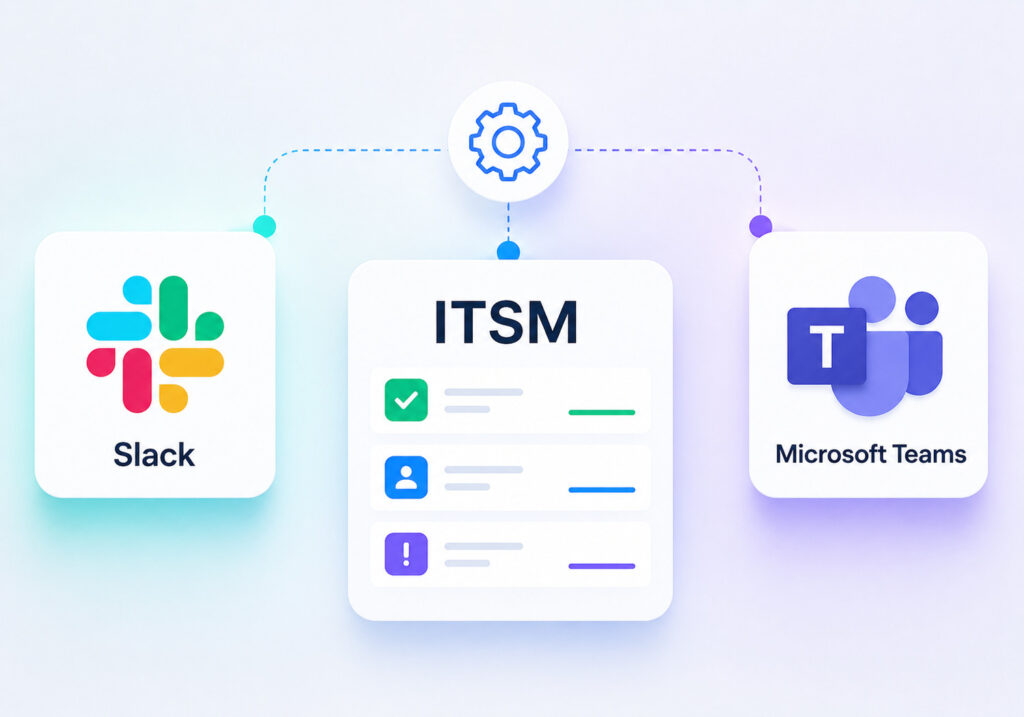
Integrating ITSM platforms with Slack and Microsoft Teams eliminates that gap — transforming chat channels into active service management hubs where incidents get logged, tickets get updated, and engineers get notified without anyone leaving the tools they work in all day. However, not every ITSM platform approaches this integration with the same depth or flexibility. This article examines how leading platforms — particularly ManageEngine ServiceDesk Plus and Freshservice — implement these integrations, what businesses gain from them, and how to choose and deploy the right solution.
Table of contents
Quick Summary: What Will This Article Cover?
By the end of this article, you will understand: Why integrating Slack and Microsoft Teams with ITSM platforms matters for modern IT operationsHow ManageEngine ServiceDesk Plus approaches chat platform integration. How Freshservice builds native integrations with Slack and TeamsA side-by-side feature comparison of both platforms on integration capabilitiesBest practices for planning and executing a successful integration projectHow Solution for Guru accelerates and de-risks the entire process
How Are ManageEngine and Freshservice Connected to This Topic?
Two platforms stand out as particularly relevant when discussing ITSM integration with Slack and Microsoft Teams: ManageEngine ServiceDesk Plus and Freshservice. Both occupy leading positions in the mid-market and enterprise ITSM space, and both have invested significantly in building chat-platform integrations — albeit with different philosophies and architectural approaches.
ManageEngine ServiceDesk Plus is part of Zoho Corporation’s enterprise software portfolio. It offers a comprehensive ITSM suite covering incident management, problem management, change management, asset management, and service catalog functionality — all compliant with ITIL best practices. ManageEngine has developed dedicated connectors for both Microsoft Teams and Slack, enabling bidirectional ticket management directly from chat interfaces.
Freshservice is Freshworks’ cloud-native ITSM platform, built from the ground up on a modern SaaS architecture. Its Slack and Microsoft Teams integrations go beyond basic notifications, offering conversational ticketing bots, AI-assisted triage, and automated workflow triggers that respond to chat activity. Together, these two platforms represent contrasting but equally capable approaches to the chat-ITSM integration challenge.
Why Does Integrating Chat Platforms with ITSM Tools Matter for IT Teams?
What Problems Does the Chat-ITSM Gap Create in Real Organizations?
Every IT department knows the scenario: an employee reports a problem by sending a Teams message to the nearest IT contact rather than opening a formal ticket. The IT contact addresses the issue verbally or through chat, the problem gets resolved — but no ticket ever gets created. Consequently, no data accumulates about that incident type, no trend analysis occurs, and when the same issue recurs three weeks later, the team starts from scratch.
This informal resolution pattern — sometimes called shadow IT support — undermines the entire value proposition of ITSM investment. According to research published by HDI (Help Desk Institute), organizations that fail to capture all incidents formally lose 30–40% of the data they need for meaningful problem management and root cause analysis. That missing data leads directly to recurring incidents, higher mean time to resolution (MTTR), and eroded SLA performance.
Furthermore, the context-switching cost imposed by traditional ITSM portals creates genuine productivity friction. Gartner research identifies context switching between applications as one of the top contributors to IT worker burnout and error rates. When resolving an incident requires an engineer to leave their Slack workspace, navigate to the ITSM portal, locate the ticket, update it, return to Slack, and resume investigation — that workflow adds minutes to every interaction. Across hundreds of daily incidents in a medium-sized IT department, those minutes translate into hours of lost productivity each week.
What Business Value Does a Successful Integration Unlock?
A well-executed Slack or Teams integration with an ITSM platform delivers measurable improvements across several dimensions. First, incident capture rates increase dramatically because reporting a problem becomes as simple as typing a message or clicking a button within the chat interface employees already use. ManageEngine‘s Teams bot, for instance, enables users to submit incidents with a single slash command, reducing the friction that previously caused many issues to go unreported.
Second, response times improve because alerts and escalations reach engineers in the channels where they actively spend their time, rather than in email inboxes that may not receive immediate attention. Freshservice‘s alert management integration pushes critical incident notifications directly into designated Slack channels, complete with priority levels, affected services, and one-click acknowledgment buttons — enabling engineers to claim incidents without leaving the channel.
Third, collaboration quality improves. When incident discussions happen in a dedicated Slack or Teams thread linked to a specific ticket, all relevant context — log snippets, diagnostic commands, resolution steps — accumulates in one searchable place. This thread becomes part of the institutional knowledge base, accessible to future engineers facing similar issues. Both ManageEngine and Freshservice support attaching chat thread content directly to ticket records, preserving this context in the ITSM system.
How Does ITIL Framework Alignment Benefit from Chat Integration?
The Information Technology Infrastructure Library (ITIL) framework structures IT service management around a set of practices designed to align IT services with business needs. Integrating chat platforms with ITSM tools directly strengthens several core ITIL practices. Incident Management benefits from faster detection and reporting. Change Management gains when change advisory board (CAB) discussions move into Teams channels where all stakeholders participate and approvals get recorded automatically.
ManageEngine ServiceDesk Plus specifically supports ITIL-aligned workflows through its Teams integration, enabling change requests to be reviewed and approved directly within Teams adaptive cards — interactive message components that present structured information and action buttons. This approach keeps approvers engaged without requiring them to log into the ITSM portal for every decision, which significantly accelerates change approval cycles in organizations where CAB members include senior managers who rarely use the ITSM portal directly.
Freshservice takes a similarly ITIL-conscious approach, mapping its Slack bot interactions to formal ITIL lifecycle stages. When an engineer acknowledges an incident through the Slack notification, Freshservice automatically moves the ticket to the ‘In Progress’ status and logs the engineer as the assigned technician — maintaining complete audit trail integrity even though the action occurred in Slack rather than in the ITSM portal.
How Does ManageEngine ServiceDesk Plus Integrate with Slack and Microsoft Teams?

What Does ManageEngine’s Microsoft Teams Integration Offer?
ManageEngine ServiceDesk Plus delivers its Microsoft Teams integration through a dedicated Teams app available in the Microsoft AppSource marketplace. Once installed and configured, the integration creates a two-way communication channel between Teams and the ServiceDesk Plus instance — whether hosted on-premises or in the cloud. This flexibility matters significantly for enterprise organizations that run on-premises ITSM deployments due to security, compliance, or data sovereignty requirements, since most cloud-native ITSM platforms cannot offer this option.
The Teams bot enables end users to submit service requests and incidents directly from any Teams channel or chat using a conversational interface. The bot prompts users through a structured intake form, collecting the information required to create a well-formed ticket — category, priority, description, and any relevant attachments. ManageEngine’s integration then creates the ticket in ServiceDesk Plus and sends the user a confirmation card containing the ticket number and a direct link to the ticket record.
For IT technicians, ManageEngine‘s Teams integration provides a technician-facing command set that enables ticket updates, status changes, time logging, and note addition without leaving Teams. When a critical incident triggers, ManageEngine can post an alert card to a designated incident response channel, where engineers use card buttons to assign ownership, update status, and add diagnostic notes — all of which reflect immediately in the ServiceDesk Plus ticket record.
How Does ManageEngine Handle Slack Integration?
ManageEngine’s Slack integration operates through its Integration module, which connects to Slack’s API to enable notifications and basic ticket actions from Slack channels. The integration supports configurable notification rules — for example, sending a Slack message to the #critical-incidents channel whenever a ticket with Priority 1 status gets created or updated in ServiceDesk Plus.
Beyond notifications, ManageEngine enables technicians to perform key ticket actions directly from Slack using interactive message buttons. Assigning a ticket, changing its status, or adding a quick note all happen through button clicks on the Slack notification card, with changes syncing to ServiceDesk Plus in real time. This bidirectional interaction is what distinguishes a genuine integration from a simple notification feed.
One particular strength of ManageEngine’s Slack integration lies in its on-premises deployment compatibility. Organizations running ServiceDesk Plus on their own infrastructure — a common scenario in heavily regulated industries such as banking, healthcare, and government — can still achieve full Slack integration through ManageEngine’s secure connector architecture, which establishes outbound connections from the on-premises server without requiring inbound firewall rules.
What Automation Capabilities Does ManageEngine Offer Through Chat Integration?
ManageEngine‘s Business Rules engine integrates with both Teams and Slack to drive automated workflows triggered by ticket events. When a ticket matches a predefined condition — specific category, priority threshold, affected department, or keyword in the description — ManageEngine automatically posts to the relevant Teams channel or Slack workspace, ensuring the right people see the right information at the right time without manual intervention.
Additionally, ManageEngine supports scheduled reports delivered to Teams or Slack channels, which keeps stakeholders informed about SLA performance, open ticket counts, and technician workload without requiring anyone to log into the ITSM portal to pull reports manually. This scheduled reporting capability proves particularly valuable for IT managers who need to keep executive stakeholders informed about service desk performance without translating raw ITSM data into presentation format each week.
How Does Freshservice Integrate with Slack and Microsoft Teams?
What Makes Freshservice’s Slack Integration Stand Out?
Freshservice built its Slack integration around a native Slack app that the company maintains and updates directly within Slack’s app directory. The depth of this integration reflects Freshservice’s cloud-native architecture — because both platforms live entirely in the cloud, data flows between them with minimal latency and maximum reliability. Freshservice’s Slack app supports end-user ticket submission, technician ticket management, and automated alert routing, all from within the Slack interface.
The standout feature of Freshservice’s Slack integration is its AI-powered virtual agent, Freddy. When employees message the Freshservice Slack bot with a problem description, Freddy analyzes the message using natural language processing to suggest relevant knowledge base articles before creating a ticket. This deflection capability — solving issues through self-service before they become formal tickets — directly reduces ticket volume and technician workload. According to Freshworks’ published case studies, organizations using Freddy’s deflection capability reduce Level 1 ticket volume by 20–30% in typical deployments.
Furthermore, Freshservice enables technicians to create Slack-based incident war rooms directly from critical tickets. When a P1 incident gets created, Freshservice can automatically create a dedicated Slack channel, invite the relevant on-call engineers based on their on-call schedule, and post the incident details along with runbook links — all without any manual coordination. This automated war room creation compresses the time from incident detection to active response, a critical factor in meeting tight RTO targets.
How Does Freshservice Connect with Microsoft Teams?
Freshservice’s Microsoft Teams integration follows a similar philosophy of deep, native connection. The Freshservice Teams app, available through the Microsoft Teams app store, enables the same conversational ticketing, AI-assisted deflection, and automated routing capabilities as the Slack integration. The Teams app integrates with Microsoft’s Adaptive Cards framework, presenting richly formatted ticket cards with interactive buttons that enable full ticket lifecycle management from within Teams.
Notably, Freshservice integrates with Microsoft Teams’ meeting and call infrastructure. When a critical incident escalates to a bridge call, Freshservice can automatically generate a Teams meeting link and post it to the incident channel — ensuring all responders can join the war room call with one click rather than hunting for dial-in details during a high-pressure outage situation. This calendar and meeting integration represents a level of depth that goes beyond simple message exchange.
Freshservice also integrates with Microsoft 365 identity infrastructure through Azure Active Directory. This integration enables automatic technician assignment based on AD group membership, automatic requester identification when a user submits a ticket through Teams, and single sign-on for both the Teams bot and the Freshservice portal — eliminating credential management friction that often undermines adoption of new ITSM integrations.
What Workflow Automation Does Freshservice Provide Through Chat Channels?
Freshservice’s Workflow Automator — its visual, no-code automation builder — includes native triggers and actions for both Slack and Teams. This means IT operations teams can build sophisticated automation scenarios without writing a single line of code. For example, an automation rule can detect when a ticket’s SLA breach time approaches, post a warning to the responsible team’s Teams channel, escalate the ticket to the next tier if unacknowledged after five minutes, and notify the IT manager via a direct Teams message — all triggered automatically by time-based conditions.
Additionally, Freshservice‘s on-call management module connects directly with Slack to deliver alert notifications that respect escalation policies. When a monitoring alert triggers, Freshservice identifies the current on-call engineer from the on-call schedule, sends a Slack message with alert details and acknowledgment options, and escalates to the secondary on-call if the primary does not acknowledge within the defined timeout window. This paging-through-Slack capability reduces dependence on separate on-call tools like PagerDuty for organizations that want to consolidate their toolstack.
How Do ManageEngine and Freshservice Compare on Chat Integration Features?

The table below compares both platforms across the integration dimensions that matter most to IT operations teams evaluating their options.
| Feature / Capability |  | |
|---|---|---|
| Microsoft Teams Integration | Native Teams app via AppSource; adaptive cards; bidirectional ticket actions | Native Teams app; adaptive cards; Teams meeting link generation; Azure AD sync |
| Slack Integration | Official Slack app; notification rules; interactive ticket action buttons | Native Slack app; Freddy AI bot; automated war room channel creation |
| AI / Virtual Agent | Basic bot-guided intake form; limited NLP | Freddy AI with NLP-based deflection; suggests KB articles before ticket creation |
| On-Premises Deployment | Full support — on-prem or cloud | Cloud-only (SaaS) |
| Bidirectional Ticket Actions from Chat | Yes — assign, update status, add notes | Yes — full lifecycle management from chat |
| Automated War Room Creation | Manual channel setup; no auto-creation | Yes — auto-creates Slack/Teams channel on P1 incidents |
| On-Call / Alert Routing via Chat | Alert notifications to channels; escalation via email | Full on-call management with Slack-based paging and escalation |
| No-Code Workflow Automation | Business Rules engine with chat triggers | Visual Workflow Automator with native chat actions |
| ITIL Process Alignment | Strong — ITIL-aligned incident, change, problem modules | Strong — ITIL-aligned with chat-driven lifecycle status updates |
| Microsoft 365 / Azure AD Integration | Active Directory sync for user data | Deep Azure AD integration including SSO and group-based routing |
| Ticket Deflection via Chat Bot | Limited — basic form-based intake | Strong — Freddy AI deflects 20–30% of tickets on average |
| Scheduled Reports to Chat | Yes — scheduled reports to Teams/Slack channels | Yes — dashboard snapshots to Teams/Slack |
| Best Suited For | Enterprises needing on-prem ITSM with chat integration; ITIL-heavy environments | Cloud-first organizations prioritizing AI automation and deep chat-native workflows |
What Best Practices Should Organizations Follow When Implementing ITSM Chat Integration?

How Should IT Teams Plan the Integration Before Deployment?
Successful integrations start long before any configuration happens. IT leaders should begin by mapping their current incident and service request workflows in detail — identifying every point where communication currently moves into informal chat channels and out of the formal ITSM system. These workflow gaps represent exactly the integration points that need to be addressed, and documenting them creates a concrete requirements list rather than a vague aspiration.
Next, organizations should define their channel architecture. Which Slack workspaces or Teams tenants need to connect to the ITSM platform? Should individual team channels receive ticket notifications, or should a centralized operations hub channel aggregate all alerts? For organizations using Freshservice, deciding which incident priority thresholds trigger automatic war room channel creation requires deliberate planning — too sensitive a threshold floods the team with dedicated channels, while too high a threshold misses important incidents.
- Document all informal IT support interactions currently happening in chat (surveys, manager interviews, chat log analysis)
- Define which ITSM ticket categories and priorities should trigger chat notifications
- Establish a channel naming convention for incident war rooms before deploying automation
- Determine which teams and roles require bot access versus read-only notification access
- Set measurable success criteria — ticket capture rate, MTTR, SLA compliance — before go-live
- Plan for user training: both end users submitting via bot and technicians managing via chat
How Can Organizations Maximize Adoption After Deployment?
Technical deployment is the easier half of the integration challenge. Driving consistent adoption — ensuring that employees actually use the bot to submit tickets rather than falling back to direct messages and emails — requires deliberate change management. Both ManageEngine and Freshservice support adoption through integration simplicity, but organizations must actively reinforce the new behavior.
Effective adoption strategies include pinning the bot and integration instructions to relevant Slack channels or Teams, designating IT champions within each department who model the correct behavior, and making the old pathways — submitting by email, calling the help desk — slightly less convenient by adding an auto-reply that directs users to the chat bot. Additionally, sharing early wins publicly — ‘We resolved 40% more incidents this month because of faster reporting through Slack’ — builds momentum and demonstrates organizational value.
Freshservice’s analytics dashboard helps track adoption metrics including bot interaction rates and ticket submission sources, giving IT managers visibility into which departments use the integration heavily and which still rely on old channels. ManageEngine similarly provides reports on ticket creation source, enabling targeted follow-up training for teams that show low bot adoption rates.
What Conclusions Can We Draw About Integrating ITSM Platforms with Chat Tools?
Integrating Slack and Microsoft Teams with ITSM platforms has moved from a nice-to-have feature to a strategic necessity for IT organizations that want to operate efficiently in the modern workplace. Employees work in chat tools; IT incidents surface in chat tools; and IT support must therefore meet employees where they already are rather than demanding they learn yet another system interface.
ManageEngine ServiceDesk Plus delivers a compelling integration story for organizations that need ITIL-compliant ITSM with flexibility across deployment models. Its ability to connect both on-premises and cloud instances with Slack and Microsoft Teams makes it uniquely valuable for enterprises in regulated industries where cloud migration is incomplete or constrained. Moreover, ManageEngine’s mature Business Rules engine enables sophisticated automation scenarios that keep the right people informed through the right channels without manual effort. Organizations that prioritize ITIL process fidelity alongside chat integration will find ManageEngine a strong match for their requirements.
Freshservice, on the other hand, represents the leading edge of chat-native ITSM design. Its Freddy AI virtual agent, automated war room creation, on-call paging through Slack, and deep Azure AD integration collectively deliver a level of chat-channel intelligence that ManageEngine has not yet matched. For cloud-first organizations — particularly technology companies, fast-growing SaaS businesses, and digital-native enterprises — Freshservice’s integration depth translates directly into faster incident response, lower ticket volume through AI deflection, and reduced administrative overhead from consolidated tooling.
Ultimately, the choice between these platforms depends on organizational context: deployment model requirements, the relative importance of AI-assisted automation versus ITIL process completeness, and the size and sophistication of the IT operations team. Both platforms deliver genuine, bidirectional chat integration that improves on the status quo of fragmented communication and shadow IT support.
Frequently Asked Questions About Slack and Teams ITSM Integration
Yes — both platforms support simultaneous integration with Slack and Microsoft Teams, which matters in organizations that use both chat platforms across different teams or geographies. ManageEngine enables multiple notification channels to be configured independently, meaning incident alerts can route to a Teams channel for one business unit and a Slack channel for another, both pulling data from the same ServiceDesk Plus instance.
Freshservice similarly supports multi-workspace Slack connections and multiple Teams tenants within a single Freshservice instance, which proves valuable for managed service providers (MSPs) serving multiple client organizations from one ITSM platform. Each client’s workspace connects independently with appropriate permissions and notification scopes, maintaining data separation while enabling unified ITSM management for the MSP’s operations team.
Implementation timelines vary considerably based on integration complexity, organizational size, and the degree of custom workflow automation required. A basic integration — connecting one Slack workspace or Teams tenant to receive ticket notifications and enable simple ticket actions — typically takes one to two weeks including configuration, testing, and user communication. Most IT teams with Slack or Teams administration experience can complete this level of integration independently using the vendor’s documentation. However, a production-ready integration that includes custom workflow automation, multi-team channel routing, AI-assisted deflection configuration, on-call scheduling integration, and user training across multiple departments realistically requires six to twelve weeks in a mid-sized organization. This timeline accounts for the iterative refinement that always occurs when real users interact with the bot and discover workflow scenarios the initial configuration did not anticipate.
How Does Partnering with Solution for Guru Accelerate Your ITSM Chat Integration?
Selecting the right ITSM platform and planning a chat integration correctly involves a level of technical and organizational complexity that many IT teams underestimate. The configuration options are extensive, the workflow design decisions are consequential, and the change management challenge is significant. Attempting to navigate all of this while simultaneously running day-to-day IT operations stretches team capacity and increases the risk of a poorly adopted, underperforming integration.
Solution for Guru specializes in guiding IT organizations through exactly this process — from initial platform evaluation through full deployment and adoption measurement. The company brings vendor-neutral expertise in both ManageEngine ServiceDesk Plus and Freshservice, enabling IT leaders to receive honest, evidence-based guidance rather than vendor sales narratives.

In the evaluation phase, Solution for Guru conducts structured discovery sessions that map the organization’s specific workflows, regulatory constraints, existing toolstack, and integration requirements. This discovery feeds into a platform recommendation that accounts for factors most vendor comparison guides overlook — such as the organization’s current Active Directory hygiene (which affects Freshservice’s Azure AD integration quality) or the presence of legacy on-premises systems that must integrate with the new ITSM platform (which affects ManageEngine’s deployment model advantage).
During deployment, Solution for Guru configures the Slack and Teams integrations with production-ready workflow automation, channel architecture, and notification rules designed for the organization’s specific incident categories and team structure — rather than the generic out-of-box defaults that most organizations accept and then struggle to customize afterward. Post-deployment, the company provides adoption tracking analysis and iterative optimization support, ensuring the integration continues delivering value as the organization’s workflows evolve.
In short, partnering with Solution for Guru transforms what is often a multi-month internal project marked by trial and error into a focused, expertly guided implementation that delivers measurable results faster and with lower risk of costly rework.
Recommended:
- Automating Software License Tracking with ITSM Solutions: How Can You Take Control?
- Best Microsoft 365 Integrations for ManageEngine and Freshservice
- Integrating Endpoint Management Tools with ITSM Systems
- Aligning ITSM Processes with ISO 20000 Standards
- How Long Does an ITSM Implementation Really Take? Key Factors Explained
- ManageEngine vs Freshservice
- Top ITSM Best Practices Using ManageEngine
- Improving IT Governance and Compliance with ManageEngine ITSM
- Cloud vs On-Premise ManageEngine ITSM: Which Should You Choose?
- Integrating ManageEngine with Microsoft 365
- Automating IT Approvals in ManageEngine Using Workflows
- Designing an Effective ITSM Model for Modern IT Environments
- Common Implementation Mistakes in ManageEngine ITSM (and How to Avoid Them)
- API Automation in ManageEngine: Practical Use Cases