Integrating Endpoint Management Tools with ITSM Systems: How Does It Actually Work?

Modern IT environments grow more complex every year. Organizations manage hundreds or thousands of devices while simultaneously handling service requests, incidents, and change tickets. Without a clear connection between endpoint management and IT service management (ITSM), teams waste time on manual updates, duplicate data entry, and slow incident resolution. Integrating endpoint management tools with ITSM systems solves these inefficiencies by creating a unified workflow where device data flows directly into service processes — and vice versa. This integration not only accelerates response times but also improves visibility, compliance, and overall IT governance.
Table of contents
What Do You Need to Know at a Glance?
Before diving into the full details, here is a quick summary of the key points this article covers:
- Endpoint management tools collect and manage device data, configurations, and patch statuses across an organization’s IT infrastructure.
- ITSM platforms organize service requests, incidents, changes, and assets within structured workflows.
- Integrating these two systems creates a closed-loop IT environment that reduces manual work and improves accuracy.
- ManageEngine ITSM and Freshservice stand out as two leading ITSM platforms that offer robust endpoint integration capabilities.
- A comparison of ManageEngine and Freshservice helps IT teams choose the right fit for their needs.
Which ITSM Platforms Support Endpoint Management Integration Best?
How Does ManageEngine ITSM Fit Into This Picture?

ManageEngine offers one of the most tightly integrated IT management suites available today. Its ITSM platform, ManageEngine ServiceDesk Plus, connects directly with ManageEngine Endpoint Central (formerly Desktop Central), creating a seamless flow between endpoint data and service management workflows. As a result, IT teams gain real-time visibility into the devices they manage, all from within the same ecosystem.
When an endpoint issue triggers an alert — such as a failed patch deployment or a disk nearing capacity — ManageEngine automatically creates a service ticket and assigns it to the appropriate team. This eliminates the need for manual ticket creation and ensures that incidents never slip through the cracks. Furthermore, the asset management module pulls hardware and software inventory data directly from managed endpoints, keeping the CMDB (Configuration Management Database) accurate without requiring tedious manual updates.
ManageEngine also supports extensive automation rules. For example, teams can configure workflows that automatically push a software update to a device once a change request receives approval. Consequently, the approval and execution happen within the same platform, which dramatically shortens change cycle times. The platform supports both cloud and on-premises deployment, making it suitable for organizations with strict data residency requirements.
How Does Freshservice Approach Endpoint Integration?

Freshservice, developed by Freshworks, takes a cloud-first approach to ITSM with a strong emphasis on simplicity and user experience. The platform integrates with endpoint management tools — including its own Freshservice Device Management module and third-party tools like Microsoft Intune, JAMF, and others — to bring device data directly into the service desk environment. You can explore Freshservice at this link.
Freshservice’s discovery module continuously scans the network to identify and catalog endpoints, automatically populating the asset inventory. When a new device appears or an existing one changes configuration, Freshservice updates its CMDB in near real time. This level of automation means that IT teams spend less time on data maintenance and more time resolving actual problems.
The platform also shines in its workflow automation capabilities. Using its no-code workflow orchestrator, teams can build complex automation sequences that span endpoint management and service management actions. For instance, when a device fails a compliance check, Freshservice can simultaneously log an incident, notify the device owner, and trigger a remediation script — all without manual intervention. Additionally, Freshservice’s AI-powered virtual agent assists users in resolving common endpoint-related issues through self-service, which reduces the ticket volume that reaches human agents.
Why Does Integrating Endpoint Management With ITSM Matter So Much?
What Problems Does This Integration Actually Solve?
Many IT organizations operate endpoint management and ITSM as separate silos. The endpoint team manages patches and configurations using one tool while the service desk handles tickets in another, with little to no data sharing between the two. This separation creates several serious problems:
- Stale asset data: Service desk agents work from inaccurate device inventories, leading to incorrect troubleshooting steps.
- Slow incident resolution: Technicians manually look up device information when responding to incidents, adding unnecessary time to each ticket.
- Missed compliance deadlines: Without automatic alerts tied to patch status, security teams often discover compliance gaps only during audits.
- Duplicate effort: Both teams enter the same device information into separate systems, wasting time and introducing errors.
- Poor change management: Changes pushed to endpoints are not always logged in the ITSM system, making it impossible to trace configuration changes during incident investigations.
Integrating endpoint management with ITSM directly addresses each of these problems. Moreover, the integration creates a single source of truth for device data, ensuring that every team works from the same accurate information.
How Does the Integration Workflow Typically Function?
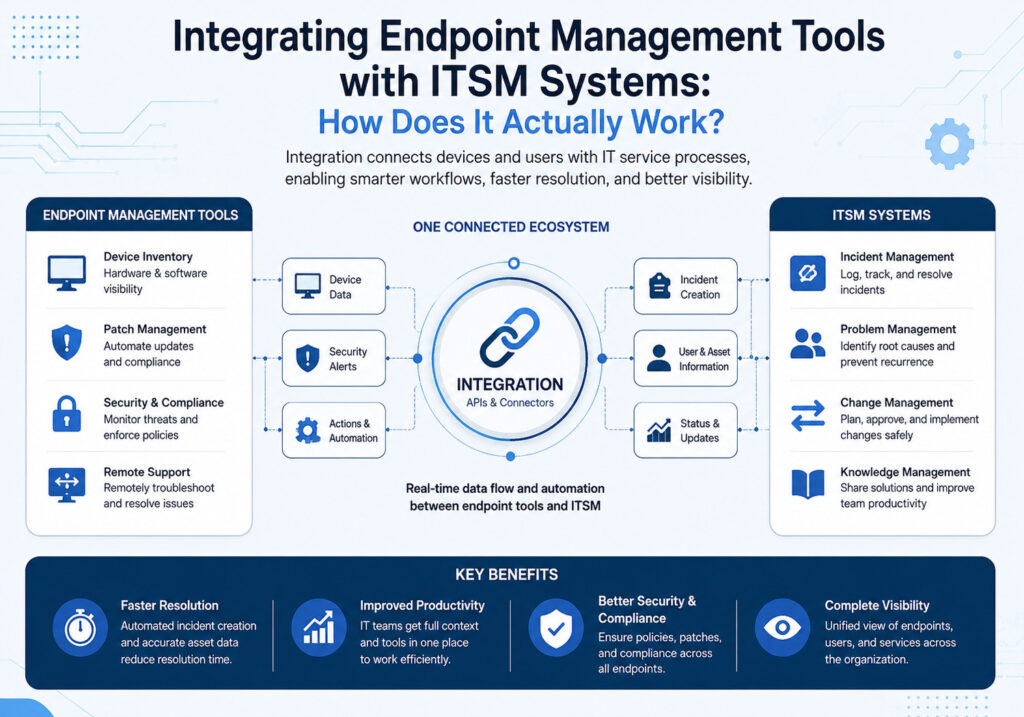
Understanding the technical flow of an endpoint-ITSM integration helps IT teams appreciate the practical benefits. In most implementations, the integration operates as follows:
- The endpoint management tool continuously collects data from managed devices, including hardware specifications, installed software, patch status, and compliance state.
- This data flows into the ITSM platform’s asset management and CMDB modules through API connections or native integrations.
- When the endpoint tool detects an issue — such as a failed patch or an unauthorized software installation — it triggers an event that automatically creates a ticket in the ITSM system.
- The ITSM platform routes the ticket to the correct team based on pre-configured assignment rules and priorities.
- The assigned technician reviews the ticket, which already contains the relevant device context, and takes remediation action — often by triggering a remote action directly from the ITSM interface.
- Once resolved, the ITSM ticket closes, and the endpoint tool records the remediation action in the device’s history log.
This closed-loop process ensures that every incident leaves a full audit trail, simplifying compliance reporting and root cause analysis.
What Technical Components Make the Integration Possible?
Several technical components work together to enable endpoint-ITSM integration. Understanding these components helps IT architects design integrations that are both reliable and scalable.
- REST APIs: Most modern endpoint management tools and ITSM platforms expose REST APIs that allow bidirectional data exchange. These APIs serve as the backbone of any integration architecture.
- Webhooks: Endpoint tools use webhooks to push event notifications to the ITSM platform in real time, eliminating the need for constant polling.
- Discovery agents: Lightweight agents installed on managed devices feed live data into the endpoint management tool, which then synchronizes with the ITSM platform.
- CMDB connectors: Dedicated connectors map endpoint data to CMDB configuration item (CI) schemas, ensuring data consistency across both systems.
- Middleware and iPaaS platforms: Organizations that use endpoint and ITSM tools from different vendors often rely on integration platforms such as Zapier, MuleSoft, or Microsoft Power Automate to bridge the two systems.
Both ManageEngine and Freshservice support all of these integration methods, though ManageEngine’s deep native integration with its own endpoint management suite reduces the reliance on external middleware for organizations that standardize on the ManageEngine ecosystem.
What Are the Key Benefits of Combining Endpoint Management and ITSM?
How Does Integration Improve Incident Management?
Faster, more accurate incident management stands as one of the most immediate benefits of endpoint-ITSM integration. When endpoint data flows directly into incident tickets, technicians no longer waste time gathering basic device information. Instead, they start troubleshooting immediately with a complete picture of the affected device’s state.
For example, when a user reports that their computer runs slowly, the integrated system automatically attaches the device’s performance metrics, recent software changes, and patch history to the incident ticket. The technician can identify the root cause — perhaps a recently installed application consuming excessive memory — without leaving the ITSM interface. As a result, mean time to resolution (MTTR) drops significantly, and user satisfaction improves.
ManageEngine and Freshservice both offer this capability. ManageEngine leverages its tight integration with Endpoint Central to pull live device diagnostics into tickets, while Freshservice uses its asset management module and third-party integrations to achieve the same result. Either way, the technician benefits from richer context and faster resolution paths.
How Does Integration Strengthen Security and Compliance?
Security teams face constant pressure to maintain compliance across large fleets of endpoints. Integration with ITSM platforms transforms compliance monitoring from a reactive, audit-driven process into a continuous, proactive discipline.
When an endpoint management tool detects a device that falls out of compliance — such as a machine missing a critical security patch — the integration automatically logs a high-priority incident in the ITSM system and notifies the security team. This automatic escalation ensures that compliance gaps receive immediate attention rather than lingering unnoticed until the next audit.
Furthermore, all remediation actions are logged in the ITSM system with timestamps, technician names, and change details. This complete audit trail satisfies regulatory requirements from frameworks such as ISO 27001, SOC 2, and GDPR, giving compliance teams the documentation they need without manual effort. Both ManageEngine and Freshservice support compliance-oriented workflows, with ManageEngine offering particularly deep integration with its vulnerability management modules.
How Does Integration Optimize Asset Management and CMDB Accuracy?
Maintaining an accurate CMDB is notoriously difficult. Devices arrive, change configurations, and retire constantly, and manual update processes rarely keep pace with this rate of change. Endpoint management integration solves this problem by automating CMDB updates.
Every time an endpoint management tool detects a hardware change, software installation, or configuration modification, it pushes an update to the ITSM platform’s CMDB automatically. As a consequence, asset records stay current without requiring IT staff to manually audit and update them. This accuracy has downstream benefits for incident management, change management, and capacity planning, since every process that relies on CMDB data now works from reliable information.
Freshservice’s discovery module excels at this task, continuously scanning for new and changed assets and syncing them to the CMDB in near real time. ManageEngine’s integration with its asset management modules achieves similar results, particularly for organizations that deploy its full suite of IT management tools.
How Does Automation Cut Operational Costs?

Beyond improving quality, endpoint-ITSM integration drives measurable cost savings by automating tasks that previously required manual effort. Consider the following examples:
- Automated patch deployment: When a change request for a software update receives approval in the ITSM system, the integration triggers automatic deployment to all affected endpoints — eliminating the need for technicians to manually initiate the update.
- Self-healing workflows: When monitoring tools detect a known issue pattern, automated workflows can apply predefined fixes before a technician even reviews the ticket, resolving problems before users notice them.
- Automated onboarding and offboarding: When HR creates a new employee record, the integration can trigger automated device provisioning, software installation, and account setup — compressing a multi-hour manual process into minutes.
These automation capabilities translate directly into reduced labor costs and allow IT staff to focus on higher-value strategic initiatives rather than repetitive operational tasks. Freshservice‘s workflow orchestrator and ManageEngine‘s automation rules both support these use cases effectively.
How Do ManageEngine and Freshservice Compare for Endpoint-ITSM Integration?

Choosing the right ITSM platform for endpoint integration depends on your organization’s specific needs, existing toolset, and deployment preferences. The table below compares ManageEngine and Freshservice across the most critical dimensions:
| Feature / Criterion | ManageEngine | Freshservice | ManageEngine Advantage | Freshservice Advantage |
|---|---|---|---|---|
| Native Endpoint Integration | Deep native integration with Endpoint Central | Device Management module + third-party connectors | Tighter out-of-box sync for ManageEngine ecosystem | Broader third-party tool support |
| Deployment Options | Cloud and on-premises | Primarily cloud (SaaS) | Flexibility for data residency requirements | Faster deployment, no infrastructure to manage |
| CMDB Automation | Strong with full ManageEngine suite | Continuous discovery and auto-sync | Comprehensive for ManageEngine-only environments | More agile for diverse environments |
| Workflow Automation | Automation rules and script-based workflows | No-code workflow orchestrator (visual builder) | More control for technical teams | Easier for non-technical admins |
| AI and Self-Service | AI-assisted suggestions and knowledge base | AI virtual agent (Freddy AI) | Solid for structured environments | More advanced conversational AI capabilities |
| Pricing Model | Per-technician and asset-based tiers | Per-agent subscription tiers | More granular control at scale | Simpler, predictable pricing |
| Compliance Reporting | Built-in reports with vulnerability management links | Customizable dashboards and audit logs | Deeper security-compliance integration | More flexible report customization |
| Ease of Setup | Moderate — benefits most from full suite adoption | Quick — guided setup with minimal configuration | Better ROI for existing ManageEngine users | Faster time-to-value for new deployments |
| Third-Party Integrations | Extensive marketplace and API support | Large marketplace with 1000+ integrations | Strong for enterprise on-prem ecosystems | Broader cloud-native integration library |
In summary, ManageEngine suits organizations that already use or plan to adopt its broader suite of IT management tools and need strong on-premises support. Freshservice, on the other hand, offers a more accessible cloud-native experience with advanced AI capabilities and a faster setup process, making it particularly attractive for growing organizations and those migrating to cloud-first architectures.
What Are the Key Takeaways From This Topic?
Integrating endpoint management tools with ITSM systems represents one of the highest-impact improvements an IT organization can make. By connecting device data with service workflows, organizations achieve faster incident resolution, stronger security posture, more accurate asset management, and significant automation-driven cost savings.
ManageEngine ITSM stands out as the ideal choice for organizations that value deep, native integration within a single vendor ecosystem and need flexible deployment options that include on-premises infrastructure. Its tight coupling with Endpoint Central makes it especially powerful for environments where security, compliance, and change management all require strong coordination.
Freshservice, on the other hand, excels for organizations seeking a modern, cloud-native experience with minimal setup friction and powerful AI-driven automation. Its intuitive interface and extensive integration marketplace make it a strong choice for organizations undergoing digital transformation or scaling their IT operations rapidly.
Ultimately, both platforms deliver substantial value when properly integrated with endpoint management tools. The right choice depends on your organization’s specific environment, growth trajectory, and technical requirements. Furthermore, partnering with an expert implementation provider dramatically increases the likelihood of a successful outcome.
Solution for Guru brings the specialized expertise needed to navigate this complexity — from selecting the right platform to designing custom integrations and supporting ongoing optimization. Choosing the right partner, alongside the right technology, positions your IT organization to operate with the speed, accuracy, and resilience that modern business demands.
Frequently Asked Questions
The most critical first step is conducting a thorough discovery and gap analysis of your current IT environment. Before selecting tools or designing workflows, you need a clear picture of what data your endpoint management tool currently collects, how your ITSM platform currently uses asset and device information, and where the gaps and manual steps are causing delays or errors. This analysis forms the foundation of your integration roadmap and prevents costly rework later in the project. Solution for Guru specializes in exactly this kind of structured assessment, helping organizations build a solid foundation before any technical implementation begins.
Yes, absolutely. Both ManageEngine and Freshservice support integration with third-party endpoint management tools through REST APIs, webhooks, and dedicated integration connectors. ManageEngine offers a range of API endpoints and supports integration platforms like Microsoft Power Automate and MuleSoft for connecting with external tools. Freshservice provides a particularly broad integration marketplace with over a thousand pre-built connectors, including support for popular endpoint tools such as Microsoft Intune, Jamf, Ivanti, and Tanium. However, the depth and reliability of these integrations vary. Native integrations — like ManageEngine’s connection with its own Endpoint Central — typically offer richer data exchange and tighter workflow coupling than third-party connector-based integrations. Organizations relying on mixed-vendor environments benefit most from working with an integration specialist who can evaluate the best approach for their specific toolset.
Implementation timelines vary significantly based on the complexity of the environment, the number of endpoints under management, and the depth of integration required. A straightforward integration between ManageEngine ServiceDesk Plus and Endpoint Central in a mid-sized organization might take two to four weeks to configure and test. A more complex project involving multiple endpoint tools, custom CMDB schema design, and advanced automation workflows could take two to four months. Freshservice deployments in cloud-native environments tend to move faster due to the platform’s guided setup process and pre-built integration templates.
Why Should You Partner With Solution for Guru for Your Integration Project?
Implementing endpoint-ITSM integration is rarely a simple plug-and-play exercise. It requires careful planning, technical expertise, and ongoing optimization to deliver the expected results. This is where Solution for Guru adds exceptional value. Solution for Guru is a specialized IT consultancy that helps organizations design, deploy, and optimize integrations between endpoint management tools and ITSM platforms, including ManageEngine and Freshservice.

What Specific Benefits Does Solution for Guru Provide?
Organizations that work with Solution for Guru gain access to a structured, expert-led implementation process that addresses every phase of the integration project:
- Expert assessment and roadmap: Solution for Guru begins every engagement with a thorough analysis of the client’s existing IT environment, identifying integration gaps and designing a realistic roadmap that aligns with business goals.
- Platform selection guidance: For organizations that are still choosing between ManageEngine and Freshservice, Solution for Guru provides objective, experience-based recommendations tailored to the client’s specific needs, budget, and technical context.
- Custom integration design: Rather than applying generic templates, Solution for Guru designs integration architectures that match the client’s workflows, ensuring that the integrated system reflects how the IT team actually works.
- End-to-end implementation: The team handles every technical aspect of the deployment, from API configuration and data mapping to CMDB schema design and automation workflow development.
- Training and knowledge transfer: After deployment, Solution for Guru trains IT staff on operating and maintaining the integrated system, ensuring that the organization can manage the solution independently.
- Ongoing support and optimization: As the organization’s needs evolve, Solution for Guru provides continuous support to refine workflows, add new integrations, and troubleshoot issues before they impact operations.
Working with a specialist partner like Solution for Guru reduces implementation risk, shortens time-to-value, and ensures that the organization extracts the full benefit from its investment in ManageEngine or Freshservice.
Recommended:
- Aligning ITSM Processes with ISO 20000 Standards
- How Long Does an ITSM Implementation Really Take? Key Factors Explained
- ManageEngine vs Freshservice
- Top ITSM Best Practices Using ManageEngine
- Improving IT Governance and Compliance with ManageEngine ITSM
- Cloud vs On-Premise ManageEngine ITSM: Which Should You Choose?
- Integrating ManageEngine with Microsoft 365
- Automating IT Approvals in ManageEngine Using Workflows
- Designing an Effective ITSM Model for Modern IT Environments
- Common Implementation Mistakes in ManageEngine ITSM (and How to Avoid Them)
- API Automation in ManageEngine: Practical Use Cases
- How ManageEngine Supports ITIL 4 Framework?
- ITSM — How to Start Implementation?
- Core ITSM Processes: A Comprehensive Guide to Service Management Excellence