UX Design for Beginners: Your 2026 Starter Guide

What is UX design, and why does it matter for beginners?
UX design is the practice of combining problem-solving with visual design to make digital products feel intuitive and rewarding for users. It sits at the intersection of human psychology, business goals, and technology, making it one of the most transferable skills in the modern digital economy. For anyone starting out, the most clarifying thing to understand is this: UX is not about making things look beautiful. It is about making them work.

A well-designed product reduces friction, builds trust, and keeps users coming back. Poor UX, by contrast, drives users away regardless of how polished the visuals are. That is why companies invest heavily in UX talent at every stage of product development.
Core goals of UX design every beginner should know:
- Make products usable so users can accomplish tasks without confusion
- Make products useful by solving real, validated user problems
- Make products accessible so people with varying abilities can engage fully
- Make products desirable through thoughtful visual and interaction design
- Create trust between the user and the product through consistency and reliability
- Align user needs with business objectives to drive measurable outcomes
UX designers serve as the bridge between what users need and what a business wants to deliver. That role requires research, empathy, analytical thinking, and communication skills, not just proficiency with design software.
Table of Contents
- Seven foundational principles that guide good UX design
- How the UX design process works, step by step
- Practical steps and recommended courses for learning UX design
- Expert perspectives on what it actually takes to succeed in UX
- Which UX methodologies and frameworks do beginners need to know?
- Beginner-friendly UX projects you can build right now
- Common challenges beginners face and how to get past them
- Career paths and job roles available to new UX designers
- How Solution4guru supports your UX and digital design goals
- Key Takeaways
- FAQ
Seven foundational principles that guide good UX design
Good UX design rests on seven core pillars that beginners should internalize before touching any design tool: user-centricity, consistency, hierarchy, usability, user control, accessibility, and context. Mastering these principles produces interfaces that feel intuitive because they align with how people already think and behave.
- User-centricity: Every decision starts with the actual user’s needs, not assumptions. Research comes before wireframes.
- Consistency: Repeated patterns, terminology, and visual language reduce cognitive load. Users should never have to relearn how your product works.
- Hierarchy: Visual and informational structure guides the eye and communicates priority. What matters most should be most prominent.
- Usability: A product is only as good as its ability to help users complete tasks efficiently. Usability testing reveals gaps no designer can spot alone.
- User control: Users need to feel in command. Undo functions, clear navigation, and predictable interactions build that confidence.
- Accessibility: Usability and accessibility are inseparable. Products must work effectively for users with visual, motor, cognitive, or hearing differences.
- Context: Design decisions must account for where, when, and how users interact with a product, whether on a mobile device during a commute or on a desktop in a focused work session.
One insight that separates strong beginners from struggling ones: successful UX relies on leveraging mental models that users already understand, established design patterns they recognize from other products, rather than forcing novel, unfamiliar arrangements. Familiarity reduces friction. Novelty for its own sake creates it.
Pro Tip: Before designing any screen, write down the single most important task a user needs to complete on that screen. Every design decision should serve that task.

How the UX design process works, step by step
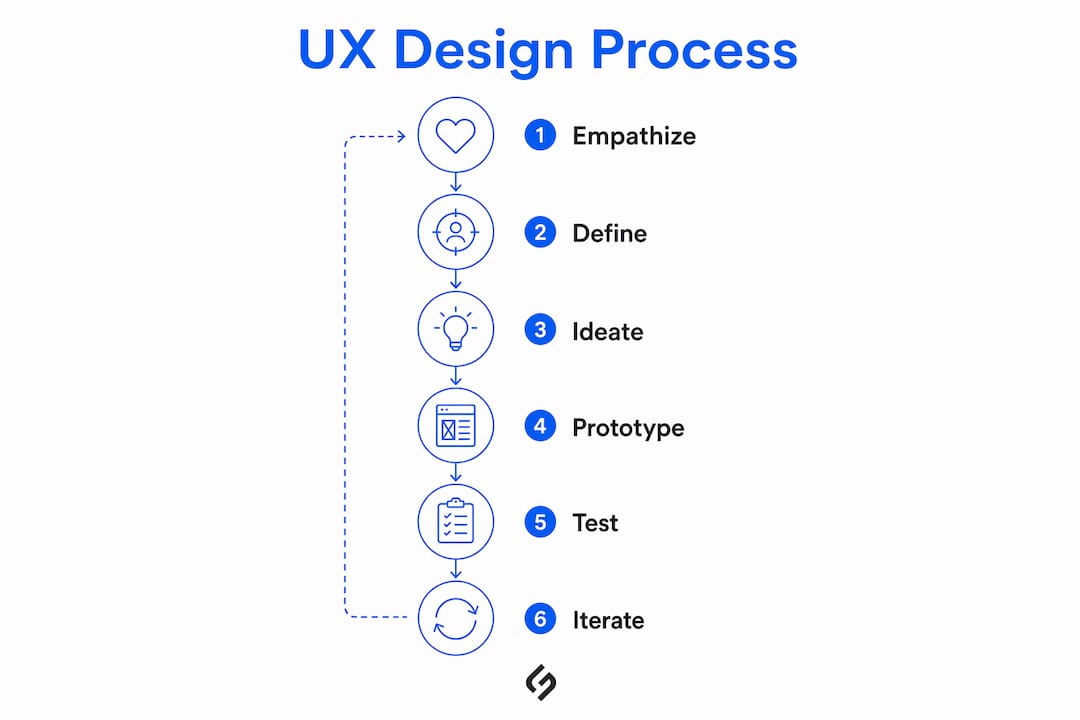
The UX design process follows at least six iterative phases, as explained in this detailed overview of grabación de acciones de usuario to enhance user experience. Understanding each phase helps beginners see where their work fits within a larger product development cycle.
Empathize — Conduct user interviews, surveys, and observation sessions to understand real behaviors, motivations, and pain points. This phase produces the raw material that drives every subsequent decision.
Define — Synthesize research findings into a clear problem statement. A well-defined problem is specific: “Users abandon checkout because they cannot find their preferred payment method” is actionable. “Users have a bad experience” is not.
Ideate — Generate a wide range of potential solutions without judgment. Sketching, mind mapping, and collaborative brainstorming all belong here. Quantity precedes quality at this stage.
Wireframe — Translate the strongest ideas into low-fidelity structural layouts. Wireframes focus on information architecture and content placement, not color or typography.
Prototype — Build an interactive model of the design. Prototypes range from paper sketches to clickable digital mockups, depending on the fidelity needed for testing.
Test — Put the prototype in front of real users. User research methods like usability testing, interviews, and surveys validate whether the design solves the original problem or needs another iteration.
The cycle does not end at step six. Findings from testing feed back into the empathize and define phases, producing a continuous loop of improvement. Iteration is not a sign of failure; it is the mechanism by which good design becomes great design.
Pro Tip: Resist the urge to jump straight to high-fidelity prototypes. Spending an extra day on wireframes and low-fidelity testing can save weeks of rework later.
Practical steps and recommended courses for learning UX design
UX design is highly learnable through self-study because it relies on objective principles and structured problem-solving rather than a specific academic background. That said, structured progression matters. Jumping between YouTube tutorials without a clear learning path produces scattered knowledge that is hard to apply in real projects.
Recommended courses for beginners in 2025:
Google UX Design Certificate (Coursera): A seven-course program designed for complete beginners with no prior experience required. It covers user-centered design, wireframing, prototyping, and usability testing, and includes portfolio projects. Widely recognized by employers as a credible entry-level credential.
CareerFoundry UX Design Bootcamp: A mentor-led program that takes beginners from foundational concepts through a job-ready portfolio. The structured curriculum covers research, ideation, wireframing, and prototyping, with direct feedback from working UX professionals.
Springboard Free UX Design Course: A no-cost introduction to UX fundamentals covering the design process, user research, and basic prototyping. A strong first step before committing to a paid program.
UX design bootcamps can take complete beginners to job-readiness by concentrating on research, ideation, wireframing, and prototyping. For those who prefer a more flexible pace, the Google certificate on Coursera allows self-paced learning.
Essential tools to start learning now:
- Figma: The industry-standard design and iterative prototyping tool. Free for individual use and widely used across teams of every size.
- Miro: A collaborative whiteboarding tool useful for affinity mapping, journey mapping, and ideation sessions.
- Adobe XD: An alternative to Figma with strong prototyping capabilities, included in Adobe Creative Cloud subscriptions.
Building a portfolio from day one is non-negotiable. Document every project, including the research process, design iterations, and testing results, not just the final screens.
Expert perspectives on what it actually takes to succeed in UX
Many beginners mistake UX for mostly visual design work. The reality is that UX starts with deep user research and information architecture to validate problems before a single interface element is designed. Skipping that foundation produces polished screens that solve the wrong problem.
The most common expert observation from working UX professionals is consistent: understanding the “why” behind a design challenge matters more than the speed at which you can produce mockups. Effective designers collaborate iteratively and ask hard questions about user behavior before committing to a direction.
The practical implication: when building portfolio projects, document the entire process. Show the messy early sketches, the user interview notes, the failed prototype that led to a better one. Hiring managers at product companies are evaluating your thinking, not just your visual output.
Soft skills carry more weight than most beginners expect. Communication, the ability to present and defend design decisions with user research evidence, and collaboration with developers and product managers are what separate candidates at the junior level. UX design best practices consistently emphasize that tool proficiency is table stakes; the ability to justify decisions with evidence is the real differentiator.
Which UX methodologies and frameworks do beginners need to know?
Two frameworks dominate UX practice and appear in virtually every job description: user-centered design (UCD) and design thinking. Understanding both gives beginners a shared vocabulary with professional teams.
User-Centered Design (UCD) is an iterative design philosophy that places the user at the center of every decision throughout the product development lifecycle. It involves continuous research, testing, and refinement based on real user feedback rather than internal assumptions. UCD is less a specific process and more a governing principle that shapes how teams approach every phase of work.
Design Thinking is a structured five-stage problem-solving framework: Empathize, Define, Ideate, Prototype, and Test. Popularized by IDEO and Stanford’s d.school, it gives teams a concrete process for tackling ambiguous, human-centered problems. Design thinking maps closely to the UX process described earlier, which is why the two are often used together.
Beyond these two, beginners will encounter Agile UX, which integrates design work into Agile software development sprints, and Lean UX, which prioritizes rapid experimentation and validated learning over extensive upfront documentation. Both require UX designers to collaborate closely with engineering and product teams and to produce work quickly enough to keep pace with development cycles.
Knowing which framework a team uses before joining is useful context for interviews. Most product companies use some hybrid of design thinking for discovery and Agile UX for execution.
Beginner-friendly UX projects you can build right now
The fastest way to develop real UX skills is through project-based practice. The following project types are well-suited to beginners because they are scoped narrowly enough to complete in a few weeks while still demonstrating the full design process.
1. Redesign a frustrating app you use daily. Pick an app with obvious usability problems, document the pain points through a personal audit and informal user interviews with friends, then redesign two or three key screens. This project demonstrates research, problem definition, and design execution in a familiar context.
2. Design an onboarding flow for a simple product. Onboarding is a contained, high-impact UX challenge. Choose a hypothetical or real product and design the first-time user experience from sign-up through first meaningful action. This type of project highlights your understanding of user goals and information hierarchy.
3. Conduct a usability audit of a nonprofit website. Many nonprofit organizations have outdated or poorly structured websites and welcome volunteer UX help through platforms like VolunteerMatch. A real-world audit produces genuine findings and demonstrates professional-grade research skills.
4. Create a mobile app concept from scratch. Identify a specific problem in your own life or community, conduct five user interviews, and design a low-fidelity prototype addressing the validated need. This end-to-end project is the most common portfolio piece hiring managers request.
5. Improve an e-commerce checkout flow. Checkout abandonment is one of the most studied UX problems in the industry. Analyze an existing checkout experience, identify friction points, and propose a redesigned flow with rationale grounded in usability principles.
Each project should be documented with a case study: problem statement, research methodology, key findings, design decisions, and outcomes or next steps.
Common challenges beginners face and how to get past them
Starting out in UX comes with predictable obstacles. Knowing them in advance makes them easier to work through.
Perfectionism in early-stage work is the most common trap. Beginners often spend too much time refining wireframes before testing them with users. The fix is deliberate: set a time limit for each design phase and move to testing even when the work feels incomplete. Feedback from real users is more valuable than a polished wireframe no one has seen.
Tool overwhelm hits most beginners within the first month. Figma, Miro, Adobe XD, InVision, and dozens of other tools compete for attention. The practical answer is to learn Figma first and learn it well. It covers wireframing, prototyping, and collaboration in a single platform, and its free tier is sufficient for building a full portfolio.
Difficulty getting user research participants is a real constraint for self-learners. The solution is to start with your immediate network. Five interviews with friends, family members, or colleagues who fit the target user profile produce more useful insights than no research at all. As skills develop, platforms like UserTesting and Lookback provide access to screened participants.
Portfolio anxiety paralyzes many beginners who feel they have nothing to show. The answer is to start with redesign projects and concept work. Employers understand that entry-level candidates lack professional project history. What they evaluate is the quality of thinking demonstrated in the case study, not the prestige of the client.
Imposter syndrome is nearly universal in the first year. The most effective counter is community. Joining UX communities on LinkedIn, Reddit’s r/UXDesign, and local UXPA chapters connects beginners with practitioners who share honest perspectives on the learning curve.
Career paths and job roles available to new UX designers
UX design is not a single job title. The field encompasses several distinct roles, and understanding the differences helps beginners target their learning and job search more precisely.
- UX Designer: The generalist role covering research, wireframing, prototyping, and testing. Most entry-level positions fall here.
- UX Researcher: Focused exclusively on user research methods, including interviews, surveys, usability studies, and data analysis. Requires stronger analytical and communication skills than design tool proficiency.
- UI Designer: Specializes in the visual layer of the product, including color, typography, iconography, and component design. Closer to graphic design than UX research.
- Product Designer: A broader role that combines UX and UI responsibilities with strategic input on product direction. Common at startups where designers wear multiple hats.
- Interaction Designer: Focuses on the behavior of interface elements, including animations, transitions, and micro-interactions.
- Accessibility Specialist: Ensures products meet WCAG standards and work for users with disabilities. A growing specialization as accessibility compliance becomes a legal and business priority.
Entry-level UX roles typically require a portfolio of three to five case studies, proficiency in Figma or a comparable tool, and demonstrated understanding of the research-to-design process. Formal degrees are less important than portfolio quality, which is why structured bootcamps and certificate programs have become the primary entry path for career changers. The UX/UI design market is growing fast, driven by the increasing priority companies place on user experience across web, mobile, and emerging platforms.
How Solution For guru supports your UX and digital design goals
Learning UX design is one side of the equation. Applying it to real digital products is where the skills compound. Solution4guru is a full-service digital agency offering UI/UX design, web development, SEO, and digital transformation consulting, built specifically for businesses that need production-quality digital work without the overhead of a large agency retainer.
For beginners transitioning into professional UX work, or for businesses that need experienced UX practitioners to execute on their digital products, Solution4guru provides the applied expertise that bridges the gap between learning and shipping. The team brings structured research, iterative design, and user testing into every project, the same process this guide describes, executed at a professional level.
Whether you are a business owner looking to improve your product’s user experience or a newcomer seeking to understand how professional UX work gets done in practice, exploring Solution4guru’s UX design best practices resource is a strong next step. For a broader view of how UX fits within digital product strategy, the guide to web development basics provides useful context on how design and development intersect.
Key Takeaways
UX design for beginners is most effectively learned through structured progression: master the seven core principles, follow the iterative six-phase process, build a documented portfolio, and pursue recognized credentials like the Google UX Design Certificate.
| Point | Details |
|---|---|
| Start with principles, not tools | Master the seven UX pillars (user-centricity, consistency, hierarchy, usability, user control, accessibility, context) before focusing on software. |
| Follow the six-phase process | The iterative cycle of empathize, define, ideate, wireframe, prototype, and test applies to every UX project regardless of scope. |
| Portfolio beats credentials | Employers prioritize portfolios showing research, iterations, and testing over formal degrees when evaluating beginner UX candidates. |
| Figma is the priority tool | Learn Figma first; it covers wireframing, prototyping, and collaboration in one platform with a free tier sufficient for a full portfolio. |
| Solution4guru for applied UX | Solution4guru offers professional UI/UX design and digital transformation services for businesses ready to move from learning to execution. |
FAQ
Begin with a structured free resource like the Springboard Free UX Design Course or the Google UX Design Certificate on Coursera, both of which require no prior experience. Focus on understanding the research-to-design process before investing in tools.
Yes. UX design is learnable through self-study because it is grounded in objective principles and problem-solving rather than a specific academic background. Structured programs like CareerFoundry or the Google certificate provide the progression that unguided self-study often lacks.
The core concepts are accessible, but beginners commonly struggle with two things: resisting the urge to skip user research and building a portfolio without professional project experience. Both are solvable with deliberate practice and redesign projects that document the full design process.
The seven foundational UX principles are user-centricity, consistency, hierarchy, usability, user control, accessibility, and context. Together, they guide designers toward interfaces that feel intuitive because they align with how users already think and behave.