Pipedrive for B2B vs B2C: How Should You Configure the Platform for Each Sales Model?

Most CRM platforms claim to serve every type of sales organization equally well. In practice, however, the way a B2B sales team pursues a six-month enterprise deal bears almost no resemblance to how a B2C retailer converts a shopper in two clicks. The underlying logic — who the buyer is, how long the journey takes, how many people influence the decision, and what data matters most — differs fundamentally between these two models. Pipedrive, one of the world’s most popular sales CRMs with over 100,000 companies using the platform globally, offers enough flexibility to serve both models effectively. But that flexibility only delivers value when you configure the platform deliberately for the specific sales motion your business uses.
Table of contents
What Are the Most Important Points Before You Dive In?
Here is a quick summary of the key topics this article covers:
- B2B sales in Pipedrive centers on the deal and organization records, reflecting long sales cycles with multiple stakeholders.
- B2C sales in Pipedrive centers on the contact (person) record, reflecting shorter cycles driven by individual buyer behavior.
- Pipeline stage logic, deal rotation speed, and win/loss criteria differ substantially between B2B and B2C configurations.
- Custom fields, required fields, and field visibility rules should reflect the data that actually drives decisions in each model.
- Automation workflows, email sequences, and activity scheduling work differently at the volume and pace of B2C versus the depth and precision of B2B.
- Solution for Guru provides specialized Pipedrive configuration services for both B2B and B2C organizations, shortening setup time and maximizing CRM adoption.
What Makes Pipedrive Suitable for Both B2B and B2C Sales?

How Does Pipedrive’s Core Architecture Support Different Sales Models?
Pipedrive built its platform around a visual pipeline that sales teams can see, manage, and move deals through in a single interface. Unlike enterprise CRMs that bury the sales process under layers of configuration, Pipedrive keeps the deal at the center of the experience — a design decision that reflects the platform’s origins as a tool built by salespeople, for salespeople. This pipeline-first philosophy works naturally for B2B sales, where deals move through discrete, trackable stages over weeks or months. With the right configuration adjustments, however, the same architecture also accommodates B2C sales patterns, where the pipeline may compress to days or hours and contact-level data carries more weight than organizational hierarchy.
The platform’s flexibility comes from several core architectural features. First, Pipedrive allows unlimited custom pipelines within a single account, enabling businesses to run separate B2B and B2C pipelines simultaneously if needed. Second, its custom fields system allows teams to define exactly what data they collect at the deal, contact, organization, and product levels — with different field sets appropriate for each model. Third, Pipedrive’s automation engine, called Workflow Automations, triggers actions based on events within the pipeline, supporting both the high-volume, fast-moving nature of B2C and the structured, milestone-driven cadence of B2B.
Furthermore, Pipedrive’s reporting and forecasting tools allow managers to segment performance data by pipeline, user, product, or custom field, giving both B2B account executives and B2C sales teams the visibility they need to manage their respective sales motions effectively. Understanding which of these capabilities to activate and configure for each model is the central challenge this article addresses.
What Is the Fundamental Difference Between Deal-Centric and Contact-Centric Flows?
The single most important configuration decision when setting up Pipedrive for B2B or B2C is understanding which record type should anchor the sales process. In B2B selling, the deal record serves as the primary unit of work. A deal represents a specific commercial opportunity with a defined organization, involves multiple contacts (stakeholders, decision-makers, influencers), and progresses through stages that reflect the buying committee’s decision process. The deal is what the salesperson ultimately wins or loses, and all activities — calls, emails, meetings, proposals — link to that deal.
In B2C selling, the contact (person) record often serves as the more relevant anchor. Individual consumers do not represent organizational buying committees. Instead, each consumer follows their own journey, and the relationship between the salesperson and that individual drives conversion. The deal still exists in the Pipedrive model, but it typically maps one-to-one with the contact, making the distinction between deal and contact almost semantic. What matters more in B2C is the richness and recency of contact-level data — purchase history, communication preferences, last interaction date, and behavioral signals.
Recognizing this difference shapes every subsequent configuration decision, from which fields to make required, to how automation triggers fire, to which reports management reviews each week. Teams that apply a B2B configuration to a B2C process (or vice versa) typically end up with a CRM that feels cumbersome, generates incomplete data, and gets abandoned by the sales team within months.
How Should You Structure Your Pipelines Differently for B2B and B2C?
What Does an Effective B2B Pipeline Look Like in Pipedrive?
A B2B pipeline in Pipedrive should reflect the buying process of the target customer, not the internal wish list of the sales team. Research from HubSpot and Gartner consistently shows that B2B buying journeys involve an average of six to ten stakeholders, making stakeholder mapping a critical pipeline activity rather than an afterthought. As a result, effective B2B pipeline stages explicitly mark the milestones where the sales team gains meaningful access or commitment from the buying organization.
A well-configured B2B pipeline in Pipedrive typically includes stages such as: Prospecting (initial research and lead qualification), Initial Contact Made (first meeting or discovery call completed), Needs Assessment (requirements documented and buying team identified), Solution Proposed (proposal or demo delivered), Negotiation (commercial terms under discussion), and Closed Won / Closed Lost. Each stage transition should require a verifiable activity — not just a salesperson’s judgment call. Pipedrive’s rotting feature helps enforce this discipline by highlighting deals that have stayed in a stage longer than the target time, prompting action before the opportunity goes cold.
Furthermore, B2B pipelines benefit from probability weighting at each stage. Pipedrive allows you to assign a default win probability percentage to each stage, which feeds directly into the revenue forecasting view. A deal in the Needs Assessment stage might carry a 20% probability, while one in Negotiation might carry 75%. These probabilities give sales managers a weighted pipeline value that reflects reality rather than optimism — a critical input for accurate revenue planning.
How Does a B2C Pipeline Differ in Structure and Velocity?
B2C pipelines in Pipedrive operate at a fundamentally different velocity. Where a B2B deal might spend two weeks in a single stage, a B2C deal might complete the entire pipeline in 24 to 72 hours. Consequently, B2C pipelines should have fewer stages, each representing a clear and quickly observable buyer action rather than a prolonged internal process.
A typical B2C pipeline in Pipedrive might include: New Lead (contact captured from web form, ad, or inbound call), Contacted (first outreach made), Engaged (prospect showed interest — replied, clicked, or attended a call), Offer Sent (pricing or product information delivered), and Closed Won / Closed Lost. The entire pipeline compresses what a B2B team might spread across months into a sequence that resolves in days. Because of this velocity, B2C teams gain much more value from Pipedrive’s automation capabilities — automatic follow-up emails, activity reminders, and stage transitions triggered by prospect actions such as opening an email or clicking a link.
Additionally, B2C pipelines often run at much higher volume than B2B. A B2C sales team might manage hundreds of open deals simultaneously, whereas a B2B enterprise rep might manage twenty. This volume difference makes manual pipeline hygiene impossible in B2C, reinforcing the need for automation rules that advance or close deals based on pre-set criteria rather than requiring individual rep action for every contact.
How Should Custom Fields and Data Structures Differ Between B2B and B2C Setups?
Which Custom Fields Matter Most for B2B Configuration?
Custom fields in Pipedrive allow teams to capture the specific data points that drive their sales decisions. For B2B organizations, the most valuable custom fields exist at three levels: the organization record, the deal record, and the contact record.
At the organization level, B2B teams should capture fields that reflect the commercial and structural characteristics of the target account. These typically include: industry vertical, company size (employee count or revenue tier), technology stack (particularly relevant for software vendors), existing contract status, renewal date, and account owner or territory assignment. These fields enable segmentation, account prioritization, and territory reporting that a B2B sales leader needs to manage a portfolio of accounts effectively.
At the deal level, B2B teams should capture fields that reflect the commercial dynamics of each specific opportunity. Key fields include: deal source, use case or problem being solved, competing vendors in the evaluation, decision-maker name and title, procurement process type (direct vs. tender), expected close date rationale, and budget confirmation status. Making certain fields required at specific pipeline stage transitions — a capability Pipedrive supports through its required fields feature — ensures that salespeople capture critical qualification data before moving a deal forward, maintaining data quality without relying on management enforcement.
Which Custom Fields Drive B2C Sales Performance in Pipedrive?
B2C custom fields focus primarily on the contact and deal records, with less emphasis on organizational data. Since B2C buyers are individuals rather than companies, the relevant data points reflect personal characteristics, behavioral signals, and purchase context rather than organizational structure.
At the contact level, high-value B2C custom fields include: lead source channel (paid search, social media, referral, organic), geographic region or market segment, product category interest, communication preference (phone, email, WhatsApp), consent and GDPR status, customer lifetime value (for existing customers re-entering the pipeline), and loyalty tier or membership status. These fields power segmentation for marketing campaigns, personalization for sales outreach, and compliance management for data protection obligations.
At the deal level, B2C configurations benefit from fields such as: product or service of interest, discount applied, campaign or promotion associated with the lead, urgency indicator (actively shopping vs. browsing), and referral source name. The combination of contact-level and deal-level custom fields gives B2C sales teams a rich profile of each prospect that supports both personalized selling and aggregate performance analysis by channel, product, and campaign.
How Do Field Structures Compare Between B2B and B2C Pipedrive Configurations?
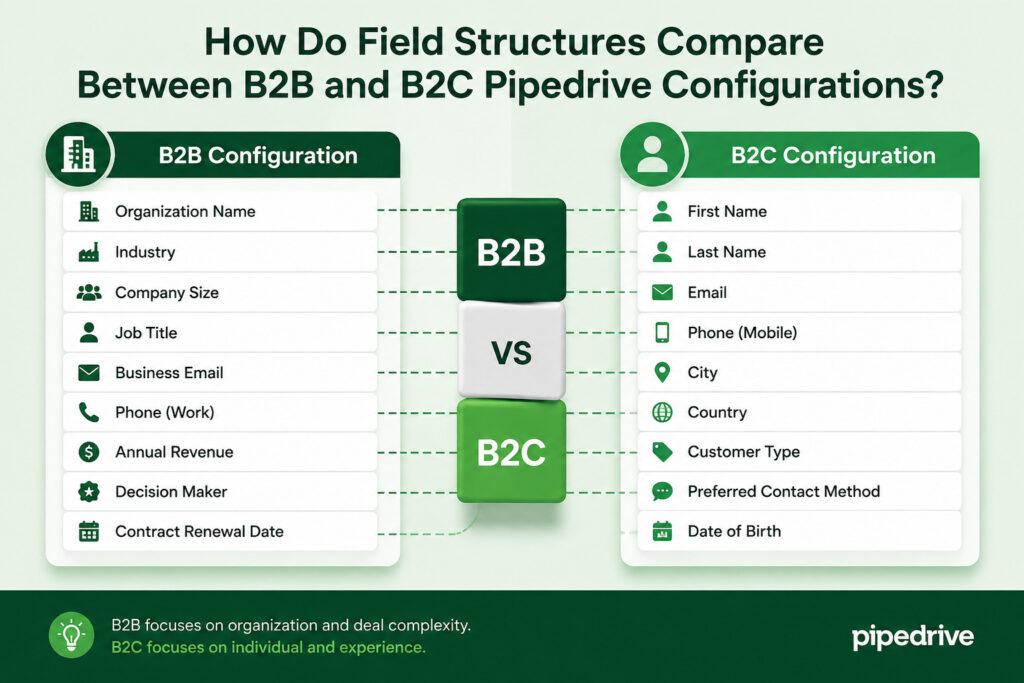
The table below illustrates how the same Pipedrive field categories serve different purposes in B2B and B2C configurations:
| Field Category | B2B Configuration Purpose | B2C Configuration Purpose |
|---|---|---|
| Organization / Company | Industry, size, tech stack, account tier, renewal date | Less relevant; often omitted or simplified to brand/employer |
| Contact (Person) | Role, seniority, buying authority, department | Lead source, communication preference, GDPR consent, loyalty tier |
| Deal — Qualification | Budget confirmed, decision-maker identified, competitor named | Product interest, urgency, campaign source, discount applied |
| Deal — Timing | Expected close date, procurement timeline, board approval date | Lead capture date, follow-up window, offer expiry date |
| Deal — Commercial | Contract value, payment terms, multi-year option | Transaction value, upsell flag, promotion code |
| Required Field Gates | Required at key stages: e.g., budget confirmed before Proposal | Required at entry: lead source and consent fields mandatory |
| Reporting Priority | Pipeline value by account tier, stage conversion by rep | Volume by channel, conversion rate by product, revenue by campaign |
How Should Automation Logic Differ Between B2B and B2C Pipedrive Setups?
Which Automation Patterns Work Best for B2B Sales in Pipedrive?
B2B automation in Pipedrive should prioritize precision over speed. Because B2B deals involve multiple stakeholders and long decision timelines, automation serves primarily to enforce process discipline, eliminate administrative overhead, and ensure consistent follow-through rather than to accelerate raw volume.
The most impactful B2B automation workflows in Pipedrive include: automatic activity creation when a deal enters a new stage (for example, creating a follow-up call task whenever a deal moves to Proposal Sent), automated notification to the sales manager when a deal has not advanced in more than a defined number of days, automatic email sequences triggered by stage transitions that send relevant content or next-step confirmations, and automatic deal creation from inbound web forms or integrated marketing tools like HubSpot or Mailchimp. Furthermore, Pipedrive’s integration with tools like Slack allows automation workflows to post deal update notifications directly to team channels, keeping the broader account team informed without requiring manual status updates.
B2B teams should also use Pipedrive’s smart contact data feature, which automatically enriches contact and organization records with publicly available data from LinkedIn and other sources. This enrichment reduces the manual research burden on salespeople and keeps organizational data current, particularly for accounts with high staff turnover.
How Does B2C Automation in Pipedrive Work at Scale?
B2C automation in Pipedrive operates at a very different scale and pace. Rather than triggering a handful of precision actions for each deal, B2C automation handles high-volume, time-sensitive sequences that would be completely impractical to manage manually. A B2C team processing 500 new leads per week cannot afford to manually send a first-contact email, schedule a follow-up, and update a stage for each one — automation handles all of these steps automatically based on trigger conditions.
Key B2C automation patterns in Pipedrive include: instant automated email response when a new lead enters the pipeline (using Pipedrive’s email templates and automation engine), automatic deal stage advancement when a contact replies to an email or books a meeting, automatic deal closure (as Lost) when a contact has not responded within a defined window, lead rotation to distribute new contacts evenly across the sales team, and automated SMS or WhatsApp outreach through integrations with tools like Twilio or WhatsApp Business API.
Additionally, Pipedrive’s integration with LeadBooster — its built-in lead generation tool — captures B2C prospects from web chatbots and contact forms and immediately places them into the appropriate pipeline with pre-populated fields based on the form data. This zero-touch lead intake process ensures that no prospect falls through the cracks during high-traffic periods, and it starts the automated follow-up sequence the moment the contact enters the system.
What Reporting Configurations Should B2B and B2C Teams Build in Pipedrive?

Which Reports Drive B2B Sales Management?
B2B sales leaders use Pipedrive’s reporting to manage pipeline health, forecast revenue, and coach individual salespeople. The reports that deliver the most value in a B2B context focus on deal velocity, stage conversion, and pipeline composition by account tier or market segment.
Essential B2B reports in Pipedrive include: weighted pipeline value by stage (using the probability percentages assigned to each stage), average deal size by industry vertical or account tier, stage-by-stage conversion rates to identify where deals most commonly stall, deal age report to surface opportunities that have exceeded their expected time in a stage, and won/lost analysis by competitor or reason code. These reports require consistent data entry from the sales team, which is why B2B configurations should invest heavily in required fields and stage-gate validation to maintain data quality.
Pipedrive’s Insights feature allows managers to build custom dashboards that combine multiple report types into a single view. A B2B sales manager’s dashboard might show total pipeline value, number of deals by stage, deals without next activity scheduled, and this quarter’s forecast versus target — all updating in real time as reps work their pipelines. Consequently, managers can run effective one-on-one coaching conversations based on live data rather than relying on manually prepared status reports.
Which Reports Matter Most for B2C Sales Performance?
B2C sales reporting in Pipedrive focuses on volume, velocity, and conversion efficiency rather than individual deal progression. Because B2C teams handle hundreds or thousands of deals simultaneously, aggregate metrics replace deal-by-deal inspection as the primary management tool.
The most valuable B2C reports in Pipedrive include: new leads per day or week by source channel (essential for measuring marketing effectiveness), overall pipeline conversion rate from lead to won deal, average time-to-close by product category or offer type, revenue per lead by source to identify the highest-ROI acquisition channels, and individual rep conversion rates to identify performance gaps and coaching opportunities. Pipedrive’s activity completion reports also provide valuable insight into whether the team is executing the required follow-up volume, since B2C conversion rates correlate strongly with contact frequency in the early pipeline stages.
Furthermore, B2C teams benefit significantly from Pipedrive’s goal-setting features, which allow managers to set weekly or monthly targets for deal volume, revenue, and activities at the individual and team level. Progress toward these goals appears visually on each rep’s dashboard, creating real-time accountability without requiring manual scorecard updates.
How Do B2B and B2C Pipedrive Configurations Compare Feature by Feature?
| Pipedrive Feature | B2B Configuration | B2C Configuration | Why the Difference Matters |
|---|---|---|---|
| Pipeline Stages | 6–8 stages; milestone-based; long dwell time per stage | 3–5 stages; action-based; fast progression | Complexity of the buying process determines stage count |
| Primary Record Type | Deal + Organization; contact linked as stakeholder | Contact (Person); deal often 1:1 with contact | Reflects whether the buyer is an organization or an individual |
| Pipeline Velocity | Weeks to months per deal | Hours to days per deal | Determines automation urgency and follow-up cadence |
| Custom Fields Priority | Org-level and deal-level qualification fields | Contact-level behavioral and preference fields | Data must reflect what actually influences the buying decision |
| Required Fields / Gates | Stage-gate requirements before advancing | Entry-point requirements (source, consent) | Enforces data quality at the moments that matter most |
| Automation Volume | Low volume; high precision; stage-triggered sequences | High volume; time-triggered mass follow-up sequences | Volume and urgency shape automation design entirely |
| Deal Rotting | Set to 7–21 days depending on stage | Set to 1–3 days to flag stale high-velocity contacts | Rotting thresholds must match expected progression speed |
| Revenue Forecasting | Weighted pipeline by stage probability | Volume × conversion rate × average order value | Forecasting model reflects the nature of the revenue stream |
| Key Integrations | LinkedIn Sales Navigator, Slack, DocuSign, Zoom | LeadBooster, Mailchimp, WhatsApp, Stripe, ad platforms | Integration stack mirrors the tools used in each sales motion |
| Reporting Focus | Deal velocity, stage conversion, weighted forecast | Lead volume by source, conversion rate, revenue per lead | Managers need different visibility depending on deal type |
What Should You Take Away About Configuring Pipedrive for B2B vs B2C?
Pipedrive is a genuinely flexible platform, and that flexibility is both its greatest strength and its primary implementation challenge. Organizations that invest the time to configure Pipedrive deliberately for their specific sales model consistently report higher CRM adoption rates, better data quality, more accurate forecasting, and stronger revenue results. Organizations that apply a generic setup or copy a configuration designed for a different sales model typically experience the opposite: a CRM that generates noise instead of signal.
The core distinction is clear. B2B sales in Pipedrive demands a deal-centric, organization-focused architecture with deep qualification fields, stage-gate validation, stakeholder tracking, and weighted pipeline forecasting. Every configuration decision should reflect the complexity of multi-stakeholder organizational buying, the length of the sales cycle, and the need for precise deal-by-deal visibility.
B2C sales in Pipedrive, by contrast, demands a contact-centric, high-velocity architecture with behavioral fields, fast-trigger automation, volume-based reporting, and compressed pipelines that resolve in days rather than months. Every configuration decision should reflect the individual buyer’s journey, the importance of channel attribution, and the need to manage hundreds of contacts simultaneously without sacrificing personalization. Pipedrive supports both models exceptionally well — but only when configured with intentionality and a clear understanding of what each model actually requires.
Partnering with Solution for Guru accelerates this process significantly. With specialized Pipedrive implementation experience across both B2B and B2C environments, the team at Solution for Guru delivers configurations that work from day one, automation workflows that scale with your team, and ongoing support that ensures your Pipedrive investment continues to generate returns as your business grows.
Frequently Asked Questions
Yes, and many organizations with mixed sales models do exactly this. Pipedrive supports multiple pipelines within a single account, allowing B2B and B2C deals to flow through entirely separate pipeline architectures simultaneously. Each pipeline can have its own stages, rotting thresholds, probability weightings, and automation rules. Sales reps who handle only B2B deals see only the B2B pipeline in their daily view, while B2C reps work in their own pipeline — and managers who oversee both can view reports across all pipelines from the Insights dashboard. The key to making a dual-model setup work is maintaining clean separation between the two processes. This means creating distinct custom fields for each pipeline type (using Pipedrive’s pipeline-specific field visibility rules where possible), building separate automation workflows that trigger only within the appropriate pipeline, and configuring separate reporting dashboards for each model.
The right number of pipeline stages depends entirely on the buying process you are modeling, not on what feels comprehensive or looks impressive in a demo. Research from Pipedrive’s own State of Sales and Marketing report suggests that the most effective pipelines typically contain between four and seven stages — enough to capture meaningful milestones without creating so many intermediate stops that reps treat stage advancement as a bureaucratic exercise rather than a reflection of real progress. For B2B sales, six to eight stages generally provide adequate granularity to track the progression from initial qualification through contract signature. Each stage should represent a verifiable external event — something the prospect did or agreed to, not something the salesperson intends to do.
Why Should You Partner With Solution for Guru for Your Pipedrive Configuration?
Configuring Pipedrive correctly for a specific sales model requires more than reading documentation. It requires a deep understanding of how pipeline logic, field architecture, automation sequencing, and reporting interact to either support or undermine the way a sales team actually works. Many organizations invest in Pipedrive and then spend months battling a setup that technically functions but generates frustration because it does not reflect their real sales process. Solution for Guru eliminates this problem by providing expert, sales-model-specific Pipedrive configuration services built on proven methodology and real-world implementation experience.

What Concrete Benefits Does Solution for Guru Deliver for Pipedrive Users?
- Sales model diagnosis: Solution for Guru begins every Pipedrive engagement by mapping the client’s actual sales process — not the idealized version — identifying where the current CRM setup creates friction, and defining what a well-configured Pipedrive should look like for their specific B2B or B2C motion.
- Custom field strategy: Solution for Guru defines the full field architecture — which fields to create, at which record level, with which input types, and which fields to make required at which stages — ensuring that the CRM captures exactly the data leadership needs for forecasting, coaching, and segmentation.
- Automation workflow development: The team builds Pipedrive automation workflows tailored to the client’s follow-up cadence, communication channels, and team structure, covering everything from lead intake and stage progression to deal closure and post-sale handoff.
- Integration setup: Solution for Guru connects Pipedrive to the client’s broader technology stack — whether that includes marketing automation tools, communication platforms, contract management software, or payment systems — ensuring that data flows seamlessly across the sales ecosystem.
- Team training and adoption support: A well-configured CRM only delivers value if the sales team uses it correctly and consistently. Solution for Guru provides role-specific training for sales reps, managers, and administrators, driving adoption from day one rather than leaving teams to self-discover through trial and error.
- Ongoing optimization: As the client’s sales process evolves, Solution for Guru provides continuous support to refine the configuration, add new pipelines for new product lines or markets, and update automation workflows as the team’s needs change.
Whether your organization runs a high-touch B2B enterprise sales process or a high-volume B2C conversion funnel, Solution for Guru brings the Pipedrive expertise to configure the platform precisely for your model — so your CRM becomes an engine for growth rather than an administrative burden.
Recommended:
- Pipedrive CRM Onboarding and Staff Training: How to Achieve 90%+ Adoption Rates
- Calculating the ROI of Pipedrive CRM
- Connecting Creatio with Marketing Automation Tools
- Best Mortgage CRM Systems for Loan Officers
- Best Automotive CRM Systems in 2026: Top Solutions for Dealership Growth
- Traditional CRM vs Social CRM: Which Approach Wins in 2026?
- How Does Creatio Support Omnichannel Marketing Automation?
- What Are the Best Integrations for Creatio CRM in the U.S. Tech Stack?
- Troubleshooting and Common Issues in monday.com CRM
- How Do You Set Up Salesforce and Outlook Integration the Right Way?
- Zoho CRM Implementation Guide for Enterprises
- 5 Essential Pipedrive CRM Features for Successful Sales
- Best HubSpot Integrations for Sales and Marketing Teams
- HubSpot CRM: What It Is and How It Works for Businesses
- Top Pipedrive Tips from the Community That Most Guides Don’t Cover