How Does Freshservice Simplify IT Service Management for Modern Organizations?

IT teams carry an enormous operational load. They field hundreds of support requests each week, manage complex infrastructure, coordinate change approvals, and try simultaneously to improve service quality — all while keeping the business running smoothly. Without the right platform, that workload buries even the most capable teams in manual processes and disconnected tools.
Freshservice changes that equation. Built specifically for modern IT service management, Freshservice delivers a unified platform that brings incident management, asset tracking, change control, and service delivery together in one intuitive interface. It removes the administrative burden so IT professionals can focus on what actually matters: solving problems faster and delivering better service to the people who depend on them.
This article covers everything you need to know about Freshservice — how it works, what it offers, why it stands out in the ITSM market, and how partnering with Solution4Guru helps you get the most from it from day one.
Table of contents
Quick Summary
| Capability | What Freshservice Delivers |
|---|---|
| Incident Management | Automated ticket routing, prioritization, and SLA enforcement |
| Service Catalog | Self-service portal with pre-defined request templates |
| Asset Management | Full CMDB with auto-discovery and lifecycle tracking |
| Change Management | Structured change workflows with approval boards |
| Problem Management | Root cause analysis linked to incidents and changes |
| Automation Engine | No-code workflow automation across all ITSM processes |
| Reporting & Analytics | Real-time dashboards and custom performance reports |
| Solution4Guru | Certified implementation, configuration, and optimization partner |
What Is Freshservice and How Does It Relate to ITSM?
Freshservice is a cloud-native IT service management platform developed by Freshworks. It aligns with the ITIL (Information Technology Infrastructure Library) framework — the globally recognized set of best practices that govern how IT services should be designed, delivered, and continually improved.
ITSM, at its core, is the practice of managing IT services as a structured business discipline rather than a reactive support function. Organizations that implement ITSM effectively see fewer incidents, faster resolution times, lower operational costs, and higher user satisfaction. Freshservice provides the infrastructure to make all of that achievable — without the complexity or cost of legacy ITSM tools.
How Does Freshservice Differ from Traditional ITSM Platforms?
Traditional ITSM platforms — think legacy on-premise systems — require significant infrastructure investment, long implementation cycles, and dedicated admin resources just to keep the configuration current. Freshservice, by contrast, operates entirely in the cloud, deploys in days rather than months, and delivers a consumer-grade user experience that employees actually want to use.
According to Gartner’s IT Service Management Tools Magic Quadrant, cloud-native ITSM platforms have consistently outpaced traditional solutions in adoption rates, partly because they lower the barrier to entry and reduce total cost of ownership significantly. Freshservice consistently earns recognition in this space for its combination of feature depth and usability.
Who Uses Freshservice?
Freshservice serves a wide range of organizations — from mid-market companies with twenty IT staff members to enterprise organizations managing global service operations. Its flexibility makes it equally effective for:
- Internal IT departments supporting employees across multiple locations
- Managed service providers (MSPs) supporting multiple client environments
- Enterprise IT teams running complex, multi-tier service structures
- Non-IT business units (HR, facilities, legal) that need structured service workflows
This breadth of application reflects a core Freshservice design principle: great ITSM should not require a team of consultants to operate.
How Does Freshservice Handle Incident Management?
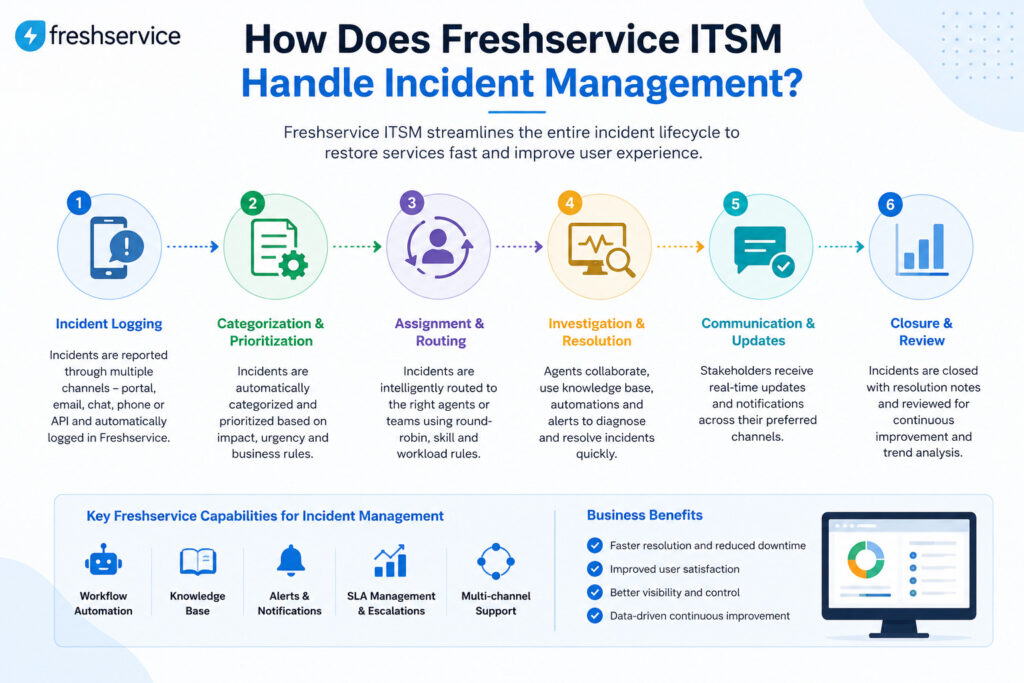
Incident management is the heartbeat of any ITSM platform. When something breaks — a system goes down, an application fails, a user cannot access a critical tool — the speed and accuracy of your response determines business impact. Freshservice builds its incident management module around four principles: visibility, prioritization, automation, and accountability.
How Does Freshservice Route and Prioritize Incidents?
When a user submits a ticket — through email, the self-service portal, a chat integration, or a phone call logged by an agent — Freshservice immediately applies its intelligent routing engine. The system reads ticket attributes (category, keyword, urgency signals) and routes the request to the correct team or agent automatically.
Beyond routing, Freshservice applies priority scores based on configurable rules that combine urgency (how fast the issue needs resolution) with impact (how many users or systems the issue affects). A server outage affecting three hundred users routes immediately to the infrastructure team and escalates to management if no agent acknowledges it within ten minutes. A password reset request routes to the help desk queue and follows a standard SLA track.
What SLA Management Tools Does Freshservice Provide?
Service Level Agreements define the performance commitments your IT team makes to the business. Freshservice enforces them automatically:
- SLA policies — define response and resolution time targets by ticket priority
- SLA escalation rules — automatically notify supervisors or reassign tickets before a breach occurs
- SLA reporting — track compliance rates over time and identify categories where breaches cluster
- Business hours configuration — apply SLA timers only during working hours, or run them 24/7 for critical services
These tools transform SLAs from promises written in a document into enforced operational standards that the system monitors continuously.
How Does Freshservice Support Multi-Tier Support Structures?
Most IT organizations use tiered support: Tier 1 handles common issues, Tier 2 addresses more complex problems, and Tier 3 involves specialists or vendors. Freshservice maps directly to this model. Agents can escalate tickets up the tier structure with full context preserved — every note, attachment, and communication stays with the ticket. Consequently, Tier 2 agents never have to ask users to explain the problem again.
How Does the Freshservice Service Catalog Work?
The service catalog is one of Freshservice’s most impactful features for both IT teams and end users. Rather than routing every request through a generic ticket form, the service catalog lets users browse and request specific IT services — new laptop provisioning, software access, VPN setup, account creation — through structured, self-service forms.
What Can You Include in a Freshservice Service Catalog?
The catalog supports virtually any repeatable IT service. Common categories include:
| Catalog Category | Example Items |
|---|---|
| Hardware requests | Laptop replacement, monitor request, keyboard/mouse |
| Software access | License request, SaaS tool provisioning, upgrade |
| Account management | New user onboarding, role change, account deactivation |
| Network & connectivity | VPN access, Wi-Fi troubleshooting, network drive mapping |
| Security | Password reset, MFA setup, access review |
| Facilities & IT | Conference room equipment, printer setup, desk phone |
Each catalog item includes a custom form that collects exactly the information IT needs to fulfill the request. When a user submits a request, Freshservice creates a structured service ticket with all fields pre-populated, routes it to the correct fulfillment team, and triggers any associated workflows automatically.
How Does the Self-Service Portal Reduce Ticket Volume?
Freshservice pairs the service catalog with a knowledge base — a searchable library of articles, guides, and FAQs that help users resolve common issues without contacting IT. When a user types a query into the support portal, Freshservice surfaces relevant knowledge base articles before the ticket submission screen appears. If the article resolves the issue, the user never creates a ticket at all.
Organizations that actively maintain their Freshservice knowledge base typically see a 20–30% reduction in ticket volume, according to Freshworks customer success data. That reduction directly frees agent time for higher-value work.
How Does Freshservice Manage IT Assets?
IT teams cannot manage what they cannot see. Freshservice’s asset management module gives you a complete, continuously updated picture of every hardware device, software application, and configuration item in your environment.
What Is the Freshservice CMDB?
The Configuration Management Database (CMDB) is the central repository where Freshservice stores all asset records and, critically, the relationships between them. Rather than a flat list of devices, the CMDB maps dependencies — this server supports these three applications, which in turn support these business services.
This relationship mapping delivers immediate operational value. When an agent works an incident involving a specific server, Freshservice surfaces all related configuration items, open incidents on connected systems, and recent changes that might have contributed to the problem. Consequently, root cause analysis that once took hours can surface in minutes.
How Does Freshservice Discover Assets Automatically?
Manual asset inventories become outdated the moment someone adds a new device. Freshservice solves this with automated discovery:
- Agent-based discovery — deploy a lightweight Freshservice agent on Windows, Mac, and Linux endpoints for continuous inventory updates
- Network scanning — probe the network for routers, switches, printers, and unmanaged devices
- Cloud asset discovery — connect to AWS, Azure, or Google Cloud to inventory virtual machines, storage, and services
- Integration-based discovery — sync with MDM tools, Active Directory, and other sources of truth
Every discovered asset populates the CMDB automatically, with hardware specs, installed software, network identifiers, and ownership details.
How Does Asset Lifecycle Tracking Work?
Freshservice tracks each asset from procurement through retirement. At any point, you can see:
- Purchase date, vendor, and contract terms
- Warranty expiration and upcoming renewal dates
- Current assignment (which user or location holds the asset)
- Incident and change history associated with the asset
- Depreciation calculations for financial reporting
This lifecycle visibility helps IT leaders make data-driven decisions about hardware refresh cycles, software license optimization, and vendor contract negotiations.
How Does Freshservice Manage Change and Problem Records?
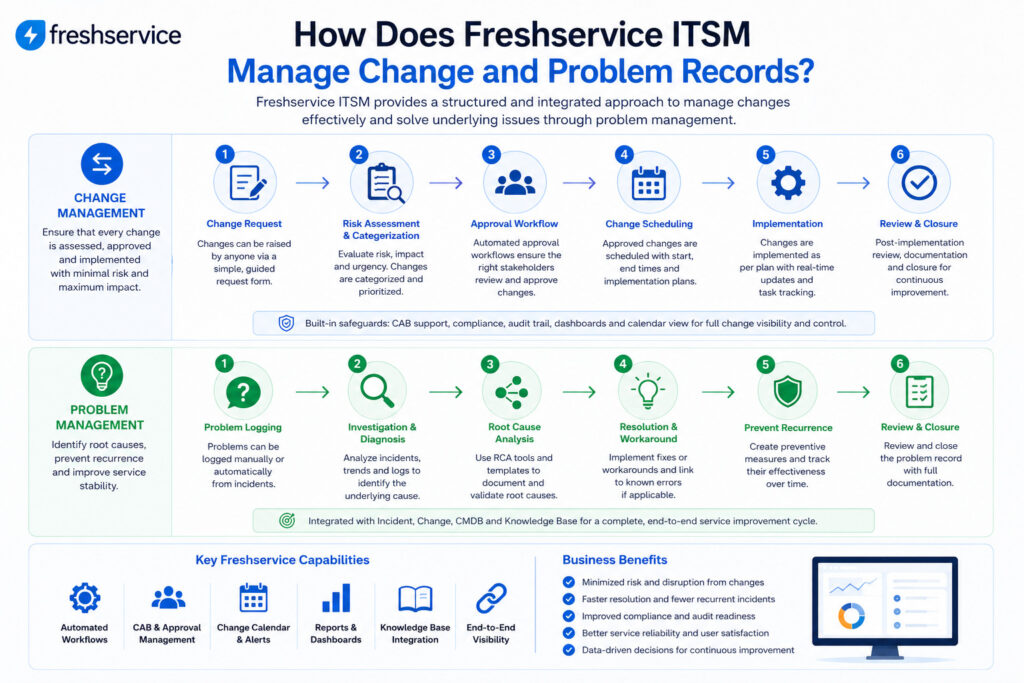
Change management and problem management represent the proactive side of ITSM — the processes that prevent incidents from occurring rather than simply reacting to them. Freshservice builds both into its platform with structured workflows designed to enforce best practices without creating bureaucratic friction.
What Is the Freshservice Change Management Workflow?
Every change — from a software patch to a network reconfiguration to a major infrastructure migration — carries risk. Freshservice manages that risk through a structured change lifecycle:
- Change request submission — requestor describes the change, its impact, rollback plan, and implementation window
- Risk assessment — Freshservice calculates a risk score based on configurable criteria; high-risk changes require additional approvals
- Change Advisory Board (CAB) review — stakeholders review and vote on proposed changes through the Freshservice interface
- Approval and scheduling — approved changes appear on the change calendar, preventing conflicting implementations
- Implementation and closure — the implementing team updates the change record with outcomes, and Freshservice links it to any incidents it caused or resolved
This workflow prevents unauthorized changes, ensures rollback plans exist, and creates a complete audit trail that satisfies compliance requirements.
How Does Problem Management Connect to Incidents?
When multiple incidents share a common root cause, Freshservice lets agents group them under a single Problem record. The Problem record tracks the investigation, workaround, and permanent fix separately from the individual incident tickets. Once the team identifies and resolves the root cause, Freshservice propagates the resolution back to all linked incidents automatically.
This linkage prevents duplicate investigative work — instead of five agents separately investigating the same underlying infrastructure failure, one problem owner coordinates the investigation while others manage user communication through the linked incident tickets.
How Does Freshservice Automation Improve IT Operations?
Automation is where Freshservice moves from a good ITSM tool to an exceptional one. Its no-code workflow automation engine lets IT teams eliminate repetitive manual tasks without writing a single line of code.
What Can You Automate in Freshservice?
The automation engine — called Workflow Automator — triggers actions based on events, conditions, and time. Here are common automation scenarios:
| Trigger | Condition | Automated Action |
|---|---|---|
| New ticket created | Category = “New Employee” | Assign to onboarding team + create checklist tasks |
| Ticket open > 4 hours | Priority = High, unassigned | Escalate to team lead + send Slack alert |
| Change request submitted | Risk score > 70 | Require CAB approval + notify all CAB members |
| Asset warranty date | Expiry within 30 days | Create renewal ticket + notify IT manager |
| Incident resolved | Related to known problem | Update problem record + notify all linked users |
Beyond Workflow Automator, Freshservice offers Freddy AI — its artificial intelligence layer — which suggests ticket categorization, recommends knowledge base articles to agents, and predicts ticket volume trends to help managers plan staffing.
How Does Freshservice Integrate with Other Business Tools?
Freshservice connects to the tools your organization already uses. Native integrations include:
- Microsoft Teams and Slack — agents receive ticket notifications and can update tickets directly from chat
- Jira — sync incidents with development tickets for software-related issues
- Azure AD and Okta — automate user provisioning and deprovisioning
- AWS, Azure, GCP — pull cloud asset data into the CMDB
- ServiceNow — migration path for organizations moving from legacy ITSM
- Zapier and REST API — connect to virtually any additional tool in your stack
These integrations mean Freshservice fits into your existing workflow rather than demanding that your team change how they work.
How Does Freshservice Reporting Support IT Leadership?
IT leaders need data to make decisions, justify budget requests, and demonstrate the value of the IT function to the broader business. Freshservice delivers that data through real-time dashboards and customizable reports.
What Metrics Does Freshservice Track Out of the Box?
Freshservice provides pre-built reports across all ITSM modules:
- Ticket volume and trends — total tickets, new vs. closed, backlog growth
- Resolution performance — average first response time, average resolution time, SLA compliance rate
- Agent productivity — tickets handled per agent, time spent, first-contact resolution rate
- Change success rate — approved vs. implemented changes, failed changes, rollback frequency
- Asset utilization — active assets by type, software license consumption, warranty status
How Do Custom Reports and Dashboards Work?
Beyond pre-built reports, Freshservice lets you build custom dashboards using a drag-and-drop report builder. You can filter by any field, set time ranges, and combine metrics across modules. For instance, you can build a single dashboard that shows SLA compliance alongside agent utilization alongside open problem record count — giving IT leadership a complete operational picture at a glance.
Furthermore, Freshservice supports scheduled report delivery — reports run automatically and email to stakeholders on a daily, weekly, or monthly cadence without any manual intervention.
Conclusions: Why Freshservice Is the Right ITSM Platform for Growing IT Teams
Throughout this article, we have examined Freshservice from every angle — incident management, service catalog, asset tracking, change control, automation, and analytics. The picture that emerges is consistent: Freshservice delivers enterprise-grade ITSM capability in a platform that teams can actually implement, maintain, and improve without an army of specialists.
What makes Freshservice particularly compelling is that it grows with your organization. A twenty-person IT team can start with incident management and the service catalog, then expand into change management, CMDB, and advanced automation as their processes mature. There is no need to rip and replace the platform — Freshservice scales by activating features you already have access to.
The cloud-native architecture means your team gets continuous updates, new features, and security improvements without scheduled maintenance windows or upgrade projects. Freshservice improves automatically, and your team benefits immediately.
For organizations ready to make that investment count from day one, Solution for Guru provides the implementation expertise that transforms Freshservice from a software purchase into a genuine operational upgrade. Their certified consultants ensure that every configuration decision reflects your real processes, your real service commitments, and your real team structure — not generic best practices that may not fit your environment.
The result is an IT operation that responds faster, makes fewer errors, satisfies more users, and demonstrates measurable value to the business. That is what modern ITSM looks like. That is what Freshservice, implemented correctly, makes possible.
Frequently Asked Questions
Implementation timelines depend on scope and complexity. A focused deployment covering incident management, the service catalog, and basic SLA configuration typically takes two to four weeks. A full deployment including CMDB setup, asset discovery, change management workflows, and integrations with multiple business tools typically runs six to twelve weeks. Solution for Guru structures implementations in phases — so you start gaining value from Freshservice quickly while more complex configurations develop in parallel. Most organizations see live agents handling tickets through Freshservice within the first two weeks of a project.
Yes. While Freshservice centers on ITSM, Freshworks designed its architecture to support any business function that delivers services to internal stakeholders. Many organizations run parallel service desks within a single Freshservice instance — IT manages technology services, HR manages employee lifecycle requests, and facilities manages physical workspace requests — all through the same platform, with separate portals, catalogs, and agent teams. This approach gives leadership a unified view of service delivery across the organization while each department maintains its own operational independence.
What Makes Freshservice a Better Choice Than Building IT Processes on a General-Purpose Ticketing Tool?
General-purpose ticketing tools — help desk software not specifically designed for ITSM — lack the structural components that make ITSM effective: a CMDB, change advisory board workflows, problem management linkage, SLA enforcement, and ITIL-aligned process modules. Teams that try to replicate these capabilities through workarounds and custom fields spend enormous time maintaining those customizations instead of delivering service. Freshservice provides all of these components as native, integrated features. Furthermore, because Freshservice follows ITIL conventions out of the box, organizations that implement it gain access to a globally recognized operational framework — and the audit trail, reporting, and compliance documentation that comes with it.
How Does Solution for Guru Help Organizations Implement Freshservice Successfully?
Selecting the right ITSM platform is only the first decision. Implementing it in a way that actually matches your processes, your team structure, and your service commitments requires expertise that most IT organizations do not have in-house. That is exactly where Solution for Guru makes a decisive difference.
What Does Solution for Guru Bring to a Freshservice Implementation?
Solution for Guru is a certified Freshworks partner with deep expertise in ITSM process design and Freshservice configuration. Their team approaches each engagement as a business problem — not a technical installation. They work alongside your IT leadership and service desk teams to:
- Assess your current ITSM maturity — mapping your existing processes, identifying gaps, and defining target-state workflows before touching a single configuration
- Design your service catalog — building catalog items and request forms that reflect how your business actually requests IT services
- Configure the CMDB — setting up asset classes, discovery integrations, and relationship maps tailored to your environment
- Build automation workflows — creating Workflow Automator rules that eliminate your specific manual bottlenecks
- Define SLA policies — translating your service commitments into enforceable Freshservice SLA rules
- Integrate your existing tools — connecting Freshservice to your identity provider, monitoring platform, communication tools, and business applications
- Train your team — delivering role-specific training for agents, team leads, and administrators
Why Does Implementation Quality Matter So Much?

A poorly configured ITSM platform can actually make things worse. Misconfigured routing rules send tickets to the wrong teams. Overly complex approval workflows slow down changes that should move quickly. A service catalog that does not match actual business needs goes unused. Solution for Guru prevents all of these outcomes by bringing proven implementation methodology to every project.
Their consultants have worked across dozens of Freshservice deployments — across industries, team sizes, and complexity levels. That experience means they recognize common pitfalls before they occur and apply configurations that work in production, not just in a demo environment.
What Ongoing Support Does Solution for Guru Provide?
Implementation is not a one-time event. As your organization grows, your IT service structure evolves — new teams form, new tools get adopted, new services launch. Solution for Guru offers ongoing optimization services that keep your Freshservice configuration aligned with your current reality:
- Quarterly configuration reviews to identify automation opportunities
- New module rollouts (project management, asset management expansion)
- Custom reporting and dashboard development
- Process improvement consulting based on your Freshservice performance data
- User adoption support and refresher training
Working with Solution for Guru means you continuously extract more value from Freshservice over time, rather than letting your configuration drift into a state that no longer fits how your team operates.
Recommended:
- How Do Businesses Integrate Slack and Microsoft Teams with ITSM Platforms?
- Automating Software License Tracking with ITSM Solutions: How Can You Take Control?
- Best Microsoft 365 Integrations for ManageEngine and Freshservice
- Integrating Endpoint Management Tools with ITSM Systems
- Aligning ITSM Processes with ISO 20000 Standards
- How Long Does an ITSM Implementation Really Take? Key Factors Explained
- ManageEngine vs Freshservice
- Top ITSM Best Practices Using ManageEngine
- Improving IT Governance and Compliance with ManageEngine ITSM
- Cloud vs On-Premise ManageEngine ITSM: Which Should You Choose?
- Integrating ManageEngine with Microsoft 365
- Automating IT Approvals in ManageEngine Using Workflows
- Designing an Effective ITSM Model for Modern IT Environments
- Common Implementation Mistakes in ManageEngine ITSM (and How to Avoid Them)