ManageEngine SLA Management: How Does It Help IT Teams Meet Every Deadline?
Missing a service level agreement doesn’t just annoy a user; it damages trust in the entire IT department. Yet manually tracking response times, resolution deadlines, and escalation paths across dozens or hundreds of tickets is nearly impossible without the right tooling.
Most IT teams don’t set out to miss deadlines. Instead, they simply run out of visibility: a ticket sits untouched because no one noticed it was aging, or an escalation happens too late to matter. That’s exactly the gap ManageEngine’s SLA management capabilities are built to close. This article explains how SLA management works inside ManageEngine’s ITSM platform, what makes it different from manual tracking, and how IT teams can use it to consistently hit their service commitments.
Table of contents
Quick Summary
If you’re short on time, here’s the condensed version:
- ManageEngine SLA management automates response and resolution deadlines, escalations, and reporting so IT teams stop tracking service commitments in spreadsheets.
- SLAs can be configured per site, priority, category, or requester, giving IT teams the flexibility to match real-world service expectations instead of relying on one-size-fits-all rules.
- Multi-level escalation rules automatically notify or reassign tickets before a deadline is breached, which reduces missed SLAs significantly compared to manual monitoring.
- Operational level agreements (OLAs) let internal teams coordinate their own contribution to a customer-facing SLA, so accountability doesn’t get lost between departments.
- Partnering with an implementation specialist, such as Solution4Guru, helps configure SLA rules correctly the first time and avoids the trial-and-error most teams go through alone.
Therefore, SLA management isn’t just a feature buried in a settings menu. It’s often the difference between an IT department that consistently meets expectations and one that’s constantly firefighting missed deadlines.
How Does ManageEngine ITSM Relate to SLA Management?
ManageEngine ITSM is the umbrella under which SLA management operates. Built primarily around ServiceDesk Plus, ManageEngine’s ITSM suite provides a centralized, ITIL-aligned platform for incident management, problem management, change management, asset management, and service catalog management. SLA management sits at the core of this suite because nearly every other ITSM process, from incident resolution to change approvals, depends on hitting a defined timeline.
Within ManageEngine, SLAs aren’t a bolt-on add-on; they’re woven into the ticket lifecycle itself. When a ticket enters the system, ManageEngine ITSM can automatically apply the correct SLA based on criteria like priority, category, department, or requester type. From there, the platform tracks first-response and resolution timers, pauses them when appropriate, and triggers escalations if a deadline is at risk. Because ManageEngine ITSM covers the full lifecycle, from ticket creation to resolution to reporting, SLA data feeds directly into dashboards, giving IT managers a real-time view of compliance rather than a monthly retrospective.
This integration matters because SLA management in isolation, disconnected from ticketing, automation, and reporting, would only solve part of the problem. ManageEngine’s approach ties SLA enforcement to the same system technicians already use daily, so meeting deadlines becomes a natural byproduct of the workflow instead of a separate administrative task.
How Does SLA Management Fit Alongside Other ManageEngine ITSM Modules?
SLA management doesn’t operate as a standalone feature within ManageEngine ITSM; it interacts closely with incident management, change management, and asset management modules. For instance, when a change request moves through its approval workflow, the associated SLA tracks how long that approval process takes, giving IT leadership visibility into bottlenecks beyond just day-to-day ticket resolution. Similarly, asset data can inform SLA prioritization, since an incident affecting a business-critical server naturally warrants a faster response than one affecting a single low-priority workstation. This interconnection is part of what makes ManageEngine’s approach to SLA management more useful than a standalone timer tool bolted onto a generic ticketing system.
What Is SLA Management, and Why Does It Matter for IT Teams?
Before going deeper into ManageEngine’s specific capabilities, it helps to establish what SLA management actually solves.
What Problems Does Manual SLA Tracking Create?
Without automated tooling, IT teams often rely on spreadsheets, calendar reminders, or simple memory to track which tickets are approaching a deadline. This approach breaks down quickly as ticket volume grows. Technicians do not miss deadlines because they don’t care. They miss them because no reliable mechanism flags at-risk tickets before it is too late. Furthermore, manual tracking makes it nearly impossible to prove compliance to stakeholders, since there’s no consistent audit trail showing when a timer started, paused, or breached.
How Does Automated SLA Management Change the Equation?
Automated SLA management removes the guesswork. Instead of a technician remembering to check ticket age, the system calculates response and resolution timers automatically, factoring in business hours, holidays, and pause conditions. When a deadline approaches, escalation rules trigger notifications or reassignments without anyone needing to intervene manually. As a result, IT teams shift from reactive firefighting to proactive management, catching at-risk tickets hours or days before they become missed commitments.
Why Do Spreadsheets and Manual Reminders Eventually Break Down?
Even a well-intentioned spreadsheet approach tends to fail once ticket volume climbs past a handful per day. Someone has to remember to update it, cross-reference deadlines, and manually notify the right person when something’s at risk. That process depends entirely on human diligence, and diligence naturally slips during busy periods, exactly when SLA violations are most likely to occur. ManageEngine removes this dependency by tying SLA logic directly to the ticketing system itself, so tracking happens automatically regardless of how busy the team gets.
How Does ManageEngine Configure and Apply SLAs?
Once the value of automated SLA management is clear, the next question is how ManageEngine actually implements it in practice.
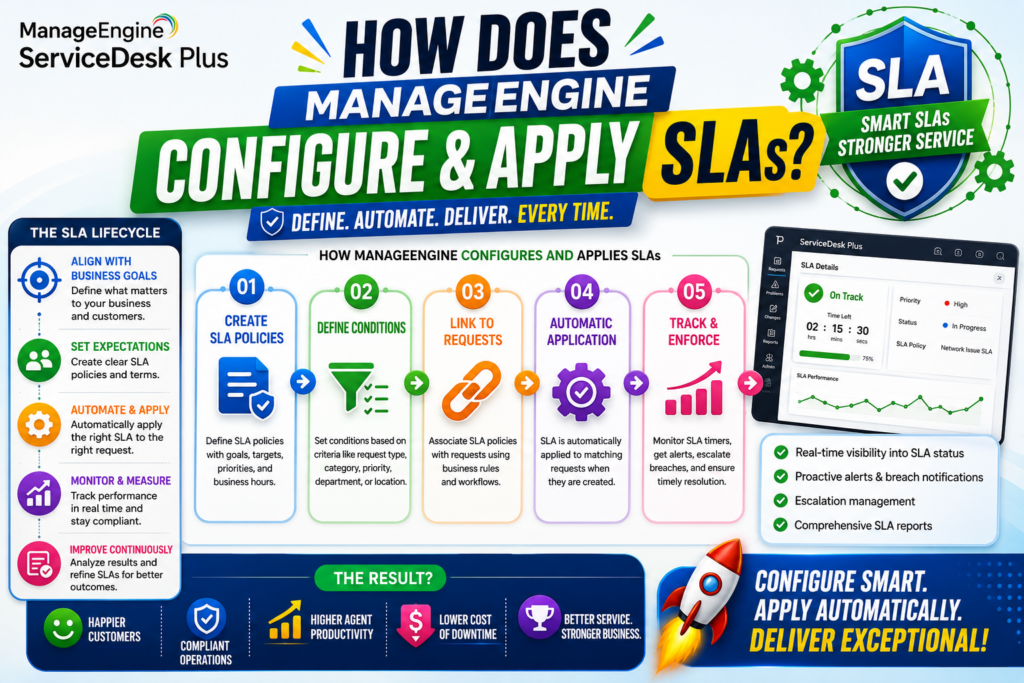
How Are SLAs Automatically Assigned to Incoming Tickets?
ManageEngine ITSM applies SLAs to tickets based on configurable parameters rather than requiring manual selection every time. These parameters typically include:
- Ticket priority (e.g., low, medium, high, critical)
- Impact and urgency levels
- Department or requesting business unit
- Service category or request type
- VIP user status
- Site or location
Because these rules run automatically the moment a ticket is created, technicians don’t need to remember which SLA applies to which situation. This consistency also prevents the common problem of technicians unintentionally applying a lenient SLA to a high-priority issue simply because they were moving quickly.
What Do Response and Resolution SLAs Track Separately?
ManageEngine distinguishes between response time and resolution time, and it tracks each with its own timer. Response time measures how quickly a technician acknowledges a ticket, while resolution time measures how long it takes to actually close it. Separating these two metrics matters because a fast acknowledgment reassures the requester even if full resolution takes longer, and it gives IT managers a clearer picture of where delays are actually occurring, whether that’s in the initial pickup or in the deeper troubleshooting work.
How Do Site-Specific SLAs Support Multi-Location Organizations?
For organizations with multiple offices, branches, or client sites, a single global SLA rarely reflects reality. ManageEngine allows administrators to configure site-specific SLAs. This flexibility lets each site follow a resolution timeline that matches its available resources. For example, a site with slower internet infrastructure or a smaller local IT team can use a longer resolution timeline than headquarters. This flexibility ensures service level targets stay realistic and achievable rather than becoming a source of constant, unavoidable violations.
How Do Escalations and Pause Timers Prevent SLA Violations?
Configuring an SLA is only half the job. The other half is what happens when a ticket starts drifting toward a missed deadline.
What Happens When a Ticket Approaches Its Deadline?
ManageEngine supports multi-level escalation rules, typically allowing one to four escalation stages per SLA. As a ticket approaches its deadline, the system can notify a specific technician, alert a manager, or automatically reassign the ticket to a different group entirely. Because these escalations trigger automatically, at-risk tickets get visibility well before the deadline passes, giving technicians a real opportunity to act rather than discovering the miss after the fact.
Why Do SLA Timers Pause While Waiting on the Requester?
One of the more practical features in ManageEngine’s SLA management is the ability to pause SLA timers when a ticket is awaiting a response from the end user. Without this, a technician could be penalized for a delay caused entirely by a slow-responding requester. Pausing the timer during these wait periods keeps SLA compliance data accurate and fair, and it prevents unnecessary escalations from firing on tickets that are actually just waiting on someone else.
How Are High-Priority Tickets Handled Differently?
For high-priority or high-impact incidents, ManageEngine allows administrators to configure SLAs that apply regardless of business hours, holidays, or weekends. This ensures that a critical outage doesn’t sit untouched simply because it occurred after 5 p.m. on a Friday. Consequently, organizations can maintain strict round-the-clock commitments for their most business-critical issues while keeping standard business-hours SLAs for lower-priority requests.
What Happens When an SLA Is Actually Violated?
Even with proactive escalation, some tickets will still breach their SLA, whether due to genuine complexity or resource constraints. ManageEngine lets administrators configure what happens after an SLA violation. The system can automatically move a ticket to a different group, assign it to another technician, or flag it with a distinct status. These actions make the ticket immediately visible in reports and dashboards. This matters because a missed SLA shouldn’t simply disappear into the same queue as everything else; it needs a clear path toward resolution and, later, toward review so the same bottleneck doesn’t repeat itself.
How Do Operational Level Agreements (OLAs) Support SLA Compliance?
SLAs represent the promise made to the end user or customer, but internal teams often need their own coordination mechanism to actually deliver on that promise.
What Is the Difference Between an SLA and an OLA?
While an SLA defines the commitment between the service provider and the requester, an operational level agreement (OLA) defines how internal teams coordinate to meet that commitment. For example, a customer-facing SLA might promise a four-hour resolution time, but that resolution may depend on the network team, the applications team, and the security team each completing their portion of the work within specific internal windows. ManageEngine allows administrators to configure up to five OLAs per SLA, giving each internal group its own timer and accountability structure.
Why Does This Distinction Matter for Complex Organizations?
Without OLAs, accountability for a missed SLA can become murky, especially when multiple departments touch a single ticket before it’s resolved. By breaking the overall SLA down into internal OLA segments, ManageEngine makes it possible to pinpoint exactly which group caused a delay. This visibility does more than improve reporting. It also helps IT leaders hold more productive, evidence-based conversations with internal teams. Together, they can identify where the process needs improvement and decide how to address those issues.
How Does ManageEngine Report on SLA Performance?
Configuring SLAs and escalations solves the operational side of the problem, but ongoing visibility into performance is equally important for long-term improvement.
What Kind of SLA Reports Are Available?
ManageEngine provides reporting tools that let administrators filter SLA violations and performance data by parameters such as site, category, priority, or technician. These reports can typically be exported in formats like CSV, HTML, XLS, and PDF, making it straightforward to share compliance data with stakeholders who may not have direct access to the platform. For IT managers, this reporting layer transforms SLA management from a purely operational tool into a strategic one, since patterns in missed SLAs often reveal deeper staffing, training, or process issues.
How Can Dashboards Support Real-Time Decision-Making?
Beyond static reports, ManageEngine ITSM offers dashboards that display SLA compliance in real time. Instead of waiting for a monthly report to discover a compliance problem, IT managers can see which tickets are trending toward violation right now and reallocate resources accordingly. Real-world results back this up: some ManageEngine customers have used automation and dashboard visibility within the platform to achieve compliance rates approaching 99%, illustrating how much impact consistent, real-time tracking can have compared to manual oversight.
What Are the Business Benefits of Strong SLA Management?
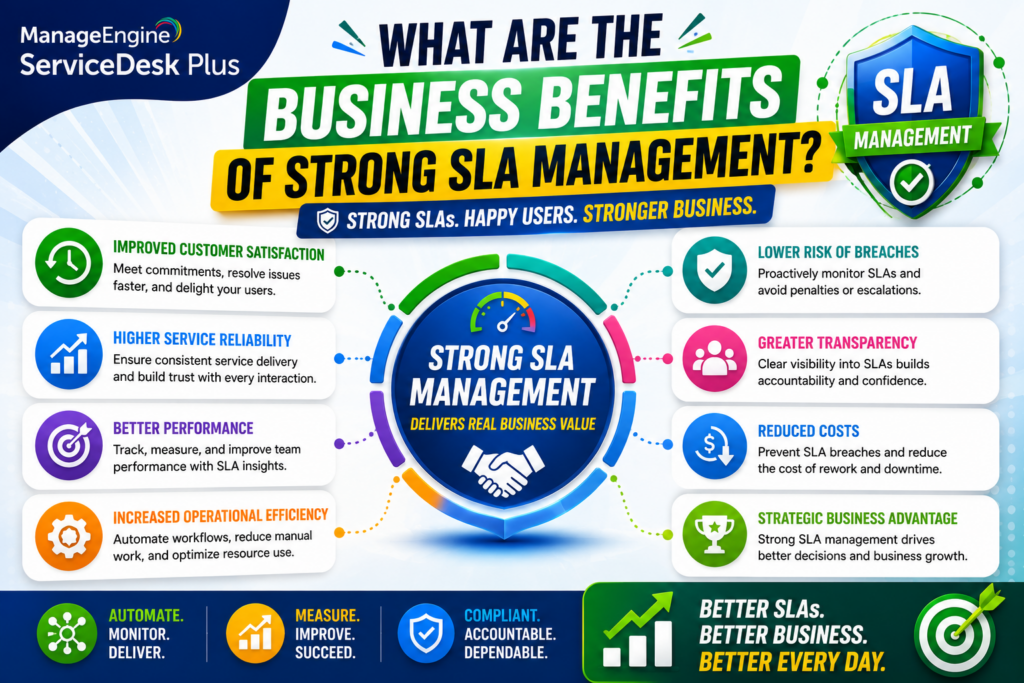
Understanding the mechanics is useful, but it’s worth connecting these features back to tangible business outcomes.
How Does SLA Management Improve Customer and Employee Satisfaction?
When tickets consistently get resolved within promised timeframes, trust in the IT department grows. Employees stop relying on IT because they no longer expect timely support. In managed service provider environments, external customers gain confidence because the provider consistently meets the service levels defined in their contracts. This consistency reduces the friction and frustration that typically drive escalations to management or, worse, complaints that damage the relationship entirely.
How Does Automated SLA Tracking Reduce Operational Costs?
Manually monitoring SLA compliance requires dedicated time from IT staff or managers, time that could otherwise go toward actual problem-solving. Automating this tracking, along with escalation and reporting, frees up that time significantly. Additionally, fewer missed SLAs mean fewer emergency escalations, fewer client relationship repairs, and, in contractual environments, fewer penalty payments tied to service level breaches.
How Does SLA Data Support Continuous Improvement?
Because ManageEngine tracks SLA performance at a granular level, by technician, category, site, or priority, patterns become visible over time. If one category of ticket consistently breaches its SLA, that’s a signal worth investigating, whether the root cause is understaffing, an outdated process, or an unrealistic deadline in the first place. Therefore, SLA data isn’t just a compliance metric; it becomes a diagnostic tool for improving the underlying service delivery process.
How Does SLA Management Support Compliance in Regulated Industries?
For sectors like healthcare and financial services, meeting SLAs often intersects with broader regulatory obligations. Hospitals and clinics, for instance, depend on reliable IT support to keep electronic medical record systems available, while banks and insurers rely on prompt IT response to protect sensitive financial data and meet industry compliance standards. ManageEngine’s audit trails and reporting give these organizations a documented history of SLA performance, which becomes valuable evidence during compliance reviews or audits, not just an internal management metric.
What Does Setting Up SLA Management in ManageEngine Typically Look Like?
For teams considering or newly adopting ManageEngine’s SLA features, understanding the general setup process helps set realistic expectations.
What Are the Core Steps to Configure an SLA?
Setting up an SLA in ManageEngine ITSM generally follows this sequence:
| Step | What Happens |
|---|---|
| 1. Define SLA details | Name the SLA and provide a description for internal reference |
| 2. Set response and resolution times | Establish the target timeframes for first response and full resolution |
| 3. Configure business hour rules | Decide whether the SLA applies regardless of holidays or weekends |
| 4. Set up OLAs | Assign internal group timers if multiple teams contribute to resolution |
| 5. Configure escalation levels | Define up to four escalation stages and who gets notified at each |
| 6. Apply auto-assignment rules | Set criteria (priority, category, site, etc.) so the correct SLA applies automatically |
Following this structure ensures that SLAs aren’t just created in isolation but are properly tied into the broader ticket lifecycle from the moment a request comes in.
What Common Mistakes Should Teams Avoid During Setup?
A few missteps commonly undermine SLA management before it even gets a fair chance to prove its value:
- Setting unrealistic deadlines: SLAs that don’t reflect actual team capacity lead to chronic violations that erode trust in the metric itself.
- Skipping OLA configuration: Without internal OLAs, a multi-team resolution process can leave accountability unclear when something goes wrong.
- Ignoring pause conditions: Failing to configure pause timers for end-user response delays results in unfair, misleading compliance data.
- Overlooking site-specific needs: Applying one global SLA to a multi-site organization often ignores real infrastructure and staffing differences between locations.
- Neglecting regular review: SLAs configured once and never revisited tend to drift out of sync with actual business needs as the organization grows.
Avoiding these pitfalls early on saves significant rework later and helps SLA management deliver value from day one rather than after months of trial and error.
So, What’s the Bottom Line on ManageEngine SLA Management?
ManageEngine SLA management gives IT teams the automation, visibility, and accountability needed to consistently meet service commitments, something manual tracking simply can’t scale to deliver. From automatic SLA assignment and multi-level escalations to OLA coordination and real-time compliance dashboards, ManageEngine turns SLA enforcement from a reactive scramble into a proactive, measurable process.
That said, the platform’s value depends heavily on how thoughtfully it’s configured. Realistic deadlines, properly structured OLAs, and well-planned escalation paths all determine whether SLA management becomes a genuine competitive advantage or just another underused feature. Teams that treat SLA setup as a one-time task, rather than something to revisit as ticket volume and business needs evolve, tend to see compliance rates drift downward over time, even with strong tooling in place.
For organizations serious about consistently hitting their service targets, combining ManageEngine’s SLA capabilities with expert setup support, such as the kind Solution For Guru provides, offers the clearest path to reliable, sustained compliance.
Frequently Asked Questions
ManageEngine typically supports up to four escalation levels per SLA, allowing organizations to notify or reassign tickets at multiple stages as a deadline approaches. This tiered structure ensures that a ticket doesn’t silently breach its SLA without anyone being alerted well in advance.
Can SLAs Be Different for Each Office or Client Site?
Yes. ManageEngine allows administrators to configure site-specific SLAs, so organizations with multiple locations or client accounts can set realistic, tailored response and resolution targets rather than applying one uniform standard across every site.
Yes. When a ticket is awaiting a response from the requester, ManageEngine can pause the SLA timer automatically. This prevents unnecessary escalations and keeps compliance reporting accurate, since delays caused by the end user shouldn’t count against the IT team’s performance metrics.
How Can Solution For Guru Help You Get the Most From ManageEngine SLA Management?
Even a powerful platform like ManageEngine ITSM requires thoughtful configuration to deliver its full value. This is where a specialized implementation partner makes a measurable difference. Solution For Guru helps organizations set up, customize, and optimize ManageEngine’s SLA management capabilities so teams don’t have to learn everything through costly trial and error.
Here’s what that partnership typically adds:
- Accurate SLA design from day one: Instead of guessing at realistic response and resolution windows, Solution4Guru helps map SLAs to actual team capacity and historical ticket data.
- Properly structured escalation paths: Escalation rules configured by an experienced partner reflect your real organizational hierarchy, rather than generic defaults that don’t match how your team actually operates.
- Correctly configured OLAs: For organizations with multiple internal teams contributing to resolution, Solution4Guru ensures OLA timers are set up so accountability stays clear across departments.
- Ongoing tuning as the business evolves: As ticket volume grows or new sites come online, Solution4Guru can help adjust SLA rules so they continue reflecting reality instead of becoming outdated.
- Faster time to value: Guided implementation shortens the runway between purchasing ManageEngine ITSM and actually seeing measurable improvements in SLA compliance.
Ultimately, pairing ManageEngine’s SLA management features with expert implementation support means fewer missed deadlines, clearer accountability, and a faster path to consistent service delivery.

What Does the Solution For Guru Implementation Process Typically Involve?
Working with Solution For Guru generally begins with an assessment of your current ticket volume, team structure, and existing service expectations, whether formal or informal. From there, the team designs SLA and OLA structures tailored to how your organization actually operates, configures escalation rules that match your real reporting lines, and connects the platform to your existing systems and workflows. After go-live, ongoing support ensures SLA rules stay aligned as your business changes, whether that means adding new sites, scaling ticket volume, or adjusting priorities as the organization grows. This structured approach turns ManageEngine SLA management from a configuration exercise into a fully optimized, sustainable part of daily IT operations.
Recommended:
- Freshservice for Growing Companies: When Is the Right Time to Upgrade ITSM?
- Freshservice Change Management: Real-World Configuration Strategies
- What Are the Best Automation Use Cases for ITSM Platforms in Growing Businesses?
- How Does Freshservice Support Compliance and Audit Readiness?
- Freshservice vs Traditional Help Desk Systems: What Has Changed?
- What Reporting and Dashboard Strategies Do High-Performing ITSM Leadership Teams Actually Use?
- What Are ITSM KPIs and Why Do They Matter for Your IT Organization?
- What Is a Self-Service Portal in ITSM and Why Does Your Business Need One?
- ESM vs ITSM: What Is the Difference and Which One Does Your Business Need?
- Freshservice for Non-IT Departments: HR, Facilities, Finance, and Operations
- Can Freshservice Reduce IT Operational Costs?
- ITSM Workflow Optimization Strategies for Hybrid Work Environments
- Breaking Down the ITSM Model: What Are the Core Processes, Roles, and Value Streams?
- Common ITSM Deployment Mistakes Businesses Make — and How to Avoid Them
- ITSM for DevOps Teams: Bridging Agile and Service Management