Multi-Tenant ITSM Architectures: What MSPs Should Know
Managed service providers rarely support just one company. Instead, they juggle dozens, sometimes hundreds, of client environments at once, each with its own tickets, assets, SLAs, and security requirements. A single-tenant help desk simply can’t keep up with that complexity, which is why multi-tenant ITSM architecture has become the standard foundation for MSP tooling. Two platforms that illustrate this shift particularly well are ManageEngine ServiceDesk Plus and Freshservice, both of which offer purpose-built multi-tenant editions for MSPs. This article breaks down what multi-tenant ITSM architecture actually means, why it matters, and how these two platforms approach it.
Table of contents
What Will This Article Cover? A Quick Summary
Before diving into the details, here’s an overview of what’s ahead.
| Section | What You’ll Learn |
|---|---|
| What is multi-tenant ITSM? | The core concept and why MSPs rely on it |
| ManageEngine & Freshservice | How each platform structures multi-tenancy |
| Core architecture components | Data segregation, branding, SLAs, and access control |
| Comparison table | A side-by-side look at both platforms’ MSP capabilities |
| Common challenges | What can go wrong, and how to avoid it |
| Best practices | How MSPs should structure and scale a multi-tenant setup |
| Solution4Guru | Why professional implementation support matters |
| FAQs | Fast answers to common multi-tenancy questions |
In short, multi-tenant architecture is what allows a single ITSM instance to serve many clients at once, without those clients ever seeing each other’s data, workflows, or branding.
How Do ManageEngine ServiceDesk Plus and Freshservice Relate to This Topic?
Both ManageEngine and Freshservice recognized early that MSPs need something fundamentally different from a standard, single-organization help desk, and both built dedicated multi-tenant editions to address that gap.
ManageEngine offers ServiceDesk Plus MSP, a version of its platform built specifically around multi-tenant architecture. It lets MSPs oversee multiple clients within a single interface while maintaining strict data segregation and account-specific automations, SLAs, knowledge bases, and reports. This design directly addresses the core challenge MSPs face: delivering personalized service to every client without running a separate service desk instance for each one.
Freshservice takes a comparable approach through its MSP mode and dedicated “Freshservice for MSPs” offering. Rather than treating multi-tenancy as an add-on, Freshservice was engineered so that each client behaves as its own logical tenant, complete with separate portals, branding, and optional dedicated support email addresses, all while the MSP itself is treated internally as a client too.
This is precisely where the topic of this article takes shape: multi-tenant ITSM architecture isn’t just a marketing term. It’s a specific set of design decisions around data segregation, access control, and configuration flexibility, and comparing how ManageEngine and Freshservice implement these decisions helps MSPs understand what to expect from a platform before committing to one.
What Is Multi-Tenant ITSM Architecture, Exactly?
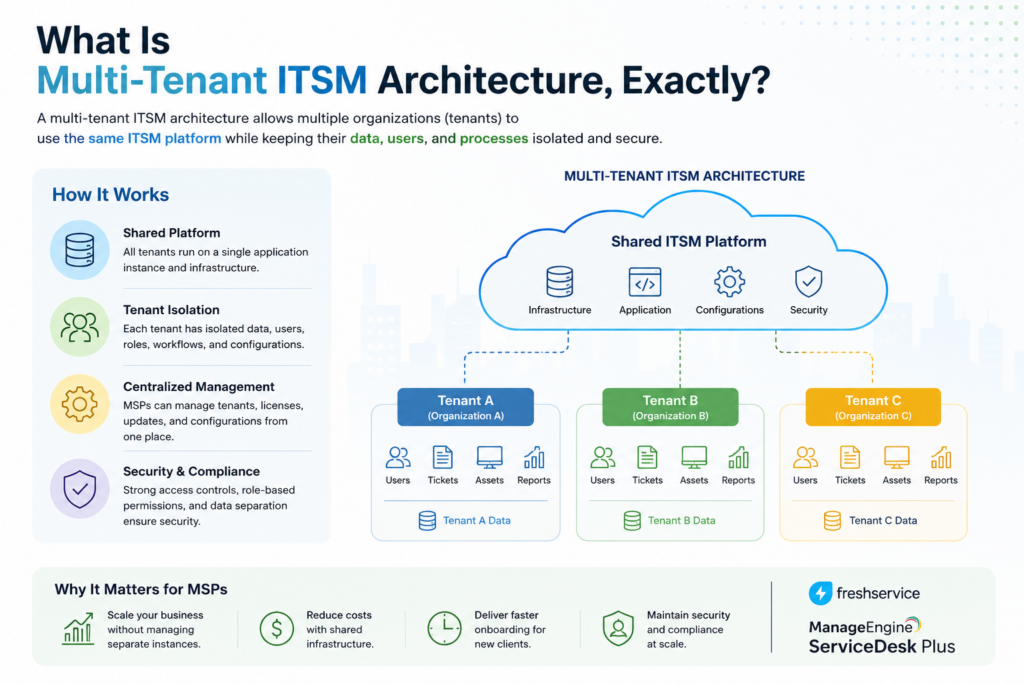
Multi-tenant ITSM architecture describes a system where a single software instance serves multiple, logically separated clients, referred to as tenants. Each tenant’s tickets, assets, contacts, and configurations stay isolated from every other tenant, even though they all run on the same underlying platform.
This differs sharply from a single-tenant model, where each client would need its own dedicated instance of the software. For MSPs, running dozens of single-tenant instances quickly becomes unmanageable: updates, integrations, and reporting all have to be repeated client by client. Multi-tenancy solves this by centralizing infrastructure while still keeping client data strictly separated.
How Does Multi-Tenancy Differ From Multi-Instance Deployment?
Multi-instance deployment involves spinning up a completely separate environment for each client, which offers strong isolation but sacrifices efficiency, since every configuration change or update has to be applied repeatedly. Multi-tenancy, by contrast, shares infrastructure across clients while enforcing separation through the application layer itself, so MSPs get both centralized management and reliable data isolation.
Why Do MSPs Specifically Need This Architecture?
Standard ITSM tools are typically designed for a single organization’s internal IT department. When an MSP tries to force that model to work across many client accounts, workarounds pile up quickly, whether that means using shared inboxes, spreadsheets to track which client owns which ticket, or manually restricting visibility. Purpose-built multi-tenant architecture removes these workarounds by making client separation a native part of how the platform operates.
What Are the Core Components of a Multi-Tenant ITSM Architecture?

A well-designed multi-tenant ITSM platform generally rests on a handful of architectural pillars. Understanding each one helps MSPs evaluate whether a given platform will actually hold up as their client base grows.
How Does Data Segregation Work Across Tenants?
Data segregation ensures that one client’s tickets, assets, and contacts remain completely invisible to another client, even though they share the same underlying platform. This typically works by tagging every transactional record, such as a ticket or asset, with a client identifier and enforcing access control rules that filter results based on that identifier. Both ManageEngine ServiceDesk Plus MSP and Freshservice apply this principle, ensuring that agents working across multiple accounts only see the data relevant to the client they’re currently supporting.
How Do Global and Client-Specific Configurations Coexist?
MSPs need to strike a balance between standardization and customization. Global configurations, such as default SLA templates or automation rules, apply consistently across all clients and reduce administrative overhead. At the same time, individual clients often require their own SLAs, escalation paths, or branding. A strong multi-tenant architecture supports both layers simultaneously, letting MSPs set baseline standards while still accommodating client-specific requirements without duplicating effort.
How Does Role-Based Access Control Fit Into Multi-Tenancy?
Access control becomes more complex in a multi-tenant environment, since permissions need to account for both a technician’s role and which client accounts they’re authorized to support. Robust access control lists (ACLs) applied at the client level ensure that a technician assigned to one account can’t accidentally view or modify tickets belonging to another. This layered permission model is essential for maintaining client trust and meeting contractual confidentiality requirements.
How Does Client-Facing Branding Work in a Shared Platform?
Even though multiple clients share the same backend infrastructure, each one typically expects a support portal that looks and feels like it belongs to their own organization, or at least reflects the MSP’s branding consistently. Multi-tenant platforms generally support customizable logos, header images, and sometimes dedicated support email addresses for each account, so end users never notice they’re interacting with a shared system.
How Does ManageEngine ServiceDesk Plus MSP Structure Multi-Tenancy?
ManageEngine ServiceDesk Plus MSP was built from the ground up around multi-tenant architecture, positioning it as a dedicated MSP product rather than a retrofitted version of its standard ITSM platform.
How Does ServiceDesk Plus MSP Handle Account Management?
The platform allows MSPs to manage all their clients from a single interface while configuring account-specific automations, SLAs, knowledge bases, assets, and reports. Each client account functions as its own segregated space within the larger system, so technicians can move between accounts without data from one client bleeding into another.
How Does ServiceDesk Plus MSP Support Billing and PSA Functions?
Beyond ticketing and asset management, ManageEngine ServiceDesk Plus MSP combines ITSM with professional services automation (PSA) capabilities. It can bill clients automatically based on predefined service plans, sync account details and work logs, and generate invoices on a schedule. This tight integration between service delivery and billing is particularly valuable for MSPs that want to avoid juggling a separate PSA tool alongside their help desk.
How Does ServiceDesk Plus MSP Handle Client-Facing Portals?
Each client account can have its own customized self-service portal, including its own logo and header image, giving end users a branded experience even though the underlying platform is shared. This attention to per-client presentation reflects how seriously the architecture treats tenant-level customization, not just tenant-level data separation.
How Does Freshservice Structure Multi-Tenancy?

Freshservice approaches multi-tenancy through its MSP mode, which transforms a standard Freshservice account into a platform capable of managing multiple client companies from a single instance.
How Does Freshservice Treat Clients as Tenants?
According to Freshworks’ own engineering documentation, Freshservice’s MSP architecture treats each client as a primary module, while the MSP itself is treated internally as a client too. All transactional data links to a specific client and site, which enforces separation and access control at a structural level rather than relying solely on filters applied after the fact.
How Does Freshservice Handle Global Versus Local Configurations?
Freshservice explicitly supports both global configurations, which apply across all clients, and local configurations, which apply to one or more specific clients. This means an MSP can standardize SLA templates and automation rules across its entire client base while still accommodating a client that needs a two-hour response time instead of the standard four-hour target.
How Does Freshservice Manage Client Portals and Communication?
Freshservice MSP mode supports separate portals, branding, and optional dedicated support email addresses for each client, similar in spirit to ManageEngine’s approach. Additionally, it supports multiple languages for client communication, which becomes particularly useful for MSPs supporting clients across different regions or with multilingual staff.
How Does Freshservice Manage Apps and Integrations Across Tenants?
Freshservice also allows administrators to control whether an app or integration is installed account-wide or scoped to specific clients only, keeping tools like an HR document management app invisible to clients or workspaces that shouldn’t have access. This granularity extends the multi-tenant model beyond tickets and assets into the app ecosystem itself.
How Should an MSP Choose Between Multi-Tenant ITSM Platforms?
Choosing a multi-tenant ITSM platform isn’t just a matter of comparing feature lists. It also means thinking through how the platform will hold up operationally as the MSP’s client base grows and diversifies.
What Role Does Client Count Play in Platform Choice?
An MSP supporting five clients has very different needs than one supporting fifty. Smaller MSPs might prioritize ease of setup and a low learning curve, while larger MSPs need to think carefully about how efficiently they can onboard new accounts, apply bulk configuration changes, and generate consolidated reporting across dozens of tenants at once. Both ManageEngine ServiceDesk Plus MSP and Freshservice scale to larger client counts, but the administrative overhead of managing that scale differs based on how much automation and templating each platform supports.
How Should MSPs Weigh Integrated PSA Against a Standalone Tool?
Some MSPs prefer an ITSM platform with billing and professional services automation built in, which reduces the number of tools they need to maintain. Others prefer to use a dedicated PSA tool alongside a more focused ITSM platform, trading some convenience for deeper functionality in each individual system. This decision often comes down to how complex an MSP’s billing structures are and whether they already have PSA software they don’t want to replace.
Why Does Deployment Flexibility Matter for Some MSPs?
Certain clients, particularly in regulated industries, may require on-premise data residency rather than a purely cloud-based solution. MSPs serving these clients need to confirm that their chosen platform supports the deployment model those clients require, since a cloud-only platform could disqualify an MSP from certain contracts entirely.
How Do ManageEngine and Freshservice Compare on Multi-Tenant Architecture?
Both platforms take multi-tenancy seriously, but they differ in how they package it and which capabilities come built in. The table below summarizes the key differences.
| Feature | ManageEngine ServiceDesk Plus MSP | Freshservice (MSP Mode) |
|---|---|---|
| Core architecture | Purpose-built multi-tenant MSP edition | Standard account switched to MSP mode, plus a dedicated MSP suite |
| Data segregation | Strict separation across client accounts | Transactional data linked to client and site, with ACLs at client level |
| Global vs. local configs | Account-specific SLAs, automations, and knowledge bases | Explicit global and local configuration layers |
| Client branding | Custom logo and header per account | Separate portals, branding, and dedicated support emails per client |
| Billing/PSA capabilities | Built-in automated billing tied to service plans | Primarily ITSM-focused; billing typically handled via integrations |
| App/integration scoping | Configured at the account level | Apps can be installed account-wide or scoped to specific clients |
| Multi-language support | Available across editions | Explicitly supported for client communication |
| Deployment options | Cloud and on-premise | Cloud-based |
| Best suited for | MSPs wanting integrated PSA and billing alongside ITSM | MSPs wanting a modern interface with granular app and config scoping |
Overall, ManageEngine ServiceDesk Plus MSP tends to appeal to MSPs that want billing and PSA functions built directly into their ITSM platform, reducing the need for a separate tool. Freshservice, meanwhile, tends to appeal to MSPs that value a modern, cloud-native interface with fine-grained control over configurations and app scoping per client. Both platforms, however, treat data segregation and client-specific customization as non-negotiable architectural requirements.
What Challenges Do MSPs Commonly Face With Multi-Tenant ITSM?

Even with a solid platform, MSPs can run into predictable friction points when managing a multi-tenant environment. Recognizing these challenges early makes them much easier to avoid.
What Happens When Tenant Boundaries Aren’t Configured Correctly?
If access control isn’t set up carefully, technicians can end up with visibility into client accounts they shouldn’t have access to. This isn’t usually intentional; it often happens when a technician is added to multiple accounts for legitimate reasons, but their permissions aren’t scoped tightly enough within each one. Left unchecked, this creates both a security risk and a potential breach of client confidentiality agreements.
How Does Onboarding New Clients Sometimes Go Wrong?
Manually configuring every new client account from scratch invites inconsistency, especially as an MSP scales past a handful of clients. Without standardized templates for SLAs, automations, and knowledge base structures, technicians end up relearning slightly different setups for every account, which slows response times and increases the chance of mistakes.
What Reporting Challenges Come With Managing Many Tenants?
MSPs need visibility across their entire client base, not just one account at a time. Without strong cross-tenant reporting, it becomes difficult to spot patterns, such as a recurring issue affecting several clients simultaneously, or to demonstrate SLA compliance across the whole portfolio during a business review.
How Can Inconsistent Configuration Undermine Client Trust?
Clients notice when their support experience feels inconsistent, whether that means a portal that looks unbranded, an SLA that doesn’t match what was contractually agreed, or a technician who seems unfamiliar with their environment. These inconsistencies often trace back to configuration drift within the multi-tenant setup itself, where account-specific settings weren’t applied correctly or were changed without proper documentation. Over time, this erodes client confidence and can even affect contract renewals, making it just as important to get right as the technical data segregation itself.
What Best Practices Help MSPs Get the Most From Multi-Tenant ITSM?
Getting real value from a multi-tenant platform takes more than simply enabling MSP mode. A few practices consistently separate MSPs that scale smoothly from those that struggle as their client base grows.
How Should MSPs Standardize Onboarding?
Building a repeatable onboarding template, covering default SLAs, escalation paths, and knowledge base categories, ensures every new client starts from a consistent baseline. From there, technicians can layer in client-specific adjustments only where genuinely necessary, rather than reinventing the configuration each time.
How Often Should Tenant Access Be Reviewed?
Just as with role-based access control in a single-tenant environment, tenant-level permissions deserve periodic review. As technicians move between projects or clients change service tiers, access should be updated promptly to prevent former assignments from lingering unnecessarily.
How Should MSPs Approach Cross-Tenant Reporting?
Setting up dashboards that aggregate data across the full client portfolio, alongside individual client-specific reports, gives MSP leadership the ability to spot trends and prove value during client reviews. Both ManageEngine and Freshservice support this kind of reporting, but it usually requires deliberate setup rather than relying on default views alone.
How Should MSPs Document Client-Specific Exceptions?
Every MSP eventually encounters a client with unusual requirements, whether that’s a non-standard SLA, a custom approval chain, or a unique escalation contact. Rather than leaving these exceptions as tribal knowledge held by one technician, documenting them directly within the platform’s client-specific configuration keeps the information accessible to the whole team. This becomes especially important during shift handoffs or when a technician who originally set up an account moves on to other responsibilities, since the next person supporting that client shouldn’t have to reverse-engineer why a particular workflow looks different from the standard template.
Conclusion
Ultimately, multi-tenant ITSM architecture is what makes it possible for an MSP to support many clients profitably from a single platform, without sacrificing data separation or service quality. ManageEngine ServiceDesk Plus MSP builds multi-tenancy directly into its architecture and pairs it with integrated PSA and billing capabilities, making it a strong fit for MSPs that want ITSM and business operations under one roof. Freshservice, meanwhile, treats each client as a structurally separate tenant with both global and local configuration layers, appealing to MSPs that want granular, modern control over how each client account behaves. Whichever platform an MSP chooses between ManageEngine and Freshservice, getting the underlying architecture right, ideally with support from an experienced partner like Solution For Guru, determines whether the platform genuinely scales with the business or becomes a bottleneck as the client list grows.
Frequently Asked Questions
No, multi-tenant architecture benefits MSPs of nearly any size. Even a small MSP managing a handful of clients gains from centralized management, standardized onboarding, and strict data segregation, all of which become significantly harder to maintain manually as the client list grows even slightly.
Generally, yes, though the process varies by platform. Freshservice, for example, allows administrators to switch an account from standard service desk mode into MSP mode. However, migrating existing data and reconfiguring access controls takes planning, so it’s worth approaching this transition deliberately rather than as a last-minute fix.
Multi-tenant platforms typically allow MSPs to set global SLA templates while still overriding them for specific clients that require faster response times or different service terms. This flexibility lets MSPs maintain consistent baseline standards across their portfolio while still honoring individual client contracts.
What Are the Benefits of Partnering With Solution For Guru for Multi-Tenant ITSM Setup?
Configuring a multi-tenant ITSM platform correctly involves more than activating MSP mode. Access controls need to be scoped precisely, onboarding templates need to be built thoughtfully, and reporting needs to reflect both individual client performance and portfolio-wide trends. This is exactly where working with a specialized partner such as Solution For Guru adds real value.

Solution For Guru focuses on tailored digital solutions, including software implementation support and independent reviews across categories like CRM and IT service tools. Partnering with a team like this brings several practical advantages to a multi-tenant ITSM rollout:
| Benefit | Why It Helps |
|---|---|
| Correct tenant architecture from day one | Prevents data segregation mistakes that are costly to fix later |
| Platform-specific expertise | Understands the nuances between ManageEngine and Freshservice MSP editions |
| Standardized onboarding templates | Speeds up new client setup without sacrificing consistency |
| Ongoing access reviews | Reduces the risk of technicians retaining unnecessary tenant access |
| Independent platform guidance | Helps MSPs compare ITSM tools before committing to one |
Rather than learning multi-tenant configuration through trial and error, working with an experienced partner like Solution For Guru helps MSPs design an architecture that scales cleanly, protects client confidentiality, and stays manageable as the client roster grows.
Recommended:
- How Role-Based Access Control Improves ITSM Security
- How Self-Service Portals Improve Employee Experience in Freshservice
- ERP and ITSM Integration: Improving Operational Visibility Across Departments
- Integrating Endpoint Management Tools with Freshservice
- ManageEngine Asset Management (ITAM): Why Businesses Trust It to Control Their IT Assets
- Why Mid-Sized Companies Choose Freshservice Over Enterprise ITSM Platforms
- Best Reporting and Analytics Dashboards for IT Operations Teams in Freshservice
- How ITSM Platforms Support IT Compliance and Audit Readiness
- How ITSM Tools Support Internal IT Risk Management
- How AI Is Changing ITSM Workflows in Freshservice?
- How ITSM Platforms Like Freshservice Support Digital Transformation
- Freshservice CMDB Explained: Structure, Relationships, and Best Practices
- Freshservice for Remote and Hybrid Work Environments
- Automating Employee Onboarding and Offboarding with Freshservice
- ManageEngine ServiceDesk Plus for Mid-Size Business: Is It the Right ITSM Fit?
- ManageEngine ITSM: Standard vs Professional vs Enterprise — Which Edition Fits Your Team?
- ManageEngine SLA Management: How Does It Help IT Teams Meet Every Deadline?
- Freshservice for Growing Companies: When Is the Right Time to Upgrade ITSM?
- Freshservice Change Management: Real-World Configuration Strategies
- What Are the Best Automation Use Cases for ITSM Platforms in Growing Businesses?
- How Does Freshservice Support Compliance and Audit Readiness?