Freshservice Change Management: Real-World Configuration Strategies

Change management failures cost enterprises millions. Gartner estimates that poorly managed IT changes contribute to 80% of unplanned downtime in enterprise environments — downtime that carries an average cost of $5,600 per minute, according to IDC research. Freshservice addresses this challenge directly with a purpose-built change management module that teams can configure to match their actual approval workflows, risk frameworks, and compliance requirements. This article unpacks the real-world configuration strategies that experienced ITSM teams use to make Freshservice change management genuinely effective — not just technically deployed.
Table of contents
QUICK SUMMARY
Freshservice delivers a fully configurable change management module covering change types, CAB workflows, risk scoring, approval routing, and automation. This article explores seven real-world configuration strategies: structuring change types and risk matrices, building CAB workflows that actually work, automating pre-approval checks, integrating change with problem and release management, configuring change calendars and conflict detection, building compliance-ready audit trails, and using analytics to drive continuous improvement. Each strategy includes specific Freshservice configuration steps and common pitfalls to avoid.
How Does Freshservice ITSM Connect to Change Management?

Freshservice — available at Freshservice — is a cloud-native ITSM platform built on ITIL 4 principles and designed specifically for mid-market and enterprise IT organizations. Unlike generic helpdesk tools that bolt on change management as an afterthought, Freshservice treats change management as a first-class ITSM process with its own dedicated module, workflow engine, approval orchestration system, and reporting layer.
Change management in Freshservice operates within a connected ITSM ecosystem. Change records link natively to incidents, problems, assets, and releases — creating the process visibility that ITIL frameworks require and that compliance auditors expect. When a problem record identifies a root cause, the Freshservice agent creates a change request directly from that problem record, preserving the causal chain without manual data re-entry.
Furthermore, Freshservice’s change management module supports the three standard ITIL change categories — standard, normal, and emergency — along with a configurable change advisory board (CAB) workflow, a risk assessment matrix, a change calendar with conflict detection, and a post-implementation review (PIR) process. These capabilities make Freshservice not just a ticketing system with change fields, but a genuine operational platform for managing IT change at scale. The configuration decisions teams make inside this platform determine whether change management becomes a bureaucratic bottleneck or a risk-reduction engine.
Strategy #1: How Should You Structure Change Types and Risk Matrices in Freshservice?
The foundation of effective change management in Freshservice starts with correctly configuring change types and the risk assessment matrix. Many teams make the mistake of importing their legacy change categories without evaluating whether those categories reflect their actual risk landscape — and the mismatch undermines every downstream workflow.
What Change Types Does Freshservice Support?
Freshservice supports three native change types aligned with ITIL 4 guidance. Standard changes cover pre-approved, low-risk, repeatable activities — operating system patching on a defined schedule, SSL certificate renewals, or adding a new user to an existing group. Normal changes require CAB review and full risk assessment before approval. Emergency changes bypass standard CAB timing but still require documented approvals and post-implementation review. Freshservice lets teams create additional custom change types beyond these three, which proves useful for organizations that distinguish between major infrastructure changes and minor application configuration updates.
How Do You Build an Effective Risk Matrix in Freshservice?
Freshservice’s risk assessment matrix combines two dimensions: impact (the breadth of systems and users affected) and likelihood (the probability of failure or unintended consequences). The platform presents this as a configurable matrix where teams define what each cell means in practice — and that definition work is where configuration strategy matters most.
Experienced teams configure the risk matrix using real historical incident data rather than theoretical severity levels. If 70% of your P1 incidents over the past 12 months trace back to database schema changes, your risk matrix should flag database-layer changes as high-impact by default — regardless of how straightforward the change appears on paper. Pull this data from Freshservice’s own analytics module before you finalize risk thresholds.
| Risk Level | Impact Definition | Likelihood Threshold | Required Approvals |
|---|---|---|---|
| Low | Affects <10 users, single non-critical system | Tested in staging, documented rollback | Team lead only |
| Medium | Affects 10–100 users or one business-critical system | Partially tested, rollback defined | Team lead + IT manager |
| High | Affects 100+ users or multiple critical systems | Limited testing, complex rollback | IT manager + CAB |
| Critical | Affects all users, core infrastructure, or compliance | Untested in production equivalent | Full CAB + CISO/CTO |
Additionally, configure Freshservice to auto-populate risk score fields based on the CI (configuration item) linked to the change request. When an agent selects a production database server as the affected CI, Freshservice should automatically suggest a high or critical risk rating — reducing the cognitive load on agents and preventing underestimated risk assessments that skip required reviews.
Strategy #2: How Do You Build CAB Workflows That Actually Approve Changes?
The Change Advisory Board workflow is the centerpiece of normal and high-risk change management in Freshservice. Poorly configured CAB workflows create approval bottlenecks that frustrate change requesters, produce rubber-stamp approvals from reviewers who lack context, or generate delays that push engineers toward unauthorized changes. The goal is a CAB workflow that provides genuine risk oversight without becoming an organizational obstacle.
How Should CAB Membership Work in Freshservice?
Freshservice allows teams to define CAB membership at the platform level and then route specific change requests to subsets of that membership based on change type, affected service, or risk level. Rather than routing every change to every CAB member — which creates notification fatigue and low engagement — configure role-based CAB routing. A network change routes to the network architect and operations manager. An application deployment routes to the application owner and release manager. Only critical infrastructure changes route to the full CAB.
- Define CAB roles in Freshservice based on functional responsibility, not organizational hierarchy
- Configure minimum quorum requirements so approvals do not stall when one member is unavailable
- Set escalation timers that notify CAB managers when approvals exceed defined response windows
- Use Freshservice’s delegate approval feature to prevent single points of failure during vacations
- Record CAB meeting decisions directly in the Freshservice change record for audit continuity
What Approval Workflow Logic Works Best in Freshservice?
Freshservice supports sequential approvals, parallel approvals, and hybrid approval chains within a single change workflow. Sequential approval requires each approver to act before the next receives the request — appropriate for high-risk changes where each reviewer needs to see prior approvals before committing. Parallel approval sends to all required reviewers simultaneously and advances when a quorum responds — appropriate for medium-risk changes where speed matters and reviewers act independently.
Configure Freshservice to auto-approve standard changes that meet all pre-defined criteria without CAB involvement. This removes low-risk work from the CAB queue entirely, giving reviewers mental bandwidth to focus on the changes that genuinely require scrutiny. According to Axelos’ ITIL 4 guidance, standard change automation represents one of the highest-value efficiency opportunities in mature change management programs.
Strategy #3: How Do You Automate Pre-Approval Checks in Freshservice?
Manual pre-approval validation — confirming that a change request includes a rollback plan, a test evidence attachment, a linked CI, and a scheduled maintenance window — consumes significant reviewer time and produces inconsistent results when done manually. Freshservice’s workflow automator lets teams enforce these checks programmatically before the approval chain even begins.
Which Pre-Approval Checks Deliver the Most Value?
The most impactful pre-approval automations in Freshservice address the four most common change request quality failures: missing rollback plans, absent test evidence, unlinked configuration items, and undefined implementation windows. Configure Freshservice to block change submission — or route to a ‘Returned for Information’ status — when any of these fields remain empty. This shifts quality enforcement from the CAB review stage (where incomplete requests waste reviewer time) to the submission stage (where the requester can immediately correct the gap).
| Automation Check | Trigger Condition | Freshservice Action | Benefit |
|---|---|---|---|
| Rollback plan validation | Change submitted with rollback field empty | Return to requester with comment | Eliminates unrecoverable changes entering CAB |
| Test evidence attachment | High/Critical risk change has no attachment | Block submission, notify requester | Ensures testing documentation before review |
| CI linkage check | Change request has no associated CI | Warn requester, require confirmation | Maintains CMDB accuracy and impact analysis |
| Maintenance window conflict | Scheduled time overlaps existing freeze period | Auto-flag conflict, notify change manager | Prevents scheduling collisions automatically |
| Implementer availability | Assigned implementer has conflicting change same day | Notify change manager for reassignment | Reduces day-of implementation failures |
How Do You Configure These Automations in Freshservice?
Navigate to Admin → Workflow Automator in Freshservice and create event-based rules triggered by ‘Change Raised’ or ‘Change Updated’ events. Use condition blocks to check field values — ‘Rollback Plan is empty AND Risk is High OR Critical’ — and action blocks to set status, add a private note explaining the gap, and notify the requester. Test each automation on a sandbox change record before activating in production. Freshservice’s automator logs every rule execution, which lets you verify that checks fire correctly and diagnose edge cases where conditions overlap unexpectedly.
Strategy #4: How Should You Integrate Change Management With Problem and Release Records in Freshservice?
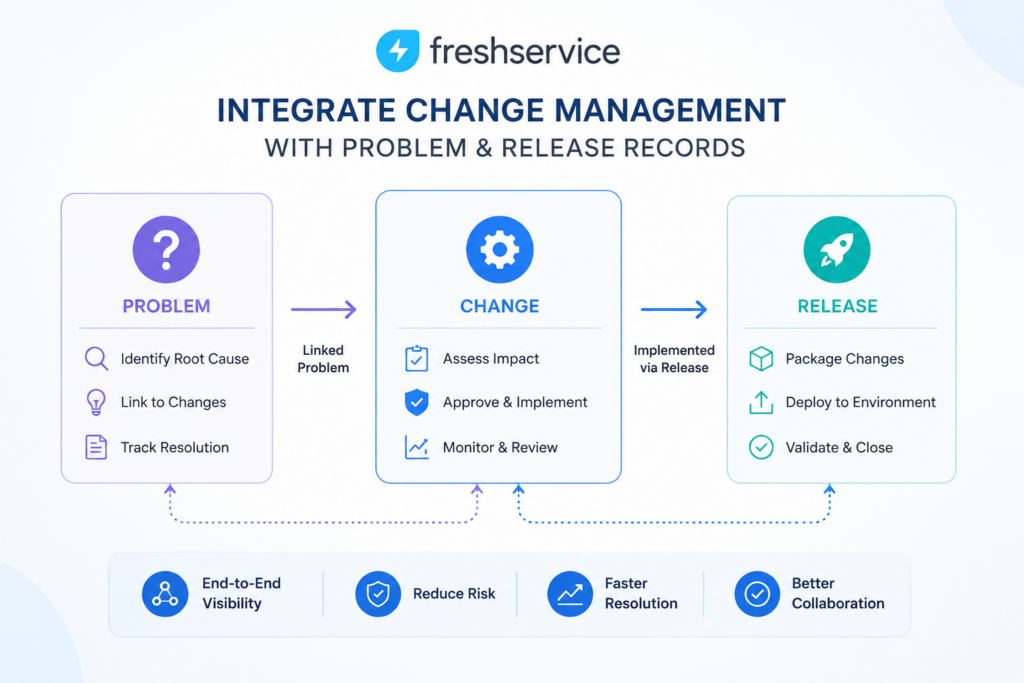
Siloed change management — where change requests exist independently of the incidents that triggered them and the releases they enable — produces incomplete audit trails, duplicated effort, and post-implementation surprises. Freshservice’s native process linking capabilities eliminate this silo when teams configure them deliberately.
How Does Freshservice Link Problems to Changes?
When a problem record reaches ‘Root Cause Identified’ status in Freshservice, the problem manager should create a change request directly from the problem record using the ‘Create Change’ action. This action pre-populates the change record with the problem description, the affected CI, and the problem’s linked incidents — giving the CAB full causal context during review. The problem record then displays the linked change and its current status, so the team managing the problem knows exactly when the remediation change reaches implementation without checking separately.
Configure Freshservice to automatically move the linked problem to ‘Change in Progress’ status when the associated change enters the implementation stage. Similarly, configure it to move the problem to ‘Resolved’ when the change closes successfully with a post-implementation review confirming resolution. This automated status chain eliminates manual status updates and keeps both records accurate in real time.
How Does Freshservice Coordinate Changes With Releases?
For organizations running a formal release management process, Freshservice allows multiple change requests to group under a single release record. The release record tracks the overall deployment — including the release window, the deployment team, and the go/no-go decision — while individual change records track the specific changes that compose the release. This structure gives the release manager a single dashboard view of all changes scheduled for a deployment event without losing the granular approval and risk documentation that each change record provides.
- Group related changes under a release record for coordinated deployment planning
- Use the release record to set a shared freeze-period window that all child changes respect
- Configure Freshservice to block individual change closure until the release PIR completes
- Link release records to the service catalog items that the release updates
Strategy #5: How Do You Configure the Change Calendar and Conflict Detection in Freshservice?
Scheduling conflicts between simultaneous changes on interdependent systems represent one of the most preventable sources of change-induced incidents. Freshservice’s change calendar provides visibility into scheduled changes across the organization — but realizing its full value requires deliberate configuration of freeze periods, CI dependency mapping, and calendar permission structures.
What Makes a Change Calendar Configuration Effective?
An effective Freshservice change calendar starts with defining recurring freeze periods that reflect your business reality: financial month-end close windows, peak retail seasons, annual reporting periods, and major product launches all warrant change freezes on business-critical systems. Configure these as recurring blackout periods in Freshservice so that any change scheduled during a freeze period automatically triggers a warning flag and routes to a change manager for explicit override approval.
Beyond freeze periods, configure CI relationship mapping in the Freshservice CMDB so that the change calendar can detect when two changes affect the same CI or CIs with documented dependencies. When a network change and a security policy update both target the same core router on the same evening, Freshservice should surface that conflict during scheduling — not during the 2 AM maintenance window when both teams are mid-implementation.
| Calendar Configuration Element | Purpose | Configuration Location in Freshservice |
|---|---|---|
| Recurring freeze periods | Block changes during high-risk business windows | Admin → Change Management → Change Calendar |
| Ad-hoc freeze periods | Emergency blackouts for incidents or audits | Change Calendar → Add Blackout Period |
| CI dependency relationships | Detect scheduling conflicts on related infrastructure | Admin → CMDB → CI Relationships |
| Calendar permission levels | Control who can view, create, and override schedule | Admin → Roles → Change Manager permissions |
| Change density alerts | Warn when too many changes cluster in a single window | Workflow Automator → Change Volume rule |
How Do You Manage Emergency Changes on the Calendar?
Emergency changes that bypass the standard scheduling process represent the highest risk to calendar integrity. Configure Freshservice to require explicit ‘Emergency Change’ type selection — rather than allowing agents to schedule a normal change in an emergency window — and attach a separate emergency approval workflow that requires change manager sign-off within a defined time limit. After implementation, Freshservice should automatically create a post-implementation review task and a retroactive CAB review notification so the emergency process receives proper oversight even under time pressure.
Strategy #6: How Do You Build a Compliance-Ready Audit Trail in Freshservice?
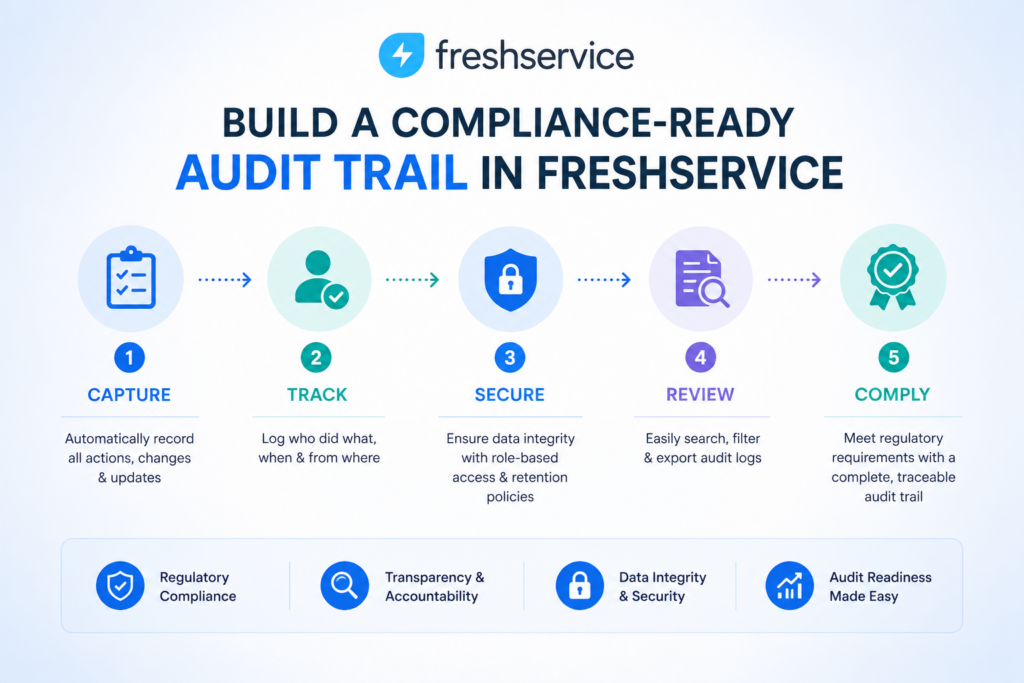
IT change management sits at the intersection of operational risk and regulatory compliance. Organizations subject to SOX, ISO 27001, HIPAA, PCI-DSS, or ITIL audit requirements need change records that tell a complete, tamper-evident story — from initial request through risk assessment, approvals, implementation, and post-implementation review. Freshservice supports compliance-grade audit trails when teams configure them correctly.
What Does a Compliance-Grade Change Record Contain?
A compliance-ready change record in Freshservice captures seven categories of information that auditors consistently request: the original change request with requester identity and timestamp; the completed risk assessment with individual field values; all approval decisions with approver identity, decision, and timestamp; any approval rejections with documented rationale; the implementation log with actual start and end times; the post-implementation review with success or failure classification; and all associated attachments including test evidence, rollback plans, and communication records.
Configure Freshservice custom fields to enforce completion of all seven categories before a change can close. Use mandatory field settings on risk assessment fields, PIR outcome fields, and actual implementation time fields. This configuration prevents agents from closing changes without completing required documentation — a common audit finding in organizations that rely on agent discretion for field completion.
How Do You Use Freshservice Activity Logs for Audit Evidence?
Freshservice automatically generates an activity log for every change record that captures every field update, status transition, approval action, and note addition with the acting agent’s identity and the precise timestamp. This log is read-only and tamper-evident — agents cannot edit or delete activity log entries. For audit purposes, export change records with their full activity logs using Freshservice’s report export functionality or the API, and store them in your document management system alongside the broader audit evidence package.
- Enable mandatory fields on risk matrix, rollback plan, and PIR outcome before change closure
- Configure Freshservice to require a closure code that distinguishes successful, failed, and rolled-back changes
- Schedule a monthly automated export of closed change records for compliance documentation
- Use Freshservice’s audit log API endpoint to feed SIEM tools that require real-time change event feeds
- Restrict change record deletion permissions to system administrators only to preserve audit chain
Strategy #7: How Do You Use Freshservice Analytics to Drive Change Management Improvement?
Change management processes that never get measured never improve. Freshservice’s analytics module provides the change-specific metrics that process owners need to identify bottlenecks, reduce failure rates, and build the case for process investment — but only when teams configure meaningful dashboards and review them on a regular cadence.
Which Change Management Metrics Matter Most?
The most operationally significant change management metrics in Freshservice fall into three categories: volume metrics (how many changes, by type and risk level, over a defined period), quality metrics (what percentage of changes fail, roll back, or cause post-change incidents), and process efficiency metrics (how long changes spend at each workflow stage). Together, these three metric families reveal whether your change management process reduces risk effectively, processes changes at acceptable speed, and improves over time.
| Metric | What It Measures | Target Benchmark | Freshservice Report |
|---|---|---|---|
| Change Success Rate | % of changes implemented without rollback or incident | >95% for normal changes | Change Overview → Success Rate |
| Emergency Change Ratio | % of all changes classified as emergency | <5% of total change volume | Change Type Distribution |
| Mean Time to Approve (MTTA) | Avg hours from submission to first CAB approval | <24 hrs for normal changes | Change SLA Report |
| Post-Change Incident Rate | % of changes linked to an incident within 72 hrs | <3% industry benchmark (Gartner) | Incident-Change Correlation |
| Unauthorized Change Rate | Changes deployed without approved change record | 0% (compliance requirement) | Custom Field Report |
| CAB Approval Cycle Time | Avg days from CAB submission to full approval | <5 business days | Approval Workflow Analytics |
How Do You Build Effective Change Dashboards in Freshservice?
Create role-specific dashboards in Freshservice Analytics that surface the metrics each stakeholder actually needs. Change managers need the daily view: changes scheduled for the next 48 hours, changes awaiting approval past their SLA, and any changes flagged as high or critical risk. IT directors need the monthly trend view: change success rate over time, emergency change ratio, and post-change incident correlation. Process improvement teams need the diagnostic view: approval cycle time by change type, most common rejection reasons, and average implementation time versus estimated.
Schedule automated weekly report delivery to change managers and IT leadership through Freshservice‘s scheduled report feature. Consistent exposure to change metrics builds the organizational habit of data-driven process review — and surfaces degrading trends before they produce compliance findings or major incidents.
What Does Effective Freshservice Change Management Actually Deliver?
Organizations that implement these seven configuration strategies in Freshservice consistently report three measurable outcomes. First, post-change incident rates drop — because pre-approval automation catches incomplete requests before they reach implementation, and CI dependency checking prevents scheduling collisions that previously caused unplanned outages. Second, change cycle times improve — because CAB workflows route to relevant reviewers rather than entire boards, and standard change automation removes low-risk work from human queues entirely. Third, audit readiness improves dramatically — because mandatory field enforcement and Freshservice’s tamper-evident activity logs ensure every change record tells the complete compliance story.
Freshservice provides all the technical building blocks for world-class change management: configurable change types, sophisticated CAB workflow orchestration, pre-approval automation, process linking, a change calendar with conflict detection, compliance-grade audit trails, and analytics. However, the configuration decisions your team makes inside these building blocks determine whether Freshservice change management reduces risk in practice or simply generates paperwork.
The strategies in this article translate Freshservice‘s capabilities into operational reality. Start with the risk matrix and change type configuration — the foundation everything else builds on — then layer CAB workflow optimization, pre-approval automation, and analytics on top. Each layer compounds the value of the ones beneath it, and each configuration decision you make deliberately saves your team from an incident that would otherwise have been preventable.
Frequently Asked Questions
Freshservice addresses emergency change governance through a dedicated Emergency Change workflow that runs in parallel with the standard normal change process — faster, but never ungoverned. When an agent creates an emergency change, Freshservice activates an expedited approval chain that notifies a pre-defined emergency CAB group (typically the change manager, the IT director, and the relevant service owner) simultaneously rather than sequentially. Approvals collect in parallel with a defined minimum quorum threshold — often two of three — so a single unavailable reviewer does not block critical remediation. After implementation, Freshservice automatically creates a post-implementation review task and schedules a retroactive CAB review within a configurable window (typically 72 hours). This retroactive review examines whether the emergency classification was appropriate, captures lessons learned, and formally closes the change record.
Yes — Freshservice integrates with modern CI/CD toolchains through its API, webhooks, and native integrations with tools including Jira, Jenkins, GitHub, GitLab, and Azure DevOps. In a DevOps-aligned change management configuration, deployment pipeline events trigger Freshservice change record creation automatically: when a deployment pipeline receives approval to promote code to production, a webhook fires to Freshservice that creates a standard change record, links the release artifact, and logs the pipeline approval as the first approval event. If the deployment succeeds, the pipeline sends a second webhook that closes the change record with a success status and actual implementation times. If the deployment fails and triggers an automatic rollback, the webhook creates a change failure record and links it to the incident that the monitoring system generates.
Benefits of cooperation with Solution for Guru company

Configuring Freshservice change management to deliver genuine risk reduction — rather than just process compliance — requires experience across dozens of real-world implementations. Solution for Guru is an ITSM implementation consultancy that specializes in deploying and optimizing Freshservice for mid-market and enterprise IT organizations across multiple industries.
When you partner with Solution for Guru, your team gains: Change management process design that aligns your Freshservice configuration with ITIL 4 best practices and your actual operational workflow — not a generic templateCAB workflow configuration that routes approvals to the right reviewers at the right time, eliminating both bottlenecks and rubber-stamp approvalsRisk matrix calibration based on your historical incident data, so high-risk changes receive appropriate scrutiny and low-risk changes move efficientlyCompliance-ready audit trail configuration for SOX, ISO 27001, HIPAA, PCI-DSS, and ITIL audit requirementsAnalytics dashboard setup and KPI definition so your change management process improves continuously from day one Visit solution4guru.com to start your Freshservice change management configuration project.
Recommended:
- Freshservice Change Management: Real-World Configuration Strategies
- What Are the Best Automation Use Cases for ITSM Platforms in Growing Businesses?
- How Does Freshservice Support Compliance and Audit Readiness?
- Freshservice vs Traditional Help Desk Systems: What Has Changed?
- What Reporting and Dashboard Strategies Do High-Performing ITSM Leadership Teams Actually Use?
- What Are ITSM KPIs and Why Do They Matter for Your IT Organization?
- What Is a Self-Service Portal in ITSM and Why Does Your Business Need One?
- ESM vs ITSM: What Is the Difference and Which One Does Your Business Need?
- Freshservice for Non-IT Departments: HR, Facilities, Finance, and Operations
- Can Freshservice Reduce IT Operational Costs?
- ITSM Workflow Optimization Strategies for Hybrid Work Environments
- Breaking Down the ITSM Model: What Are the Core Processes, Roles, and Value Streams?
- Common ITSM Deployment Mistakes Businesses Make — and How to Avoid Them
- ITSM for DevOps Teams: Bridging Agile and Service Management