
Why Do Growing Businesses Choose HoorayHR?

Growth changes how a company handles people. You hire faster, approve more leave requests, and store more contracts than any spreadsheet can track. Many founders feel this strain somewhere between their tenth and fiftieth employee. At that point, HR admin starts to steal hours from sales, product, and customers.
HoorayHR gives small and mid-sized companies one place to manage that workload. This article explains why growing businesses choose HoorayHR, what the platform does, what it costs, and where it fits best. Additionally, it shows how a technology partner such as Solution for Guru can connect HR software to the rest of your stack.
Table of contents
What You Should Know in Brief About HoorayHR
Here is the short version before the details.
- What it is: HoorayHR is an all-in-one HR tool for small and medium-sized businesses.
- What it replaces: Loose spreadsheets, paper contracts, and scattered leave emails.
- What it costs: Software directories list plans from roughly €6.75 to €9.25 per user per month, and it offers a free trial.
- What users say: Capterra shows a 4.8/5 rating from 12 reviews.
- Where it falls short: Reviewers and analysts note limited advanced HR depth and possible friction when you connect payroll or accounting tools.
- Who it suits: Teams that want quick setup, clear pricing, and personal support rather than an enterprise suite.
How Does HoorayHR Relate to Growing a Business?

HoorayHR sits at the center of this topic because it targets the exact moment when informal HR habits stop working. The platform digitizes personnel files, leave registration, absence tracking, working hours, contracts, and documents, and keeps everything in one system.
Why Does HoorayHR Fit Small and Mid-Sized Teams?
HoorayHR focuses on SMEs rather than large enterprises. Typical clients include small and medium-sized enterprises and non-profit organizations. The interface is available in Dutch, English, and German, and the mobile version runs on Android devices, iPhones, and iPads. This lets a growing company with staff in various locations use the same tool without additional training materials.
What Role Does HoorayHR Play as You Scale?
HoorayHR acts as the system of record for your people data. Managers approve leave, employees update their details, and HR staff find contracts in seconds. As a result, the founder or office manager stops acting as the human database. That shift matters because growth only works when processes keep running without one person holding every detail.
What Does Growth Really Do to Your HR Workload?
Growth multiplies small tasks. Each new hire brings a contract, an onboarding checklist, a leave balance, and a set of documents. Therefore, the admin load grows faster than headcount.
Why Do Spreadsheets Stop Working?
Spreadsheets work well for five people. They break down for thirty. Versions multiply, formulas fail silently, and sensitive files travel by email. Moreover, nobody sees who changed what. A dedicated HR platform replaces that fragile setup with one controlled record per employee.
How Much Time Does Admin Consume?
The numbers explain the urgency. A QuickBooks analysis reports that entrepreneurs spend about 36% of their workweek on small administrative tasks. Meanwhile, TriNet states that HR managers can spend up to 40% of their time on manual HR work and data transfer between systems. In addition, HiBob’s HR statistics show that 77% of small businesses employ five or fewer HR professionals. Small teams therefore carry a heavy load with very little help.
What Do Growing Companies Need From HR Software?
Most growing teams look for the same core capabilities:
- A central employee database with documents and contracts
- Self-service leave and absence requests
- Simple onboarding and offboarding steps
- Predictable per-user pricing
- Fast setup without a long implementation project
HoorayHR targets this list directly, which explains much of its appeal.
What Hidden Costs Does Manual HR Create?
Manual HR looks free, but it carries real costs. Employees wait for answers about leave balances. Managers approve requests in chat threads and lose track of them. Meanwhile, the founder spends evenings fixing records that should take minutes. Each delay slows decisions, and slow decisions cost a growing company momentum. Moreover, contract errors or missing records can turn into disputes that take even more time. A platform like HoorayHR turns these scattered chores into routine steps, giving leaders their time back.
Which HoorayHR Features Attract Growing Teams?

HoorayHR bundles the daily HR tasks that eat up time. Each feature removes a manual step, and together they give a growing company a repeatable HR routine.
How Does HoorayHR Centralize Employee Data?
HoorayHR stores employee profiles, contracts, and documents in a single database. As a result, HR staff stop hunting through shared drives and inboxes. GetApp highlights employee profiles and the employee database among the features users value most. A central record also gives you one reliable answer when someone asks who signed which contract and when.
How Does HoorayHR Manage Leave and Absence?
Leave registration and absence tracking sit at the core of the platform. Employees request time off, managers approve it, and the system automatically updates balances. Furthermore, managers see requests in one place, so they can plan coverage before a gap appears. This self-service flow cuts the back-and-forth messages that clog an office manager’s day. In practice, one person no longer needs to maintain a separate leave spreadsheet.
Does HoorayHR Support Onboarding and Mobile Use?
GetApp lists onboarding, offboarding, and a mobile app as platform features. New hires receive a structured start, and departing staff follow a clear exit routine. Meanwhile, mobile access lets field teams and remote workers request leave without logging in from a desktop.
What Does the Feature Set Look Like at a Glance?
| Need | How HoorayHR addresses it |
|---|---|
| Personnel files | Digital employee profiles and documents |
| Time off | Leave requests, approvals, and absence tracking |
| Working hours | Hours registration inside the same system |
| Contracts | Central storage and easy retrieval |
| New hires and leavers | Onboarding and offboarding workflows |
| Expense claims | Included in the Plus plan, per directory listings |
| Access anywhere | Mobile support and three interface languages |
How Does HoorayHR Simplify Daily Work for Managers?
Managers want fewer interruptions, not more dashboards. HoorayHR gives them one place to review leave requests, check absences, and find employee documents. As a result, a team lead no longer asks HR for a contract copy or a leave balance. Employees also gain clarity because they see their own information without sending a message. As a result, HR questions drop, and managers spend more time coaching their teams. This everyday relief often matters more to a growing company than any advanced feature.
How Much Does HoorayHR Cost for a Growing Company?

Predictable pricing helps founders budget while headcount changes. HoorayHR uses a per-user subscription, and it offers a free trial without a credit card.
What Do the HoorayHR Plans Include?
Directories outline two main plans. The Core plan covers essential HR functions. The Plus plan adds multi-entity support, expense claims, travel expenses, and a dedicated success manager. Prices vary by directory and date, so treat the figures below as a range and confirm them on the vendor site.
| Plan | Listed price (per user, per month) | Notable inclusions |
|---|---|---|
| Core | About €6.75 to €7.50 | Core HR, leave, and employee records |
| Plus | About €8.50 to €9.25 | Multi-entity, expense claims, success manager |
What Might HoorayHR Cost for Your Team?
A simple calculation shows the scale. A 25-person company on Core at €7.50 pays about €187.50 per month. A 50-person company on Plus at €9.25 pays about €462.50 per month. Plus also includes a free trial, so you can test the platform with real data before you commit. Compare that spend with the hours your team currently loses to manual HR tasks, and the business case becomes clear.
How Can You Judge the Return on Investment?
Start with time. The QuickBooks analysis puts small administrative tasks at about 36% of an entrepreneur’s workweek. In a 40-hour week, that’s roughly 14 hours. If HR software wins back even a few of those hours, the subscription pays for itself quickly. Next, count avoidable errors, such as missed contract renewals or wrong leave balances. Finally, track how long onboarding takes before and after the switch. Together, these three measures give you a simple, honest view of the return.
Can HoorayHR Scale With Your Headcount and Compliance Needs?
Growth also brings more entities, more rules, and more tools. A good HR platform needs to absorb that complexity without a costly migration.
How Does HoorayHR Handle Multiple Entities and Languages?
The Plus plan includes multi-entity support, which helps companies that operate several legal entities or branches. In addition, the Dutch, English, and German interface options help international teams work in a familiar language. As a result, a company that expands across borders can keep one HR system instead of adding a second.
Does Central HR Data Reduce Compliance Risk?
Compliance is often the highest-stakes reason to adopt HR software. Missing documents, expired contracts, and inconsistent records create risk. HoorayHR keeps contracts and personnel files in one place, so managers find the right document quickly during an audit or a dispute. Nevertheless, software supports compliance rather than guaranteeing it, so you should still review local labor rules with a qualified advisor.
What Are the Integration Limits to Plan For?
Honest evaluation matters. HoorayHR offers limited advanced HR functionality. It also warns that companies with existing technology stacks may struggle to connect the tool to payroll providers, accounting systems, or other business applications. Therefore, map your payroll, accounting, and CRM needs before you sign up. This is exactly where an implementation partner adds value, as the final section explains.
How Should You Protect Employee Data in Any HR System?
HR records contain some of the most sensitive data in your company. Therefore, treat access control as a core requirement. Give each user only the permissions their role needs. Remove access immediately when someone leaves. Additionally, ask any vendor where it stores data and how it handles privacy obligations in your country. Finally, keep documents inside the HR system instead of in email attachments. These habits reduce risk no matter which platform you choose, and they make audits far less stressful.
What Do Users Say, and How Does HoorayHR Compare?
User feedback gives a realistic picture beyond marketing claims.
How Do Reviewers Rate HoorayHR?
Capterra and Software Advice both show a 4.8/5 rating from 12 reviews. One reviewer praised the mix of ease of use, varied features, steady product development, and personal contact, noting that the team answers the phone. Another reviewer on Capterra South Africa called the tool inexpensive and easy to use, and said it suits smaller and larger companies. However, 12 reviews form a small sample, so run your own trial.
How Does HoorayHR Compare With Other Options?
The table below summarizes general trade-offs. Fitgap positions HoorayHR as more affordable than enterprise platforms such as SAP SuccessFactors or Workday HCM, and as lighter than suites such as Rippling or Gusto that bundle payroll and benefits.
| Criteria | Spreadsheets | HoorayHR | Enterprise HR suites |
|---|---|---|---|
| Setup effort | None, but manual upkeep | Light, with a free trial | Heavy, often a project |
| Cost | Free, with hidden time cost | Per-user, from about €7 | Higher, often custom |
| Depth of HR features | Basic | Core HR for SMEs | Very deep |
| Employee self-service | None | Yes | Yes |
| Best for | Under 10 people | Small and mid-sized teams | Large organizations |
Who Should Choose HoorayHR?
HoorayHR suits companies that value speed, clear pricing, and approachable support. Conversely, organizations that need advanced analytics, complex multi-country payroll, or deep talent management may outgrow it.
Which Mistakes Should You Avoid When Choosing HR Software?
Several common errors derail HR software projects:
- Buying for the company you hope to become. Choose for the next two years, not the next ten.
- Skipping the trial. A trial with real data reveals gaps that a demo hides.
- Ignoring integrations. Payroll and accounting links cause the most surprises late in the project.
- Forgetting the users. Managers and employees decide whether the tool succeeds.
- Treating price as the only factor. Support quality and ease of use affect your daily results.
Avoid these traps, and HoorayHR or any comparable tool has a much better chance of delivering value.
How Can You Roll Out HoorayHR Step by Step?

A clear rollout plan prevents the usual adoption problems. Follow these steps to move from spreadsheets to a working HR system.
What Steps Should You Follow?
- Audit your current HR data. List every spreadsheet, folder, and inbox that holds employee information.
- Define your must-have features. Decide whether you need expense claims, multi-entity support, or only core leave and records.
- Start the free trial. Test HoorayHR with a small group and real data, since the trial requires no credit card.
- Import records and documents. Upload profiles, contracts, and leave balances, then verify their accuracy.
- Connect payroll and accounting. Confirm how the tool exchanges data with your existing systems before you go live.
- Train managers and employees. Show managers how to approve leave and employees how to use self-service.
- Review after 90 days. Measure admin hours saved, and adjust settings or plans accordingly.
Why Does Step Five Deserve Extra Attention?
Integration causes most rollout delays. Because analysts flag possible friction with payroll and accounting tools, test that connection early. Furthermore, document which system owns each data field, so your teams never argue about the “true” record later.
How Do You Measure Success After Launch?
Set targets before go-live so you can judge results objectively. Track these indicators for the first quarter:
- Hours your team spends on HR admin each week
- Time from offer acceptance to a completed onboarding
- Share of leave requests handled through the system
- Number of record errors found during monthly checks
- Employee and manager satisfaction with the new process
Review the numbers with your team after 90 days. Then adjust your plan, your settings, or your integrations based on what the data shows.
What Is the Final Verdict on HoorayHR for Growing Businesses?
Growing businesses choose HoorayHR because it removes HR friction when it hurts most. The platform centralizes personnel files, contracts, leave, and absence in one system, and it keeps pricing simple at roughly €7 to €9 per user per month. Moreover, a 4.8 out of 5 rating on Capterra and Software Advice suggests that early users appreciate the ease of use and the personal support.
What Should You Remember?
- HoorayHR suits small and mid-sized teams that outgrow spreadsheets.
- The free trial lets you test the tool with real data, with no credit card required.
- Plus, it supports multiple entities and expense claims for more complex setups.
- Advanced HR depth and integrations deserve a careful check before you commit.
What Is the Best Next Step?
Start a HoorayHR trial, list your integration needs, and measure the admin hours you save in the first month. If your stack includes payroll, CRM, or accounting tools, bring in a technology partner early. That approach keeps your HoorayHR rollout fast, and it protects the growth you worked hard to earn.
What Are the Frequently Asked Questions About HoorayHR?
Yes. GetApp lists a free trial that needs no credit card. A Dutch-language note on Capterra UK also says the first 14 days come at the vendor’s expense. Confirm the current terms on the vendor site before you sign up.
HoorayHR targets small and medium-sized businesses, and directories list small, mid-size, and non-profit organizations as typical customers. One Capterra reviewer said it works well for smaller companies and larger ones too. Nevertheless, companies that need advanced analytics or complex multi-country payroll should test the platform against those requirements first.
Analysts warn that connecting HoorayHR to payroll providers, accounting systems, or other applications can take effort when your stack is complex. Therefore, ask the vendor which integrations exist for your tools, and plan the data flow before launch. A technology partner can design and test those connections for you.
What Are the Benefits of Cooperating With Solution for Guru?
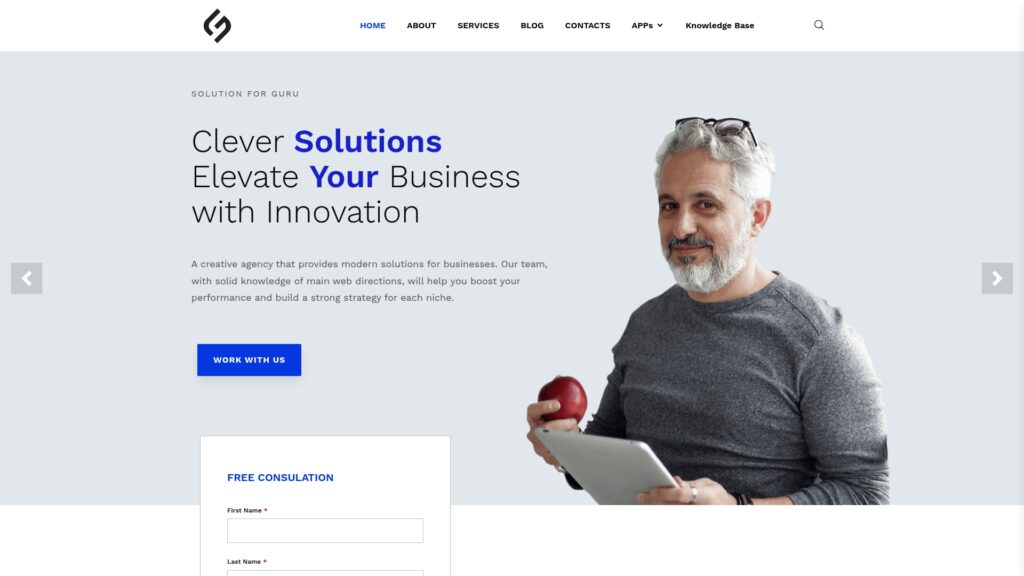
Solution for Guru is a tech solutions provider that specializes in web development, AI, and digital strategy. Its team also covers CRM and SaaS integrations, which matter when you add HR software to a growing stack.
How Can Solution for Guru Support Your HR Software Rollout?
A new HR platform rarely works alone. It needs to exchange data with CRM, payroll, accounting, and project tools. Solution for Guru works with platforms such as Zoho, Pipedrive, Salesforce, monday.com, Rippling, Sage, and Deel. As a result, the team understands how business systems connect and can help you plan a clean integration around HoorayHR.
What Benefits Do You Gain From the Partnership?
- Integration expertise: The team customizes and connects CRM and SaaS platforms to improve workflow.
- Automation: AI and automation services remove repetitive tasks beyond HR.
- Full digital coverage: Web development, UI/UX design, SEO, e-commerce, and cybersecurity sit under one roof.
- Strategic guidance: Tech consulting covers digital transformation, IT infrastructure, and business optimization.
- Proven track record: The company reports more than 35 clients and holds profiles on G2, Clutch, UpCity, and the HubSpot marketplace.
- Low-risk start: The website offers a free consultation, so you can discuss your needs before you commit.
How Do You Get Started?
Visit solution4guru.com, share your HR and software goals, and book the free consultation. Then pair that guidance with a HoorayHR trial to build a people-operations setup that grows with you.
Recommended:
- What Is BambooHR? A Complete Guide to This HRIS Platform
- HR Analytics in HoorayHR
- Digital HR Transformation with HoorayHR
- How Whitevision Helps Finance Teams Manage High Document Volumes
- Employee Onboarding Best Practices with HoorayHR
- Integrating Whitevision with Accounts Payable Software
- Whitevision AI Document Processing: Common Business Use Cases
- What KPIs Should You Track in Expense Management?
- Zoho Expense Pricing Explained: Plans, Features, and Costs
- Whitevision vs Moss: Which Platform Fits Your Finance Workflow Better?
- Key Features of HoorayHR
- Zoho Expense Review: Pros, Cons, and Key Features
- HoorayHR ROI: How Businesses Save Time with HR Automation
- How Long Does It Take to Implement HoorayHR?
- HoorayHR Review: Features, Pros, Cons, and Best Use Cases
- What Is HoorayHR? A Complete Overview
- Best Expense Automation Software: Which Platform Fits Your Business?
- What ROI Can Businesses Expect From Expense Automation Software?
- Multi-Currency Expense Management with Zoho Expense
- What Is Zoho Expense and How Does It Work?
- What Are the Biggest Challenges in Multi-Entity Expense Management?
- Whitevision vs Traditional Invoice Processing: What Changes?