Using Orchestration Center in Freshservice for IT Automation
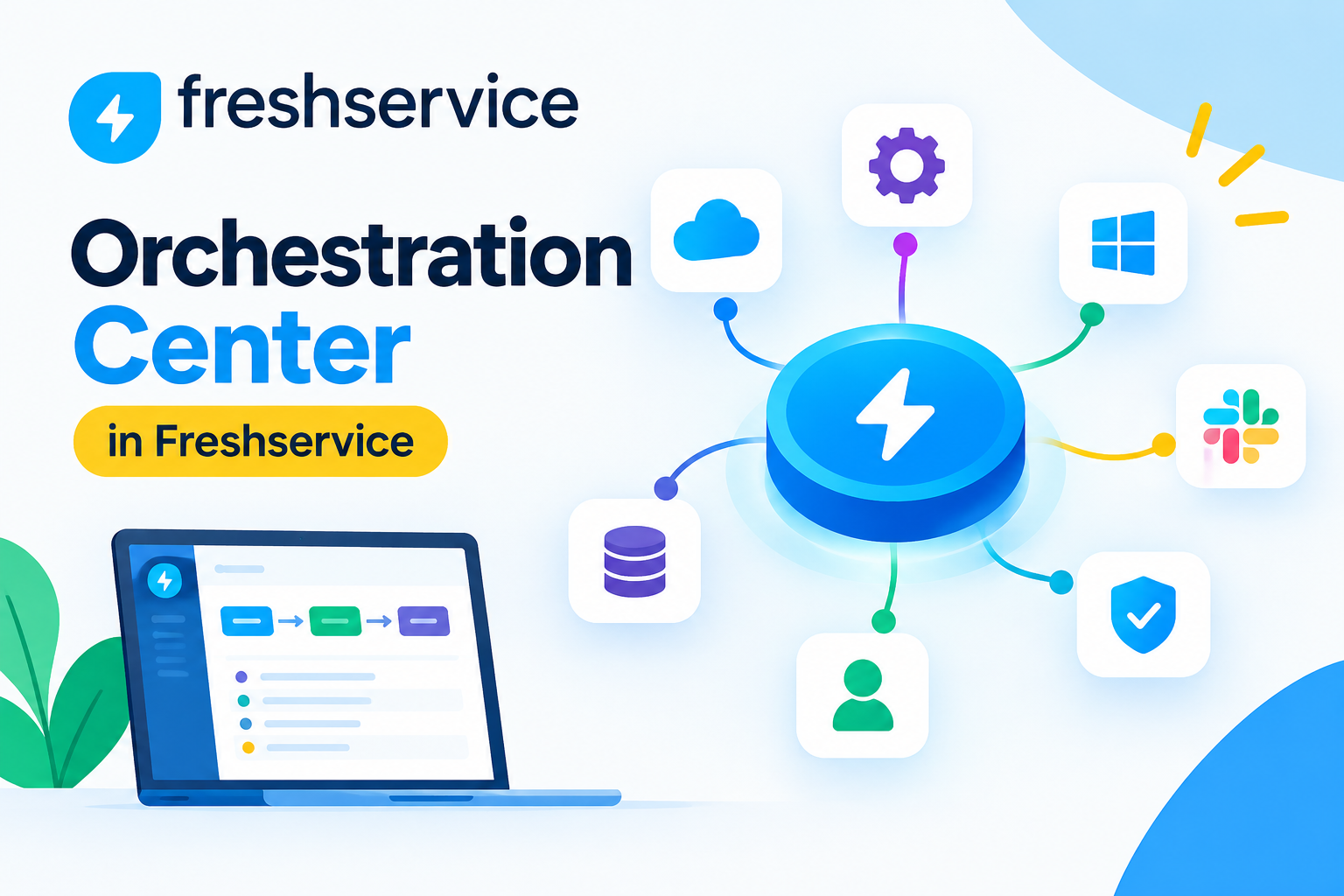
IT teams rarely lose time to hard problems; they lose it to the small repetitive steps sitting between systems — creating a new hire’s account in Azure AD, adding them to a Slack channel, and assigning a license, all for a single onboarding ticket. Freshservice tackles that gap with its Orchestration Center, a feature that connects the platform’s Workflow Automator directly to third-party apps so an entire multi-step process runs on its own instead of bouncing between an agent’s browser tabs. This article breaks down how Orchestration Center works, walks through practical IT automation examples for onboarding, offboarding, password resets, and cloud provisioning, and shows where it fits alongside Freshservice‘s broader automation toolkit. Along the way, it highlights the trigger, the connected app, and the outcome for each workflow, so an IT operations lead can start building similar automations right away.
Table of contents
Quick Summary
Before the full breakdown, here is a fast overview of what Orchestration Center automates inside Freshservice.
| Automation Area | What It Does |
| Employee Onboarding | Provisions accounts, licenses, and channel access automatically when a new hire ticket opens. |
| Employee Offboarding | Deprovisions accounts, revokes licenses, and removes distribution list access on termination. |
| Password & Account Support | Resets passwords and unlocks accounts without agent intervention. |
| Cloud Infrastructure | Provisions or deprovisions virtual machines across AWS, Azure, and Google Cloud. |
| Incident Alerting | Posts real-time alerts to Slack or Microsoft Teams and escalates unresolved incidents. |
| Reporting | Tracks orchestration transactions and execution logs across every connected app. |
What Is Freshservice ITSM and How Does It Relate to Orchestration Center?

Freshservice ITSM is a cloud-based IT service management platform that brings incident, problem, change, and asset management into a single system with a shared data model. Because Freshservice already tracks every ticket, asset, and user in one place, it has direct visibility into exactly when a process needs to reach outside the platform — say, when a new hire ticket needs an Azure AD account, or when a termination ticket needs a license revoked.
Orchestration Center is the layer that acts on that visibility, sitting inside Freshservice’s Workflow Automator and giving it the ability to invoke actions in connected third-party systems, not just update fields inside Freshservice itself. In other words, Freshservice supplies the trigger and the business context, while Orchestration Center supplies the reach into the rest of the IT stack. Together, they let a single ticket set off a chain of actions across several different applications without an agent touching any of them individually.
How Does Orchestration Differ From Basic Workflow Automation?
Freshservice’s standard Workflow Automator already handles plenty of useful automation on its own, such as auto-assigning a ticket, updating a field, or sending an internal notification whenever a specific event occurs. However, all of that activity stays inside Freshservice. Orchestration extends the same automator with a special node type that reaches into external applications and performs a real action there — creating a user in Azure AD, resetting a password in Okta, or posting a message in Slack. Consequently, a single workflow can combine ordinary Freshservice automation with orchestration steps, so a ticket might update its own status, notify the requester, and then also provision a cloud resource, all inside one continuous sequence. This distinction matters because it determines which problems each tool solves: basic automation cleans up work inside the service desk, while orchestration eliminates the manual handoffs between the service desk and everything around it.
Which Freshservice Plans Include Orchestration Center Transactions?
Freshservice makes Orchestration Center available across every plan tier, from Starter through Enterprise, though the number of included monthly transactions scales with the plan. Each action performed through an app node counts as one transaction, so a workflow with four orchestration steps on its success path consumes four transactions per run. Lower tiers include a smaller monthly transaction allowance, while Growth, Pro, and Enterprise plans raise that ceiling considerably to support larger, more automation-heavy IT organizations. Teams that exceed their monthly allowance can purchase additional transaction packs rather than upgrading their entire plan, which gives smaller IT departments a way to scale orchestration usage gradually. Because transaction limits and pricing structures change periodically, it is worth confirming current allowances directly in the Freshservice admin settings before designing a large batch of orchestration workflows.
How Does the Orchestration Center Work Inside Freshservice’s Workflow Automator?
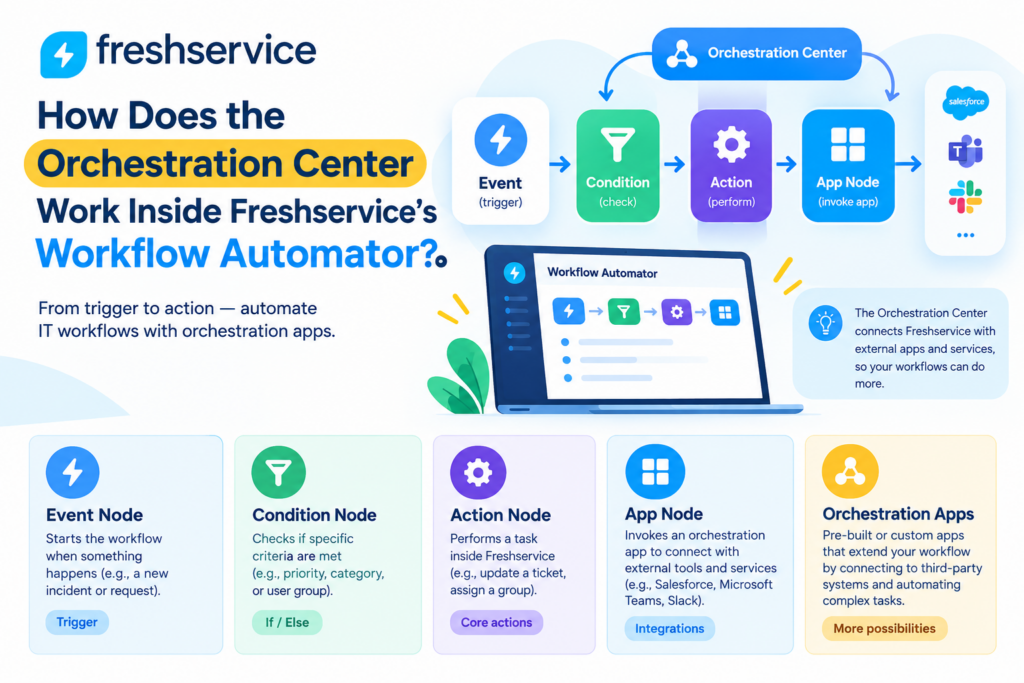
What Are Event, Condition, and Action Nodes?
The Workflow Automator organizes every automation around three core node types: Event, Condition, and Action. An Event node defines what starts the workflow, such as a new ticket being created, a service request being approved, or an asset field changing. Next, a Condition node narrows down exactly when the workflow should proceed, checking details like ticket category, requester department, or a custom field value. Finally, an Action node tells Freshservice what to do once the event and condition line up, whether that means updating a field, adding a note, or notifying an agent. Because these nodes snap together visually, an IT admin can map out a fairly sophisticated process without writing a single line of code, which keeps workflow ownership inside the IT team instead of requiring a developer for every change.
What Is an App Node and How Does It Invoke Orchestration Apps?
The App Node is what turns a standard Freshservice workflow into an orchestrated one. Instead of performing an action inside Freshservice, this node invokes a pre-built Orchestration App connected to a third-party system, such as Azure AD, Okta, Slack, or a cloud provider. Freshservice abstracts away the scripting behind these integrations, so the admin simply selects the app, chooses the action, and maps the relevant fields — the requester’s email, department, or job title — into the app’s required inputs. Additionally, these workflows stay context-aware, meaning the output from one step, such as a newly generated user ID, can feed directly into the input of the next step. As a result, a single ticket can trigger a coordinated sequence across five or six different systems, all monitored from one place inside Freshservice.
How Can IT Teams Automate Employee Onboarding With Orchestration Center?
How Does Account Provisioning Happen Automatically?
Onboarding traditionally means an IT agent manually creating accounts across several systems the moment HR confirms a start date, and that manual process is exactly where delays and errors creep in. Freshservice removes this bottleneck by triggering an orchestration workflow the moment an onboarding service request gets approved, automatically creating the new hire’s account in Azure AD or Google Workspace, generating a temporary password, and populating the employee’s profile with the department and job title pulled straight from the ticket. Meanwhile, a parallel step in the same workflow can add the employee to the correct Slack or Microsoft Teams channels, so their communication access appears before their first day even starts. Therefore, IT no longer needs to treat onboarding as a checklist to complete manually; instead, the checklist runs itself the moment the request clears approval.
How Are Software Licenses and Access Assigned Without Manual Steps?
Beyond basic account creation, new hires typically need specific software licenses and access rights depending on their role, and Freshservice orchestration handles this layer with the same trigger-based approach. A condition node checks the requester’s department or job title against the ticket, and the matching action node assigns the correct license bundle, adds the user to the relevant distribution groups, or grants access to a specific SaaS application. Consequently, a marketing hire and an engineering hire moving through the same onboarding request end up with entirely different toolsets, all determined automatically rather than through a manager remembering to submit a separate access request. This approach also creates a consistent audit trail, since every license and access grant traces back to the same orchestrated workflow rather than a scattered series of individual agent actions.
How Can Orchestration Center Automate Offboarding and Access Revocation?
How Does Deprovisioning Reduce Security Risk?
Offboarding carries real security stakes, since a former employee’s lingering access to email, cloud storage, or internal tools represents an open door long after their last day. Freshservice addresses this by triggering an orchestration workflow the instant a termination ticket gets created or approved, immediately disabling the employee’s Azure AD or Okta account rather than waiting for an agent to get around to it later that week. Additionally, the same workflow can revoke VPN access and disable any single sign-on sessions still active, closing multiple entry points in one coordinated action instead of a slow, manual sweep across separate admin consoles. Because the trigger fires the moment HR confirms the termination, the gap between an employee’s last day and their loss of system access shrinks from days to minutes, which meaningfully lowers the organization’s exposure to accidental or malicious misuse.
How Can Freshservice Revoke Licenses and Distribution List Access?
License costs add up quickly when former employees keep occupying paid seats simply because nobody remembered to remove them, and distribution list membership creates its own quiet risk when a departed employee keeps receiving internal communications. Orchestration Center resolves both issues in the same offboarding sequence: an app node revokes the employee’s software licenses and returns them to the available pool, while a separate action removes the employee from every relevant distribution group and shared mailbox. As a result, finance stops paying for unused licenses, and internal communications stop reaching an inbox nobody monitors anymore. Since these steps run automatically as part of a single Freshservice-triggered workflow, IT no longer needs a separate offboarding checklist tracked in a spreadsheet alongside the ticket itself.
How Can Password Resets and Account Unlocks Be Automated?
Password resets and account lockouts remain some of the highest-volume ticket categories at most IT service desks, and they rarely require judgment beyond verifying the requester’s identity. Freshservice orchestration lets a service request trigger a password reset or account unlock directly in the connected identity provider, generating a new temporary password and delivering it to the employee through a secure channel without an agent ever touching the account manually.
Similarly, an account lockout ticket can trigger an orchestration workflow that checks recent login attempts, unlocks the account if no suspicious pattern appears, and automatically escalates to a human agent if the pattern looks unusual. This split matters because it keeps low-risk, high-volume requests moving instantly while still routing genuinely risky situations to a person who can investigate further. Over time, this shift measurably reduces ticket backlog, since password and lockout requests often make up a large share of daily ticket volume at a typical service desk.
How Can Freshservice Orchestrate Cloud Infrastructure Actions?
How Does Orchestration Provision Virtual Machines on AWS, Azure, and Google Cloud?
Requests for new development or testing environments often stall in a queue waiting for a cloud administrator to manually spin up a virtual machine, even though the request itself is usually routine. Freshservice orchestration removes that wait by connecting a service catalog item directly to an app node that provisions a virtual machine on AWS, Azure, or Google Cloud, using the specifications the requester selected in the original ticket. Once the request is approved, the workflow calls the relevant cloud provider’s API, creates the instance, and updates the ticket with the new VM’s connection details, all without a cloud administrator opening a separate console. Consequently, a developer who requests a test environment on Monday morning can have it running before their first meeting, rather than waiting for a manual provisioning queue to clear.
How Can Automation Deprovision Unused Cloud Resources?
Cloud costs climb quietly when temporary resources outlive their purpose because nobody remembers to shut them down, and Freshservice orchestration addresses this the same way it handles offboarding: through a scheduled or event-based trigger. A workflow can check for virtual machines tagged as temporary that have passed their expiration date and automatically deprovision them, freeing up the resource and preventing an unnecessary charge from appearing on next month’s cloud bill. Furthermore, this same pattern extends to storage volumes, test databases, or any other cloud resource with a defined lifecycle, giving finance and IT operations a reliable cleanup mechanism instead of relying on manual audits that tend to happen only once a resource has already accumulated significant cost.
How Can Orchestration Center Improve Incident Alerting and Team Collaboration?
How Does Orchestration Trigger Slack or Microsoft Teams Alerts?
When a critical incident opens, the speed of the initial alert often determines how quickly the right people start working on it. Freshservice orchestration connects incident creation directly to Slack or Microsoft Teams, posting an immediate message to a dedicated channel the moment a high-priority ticket appears, complete with the ticket summary, priority level, and a direct link back into Freshservice. Because the alert lands where the technical team already communicates, responders avoid the delay of someone manually copying details from the service desk into a chat message. Additionally, teams can configure separate channels for different incident categories or severity levels, so a minor service degradation does not compete for attention with a full outage in the same busy channel.
How Does Automatic Escalation Reduce Mean Time to Resolution?
Beyond the initial alert, orchestration keeps watching an incident’s progress and escalates automatically if it stays unresolved past a defined threshold. A workflow can check whether a critical incident remains open after, say, thirty minutes, and if so, notify a secondary on-call engineer or post an escalation message to a management channel without anyone needing to track the clock manually. As a result, incidents no longer depend on someone remembering to check in periodically; the system enforces the escalation path automatically every time. This consistency directly supports mean time to resolution, since the right people get pulled in exactly when the situation calls for it rather than whenever someone happens to notice the ticket has gone quiet.
How Can Orchestration Center Support SaaS and License Management?

Beyond onboarding and offboarding, many IT teams manage a growing list of SaaS subscriptions where usage quietly drifts away from what the organization actually pays for. Freshservice orchestration can trigger on a scheduled check of SaaS usage data, flagging accounts that show low activity over a defined period and automatically generating a service request asking whether the license should be downgraded or reclaimed. If a manager approves the downgrade, an app node calls the relevant SaaS provider’s API to change the plan or remove the seat entirely, closing the loop without an admin manually auditing spreadsheets full of subscription data. This kind of continuous, automated review catches wasted spend far earlier than an annual license audit ever could, and it keeps the reclaimed licenses available for the next onboarding workflow instead of sitting unused indefinitely.
What Do Real Orchestration Center Workflows Look Like in Practice?
The concepts above become clearer with specific examples attached. The table below shows six ready-to-adapt Freshservice orchestration workflows, including the trigger, the condition, the orchestrated action, and the outcome each one produces.
| Trigger | Condition | Orchestration Action | Business Outcome |
| Onboarding request approved | Department = Engineering | Create Azure AD account; add to Slack channel; assign license | New hire has full access before day one |
| Termination ticket created | — | Disable Azure AD account; revoke VPN access | Access closes within minutes of approval |
| Password reset request | Identity verified | Reset password in Okta; send temporary credentials | Instant resolution with no agent involved |
| VM request approved | Environment = Test | Provision VM on Azure; update ticket with access details | Developer has an environment same-day |
| Critical incident created | Priority = P1 | Post alert to Slack; notify on-call engineer | Faster response, lower MTTR |
| Incident open 30+ minutes | Priority = P1, unresolved | Escalate to secondary on-call; notify manager | Prevents incidents from going unnoticed |
What Mistakes Should IT Teams Avoid When Building Orchestration Workflows?

Orchestration delivers the most value when a team plans it carefully rather than building workflows reactively. The following mistakes come up repeatedly among teams new to Freshservice’s Orchestration Center, and avoiding them early saves considerable rework later.
- Automating a process before mapping it clearly — orchestration locks in whatever process exists today, so document the actual steps first, including exceptions.
- Ignoring transaction limits — a workflow with several app nodes can consume transactions quickly at scale, so estimate monthly volume before rolling out broadly.
- Skipping error handling — a failed app action without a fallback step can leave a ticket in limbo, so build in retries or a manual escalation path.
- Granting overly broad access to orchestration apps — connected apps should use scoped credentials limited to the exact actions the workflow requires.
- Not testing with real edge cases — a workflow that works for a standard onboarding request may break on a contractor or a rehire with unusual field values.
- Failing to review orchestration reports — the curated execution log surfaces failed or delayed transactions, so regular review catches problems before they compound.
Conclusion
Orchestration Center gives Freshservice the ability to reach beyond its own ticket queue and coordinate real actions across the tools an IT team already relies on, from identity providers to cloud platforms to team chat apps. The examples covered here show how much manual coordination disappears once onboarding, offboarding, password resets, cloud provisioning, and incident alerting run through a connected workflow instead of a checklist an agent works through by hand. Additionally, none of these workflows require custom development, since Freshservice’s Workflow Automator handles the entire sequence through a visual, no-code interface built around Event, Condition, Action, and App nodes.
Therefore, the real work for most IT teams lies in choosing which manual processes deserve orchestration first, rather than in any technical barrier to building it. Starting with onboarding and offboarding typically delivers the fastest security and efficiency gains, after which a team can expand into cloud provisioning and incident escalation. Ultimately, a well-built Freshservice orchestration setup lets IT staff spend less time on repetitive handoffs and more time on the problems that actually need a person’s judgment.
Frequently Asked Questions
Yes. Freshservice includes Orchestration Center on every plan tier, from Starter through Enterprise, though the number of free monthly transactions bundled with each plan varies considerably. Lower tiers include a smaller transaction allowance suited to lighter automation needs, while Growth, Pro, and Enterprise plans provide substantially higher limits for organizations running many orchestrated workflows at once.
Orchestration Center follows a transaction-based pricing model, where every action performed through an app node counts as one transaction, regardless of which third-party system it touches. A workflow with four orchestration steps on its success path consumes four transactions each time it runs, so teams should estimate their expected monthly volume before scaling up automation. Additional transaction packs remain available for purchase once an account exceeds its plan’s included allowance.
Orchestration Center primarily connects to cloud-based applications and services through its library of pre-built Orchestration Apps, covering identity providers, communication tools, and major cloud platforms. Connecting to an on-premises system typically requires an intermediary integration layer or a custom app built against Freshservice’s API, so teams with significant on-premises infrastructure should confirm compatibility with their specific systems before planning a large-scale orchestration rollout. In practice, most organizations run a hybrid setup, orchestrating the cloud-native parts of a process directly while routing on-premises steps through a lightweight middleware connector or a scheduled script that reports its results back into the same Freshservice ticket.
Benefits of Cooperation With Solution for Guru

Designing a reliable set of Orchestration Center workflows takes more than connecting a few apps and hoping the sequence holds up under real ticket volume. Solution for Guru specializes in ITSM implementation and automation strategy, helping IT teams map their actual onboarding, offboarding, and incident processes before building a single orchestration workflow, so every automation reflects how the organization genuinely operates rather than a generic template. Instead of trial-and-error configuration that risks a broken onboarding sequence or an incident alert that never fires, a team working with Solution for Guru gets workflows tested against real edge cases, documented for future admins, and tied into a broader Freshservice setup that includes reporting, integrations, and staff training. The table below outlines common gaps IT teams run into when building orchestration alone, compared with what a Solution for Guru engagement typically resolves.
| Common Gap When Automating Alone | How Solution for Guru Addresses It |
| Orchestration workflows built without mapping the real process first | Conducts a process audit before configuring a single workflow |
| Workflows fail silently on edge cases like contractors or rehires | Tests workflows against real-world exceptions before go-live |
| No one monitors transaction usage or execution logs after launch | Provides ongoing support and periodic orchestration audits |
| Connected apps use overly broad credentials and permissions | Configures scoped access aligned with security best practices |
| IT staff unsure how to modify or extend existing workflows | Delivers hands-on training so the internal team owns the system |
Recommended:
- Common Freshservice Implementation Mistakes and How to Avoid Them
- Choosing and Implementing the Right ITSM Model for Your IT Team
- Best Practices for IT Asset Lifecycle Management Using ITSM Platforms
- How to Measure ITSM Success After Implementing Freshservice
- How Automation in Freshservice Helps Prevent IT Bottlenecks
- Multi-Tenant ITSM Architectures: What MSPs Should Know
- How Role-Based Access Control Improves ITSM Security
- How Self-Service Portals Improve Employee Experience in Freshservice
- ERP and ITSM Integration: Improving Operational Visibility Across Departments
- Integrating Endpoint Management Tools with Freshservice
- ManageEngine Asset Management (ITAM): Why Businesses Trust It to Control Their IT Assets
- Why Mid-Sized Companies Choose Freshservice Over Enterprise ITSM Platforms
- Best Reporting and Analytics Dashboards for IT Operations Teams in Freshservice
- How ITSM Platforms Support IT Compliance and Audit Readiness
- How ITSM Tools Support Internal IT Risk Management
- How AI Is Changing ITSM Workflows in Freshservice?
- How ITSM Platforms Like Freshservice Support Digital Transformation
- Freshservice CMDB Explained: Structure, Relationships, and Best Practices