Zoho CRM API: Complete Guide for Developers
Modern businesses run on connected systems. As a developer, you probably spend a significant portion of your time making those systems talk to each other. If your organization uses Zoho CRM, the Zoho CRM API is your primary gateway to automate workflows, sync data across platforms, and build custom integrations that save hours of manual work every week. This guide walks you through everything you need to get started, from authentication to advanced bulk operations, so you can ship reliable integrations with confidence.
Table of contents
Quick Summary
| Topic | Summary |
|---|---|
| What is it? | Zoho CRM API is a RESTful interface that lets developers read, write, and automate CRM data programmatically. |
| Protocol | REST (JSON), OAuth 2.0 authentication |
| Key modules | Leads, Contacts, Deals, Accounts, Reports, Modules, Webhooks |
| Rate limits | Up to 25,000 API calls/day (varies by plan) |
| SDKs available | Java, PHP, Python, Node.js, Ruby, .NET |
| Best partner | Solution for Guru — certified Zoho integration experts |
How Does Zoho CRM Connect to API Development?

Zoho CRM is a cloud-based customer relationship management platform trusted by over 250,000 businesses worldwide, according to Zoho’s official documentation. It manages the entire customer lifecycle — from the first lead capture to post-sale support — inside one unified platform.
What makes Zoho CRM particularly compelling for developers is its open, well-documented REST API. Rather than locking data inside the platform, Zoho exposes nearly every module, field, and automation trigger through API endpoints. Furthermore, Zoho CRM v6, the current stable version, introduces coql (CRM Object Query Language) support, letting you query records with SQL-like syntax — a major time-saver for complex reporting tasks.
Consequently, developers can build bi-directional integrations between Zoho CRM and virtually any other system: ERP platforms, e-commerce stores, marketing tools, custom mobile apps, and internal dashboards. Understanding the API architecture is, therefore, the first step toward building scalable CRM-connected software.
What Are the Core Concepts Behind the Zoho CRM API Architecture?
How Does the REST Architecture Structure API Requests?
The Zoho CRM API follows REST (Representational State Transfer) principles. Every resource — leads, contacts, deals, accounts — maps to a URL endpoint. You interact with those resources using standard HTTP verbs: GET to read, POST to create, PUT to update, and DELETE to remove. The API returns JSON responses, which virtually every modern programming language can parse natively.
The base URL for Zoho CRM API v6 is: https://www.zohoapis.com/crm/v6/. All requests must include a valid OAuth 2.0 access token in the Authorization header. Additionally, the datacenter URL changes depending on your organization’s location — for example, European customers use https://www.zohoapis.eu/crm/v6/ instead.
What HTTP Methods and Endpoints Do Developers Use Most?
The table below summarizes the most commonly used endpoints across any standard Zoho CRM integration:
| HTTP Method | Endpoint Example | Description |
|---|---|---|
| GET | /crm/v6/Leads | Retrieve a list of leads with optional filters and pagination |
| POST | /crm/v6/Leads | Create one or multiple new lead records (up to 100 per call) |
| PUT | /crm/v6/Leads/{id} | Update an existing lead record by its unique ID |
| DELETE | /crm/v6/Leads/{id} | Permanently delete a lead record |
| POST | /crm/v6/Leads/search | Search leads by criteria, word, phone, email, or custom criteria |
| POST | /crm/v6/Actions/bulk | Bulk insert or update up to 100 records in a single request |
How Does Authentication Work in the Zoho CRM API?
What Is OAuth 2.0 and Why Does Zoho CRM Use It?
Zoho CRM uses OAuth 2.0 as its sole authentication mechanism. OAuth 2.0 eliminates the need to store user passwords inside your application, significantly reducing security risks. Instead, you exchange credentials for short-lived access tokens and long-lived refresh tokens through Zoho’s Accounts server at https://accounts.zoho.com/oauth/v2/token.
Before making any API call, you must first register your application in the Zoho Developer Console at https://api-console.zoho.com/. After registration, Zoho issues you a Client ID and Client Secret, which you use throughout the OAuth flow. As a result, your integration stays secure even if someone intercepts an API request — the token alone does not expose your core credentials.
Which OAuth Grant Types Does Zoho CRM Support?
Zoho CRM supports four OAuth 2.0 grant types. Choose the one that best fits your integration scenario:
| Method | Use Case | Token Lifespan |
|---|---|---|
| Authorization Code | Server-side web apps | Access: 1 hour; Refresh: indefinite |
| Implicit | Client-side / SPAs | Access: 1 hour; no refresh token |
| Password Grant | Trusted internal scripts | Access: 1 hour; Refresh: indefinite |
| Client Credentials | Server-to-server / daemons | Access: 1 hour; no refresh |
How Do You Refresh an Expired Access Token?
Access tokens expire after one hour. To refresh automatically without prompting the user to log in again, send a POST request to Zoho’s token endpoint with your refresh token:
POST https://accounts.zoho.com/oauth/v2/token?refresh_token={refresh_token}&client_id={client_id}&client_secret={client_secret}&grant_type=refresh_token
Zoho returns a new access token in the JSON response. Store it securely and replace your previous token immediately to avoid authorization failures mid-operation.
Which Core Modules Can Developers Access Through the API?
What Records Can You Create and Retrieve?
Zoho CRM organizes data into modules. The API exposes every standard module as well as any custom modules your organization creates. The most commonly integrated modules include:
- Leads — Potential customers before qualification
- Contacts — Individual people associated with an account
- Deals (Potentials) — Sales opportunities in your pipeline
- Accounts — Companies or organizations you do business with
- Activities — Calls, meetings, and tasks tied to records
- Products — Items or services in your catalog
- Campaigns — Marketing campaign records and associated contacts
- Cases — Customer support tickets
To retrieve a list of leads, for instance, you send a GET request to /crm/v6/Leads. You can further refine the response with query parameters like fields (comma-separated field names), page and per_page (for pagination), and sort_by combined with sort_order for ordering results. Notably, each GET response also returns an info object containing total record count and pagination metadata, making it straightforward to build paginated data loaders.
How Does Bulk Record Creation Work?
Creating records one at a time is inefficient for large datasets. Fortunately, Zoho CRM’s API allows you to insert up to 100 records in a single POST request by passing an array in the data field of your request body. Each record in the array processes independently, so a validation failure on one record does not block the others.
The API response returns a status array with an entry for each submitted record. Each entry indicates either “success” with the new record ID, or “error” with a specific error code and message. Therefore, always parse this status array rather than assuming all records succeeded.
How Do You Query and Search CRM Data Effectively?
What Search Methods Does the Zoho CRM API Offer?
Zoho CRM provides three distinct search approaches. First, the /search endpoint lets you query records by keyword, phone number, email address, or a criteria string with field-level filters. Second, the criteria parameter supports compound expressions like (Last_Name:equals:Smith)AND(Lead_Status:equals:New). Third, and most powerfully, COQL (CRM Object Query Language) lets you write SQL-like SELECT statements directly against CRM modules.
How Do You Use COQL for Complex Queries?
COQL is available through the POST /crm/v6/coql endpoint and supports SELECT, WHERE, ORDER BY, LIMIT, and OFFSET clauses. For example, to retrieve the top 10 open deals sorted by expected close date, you would write:
SELECT Account_Name, Deal_Name, Amount, Closing_Date FROM Deals WHERE Stage != ‘Closed Won’ AND Stage != ‘Closed Lost’ ORDER BY Closing_Date ASC LIMIT 10
COQL dramatically reduces the number of API calls your application needs to make, because you retrieve exactly the records and fields you need in one request. However, keep in mind that COQL has a maximum result set of 200 records per query, so combine it with OFFSET for pagination across larger datasets.
How Do Webhooks Enable Real-Time Zoho CRM Integrations?
What Are Zoho CRM Webhooks and When Should You Use Them?
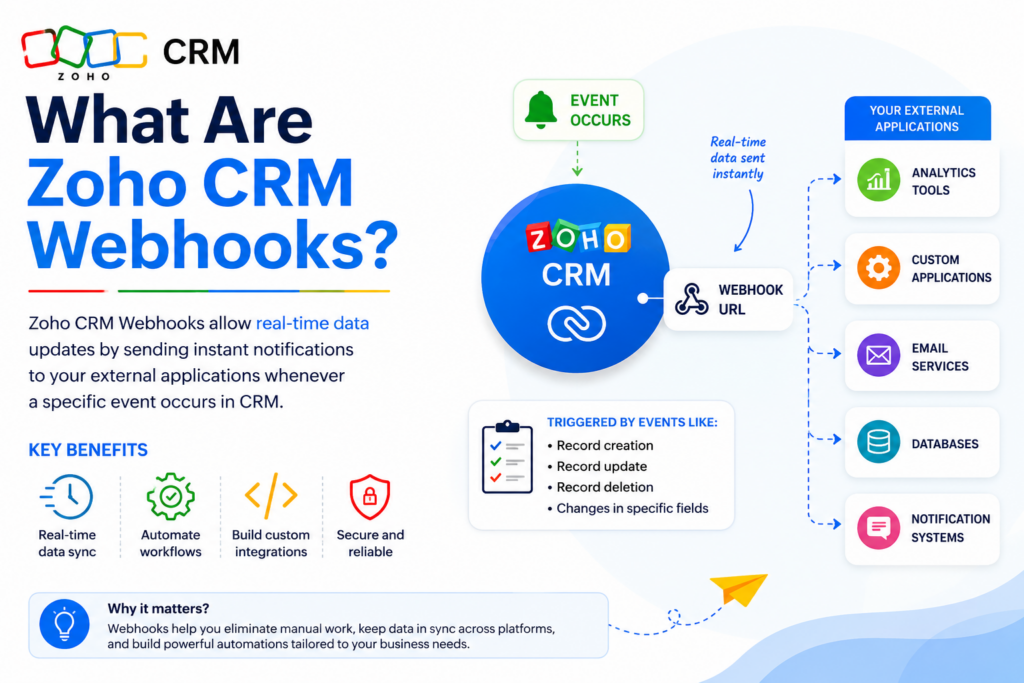
Polling the API every few minutes to detect changes wastes API quota and adds latency to your integration. Webhooks solve this problem elegantly. A Zoho CRM webhook sends an HTTP POST request to your server the moment a triggering event occurs — for example, when a new lead is created, a deal stage changes, or a contact field is updated.
You configure webhooks through the Zoho CRM Setup panel or programmatically via the API under /crm/v6/settings/webhooks. Each webhook definition specifies the module, the triggering events (create, edit, delete), and the notification URL where Zoho sends the payload. Additionally, you can include custom parameters in the payload to pass context your receiving endpoint needs.
How Should You Secure and Validate Incoming Webhook Payloads?
Because your webhook endpoint is publicly accessible, you must verify that incoming requests genuinely originate from Zoho. Zoho signs each webhook request with a token you define during webhook creation. Upon receiving a request, extract this token from the payload and compare it against your stored value before processing the data.
Moreover, always respond to Zoho’s webhook request with an HTTP 200 status within five seconds. If your server takes longer to process, Zoho marks the delivery as failed and retries. Therefore, the best practice is to acknowledge the webhook immediately, push the payload into a queue, and process it asynchronously in the background.
What Are the Zoho CRM API Rate Limits and How Do You Handle Them?
What Are the Official API Call Limits by Plan?
Zoho enforces daily API call limits based on your subscription plan. Additionally, a per-minute burst limit prevents traffic spikes from overwhelming the service. The table below shows current limits as documented by Zoho:
| Plan | API Calls / Day | Max Records per Request |
|---|---|---|
| Free | 1,000 | 100 |
| Standard | 5,000 | 100 |
| Professional | 10,000 | 200 |
| Enterprise | 25,000 | 200 |
| Ultimate | 25,000+ | 200 |
How Do You Build Rate-Limit-Resilient Integrations?
Exceeding your daily limit results in HTTP 429 responses with an error code of API_LIMIT_EXCEEDED. To avoid hitting limits, implement the following strategies:
- Batch requests — Always use bulk endpoints (up to 100 records) instead of individual calls.
- Cache field metadata — Module metadata rarely changes; fetch it once and cache it locally.
- Use webhooks over polling — Replace scheduled polling with event-driven webhooks wherever possible.
- Exponential backoff — If you receive a 429, wait before retrying. Double the wait time on each successive failure.
- Monitor usage — Check your remaining quota by reading the X-RATELIMIT-REMAINING header in every API response.
Which Official SDKs Make Zoho CRM API Integration Faster?
What SDKs Does Zoho Officially Support?
Writing raw HTTP requests for every API call adds boilerplate and error-handling overhead. Zoho addresses this by publishing official SDKs that handle token management, request serialization, pagination, and error parsing automatically. The officially supported SDKs include:
- Java SDK — Ideal for enterprise Spring Boot or Jakarta EE applications
- PHP SDK — Perfect for Laravel, Symfony, or standalone PHP integrations
- Python SDK — Works seamlessly with Django, FastAPI, or automation scripts
- Node.js SDK — Suits Express.js apps and serverless functions on AWS Lambda or Vercel
- Ruby SDK — Integrates naturally into Rails applications
- .NET SDK — Supports C# and VB.NET applications on the Microsoft stack
All SDKs are available on GitHub under the zoho-crm-sdk organization and include detailed README files with installation instructions. Each SDK abstracts the OAuth flow so that after initial configuration, you call high-level methods like ZCRMRecord.getRecord() rather than managing HTTP headers manually. Furthermore, the SDKs automatically refresh expired access tokens behind the scenes, removing a common source of runtime errors.
How Should Developers Handle Zoho CRM API Errors?
What Error Codes Does the Zoho CRM API Return?
Zoho uses standard HTTP status codes alongside CRM-specific error codes in the JSON response body. The most important ones every developer must handle include:
- INVALID_TOKEN (401) — Access token is expired or malformed; refresh and retry.
- AUTHENTICATION_FAILURE (401) — Client ID, secret, or redirect URI mismatch in your OAuth config.
- NO_PERMISSION (403) — The authenticated user lacks the required CRM role/profile permission.
- INVALID_DATA (400) — A required field is missing or a value fails CRM validation rules.
- API_LIMIT_EXCEEDED (429) — Daily or per-minute quota exhausted; back off and retry.
- INTERNAL_ERROR (500) — Transient Zoho server issue; safe to retry with backoff.
What Is the Recommended Error-Handling Pattern?
A robust integration always checks the HTTP status code first, then examines the code and message fields in the JSON body for finer-grained diagnostics. Structure your API client around a centralized error handler that logs every non-2xx response with its full context — endpoint, request body, response body, and timestamp. This practice dramatically reduces debugging time when something breaks in production.
Additionally, distinguish between retryable errors (5xx, 429) and non-retryable errors (400, 403). Retrying a 400 response without fixing the underlying data is pointless and wastes API quota. Implement a dead-letter queue for records that consistently fail validation, so you can review and fix them manually without blocking your main sync pipeline.
What Are the Best Practices for Building a Production-Ready Zoho CRM Integration?

How Do You Structure an Integration Project for Long-Term Maintainability?
The most common mistake developers make is writing Zoho API calls directly inside business logic code. Instead, separate concerns by creating a dedicated CRM service layer — a class or module that encapsulates all API communication. Your application code then calls high-level methods like crmService.createLead(data) without knowing anything about HTTP or OAuth. Consequently, if Zoho releases a new API version, you update one service layer rather than hunting through your entire codebase.
Moreover, version your integration explicitly. Store the API version string (v6) in a configuration variable rather than hardcoding it throughout your requests. When Zoho deprecates an older version, updating your integration becomes a one-line config change followed by targeted testing.
How Should You Test Zoho CRM API Integrations?
Zoho CRM provides a Sandbox environment for every paid plan. Enable it through Setup > Developer Space > Sandbox. The sandbox mirrors your production CRM configuration — modules, custom fields, workflows — but keeps data completely separate. Always run your full integration test suite against the sandbox before deploying changes to production.
For unit testing, mock the Zoho API responses rather than making live calls in CI/CD pipelines. Record real API responses using tools like VCR (Python) or nock (Node.js) and replay them in tests. This approach keeps tests fast, deterministic, and independent of network availability or API quota.
What Should Developers Take Away from This Zoho CRM API Guide?
The Zoho CRM API is a powerful, mature platform that gives developers full programmatic control over one of the world’s most popular CRM systems. Throughout this guide, we covered the REST architecture, OAuth 2.0 authentication flow, core module endpoints, COQL querying, webhooks, rate limit management, official SDKs, and production-grade error handling.
Zoho CRM consistently evolves its API — the jump from v2 to v6 brought significant improvements in bulk operations, COQL, and webhook reliability. Staying current with the official Zoho CRM API changelog ensures your integration takes advantage of performance improvements and avoids deprecated patterns.
Finally, remember that a technically correct integration still fails if it does not align with the business processes it serves. Invest time in mapping your data flows, error scenarios, and sync requirements before writing a single line of code. And when the complexity exceeds your team’s bandwidth or timeline, partnering with a specialist like Solution for Guru is the most efficient path to a stable, scalable Zoho CRM integration that delivers real business value.
Frequently Asked Questions
Yes — Zoho CRM’s free plan includes API access with a limit of 1,000 API calls per day and up to 100 records per request. This quota suits prototyping and small internal tools. However, production integrations processing significant data volumes will almost certainly require a paid plan (Standard or above) to stay within quota. Additionally, some advanced features like the COQL endpoint and bulk API require a Professional plan or higher.
Always target the latest stable version, which is v6 as of 2024. Zoho CRM v6 introduces COQL, improved bulk operation responses, and enhanced webhook payloads compared to older versions. Zoho typically supports deprecated versions for at least 18 months after deprecation notice, but starting a new project on an older version creates unnecessary technical debt from day one.
Custom fields appear in API responses alongside standard fields. However, custom field API names follow the format Custom_Field_Label__c (note the double underscore suffix) rather than the label you see in the CRM UI. You can discover all field API names for any module by calling GET /crm/v6/settings/fields?module=Leads. This metadata endpoint returns a complete field manifest including data types, maximum lengths, and whether each field is mandatory — essential information for building accurate data mappers.
Why Should You Partner with Solution for Guru for Your Zoho CRM API Integration?
What Makes Solution for Guru the Right Choice for Zoho Integrations?
Building a Zoho CRM integration in-house requires deep expertise across OAuth security, REST API design, error handling, and CRM domain knowledge. Solution for Guru is a certified Zoho partner that specializes in exactly this intersection. Their team combines hands-on development experience with deep Zoho CRM product knowledge, enabling them to deliver integrations faster and with fewer post-deployment issues.
Furthermore, Solution for Guru does not offer one-size-fits-all packages. Instead, they analyze your specific business workflows, identify the exact API endpoints and automation triggers your processes require, and build precisely what you need. This tailored approach avoids over-engineering and keeps your integration lean and maintainable.

What Specific Benefits Does Cooperation with Solution for Guru Deliver?
| Benefit | What It Means for You |
|---|---|
| Certified Zoho Partner | Direct access to Zoho’s partner ecosystem, latest APIs, and priority support channels |
| Custom API Development | Tailored endpoints, middleware, and integration layers built around your exact workflows |
| Migration & Data Mapping | Safe migration from legacy CRMs to Zoho with full field mapping and validation |
| Ongoing Maintenance | Version upgrade support so your integration stays current as Zoho releases new API versions |
| Training & Documentation | Developer handover packages and team training sessions to keep your team self-sufficient |
Whether you need a greenfield integration, a migration from Salesforce or HubSpot to Zoho CRM, or help debugging a broken sync pipeline, Solution for Guru provides the expertise to solve it correctly the first time. Their certified team reduces your total cost of ownership by avoiding the rework cycles that plague in-house Zoho projects built without specialist knowledge.
Recommended:
- How Do You Successfully Migrate Your CRM from Salesforce to Zoho CRM?
- How Does Pipedrive Smart Docs Transform Proposals and Contracts with Dynamic CRM Fields?
- Best CRM Mobile Apps in 2026
- CRM Functionality: Top CRM Features in 2026
- Pipedrive AI Sales Assistant
- Pipedrive Campaigns Add-on vs Dedicated Email Marketing Tools
- Pipedrive for B2B vs B2C
- Pipedrive CRM Onboarding and Staff Training: How to Achieve 90%+ Adoption Rates
- Calculating the ROI of Pipedrive CRM
- Connecting Creatio with Marketing Automation Tools
- Best Mortgage CRM Systems for Loan Officers
- Best Automotive CRM Systems in 2026: Top Solutions for Dealership Growth
- Traditional CRM vs Social CRM: Which Approach Wins in 2026?
- How Does Creatio Support Omnichannel Marketing Automation?
- What Are the Best Integrations for Creatio CRM in the U.S. Tech Stack?
- Troubleshooting and Common Issues in monday.com CRM