Zoho CRM Webhooks and API Integrations
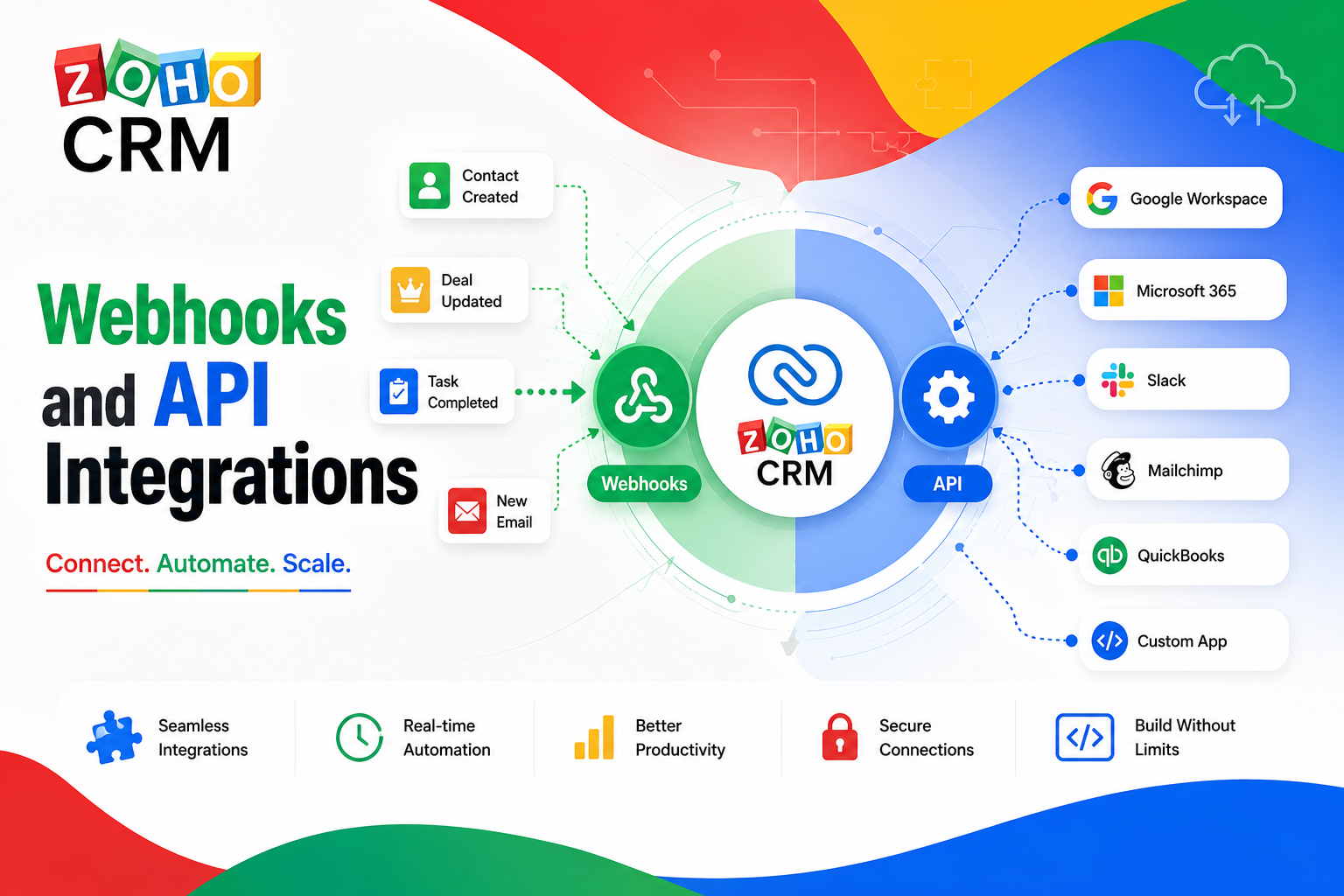
Modern sales teams rarely run on a single tool. Leads arrive from a website form, marketing platforms track engagement, accounting software issues invoices, and support desks log tickets. Without a way to connect these systems automatically, staff end up copying data by hand, and that manual work introduces delays and errors.
This is exactly the problem webhooks and API integrations solve inside a CRM. They let data flow between systems the moment something happens, instead of waiting for someone to notice and update a spreadsheet. This article explains how webhooks and API integrations work, walks through practical use cases, and shows how businesses can build reliable, real-time connections between their CRM and the rest of their software stack.
Table of contents
Quick Summary: How Do Webhooks and APIs Work Together?
Before going deeper, it helps to see the two concepts side by side, since they solve related but distinct problems.
| Concept | What It Does | When to Use It |
|---|---|---|
| Webhook | Pushes real-time data out automatically when an event occurs (record created, updated, deleted) | Instant notifications, triggering external workflows |
| REST API | Lets external systems pull or push data on demand | Custom apps, scheduled syncs, bulk data operations |
| Bulk Read API | Exports large volumes of data asynchronously | Migrating or archiving thousands of records at once |
| OAuth 2.0 | Secures every API and webhook request with scoped tokens | Authentication for any integration |
Together, these tools form the backbone of nearly every serious CRM integration, whether it connects marketing automation, billing, support ticketing, or a custom-built internal dashboard.
How Does Zoho CRM Relate to the Topic of This Article?

Zoho CRM is one of the clearest examples of how a modern CRM implements both webhooks and a full REST API, which is why it anchors this article. Zoho CRM’s API is REST-based, returns data in JSON format, and relies on OAuth 2.0 for authentication. It supports single-record operations for day-to-day CRUD tasks, as well as bulk endpoints for exporting large datasets asynchronously.
On the webhook side, Zoho CRM lets administrators configure real-time notifications that fire whenever a record is created, updated, or deleted in a chosen module, such as Leads or Contacts. These notifications can carry dynamic field data and custom headers, and they can be triggered directly from workflow rules without writing any code. Because Zoho CRM supports both approaches within a single platform, it serves as a practical case study for understanding when to use a webhook versus when to reach for the full API, a distinction this article explores in detail below.
What Is a Webhook and How Does It Work in a CRM?
A webhook is essentially a reverse API call. Instead of an external system asking the CRM for data, the CRM sends data out automatically the moment a defined event occurs. This “push” model eliminates the need for external systems to repeatedly poll the CRM and check whether something changed.
What Triggers a Webhook Event?
In Zoho CRM, webhooks are configured as part of automation features such as workflow rules or assignment rules. A webhook typically triggers on record creation, record updates, or record deletion within a specified module. For example, a workflow rule can be set so that the moment a new lead is created, Zoho CRM automatically sends that lead’s data to an external endpoint, such as a marketing automation tool or a custom application.
What Data Does a Webhook Send?
Every webhook request includes a target endpoint URL and an HTTP method, most commonly POST, PUT, GET, or DELETE. Businesses can enrich the payload using module parameters, which pull dynamic field values (like a contact’s email or an opportunity’s amount) directly from the record that triggered the event. Static custom headers can also be added for values that never change, such as an API key. This flexibility means a single webhook configuration can carry exactly the information an external system needs, nothing more and nothing less.
What Happens When a Webhook Fails?
Reliability matters just as much as functionality. If a webhook request fails, Zoho CRM sends an initial failure notification, followed by a second retry attempt roughly 15 minutes later. If the destination system still doesn’t respond successfully, the platform stops sending further notifications for that specific trigger and alerts the administrator. This built-in retry logic prevents silent failures, though it also means businesses should monitor webhook health rather than assuming every request always succeeds.
What Is a REST API and How Does It Differ from a Webhook?
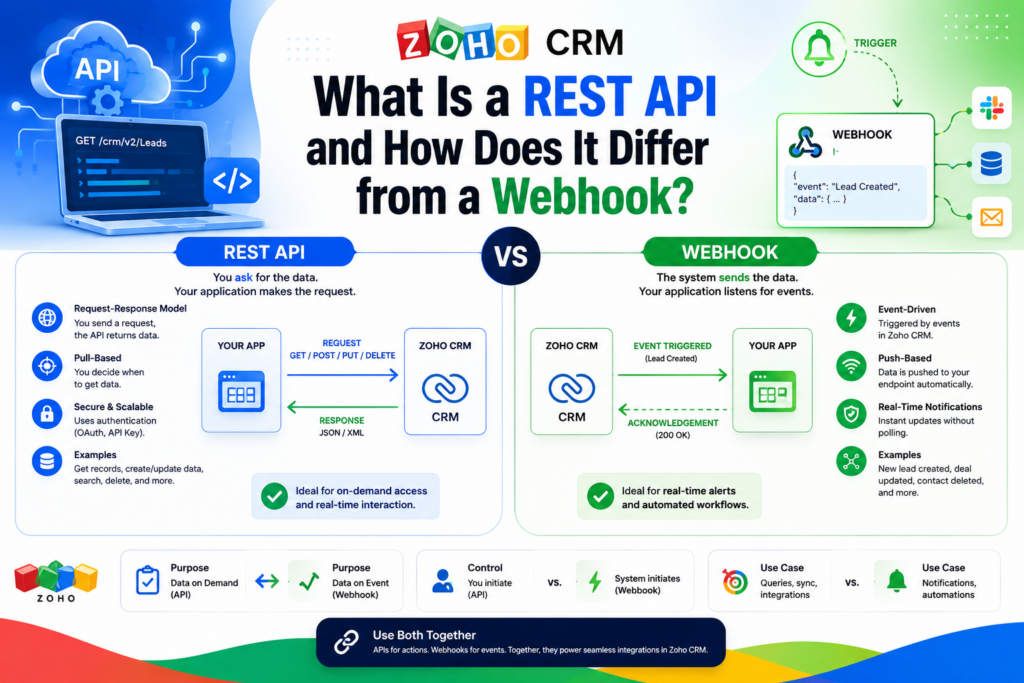
While webhooks push data outward automatically, a REST API works in the opposite direction: external systems actively request or send data whenever they need to. This distinction shapes when each tool makes sense for a given integration.
How Does the REST API Handle Day-to-Day Operations?
Zoho CRM’s REST API supports full CRUD operations, meaning applications can create, read, update, and delete records across virtually every module. Typical use cases include syncing leads collected from website forms, updating customer records from a mobile app, or pulling live pipeline reports into a custom dashboard. Because these calls happen on demand, they suit situations where an external system needs to actively fetch or modify data rather than simply wait for a notification.
When Should Businesses Use the Bulk Read API Instead?
For operations involving large datasets, such as exporting thousands of records for a data migration or archiving old data, looping standard REST calls is inefficient and can quickly hit rate limits. Zoho CRM’s Bulk Read API is designed specifically for these asynchronous, high-volume exports, letting businesses request a large dataset and retrieve the results once processing completes, rather than making thousands of individual requests.
How Does COQL Querying Fit Into the Picture?
Beyond basic CRUD operations, Zoho CRM also offers a COQL (CRM Object Query Language) API, which allows more complex, SQL-like queries across modules. This is particularly useful for building custom reports or dashboards that need to filter, join, or aggregate CRM data in ways that simple REST endpoints can’t easily support.
How Does Authentication Work Across Webhooks and APIs?
Security is a foundational part of any integration strategy, and Zoho CRM applies consistent authentication standards across both webhooks and its API.
Why Does OAuth 2.0 Matter for Integrations?
Every API call to Zoho CRM requires a valid OAuth 2.0 access token, scoped to specific permissions. For webhook configuration, for instance, a token needs a scope such as automation actions permissions before it can create or manage webhooks. This scoped approach means an integration only receives the level of access it actually needs, reducing the risk of a compromised token exposing unrelated data.
How Should Webhook Endpoints Be Secured?
On the receiving end, businesses configuring a webhook can choose an authentication method for the destination endpoint, ranging from no authorization to basic authorization or API-key-based authorization. Additionally, Zoho CRM only supports standard ports 80 and 443 for webhook destinations, which aligns with common security practices for public-facing endpoints. Choosing basic or API authentication over no authorization is generally the safer choice, since an unsecured webhook endpoint could otherwise accept requests from anyone who discovers the URL.
What Development Tools Support Zoho CRM API Integrations?
Building a reliable integration is easier when developers can rely on official tooling rather than writing every request from scratch.
What SDKs Are Available for Developers?
Zoho provides official SDKs for several popular languages, including Node.js, Python, PHP, Java, .NET, Ruby, and JavaScript. These SDKs handle much of the boilerplate work involved in authentication, request formatting, and response parsing, which reduces the amount of custom code a team needs to write and maintain. For businesses building integrations in-house, starting with an official SDK rather than raw HTTP requests typically shortens development time and reduces the risk of overlooking edge cases in the API’s behavior.
How Should Developers Test Integrations Before Going Live?
Before rolling any integration out to real users, it makes sense to test thoroughly with sample data. A common approach involves creating a test record, such as a sample deal or lead, and verifying that the connected system receives the expected data. If the external application doesn’t receive anything, reviewing the webhook or API configuration for missing parameters is usually the first troubleshooting step. Only after confirming the integration behaves correctly with test data should businesses remove the sample records and roll the connection out to the full team.
How Do Rate Limits Affect Integration Design?
API call limits vary depending on subscription tier, with higher-tier plans generally receiving significantly more call credits than entry-level plans. Developers should monitor rate-limit response headers during testing to understand how much headroom an integration has, and they should design retry logic that respects these limits rather than hammering the API with repeated requests after a failure. For any operation involving more than a couple hundred records, switching to a bulk endpoint instead of looping individual calls helps avoid running into these limits altogether.
What Best Practices Improve Integration Reliability Over Time?

Launching an integration is only the beginning. Keeping it accurate and dependable requires a few ongoing habits.
Why Does Logging and Monitoring Matter?
Because webhook retries stop after a limited number of attempts, silent failures can otherwise go unnoticed for days. Setting up logging on the receiving end, and alerting whenever expected data doesn’t arrive within a normal timeframe, helps teams catch problems quickly rather than discovering a gap only when a customer or manager asks why information is missing.
How Should Teams Handle CRM Field or Module Changes?
CRM systems evolve as businesses grow, and fields, modules, or workflows often change over time. An integration built around a specific field name or module structure can break silently if that structure changes later. Reviewing integrations periodically, and documenting exactly which fields and modules each connection depends on, makes it much easier to update them safely when the underlying CRM configuration changes.
How Should Businesses Plan an Integration Architecture from the Start?

Many integration problems trace back to decisions made before a single line of code gets written. Planning the architecture properly upfront saves significant rework later.
What Questions Should Teams Answer Before Building?
Before configuring any webhook or writing API calls, teams benefit from answering a few core questions: which systems need to exchange data, how frequently does that data need to update, and what happens if one system is temporarily unavailable. A customer support integration that needs instant updates calls for webhooks, while a nightly reporting sync might work perfectly well with a scheduled API call instead. Clarifying these requirements early prevents teams from over-engineering simple syncs or under-building time-sensitive ones.
How Does Data Mapping Prevent Downstream Errors?
Every integration ultimately depends on matching fields correctly between systems. A lead’s email field in the CRM, for instance, needs to map precisely to the corresponding field in a marketing platform. Skipping this mapping step, or assuming field names match by default, is one of the most common sources of integration bugs. Documenting field mappings clearly, ideally before development starts, makes both initial builds and future maintenance considerably smoother.
Why Does a Staging Environment Matter?
Testing directly against a live, production CRM environment risks corrupting real customer data if something goes wrong. Wherever possible, businesses should test new webhooks and API integrations in a sandbox or staging environment first, using disposable test records rather than live leads or contacts. Only after confirming the integration behaves as expected should it move into the production environment where real business data flows through it.
What Are the Most Common Use Cases for Webhooks and API Integrations?
Understanding the mechanics is useful, but the real value comes from seeing how businesses apply these tools in practice.
How Can Webhooks Connect Marketing and Sales Tools?
A common pattern involves triggering a webhook whenever a new lead or contact is created in the CRM, automatically adding that person to a mailing list in an email marketing platform. This keeps marketing and sales data aligned without requiring manual list exports, and it ensures new leads start receiving nurture campaigns immediately rather than days later.
How Do Businesses Automate Notifications and Alerts?
Webhooks also power real-time alerts outside the CRM itself. For example, a webhook can trigger an SMS reminder to a field sales representative ahead of a scheduled customer meeting or demo, reducing missed appointments. Similarly, internal teams often configure webhooks to post updates into messaging platforms whenever high-value deals change stage.
How Can APIs Support Financial and Billing Workflows?
On the API side, businesses frequently connect their CRM to accounting or invoicing software so that closing a deal in the CRM automatically generates a corresponding estimate or invoice. Rather than someone manually re-entering deal details into finance software, an integration built on the REST API keeps both systems synchronized as soon as the opportunity stage changes.
How Do Bulk Operations Support Data Migration?
When companies switch CRMs or consolidate systems after a merger, they typically need to migrate large volumes of historical records at once. The Bulk Read and Bulk Write APIs support these one-time or periodic large-scale transfers, letting teams move thousands of records without manually clicking through page after page of exports.
What Are the Benefits of Using Webhooks and API Integrations?

Connecting a CRM to external systems through webhooks and APIs delivers several concrete advantages for growing businesses.
- Real-time data flow — Information updates across systems within seconds instead of hours or days.
- Reduced manual entry — Staff no longer need to copy data between platforms by hand, cutting down on errors.
- Faster response times — Sales and support teams see new information the moment it happens, enabling quicker follow-up.
- Scalable operations — Bulk APIs handle large data volumes without overwhelming standard rate limits.
- Flexible customization — Dynamic parameters and custom headers let businesses tailor exactly what data moves between systems.
- Better visibility — Custom dashboards built on API data give managers a unified view of pipeline, support, and finance metrics in one place.
What Challenges Should Businesses Expect When Building Integrations?
While the benefits are substantial, integrations also introduce complexity that teams should plan for carefully.
- Rate limits — API call credits vary by subscription tier, so high-volume integrations may need to monitor usage closely to avoid hitting limits.
- Error handling — Applications must handle failed requests gracefully, including implementing retry logic for temporary errors.
- Webhook monitoring — Since failed webhook notifications eventually stop retrying, businesses need a way to detect and address silent failures before they cause data gaps.
- Security configuration — Choosing weak or no authentication on a webhook endpoint can expose sensitive data to unauthorized requests.
- Maintenance overhead — As CRM modules and fields change over time, integrations need ongoing updates to stay accurate and functional.
These challenges are manageable with the right expertise, but they do mean that treating an integration as a “set it and forget it” project is risky. Regular monitoring and periodic reviews help catch problems before they affect business operations.
How Should Businesses Choose Between Webhooks and Full API Integrations?
Deciding which tool to use often comes down to the nature of the data flow a business needs to support.
| Scenario | Recommended Approach |
|---|---|
| Notify an external app instantly when a record changes | Webhook |
| Pull CRM data into a custom dashboard on demand | REST API |
| Migrate thousands of historical records | Bulk Read/Write API |
| Run complex, filtered reports across modules | COQL Query API |
| Sync data on a schedule rather than instantly | REST API with scheduled calls |
In many real-world implementations, businesses end up using a combination of all four approaches. Webhooks handle time-sensitive, event-driven notifications, while the REST API, Bulk API, and COQL Query API cover on-demand data retrieval, large-scale exports, and advanced reporting, respectively. Rather than treating these as competing options, mature integration strategies use each tool where it fits best.
Conclusion
Webhooks and API integrations turn a CRM from an isolated database into the connective hub of a business’s entire software ecosystem. Webhooks deliver instant, event-driven notifications, while REST APIs, bulk endpoints, and query languages like COQL give businesses the flexibility to pull, push, and analyze data exactly as needed. Choosing the right combination of these tools, rather than defaulting to just one, is often what separates a smooth integration from a fragile one.
Zoho CRM demonstrates how these tools work together in practice, offering both real-time webhook automation and a comprehensive REST API built on secure OAuth 2.0 authentication. Businesses that invest time in designing these integrations thoughtfully, mapping data correctly, testing in a safe environment, and monitoring them consistently after launch, gain faster workflows, fewer manual errors, and a genuinely unified view of their operations. For teams that would rather not navigate this complexity alone, partnering with an experienced integration specialist can make the difference between a fragile connection and a dependable one that keeps working as the business grows.
Frequently Asked Questions
A webhook pushes data out automatically the moment an event occurs, such as a new record being created, while an API call is initiated by an external system whenever it needs to retrieve or send data. Webhooks work best for instant notifications, whereas APIs suit on-demand or scheduled data operations. Most mature integrations end up combining both approaches rather than relying on just one.
Not necessarily. Many CRMs, including Zoho CRM, let administrators configure webhooks directly through workflow automation tools without writing code, specifying the endpoint URL, HTTP method, and any dynamic data fields through a visual interface. More advanced use cases involving custom headers, complex payloads, or error handling typically benefit from developer involvement to ensure the integration behaves reliably under real-world conditions.
Since webhook notifications typically stop retrying after a couple of failed attempts, businesses should build in monitoring, such as logging failed requests or setting up alerts when an endpoint stops responding. Working with an integration partner can also help establish proactive monitoring practices from the start, rather than discovering a broken connection only after data has already been missed.
Why Partner with Solution For Guru for Webhook and API Integration Projects?

Building a reliable integration takes more than reading documentation. Authentication scopes, retry logic, rate limit management, and data mapping between systems all require careful planning, and mistakes can lead to data loss or duplicate records. This is where working with an experienced partner like Solution For Guru becomes valuable.
Partnering with Solution For Guru can help businesses in the following ways:
- Design integrations correctly the first time, mapping fields and choosing between webhooks, REST calls, and bulk operations based on actual business needs rather than guesswork.
- Implement secure authentication, configuring OAuth scopes and webhook endpoint security so sensitive CRM data stays protected.
- Build monitoring into every integration, catching failed webhook deliveries or API errors before they cause downstream data gaps.
- Handle complex data migrations, using bulk APIs to move large datasets safely during CRM transitions or system consolidations.
- Provide ongoing support, updating integrations as CRM modules, fields, or business processes evolve over time.
For businesses that want dependable, well-documented integrations without dedicating internal engineering resources to the project, working with a specialized partner such as Solution For Guru can significantly reduce both the setup time and the long-term maintenance burden.
Recommended:
- Creatio CRM Integration with ERP Systems
- API Capabilities in Creatio: What Developers Should Know
- Using Creatio to Improve B2B Sales Performance
- What Is Pipedrive Pipeline Management and How Does It Help Your Team Close More Deals?
- Pipedrive Google Workspace Integration: How Does It Transform Sales Productivity?
- What Is the Pipedrive LeadBooster Add-On and How Can It Transform Your Sales Process?
- Why Pipedrive Implementations Fail: The Top 7 Mistakes and How to Avoid Them
- CRM Systems: How to Make Your Business More Efficient?
- What Are the Best CRM Systems for Service Businesses?
- Account-Based Marketing Strategies with Creatio
- Modern CRM Teams: How Are Roles Evolving in the Digital Era?
- CRM Automation for Logistics Companies Using Creatio
- Using Creatio Dashboards for Executive Decision-Making
- Pipedrive Compliance: How Does Pipedrive Handle Data Protection, Privacy, and Security Standards?
- What Is the Pipedrive Mobile App and How Can It Transform Your Sales on the Go?
- Creatio for Healthcare Organizations: The Complete Guide
- Creatio CRM for Financial Services in the U.S.: Is It the Right Platform for Your Firm?
- Pipedrive for Sales Managers: How to Use Forecasting and Team Performance Reporting