What Is Pipedrive Pipeline Management and How Does It Help Your Team Close More Deals?

Every sale starts somewhere — a cold email, a website inquiry, a referral, or a conference handshake. But without a clear system to track what happens next, deals stall, follow-ups slip through the cracks, and revenue disappears. Pipeline management solves this problem by giving your team a structured, visual path from first contact to closed deal.
Pipedrive builds its entire CRM around this idea — and does it better than almost any other platform on the market. Furthermore, when you implement Pipedrive with guidance from Solution for Guru, you get a pipeline that reflects your actual sales process and drives consistent results from day one.
Table of Contents
Quick Summary
| Topic | Key Details |
|---|---|
| What is pipeline management? | A system for tracking deals through defined sales stages |
| Platform covered | Pipedrive CRM |
| Core features | Visual pipeline, deal stages, activity tracking, automation, reporting |
| Best suited for | Sales teams of all sizes looking to improve deal visibility |
| Implementation partner | Solution for Guru |
| Official link | Pipedrive |
What Is Sales Pipeline Management and Why Does Every Sales Team Need It?
Sales pipeline management refers to the process of actively tracking, organising, and moving deals through a defined sequence of stages — from initial contact to signed contract. Rather than managing opportunities in spreadsheets or relying on memory, pipeline management gives every salesperson and manager a live, accurate picture of where revenue stands at any moment.
Research from Harvard Business Review found that companies with a formally defined sales process generate 18% more revenue than those without one. Pipeline management makes that formal process visible, measurable, and repeatable.
Without pipeline management, sales teams face predictable problems:
- Deals sit in limbo because no one knows the next step
- Hot leads go cold because follow-up reminders never got set
- Managers struggle to forecast revenue accurately
- Top performers carry tribal knowledge that never gets shared
- New reps take months to learn a process that exists only in someone’s head
Pipeline management eliminates these problems by turning your sales process into a shared, structured system that the whole team follows consistently.
What Is Pipedrive and How Does It Approach Pipeline Management?

Pipedrive is a CRM platform built specifically for sales teams. Founded in 2010 by salespeople who were frustrated with tools built for management rather than frontline reps, Pipedrive placed the visual pipeline at the centre of everything.
Today, Pipedrive serves over 100,000 companies across more than 175 countries. Its core philosophy is simple: if salespeople love using their CRM, they use it consistently — and consistent use leads to better data, better forecasts, and more closed deals.
How Is Pipedrive Different from Other CRM Platforms?
Most CRM platforms start with contact management and add pipelines as a secondary feature. Pipedrive starts with the pipeline and builds everything else around it.
The result is a tool that salespeople actually want to open each morning, rather than a data-entry burden they resent. Additionally, Pipedrive’s interface stays uncluttered and fast — which matters enormously when a rep is updating five deals between back-to-back calls.
How Does the Pipedrive Visual Pipeline Actually Work?
The Pipedrive visual pipeline uses a Kanban-style board where each column represents a sales stage and each card represents a deal. Reps see every active opportunity at a glance, understand exactly what stage each deal occupies, and drag cards forward as deals progress.
What Information Does Each Deal Card Show?
Each deal card in the pipeline displays the most relevant information without overwhelming the view:
- Deal name and value — see revenue potential immediately
- Associated contact and company — know who the deal involves
- Expected close date — understand timing at a glance
- Assigned owner — see who is responsible
- Activity indicator — a colour-coded icon shows whether the next activity is scheduled, overdue, or completed
- Deal age — spot stalled deals quickly
Consequently, a manager reviewing the pipeline spends seconds understanding deal status rather than digging through notes and emails.
How Do You Build a Pipeline in Pipedrive That Matches Your Sales Process?
What Sales Stages Should Your Pipedrive Pipeline Include?
One of the most important decisions you make when setting up Pipedrive is defining your pipeline stages. The stages should reflect the real steps your buyers move through — not an idealised process invented by someone who has never made a sales call.
A typical B2B pipeline in Pipedrive might look like this:
| Stage | What Happens Here |
|---|---|
| Lead In | New prospect added to the pipeline |
| Qualified | Basic fit confirmed — budget, authority, need, timeline |
| Discovery Call | In-depth conversation to understand the buyer’s problem |
| Proposal Sent | Formal offer delivered to the prospect |
| Negotiation | Terms and pricing discussed |
| Closed Won | Deal signed |
| Closed Lost | Deal marked lost with a reason recorded |
However, your stages should reflect your specific process. A SaaS company with a free trial phase needs different stages than a consulting firm running multi-month procurement cycles. Pipedrive lets you create as many pipelines as you need — so one company can run separate pipelines for new business, renewals, and partnership deals simultaneously.
Can You Run Multiple Pipelines in Pipedrive?
Yes — and for most growing companies, multiple pipelines dramatically improve clarity. Rather than mixing different deal types in one view, each pipeline focuses on a specific product line, customer segment, or sales motion.
Common multi-pipeline setups include:
- New Business + Existing Customers (upsell/cross-sell)
- Direct Sales + Partner / Channel Sales
- Enterprise Deals + SMB Deals
- Product A + Product B
Moreover, Pipedrive lets managers filter across all pipelines in reporting — so the consolidated revenue picture stays accurate even when deals live in separate boards.
How Does Activity Management Connect to Pipeline Management in Pipedrive?
Why Do Activities Matter More Than Deal Stages?
Many sales teams focus on moving deals between stages — but experienced sales managers know that activities drive outcomes, not the other way around. A deal moves from “Discovery Call” to “Proposal Sent” because a rep completed specific actions, not because someone dragged a card.
Pipedrive builds activity management directly into the pipeline. Every deal links to a list of scheduled activities, and Pipedrive prompts reps to schedule a next activity every time they complete one. This creates a virtuous cycle: activity leads to progress, progress leads to the next activity.
Standard activity types in Pipedrive include:
- Calls — log calls and record outcomes
- Emails — send and track emails from within the CRM
- Meetings — schedule and record meeting notes
- Tasks — general to-do items linked to specific deals
- Lunches — track relationship-building interactions
- Deadlines — time-sensitive milestones
Furthermore, Pipedrive colour-codes activity status on every deal card. A green dot means the next activity is scheduled. A red dot means an activity is overdue. No dot means the deal has no next step — a danger sign that the rep needs to address immediately.
How Does the Activity View Help Sales Managers?
The Activity view in Pipedrive shows every scheduled activity across the team, filterable by rep, date, deal, and activity type. Sales managers use this view to:
- Identify reps with light schedules who need more pipeline
- Spot overdue activities before deals go cold
- Confirm that high-priority deals have activities scheduled
- Review completed activity volume to assess rep effort
As a result, managers shift from reactive problem-solving to proactive pipeline coaching.
How Does Pipedrive Automation Improve Pipeline Management?
What Repetitive Tasks Can You Automate Inside Pipedrive?
Manual data entry and repetitive administrative work steal time from selling. Pipedrive’s automation engine removes this friction by triggering actions automatically when deals reach specific conditions.
Here are the most impactful automations sales teams build inside Pipedrive:
| Trigger | Automated Action |
|---|---|
| Deal moves to “Proposal Sent” | Create a follow-up task for three days later |
| Deal created | Send a personalised welcome email |
| Deal reaches “Negotiation” | Notify the sales manager via email |
| Deal marked “Closed Won” | Create a task to send a contract |
| Deal reaches 30 days with no activity | Alert the deal owner |
| Contact added | Enrol contact in an email sequence |
Additionally, Pipedrive connects to thousands of external tools through Zapier and its native Marketplace integrations — so automation can extend across your entire tech stack, not just inside Pipedrive.
How Do You Set Up Pipedrive Workflow Automation?
Pipedrive’s automation builder uses a simple trigger-condition-action structure. You select what triggers the automation (a stage change, a deal creation, a field update), set optional conditions to narrow the scope, and define the action Pipedrive should take.
You do not need technical skills to build automations in Pipedrive. The visual builder walks through each step clearly. Nevertheless, planning your automation strategy before you start building prevents a tangle of overlapping rules that confuse your team. This is another area where expert guidance from Solution for Guru saves significant time.
How Does Pipedrive Help You Forecast Revenue from Your Pipeline?
Can You Trust Your Pipeline as a Forecasting Tool?
Revenue forecasting sits at the heart of every sales manager’s responsibilities. Pipedrive builds forecasting directly into the pipeline through several reporting mechanisms that turn pipeline data into actionable revenue projections.
Deal probability: Assign a probability percentage to each pipeline stage. Pipedrive multiplies deal value by probability to calculate a weighted forecast for each stage. This gives managers a realistic revenue projection rather than an optimistic total of every open deal.
Expected close dates: Every deal carries an expected close date, which Pipedrive uses to group forecast revenue by time period. Managers see which deals should close this month, this quarter, and beyond.
Revenue forecast report: Pipedrive‘s built-in forecast view shows projected revenue by month or quarter, broken down by deal, rep, or team. Furthermore, this view updates in real time as deals move, so the forecast always reflects current pipeline status.
What Does a Reliable Forecast Require?
A forecast is only as reliable as the data behind it. Consequently, pipeline hygiene — keeping deal stages, values, and close dates accurate — matters enormously. Pipedrive supports pipeline hygiene through:
- Rotting deals: Pipedrive automatically flags deals that have had no activity for a configurable number of days, highlighting stale pipeline before it distorts your forecast
- Required fields: Set mandatory fields that reps must complete before moving deals between stages
- Deal age indicators: Visual cues show how long a deal has sat in its current stage
Together, these tools push reps toward accurate data entry — which produces forecasts that management can actually trust.
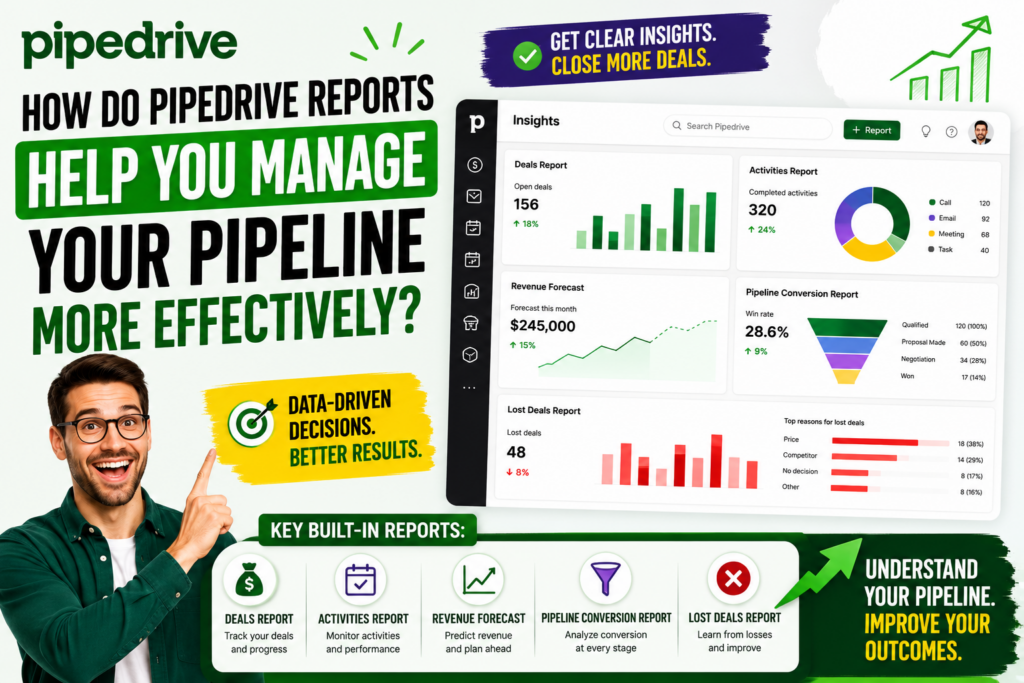
How Do Pipedrive Reports Help You Manage Your Pipeline More Effectively?
What Pipeline Reports Does Pipedrive Provide Out of the Box?
Pipedrive ships with a comprehensive set of built-in reports that cover the full pipeline management cycle. Sales managers and business owners use these reports to make data-driven decisions about coaching, resourcing, and strategy.
Key built-in reports include:
Deals report — filter open, won, and lost deals by any combination of stage, owner, product, time period, and custom fields. Use this report to identify patterns in deal outcomes.
Activities report — track completed and upcoming activity volume by rep, activity type, and time period. Use this to assess effort levels and identify reps who need coaching on activity habits.
Revenue forecast — project revenue by month, quarter, or custom period based on deal values, probabilities, and expected close dates.
Pipeline conversion report — see conversion rates between every pair of pipeline stages. For example, discover that 60% of deals that reach “Proposal Sent” convert to “Negotiation” — then investigate why 40% do not.
Lost deals report — analyse why deals were lost, by competitor, by rep, by stage, and by time period. This report often reveals product gaps, pricing problems, or training needs.
How Do Custom Reports Extend Pipedrive’s Reporting Capability?
Beyond the built-in reports, Pipedrive’s Insights module lets you build custom dashboards with the specific metrics your team tracks. Additionally, Pipedrive integrates with business intelligence platforms like Google Looker Studio, Power BI, and Tableau for teams that need deeper analytical capability.
How Does Pipedrive Handle Lead Management Before Deals Enter the Pipeline?
What Is the Difference Between a Lead and a Deal in Pipedrive?
Pipedrive distinguishes clearly between leads and deals — a distinction that keeps your pipeline clean and your forecast accurate.
- Leads sit in the Leads Inbox, separate from the main pipeline. They represent potential opportunities that have not yet been qualified enough to justify a dedicated pipeline slot.
- Deals live in the pipeline stages and represent active, qualified opportunities your team actively pursues.
This two-tier system prevents the pipeline from filling with unqualified prospects that inflate deal counts and distort forecasts. Instead, reps qualify leads first, then convert promising ones into deals that enter the pipeline at the appropriate stage.
Furthermore, the Leads Inbox integrates with LeadBooster — Pipedrive’s lead generation add-on — so chatbot conversations, Web Form submissions, and Prospector contacts flow directly into the Leads Inbox without manual entry.
How Can You Customise Pipedrive to Fit Your Unique Sales Process?
What Customisation Options Does Pipedrive Offer?
No two sales processes are identical. Pipedrive acknowledges this reality by offering extensive customisation that lets you shape the CRM around your team’s workflow rather than reshaping your workflow around the software.
Key customisation capabilities include:
| Customisation Option | What You Can Do |
|---|---|
| Custom fields | Add fields for any data point your process requires — dropdown, text, number, date, or monetary |
| Custom pipelines | Create separate pipelines for different products, segments, or regions |
| Stage customisation | Name stages to match your internal terminology |
| Required fields per stage | Make specific fields mandatory before a deal can advance |
| Custom activity types | Add activity types beyond the defaults (demos, site visits, trials) |
| Custom deal labels | Tag deals with colour-coded labels for quick visual filtering |
| Permission sets | Control what each team member can see, edit, and delete |
Moreover, Pipedrive’s API allows development teams to build deep custom integrations with proprietary systems — connecting pipeline data to ERP platforms, billing systems, or custom internal tools.
How Does Pipedrive Mobile Support Pipeline Management on the Go?

Can Your Sales Team Manage the Pipeline from Their Phones?
Field sales reps, account managers who travel frequently, and salespeople who work across multiple office locations need pipeline access that is not tied to a desktop screen. Pipedrive’s mobile apps for iOS and Android deliver the full pipeline management experience on any smartphone or tablet.
Mobile capabilities include:
- Full pipeline view — see all deals and stages in the same Kanban format
- Activity management — log calls, meetings, and tasks immediately after they happen
- Contact lookup — access contact details, call history, and deal notes before walking into a meeting
- Smart call integration — log calls automatically with duration and timestamps
- Offline mode — record updates without a connection; Pipedrive syncs when connectivity returns
- Location-based features — check nearby contacts and plan efficient visit routes
Consequently, your pipeline data stays accurate even when your reps are nowhere near a computer — which is often exactly when the most important sales interactions happen.
Conclusions: Why Pipedrive Pipeline Management Gives Your Sales Team a Competitive Edge
Effective pipeline management is not a luxury — it is a competitive necessity. Teams that track deals through a defined, visible process consistently outperform those that rely on intuition, spreadsheets, or memory. The Harvard Business Review data cited earlier makes this clear: structured sales processes generate significantly more revenue than unstructured ones.
Pipedrive delivers pipeline management that salespeople genuinely want to use. Its visual Kanban board, activity-driven workflow, intelligent automation, and real-time reporting combine to give every member of your team — from frontline rep to VP of Sales — the clarity they need to make better decisions, faster.
Moreover, Pipedrive scales with your business. Whether you run a five-person team closing SMB deals or a fifty-person team managing complex enterprise cycles, the platform adapts to your process — not the other way around. Multiple pipelines, custom fields, permission controls, and a rich integration ecosystem mean Pipedrive grows with you rather than constraining you.
Finally, the partnership you choose for implementation matters as much as the software itself. Solution for Guru brings the expertise, process knowledge, and ongoing support that turn Pipedrive from a promising tool into a genuine revenue engine. From pipeline design and data migration to automation, training, and reporting, Solution for Guru ensures your investment delivers measurable results — quickly and consistently.
If your team is ready to bring real structure, visibility, and momentum to your sales process, Pipedrive pipeline management — implemented by Solution for Guru — is the right place to start.
Frequently Asked Questions
Pipedrive does not prescribe a specific number of stages, and the right answer depends entirely on your sales process. However, most successful sales teams work with between five and eight stages. Fewer than five stages often means the pipeline skips important steps, making it hard to coach reps on the right behaviour at each phase. More than eight stages tends to create unnecessary complexity that slows reps down and reduces adoption. The key is to make sure each stage represents a genuine milestone in the buyer’s journey — a point where something meaningful has changed in the relationship between your team and the prospect. Solution for Guru helps companies define the right stage structure for their specific sales motion during the implementation discovery phase.
Yes — and many companies successfully use Pipedrive pipelines beyond traditional sales. Project management teams use pipelines to track client onboarding stages. Recruitment teams build pipelines for candidate progress through hiring stages. Account management teams use pipelines to manage renewal and upsell cycles. The visual pipeline and activity management system translate naturally to any process where items move through defined stages and require human action at each step. Pipedrive’s flexibility — custom fields, multiple pipelines, custom activity types — makes it adaptable to a wide range of team workflows beyond pure sales.
How Does Solution for Guru Help Your Team Get the Most from Pipedrive Pipeline Management?
Why Do Companies Choose Solution for Guru for Pipedrive Implementation?
Getting the technology is only the first step. The way you configure, customise, and deploy Pipedrive determines whether your team embraces it or ignores it. Solution for Guru specialises in helping businesses implement Pipedrive in a way that drives adoption, improves pipeline visibility, and accelerates revenue growth.

Here is what working with Solution for Guru delivers across every stage of your Pipedrive journey:
| Phase | What Solution for Guru Does |
|---|---|
| Discovery | Maps your existing sales process and identifies improvement opportunities |
| Pipeline design | Builds pipeline stages and field structures that reflect your actual workflow |
| Data migration | Moves your existing contacts, deals, and history into Pipedrive cleanly |
| Integration setup | Connects Pipedrive to your email, calendar, marketing tools, and other platforms |
| Automation build | Designs and implements workflow automations tailored to your team’s needs |
| Team training | Trains every user on the tools they will actually use — not a generic walkthrough |
| Reporting setup | Builds the dashboards and reports your managers need for pipeline oversight |
| Ongoing support | Continues to optimise your setup as your team grows and your process evolves |
Furthermore, Solution for Guru brings experience across multiple industries and business models. This means your Pipedrive setup benefits from best practices developed across dozens of successful implementations — not just trial and error within your own organisation.
What Makes Solution for Guru Different from Other Pipedrive Partners?
Solution for Guru focuses on outcomes, not just implementation. Their team asks the right questions upfront: How does your team currently qualify leads? Where do deals most often stall? What information does your management team need to make pipeline decisions?
The answers to these questions shape a Pipedrive configuration that solves your real business problems — rather than a generic setup that looks clean on day one but fails to support your team in practice.
Additionally, Solution for Guru provides ongoing partnership after go-live. As your team grows, adds new products, or enters new markets, your Pipedrive pipeline needs to evolve. Having an experienced partner who already understands your setup means changes happen quickly and correctly.
Recommended:
- Pipedrive Google Workspace Integration: How Does It Transform Sales Productivity?
- What Is the Pipedrive LeadBooster Add-On and How Can It Transform Your Sales Process?
- Why Pipedrive Implementations Fail: The Top 7 Mistakes and How to Avoid Them
- CRM Systems: How to Make Your Business More Efficient?
- What Are the Best CRM Systems for Service Businesses?
- Account-Based Marketing Strategies with Creatio
- Modern CRM Teams: How Are Roles Evolving in the Digital Era?
- CRM Automation for Logistics Companies Using Creatio
- Using Creatio Dashboards for Executive Decision-Making
- Pipedrive Compliance: How Does Pipedrive Handle Data Protection, Privacy, and Security Standards?
- What Is the Pipedrive Mobile App and How Can It Transform Your Sales on the Go?
- Creatio for Healthcare Organizations: The Complete Guide
- Creatio CRM for Financial Services in the U.S.: Is It the Right Platform for Your Firm?
- Pipedrive for Sales Managers: How to Use Forecasting and Team Performance Reporting
- Extending Creatio with Marketplace Apps
- Zoho CRM API: Complete Guide for Developers
- How Do You Successfully Migrate Your CRM from Salesforce to Zoho CRM?