How Intelligent Data Extraction Works in Whitevision
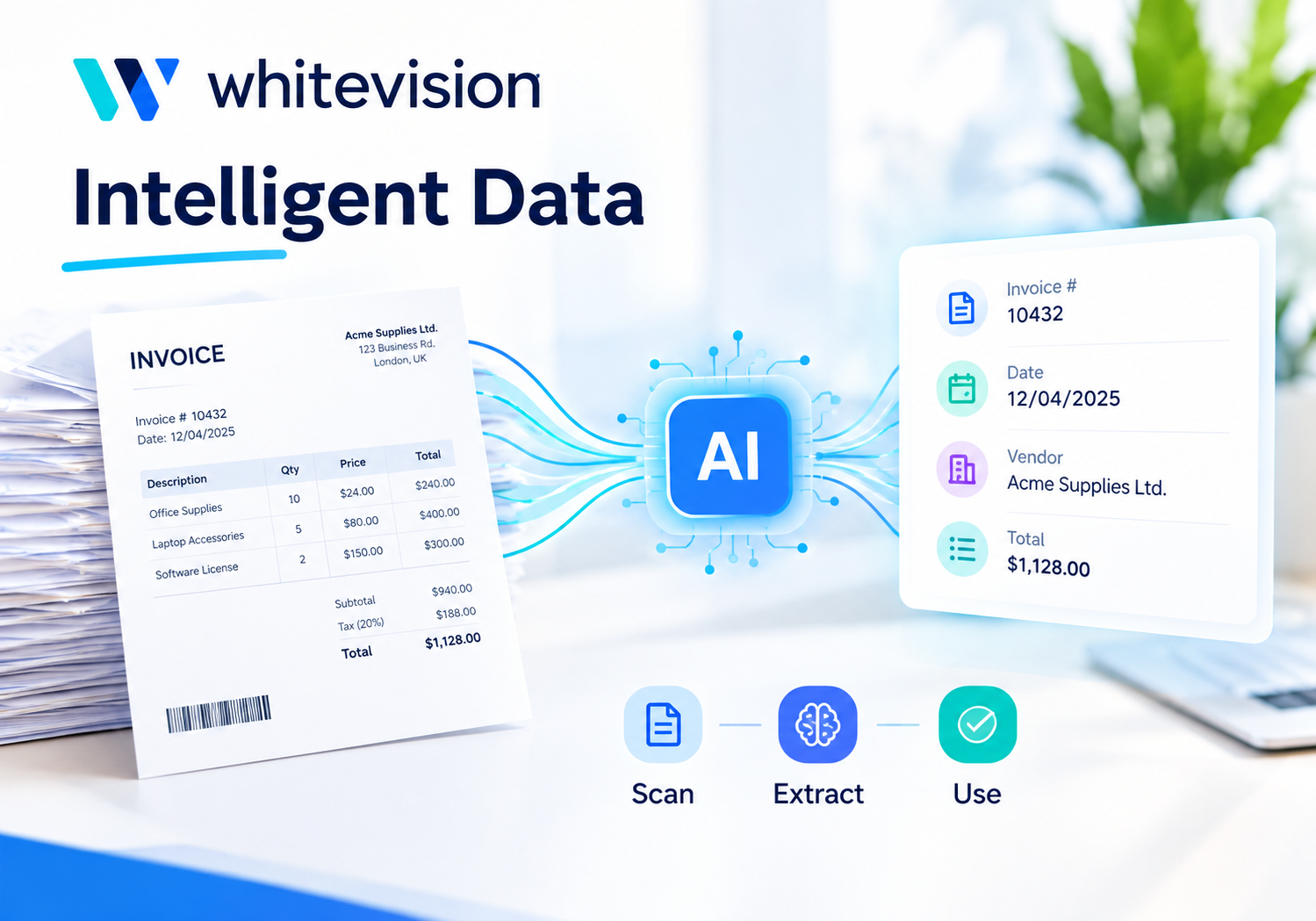
Every day, finance teams receive a flood of invoices, receipts, and expense claims, each arriving in a different format, from a different sender, through a different channel. Manually typing that information into an accounting system wastes hours and invites costly mistakes. Fortunately, intelligent data extraction solves this problem by reading documents automatically and turning them into structured, usable data. This article explains exactly how that process works inside Whitevision.
Table of contents
Quick Summary
Before diving into the details, here’s a quick overview of what this guide covers:
- How Whitevision B.V. approaches document and expense data, from capture to accounting entry
- The technology behind intelligent data extraction, including OCR, AI recognition, and self-learning models
- How extracted data flows through validation, approval, and integration steps
- Real-world use cases, from purchase invoices to mobile expense receipts
- Best practices for getting the most accurate extraction results
- Why partnering with Solution for Guru speeds up implementation and improves long-term results
How Is Whitevision Related to Intelligent Data Extraction?

Whitevision B.V. is a document and expense automation platform built around one central idea: financial documents should process themselves, not sit in someone’s inbox waiting for manual entry. The platform combines automated data capture, mobile receipt scanning, configurable approval workflows, and direct accounting integrations into a single, centralized system.
What Makes Whitevision Different From Basic Scanning Tools?
Many organizations still rely on simple scan-and-file tools that digitize a document without understanding its content. Whitevision goes several steps further, since its intelligent extraction engine actually reads and interprets the data inside each document, header details, line items, totals, and vendor information, then maps that information directly into the correct fields of a connected accounting or ERP system.
How Does Whitevision Bring Visibility to Financial Processes?
Because every invoice, receipt, and expense claim flows through the same centralized platform, finance teams gain a single, consistent view of spending across the entire organization. Rather than chasing paper receipts or email attachments scattered across different inboxes, teams see exactly what’s been submitted, what’s pending approval, and what’s already been posted, all from one dashboard.
Why Does Automation Matter for Expense and Invoice Management?
Manual processing does not just cost time; it introduces inconsistency, since two people entering the same invoice might record slightly different details. Whitevision’s automation-first approach removes that inconsistency by applying the same extraction and validation logic to every document, regardless of who submitted it or which format it arrived in.
What Is Intelligent Data Extraction, and Why Does It Matter?
Intelligent data extraction refers to the process of automatically identifying, reading, and structuring information from documents, without requiring a human to manually key in each field.
How Does This Differ From Traditional OCR?
Traditional optical character recognition simply converts an image into raw text, without understanding what that text represents. Intelligent extraction goes further by recognizing which piece of text is the invoice number, which is the vendor name, and which represents the total amount due, then placing each value into the correct structured field.
What Business Problems Does Intelligent Extraction Solve?
Without intelligent extraction, finance teams face slow processing times, frequent typos, and delayed approvals, since someone must manually review every document before it can move forward. Consequently, invoices sit unpaid longer than necessary, and expense reimbursements take days rather than hours. Intelligent extraction eliminates most of that manual bottleneck by handling the repetitive reading and data-entry work automatically.
What Are the Core Outcomes Businesses Expect?
Organizations adopting intelligent extraction typically expect three measurable results: fewer data-entry errors, faster document turnaround, and reduced administrative workload. Because the system reads documents consistently every time, these benefits compound as document volume grows.
How Does Intelligent Data Extraction Actually Work Inside Whitevision?
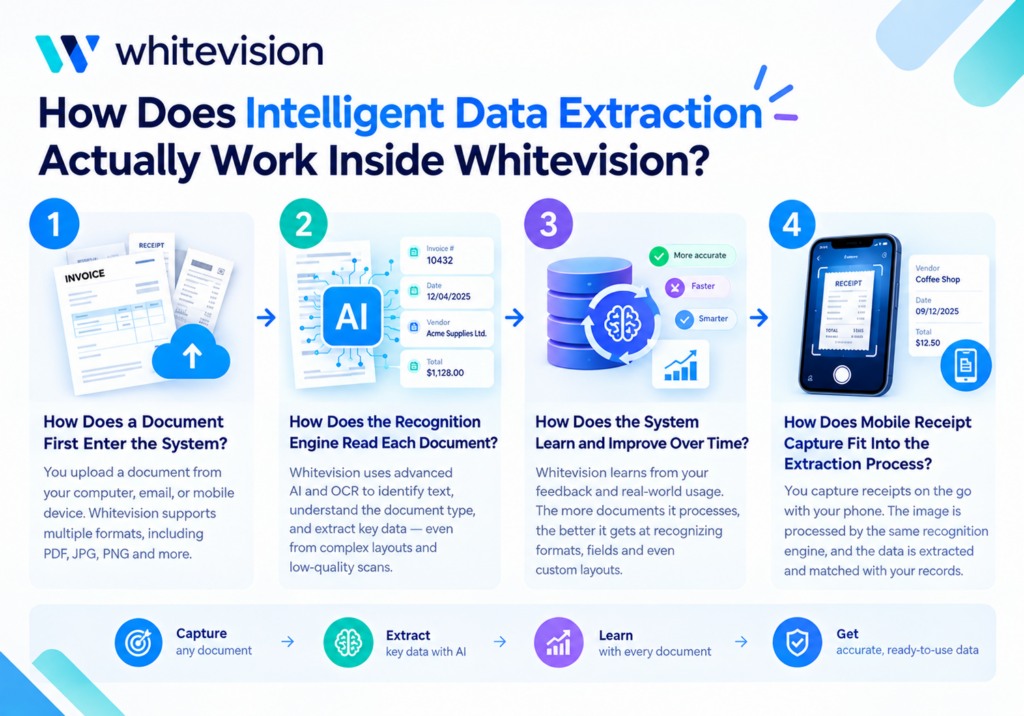
Understanding the mechanics behind Whitevision’s extraction engine makes it easier to see why the platform handles such a wide range of document types accurately.
How Does a Document First Enter the System?
Documents can enter Whitevision through several channels: email, direct upload, structured e-invoicing networks like Peppol, or the mobile app’s built-in scanning feature. Regardless of the entry point, every document lands in a centralized collection layer before extraction begins, ensuring nothing gets processed twice or lost between channels.
How Does the Recognition Engine Read Each Document?
Once collected, Whitevision’s recognition layer combines optical character recognition with AI-driven pattern matching to identify header data, such as vendor name and invoice date, alongside line-item details like quantities and unit prices. Because the system does not rely on rigid templates, it adapts to new invoice layouts without requiring manual template configuration for every new vendor.
How Does the System Learn and Improve Over Time?
Whitevision’s extraction engine is self-learning, meaning accuracy improves as it processes more documents and receives corrections from users. Consequently, a vendor’s invoice layout that initially required a manual correction becomes recognized automatically after just a few submissions, since the system retains what it learned from that correction.
How Does Mobile Receipt Capture Fit Into the Extraction Process?
For expense claims specifically, the mobile app allows employees to photograph a receipt on the spot rather than saving a paper copy for later. The same intelligent extraction engine then reads that photograph, pulling out the merchant name, date, and amount automatically, so employees avoid manually typing expense details after the fact.
What Types of Documents Can Whitevision Extract Data From?
Whitevision’s extraction capabilities extend well beyond purchase invoices, covering a wide range of financial and administrative documents.
| Document Type | What Gets Extracted | Common Use Case |
|---|---|---|
| Purchase invoices | Vendor, amounts, line items, VAT | Accounts payable processing |
| Order confirmations | Order number, quantities, pricing | Purchase order matching |
| Expense receipts | Merchant, date, amount, category | Employee reimbursement |
| Packing slips | Item counts, delivery details | Goods receipt verification |
| E-invoices (Peppol) | Structured XML invoice fields | Automated, template-free posting |
| Contracts and forms | Key terms, dates, signatures | Document management and compliance |
Because each document type follows the same underlying extraction logic, adding a new document category rarely requires building an entirely separate process from scratch.
How Does Extracted Data Move Through Validation and Matching?
Extraction alone does not guarantee accuracy, so Whitevision applies validation steps before any data reaches an accounting system.
What Happens During the Validation Step?
After extraction, the system checks the extracted values against expected patterns, confirming that a total amount matches the sum of individual line items, or that a VAT number follows the correct format. When discrepancies appear, the document gets flagged for human review rather than passing through silently with an error.
How Does Three-Way Matching Improve Accuracy?
For purchase invoices tied to a purchase order, Whitevision can perform three-way matching, comparing the invoice, the original purchase order, and the goods receipt confirmation. If all three align, the invoice proceeds automatically; if they don’t, the mismatch gets routed to the appropriate person for resolution before payment occurs.
Why Does Enrichment Matter Alongside Validation?
Beyond simply checking for errors, Whitevision enriches extracted data with information from connected systems, such as confirming a vendor already exists in the accounting platform or matching a cost center automatically based on the requester’s department. This enrichment step reduces the number of manual decisions still required further down the approval chain.
How Do Approval Workflows Build on Extracted Data?
Once data is extracted and validated, it needs to move through the right approval path before posting.
How Are Approval Rules Typically Structured?
Approval workflows in Whitevision commonly follow amount-based or department-based thresholds. A simple structure might look like this:
- Under a set amount: Automatically approved if it matches an existing purchase order
- Mid-range amount: Routed to the direct manager for approval
- Above a set amount: Routed to both the department head and finance for dual approval
How Does Touchless Processing Reduce Approval Steps?
For recurring, low-risk invoices that consistently meet predefined safe criteria, Whitevision’s touchless processing can skip manual approval entirely, posting the invoice directly into the accounting system. This approach frees approvers to focus their attention on exceptions and higher-value decisions rather than routine, repetitive approvals.
How Do Mobile Approvals Speed Up the Process?
Because approvers are not always at their desk, Whitevision’s mobile app allows managers to review and approve invoices or expense claims directly from a smartphone. As a result, approval delays caused by someone being out of office or traveling shrink considerably, since decisions no longer wait for desktop access.
How Does Whitevision Integrate With Accounting and ERP Systems?

Extraction and approval only deliver full value once the resulting data reaches the systems that actually manage the company’s finances.
Which Systems Does Whitevision Commonly Connect To?
Whitevision is designed to integrate with a range of accounting and ERP platforms, including systems widely used in construction and professional services sectors. Rather than requiring manual export and import between systems, data flows directly from Whitevision into the connected platform once it clears validation and approval.
How Does Integration Prevent Duplicate Data Entry?
Because Whitevision pushes extracted, validated data directly into the accounting system, finance staff never need to retype information a second time. This single point of entry eliminates one of the most common sources of transcription errors in traditional invoice processing.
How Does Centralized Visibility Support Financial Reporting?
Since every document, whether an invoice, receipt, or expense claim, passes through the same centralized platform before reaching the accounting system, finance leaders gain a consistent, up-to-date view of outstanding liabilities and pending expenses at any given moment, rather than waiting for month-end reconciliation to surface that picture.
What Are the Benefits of Intelligent Data Extraction for Finance Teams?

Organizations that adopt intelligent extraction through Whitevision typically report several recurring advantages:
- Faster invoice and expense processing, since manual data entry is largely eliminated
- Fewer errors, because extraction and validation apply consistent logic to every document
- Improved cash flow visibility, thanks to centralized, real-time tracking of pending payments
- Reduced administrative workload, freeing staff to focus on exceptions rather than routine entry
- Better compliance and audit trails, since every document and approval step is logged automatically
- Greater employee satisfaction, as expense reimbursements move faster through mobile capture and approval
Taken together, these benefits shift financial administration from a reactive, paperwork-heavy task into a streamlined, largely automated process.
What Are the Best Practices for Getting the Most Out of Whitevision’s Extraction Engine?
Getting strong results from intelligent extraction requires a bit of upfront planning alongside the technology itself.
How Should Organizations Prepare Their Document Sources?
Before rolling out extraction broadly, it helps to consolidate as many document channels as possible, email inboxes, upload portals, and mobile capture, into the centralized collection point Whitevision provides. Fewer scattered entry points mean fewer opportunities for a document to slip through unprocessed.
How Often Should Extraction Accuracy Be Reviewed?
Because the extraction engine improves through corrections, reviewing flagged documents regularly, rather than letting them pile up, accelerates how quickly the system learns new vendor formats. A short weekly review of exceptions keeps accuracy climbing steadily rather than stalling.
How Should Approval Thresholds Be Set Initially?
Setting overly conservative approval thresholds at first, then gradually raising the touchless processing limit as confidence grows, allows teams to trust the automation without risking oversight on larger transactions. This phased approach balances speed with appropriate financial control.
How Should Employees Be Trained on Mobile Capture?
Simple training around good photo lighting and capturing the entire receipt in frame improves extraction accuracy significantly. A short onboarding guide distributed alongside the mobile app rollout prevents avoidable extraction errors caused by poor-quality photos.
How Does Whitevision Handle Different Document Formats and Channels?
Because organizations receive documents in wildly different formats, from scanned paper to structured XML, extraction logic needs to flex accordingly.
How Does Whitevision Process Structured E-Invoices?
Structured e-invoices, delivered through networks like Peppol, already arrive in a machine-readable XML format rather than a scanned image. Whitevision reads this structured data directly, skipping the OCR step entirely and posting with very high confidence, since there is no handwriting or scan quality to interpret in the first place.
How Does Whitevision Handle Scanned Paper Documents?
For organizations still receiving paper invoices or receipts, a scanning step converts the physical document into a digital image first. From there, the same recognition engine applies OCR and AI-driven pattern matching to extract the relevant fields, just as it would for an emailed PDF, ensuring paper-based senders are not left out of the automated flow.
How Does Whitevision Combine Multiple Format Types Into One Process?
Regardless of whether a document arrives as structured XML, a PDF attachment, or a mobile photo, Whitevision routes every format into the same centralized collection and recognition pipeline. Consequently, finance teams review documents through one consistent interface, rather than needing separate tools for structured invoices versus scanned paper receipts.
How Does Whitevision Support Different Industries and Use Cases?
While invoice processing remains the most common use case, Whitevision’s extraction capabilities extend into several other document-heavy business functions.
How Do Construction and Field Service Businesses Use Whitevision?
Field-based industries, such as construction, often generate documents away from a central office, including delivery notes, service confirmations, and field purchase receipts. Whitevision’s mobile capture and centralized processing allow field staff to submit these documents on-site, so paperwork does not pile up until someone returns to the office at the end of the week.
How Do Public Sector and Nonprofit Organizations Benefit?
Organizations with strict budget accountability, such as public sector bodies, benefit from Whitevision’s centralized visibility and audit trail, since every extracted document, approval decision, and posting event is logged automatically. This transparency simplifies both internal oversight and external audits.
How Do Professional Services Firms Apply Whitevision Differently?
Professional services firms often deal with a high volume of smaller expense claims, such as client travel and mileage reimbursements, alongside standard vendor invoices. Whitevision’s mobile receipt capture handles this volume efficiently, letting consultants submit expenses as they occur rather than saving a stack of receipts for a monthly reconciliation.
What Role Does Data Security Play in Whitevision’s Extraction Process?

Financial documents contain sensitive information, so extraction technology needs to handle that data responsibly at every step.
How Does Whitevision Protect Document Data in Transit and Storage?
Because documents often contain banking details, tax identifiers, and vendor information, secure handling matters throughout the collection, extraction, and storage stages. Whitevision applies encryption and access controls across its platform, ensuring that sensitive financial data remains protected whether it’s moving between systems or sitting in centralized storage awaiting approval.
How Does Role-Based Access Support Compliance?
Not every employee should see every financial document. Whitevision’s role-based access settings ensure that approvers only see documents relevant to their department or authorization level, while finance administrators retain broader visibility needed for reconciliation and reporting. This structure supports internal controls without slowing down the approval process itself.
Why Does an Audit Trail Matter Beyond Compliance?
Beyond satisfying external auditors, a complete audit trail helps internal teams troubleshoot disputes quickly, such as confirming exactly when an invoice was approved and by whom. Because Whitevision logs every extraction, validation, and approval event automatically, resolving these questions takes minutes rather than requiring a manual search through email threads.
How Does Whitevision Measure and Report on Extraction Performance?
Rolling out intelligent extraction is not a one-time setup; ongoing measurement helps organizations confirm the technology is delivering its expected value.
What Metrics Matter Most for Tracking Extraction Success?
Tracking metrics such as straight-through processing rate, average time from receipt to approval, and the percentage of documents requiring manual correction gives finance leaders a clear picture of how well extraction is performing. As these numbers improve over time, they confirm that the self-learning engine is genuinely reducing manual workload rather than simply shifting it elsewhere.
How Should Teams Use Reporting to Guide Further Automation?
Reviewing which document types or vendors still generate the most exceptions helps prioritize where to focus additional attention, whether that means refining a specific extraction rule or providing extra training to whoever submits that document type. Rather than treating automation as finished after go-live, ongoing reporting turns it into a continuously improving process.
How Does Whitevision’s Self-Learning Model Compound These Gains?
Because the recognition engine adjusts itself based on the corrections gathered through this reporting cycle, each round of review makes the following round faster and more accurate. Over several months, organizations often notice that the same vendor formats which once required frequent correction now process without any manual intervention at all.
What Common Mistakes Should Organizations Avoid?

Even a strong extraction platform can underperform if a few common pitfalls go unaddressed.
- Skipping the review of flagged exceptions, which slows the system’s learning process
- Setting touchless thresholds too high too soon, risking unnoticed errors on larger invoices
- Failing to consolidate document channels, leaving some invoices outside the automated flow
- Ignoring mobile app training, leading to blurry or incomplete receipt photos
- Not reviewing integration mappings after an accounting system update, which can cause fields to sync incorrectly
Addressing these issues early keeps the extraction process reliable as document volume grows.
Conclusion: What’s the Bottom Line on Intelligent Data Extraction in Whitevision?
Intelligent data extraction transforms Whitevision from a simple document scanner into a genuinely automated financial processing hub. By combining AI-driven recognition, mobile receipt capture, validation and matching, configurable approval workflows, and direct accounting integrations, organizations move invoices and expenses through the system far faster than manual entry ever allowed.
Ultimately, the strength of this approach comes from how tightly these pieces work together inside Whitevision. Extraction feeds validation, validation feeds approval, and approval feeds directly into the accounting system, all without requiring a document to be retyped at any stage. For organizations that want to reach this level of automation without a long trial-and-error period, partnering with an experienced team like Solution For Guru ensures the setup reflects real financial workflows from day one, leading to faster processing, fewer errors, and clearer financial visibility.
Frequently Asked Questions
Accuracy depends on document quality and how long the system has processed a specific vendor’s format, but because Whitevision’s engine is self-learning, accuracy typically improves steadily as more documents pass through and corrections get applied. Well-scanned, clear documents generally see fewer flagged exceptions than blurry or poorly formatted ones.
No. Whitevision’s recognition engine is designed to interpret invoice layouts without relying on rigid, pre-built templates for every vendor. This template-free approach means new vendors can be onboarded without a lengthy manual configuration process before their invoices process correctly.
Yes. The Whitevision mobile app allows employees to photograph receipts directly from a smartphone, and the same extraction engine processes that image automatically. Consequently, expense submission and manager approval can both happen entirely from a mobile device, without ever needing desktop access.
Why Should You Partner With Solution For Guru for Your Whitevision Implementation?
Even though Whitevision’s extraction engine works out of the box, configuring it correctly around a specific organization’s document types, approval hierarchy, and accounting system takes experience. This is where Solution For Guru becomes a valuable partner.

What Does Solution For Guru Bring to a Whitevision Rollout?
Solution For Guru specializes in financial process automation consulting, helping organizations map their actual invoice, expense, and approval workflows onto Whitevision’s capabilities rather than adopting a generic default setup. Because extraction accuracy and approval routing depend heavily on correct initial configuration, getting this right from day one saves significant rework later.
How Does Solution For Guru Reduce Implementation Risk?
Instead of learning Whitevision‘s document flows, integration mappings, and approval rules through trial and error, teams working with Solution For Guru benefit from proven implementation patterns refined across many previous automation projects. This experience helps organizations reach accurate, reliable extraction results faster, without the common missteps outlined earlier.
What Ongoing Support Does Solution For Guru Provide After Go-Live?
Financial processes rarely stay static, so Solution For Guru also offers ongoing optimization as document types evolve, new vendors are added, or approval hierarchies change. That continued partnership keeps Whitevision’s extraction and workflow logic aligned with the organization’s real needs over time, rather than slowly drifting out of sync.
Recommended:
- HR Analytics in HoorayHR
- Digital HR Transformation with HoorayHR
- How Whitevision Helps Finance Teams Manage High Document Volumes
- Employee Onboarding Best Practices with HoorayHR
- Integrating Whitevision with Accounts Payable Software
- Whitevision AI Document Processing: Common Business Use Cases
- What KPIs Should You Track in Expense Management?
- Zoho Expense Pricing Explained: Plans, Features, and Costs
- Whitevision vs Moss: Which Platform Fits Your Finance Workflow Better?
- Key Features of HoorayHR
- Zoho Expense Review: Pros, Cons, and Key Features
- HoorayHR ROI: How Businesses Save Time with HR Automation
- How Long Does It Take to Implement HoorayHR?
- HoorayHR Review: Features, Pros, Cons, and Best Use Cases
- What Is HoorayHR? A Complete Overview
- Best Expense Automation Software: Which Platform Fits Your Business?
- What ROI Can Businesses Expect From Expense Automation Software?
- Multi-Currency Expense Management with Zoho Expense
- What Is Zoho Expense and How Does It Work?
- What Are the Biggest Challenges in Multi-Entity Expense Management?
- Whitevision vs Traditional Invoice Processing: What Changes?