Building Advanced Incident Routing Logic in Freshservice
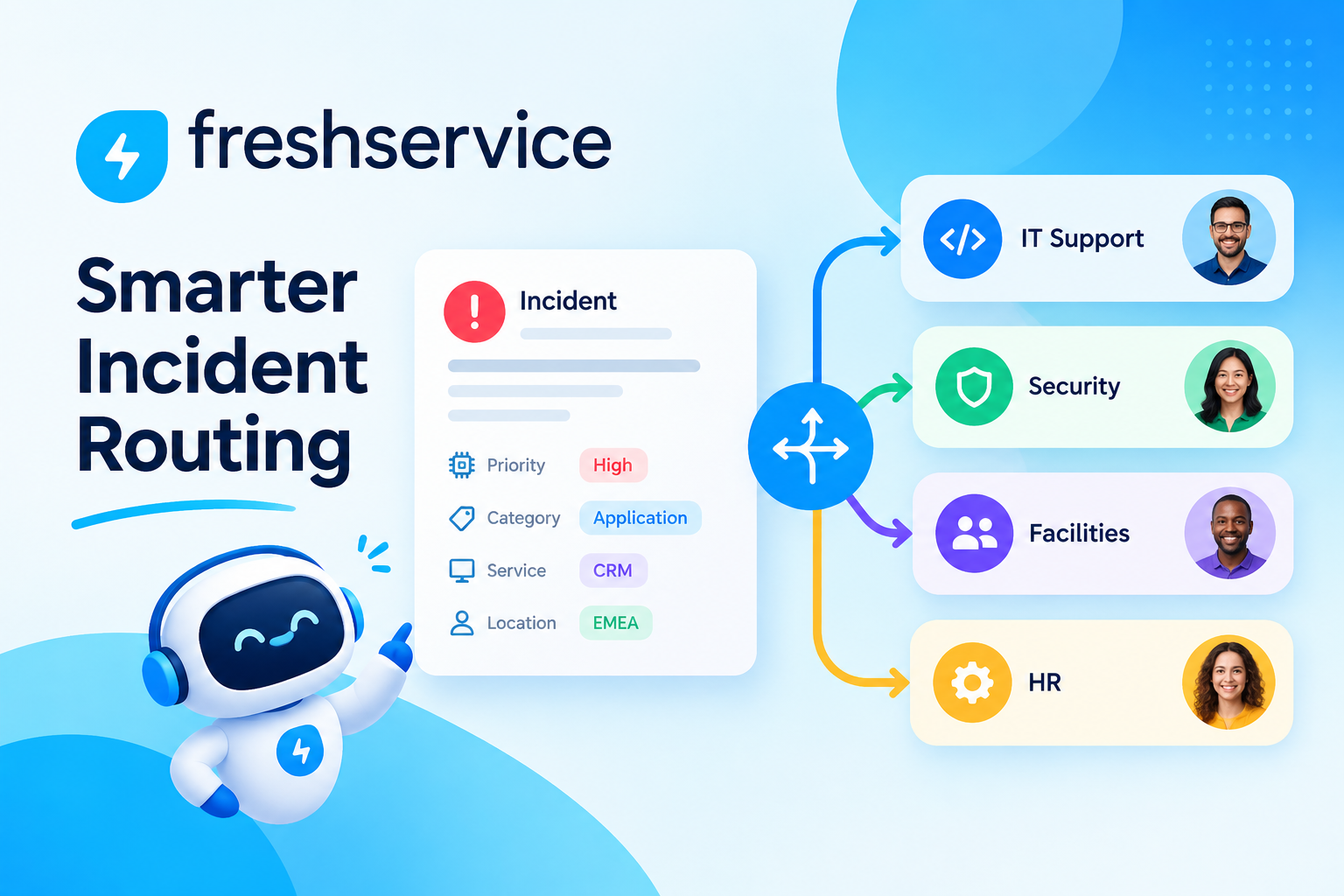
When a critical system goes down, every extra minute spent figuring out who should handle the ticket translates directly into lost productivity. Consequently, IT teams increasingly rely on automated routing logic instead of manual triage to get incidents in front of the right resolver instantly. This article walks through how to build advanced incident routing logic step by step, using the automation tools built into Freshservice.
Table of contents
Quick Summary
Before getting into the details, here’s a quick overview of what this guide covers:
- How Freshservice ITSM approaches incident routing at its core
- The building blocks of routing logic, including rules, conditions, and automation triggers
- How to layer conditions for advanced, multi-criteria routing scenarios
- Common routing models, such as category-based, skill-based, and load-balanced routing
- Best practices and pitfalls to avoid when scaling routing logic
- Why working with a specialist like Solution For Guru speeds up implementation and reduces mistakes
How Does Freshservice ITSM Relate to Incident Routing?

Freshservice ITSM is a cloud-based IT service management platform built to handle the full incident lifecycle, from logging and categorization through resolution and closure. Rather than treating routing as an afterthought, Freshservice builds it into the core ticket workflow, so every incident moves automatically toward the group or agent best equipped to resolve it.
Why Does Routing Sit at the Center of Freshservice’s Design?
Because incident volume tends to grow faster than headcount, manual triage quickly becomes a bottleneck. Freshservice addresses this by combining several automation layers, Workflow Automator, Observer Rules, and Scenario Automations, that all influence how an incident gets assigned. As a result, teams can build routing logic ranging from a simple “if category equals network, assign to network team” rule to far more advanced, multi-condition decision trees.
How Does Freshservice Fit Into a Broader ITSM Strategy?
Routing logic does not operate in isolation. Instead, it connects to priority matrices, SLA policies, and the CMDB, so that an incident gets routed correctly and simultaneously inherits the right urgency, deadline, and asset context. Because Freshservice keeps these pieces connected, teams build routing rules that reflect the full picture of an incident rather than just its category label.
What Is Incident Routing Logic, and Why Does It Matter?
Incident routing logic refers to the set of rules that determine which team or agent receives a given ticket, and in what order actions happen afterward. Rather than relying on a service desk agent to read every ticket and decide manually, routing logic automates that decision using predefined conditions.
What Problems Does Poor Routing Create?
Without solid routing logic, tickets frequently land in a generic queue, wait for manual review, then get reassigned once, or even twice, before reaching the correct resolver. Each handoff adds delay, and delays compound quickly during major incidents when speed matters most. Furthermore, inconsistent routing frustrates end users, who see the same type of request handled differently depending on who happens to review it first.
What Does Good Routing Logic Achieve?
Well-built routing logic delivers three measurable outcomes: faster time-to-assignment, fewer manual reassignments, and more consistent SLA compliance. Because tickets reach the correct queue on the first attempt, agents spend less time redirecting tickets and more time actually resolving them.
What Are the Building Blocks of Freshservice Routing Logic?
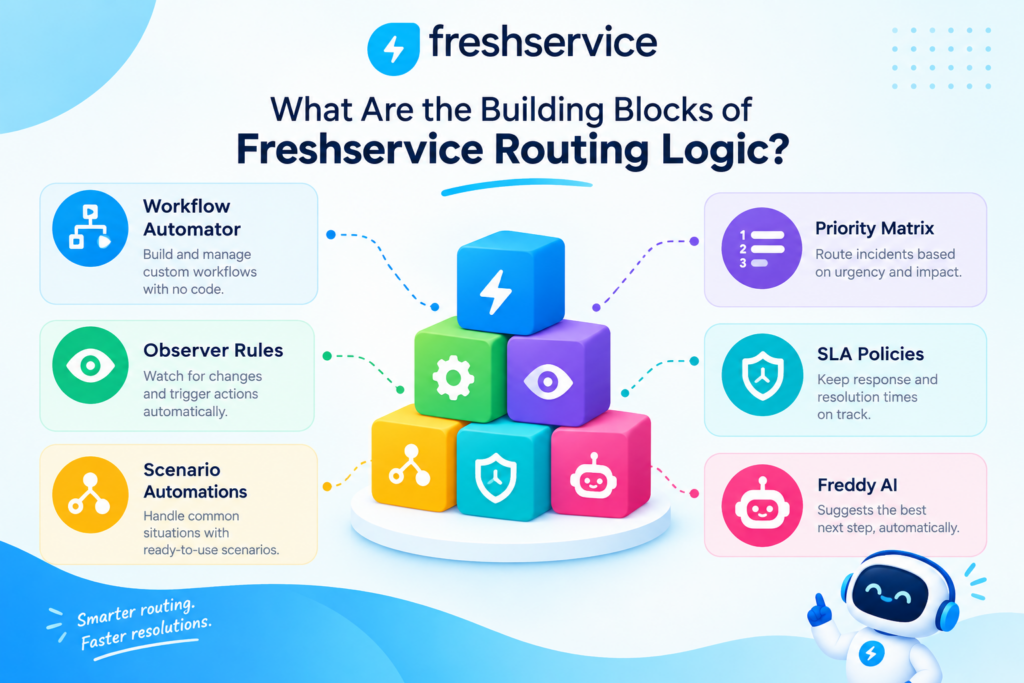
Before building advanced routing scenarios, it helps to understand the individual components Freshservice provides for constructing rules.
| Component | What It Does | Best Used For |
|---|---|---|
| Workflow Automator | Visual, drag-and-drop rule builder | Multi-step, condition-based automations |
| Observer Rules | Triggers on real-time ticket field changes | Reactive routing when a field updates |
| Scenario Automations | One-click bundled actions | Repeated manual actions turned into a button |
| Priority Matrix | Impact and urgency scoring | Determining ticket priority automatically |
| SLA Policies | Time-based targets by priority | Escalation timing and breach alerts |
| Freddy AI | Machine-learning powered suggestions | Predictive routing and agent recommendations |
Each of these pieces can work independently, but advanced routing logic typically combines several of them into a single, cohesive workflow.
How Do Conditions and Actions Work Together?
Every rule in Freshservice follows the same basic structure: a trigger event, a set of conditions, and one or more resulting actions. For instance, a rule might trigger “when a ticket is created,” check the condition “subject contains ‘VPN’,” and then execute the action “assign to Network Support group.” Because this structure stays consistent across Workflow Automator and Observer Rules, teams can mix and match components without relearning the logic each time.
Why Do Multiple Conditions Matter for Accuracy?
A single condition, such as matching a keyword, often produces false positives. For example, “VPN” might appear in unrelated billing tickets that mention VPN reimbursement. Consequently, advanced routing logic layers several conditions together, combining keyword matches with requester department, ticket type, and category, so the rule only fires when every relevant signal lines up correctly.
How Do You Build Category-Based Routing in Freshservice?
Category-based routing represents the most common starting point for incident routing logic, since most service desks already classify tickets by type.
How Should Categories Be Structured for Reliable Routing?
Before building rules, it’s worth auditing existing categories and subcategories to confirm they map cleanly onto actual support teams. If categories overlap or feel ambiguous, routing rules built on top of them will inherit that ambiguity. Therefore, cleaning up the category tree first prevents wasted effort later.
What Does a Basic Category Rule Look Like?
A simple category-based rule in Freshservice might follow this pattern:
- Trigger: Ticket created
- Condition: Category equals “Hardware”
- Action: Assign to Hardware Support group
- Additional action: Set priority based on the Priority Matrix
How Can Category Rules Scale Across Departments?
As organizations grow, a single flat rule list becomes hard to manage. Grouping rules by department, and naming them consistently, such as “Network – Category Routing” or “HR – Category Routing,” keeps the automation list navigable even as dozens of rules accumulate over time.
How Do You Build Skill-Based and Workload-Aware Routing?
Category alone does not always identify the best resolver, especially when a team includes specialists with different areas of expertise.
How Does Skill-Based Routing Improve Resolution Time?
Skill-based routing adds a layer beyond category, matching tickets to specific agents based on tagged skills or certifications. For example, a networking incident involving a specific vendor’s firewall might route directly to the one or two agents certified on that platform, rather than the entire network team’s general queue.
How Does Workload Balancing Prevent Bottlenecks?
Even with the right skill match, routing every matching ticket to the same top performer creates burnout and slows overall throughput. Freshservice’s round-robin and load-balanced assignment options distribute tickets evenly across qualified agents, so no single person becomes a bottleneck during busy periods.
How Do Skill and Workload Rules Work Together?
Advanced setups often combine both approaches: first filtering by skill tag, then applying round-robin assignment among the agents who qualify. This two-step logic ensures tickets go only to properly skilled agents, while still spreading the workload fairly across that qualified pool.
How Do You Build Priority-Driven Escalation Routing?
Routing logic becomes especially valuable once it accounts for urgency, not just topic.
How Does the Priority Matrix Influence Routing Decisions?
Freshservice’s Priority Matrix calculates priority from impact and urgency, and that calculated priority can itself become a routing condition. For instance, any ticket landing at P1 might automatically route to a senior on-call engineer rather than the general queue, regardless of category.
How Should SLA-Based Escalation Rules Be Structured?
Escalation rules typically watch for tickets approaching or breaching their SLA deadline, then take action accordingly. A typical escalation chain looks like this:
| SLA Stage | Trigger Condition | Automated Action |
|---|---|---|
| 75% of SLA elapsed | Time-based condition | Notify assigned agent |
| 90% of SLA elapsed | Time-based condition | Notify team lead |
| SLA breached | Breach condition | Reassign to senior engineer, notify manager |
Why Should Major Incidents Follow a Separate Routing Path?
Because major incidents affect multiple users or critical systems, they often warrant a distinct routing path that bypasses the standard queue entirely. Configuring a separate rule set for major incidents, one that immediately notifies an incident commander and spins up a dedicated Slack or Teams channel, keeps large-scale outages from getting lost among routine tickets.
How Does Freddy AI Enhance Advanced Routing Logic?

Rule-based routing handles predictable scenarios well, but Freshservice also layers machine learning on top of manual rules through Freddy AI.
How Does Freddy AI Predict the Right Resolver?
Freddy AI analyzes historical resolution data, including which agents resolved similar tickets fastest, then suggests an assignment recommendation. Consequently, tickets that fall outside neatly defined categories still benefit from intelligent routing rather than defaulting to a generic queue.
How Does Freddy AI Detect Emerging Incident Patterns?
Beyond individual ticket routing, Freddy AI can flag clusters of similar incidents arriving in a short window, which often signals a wider outage rather than isolated issues. Once flagged, that pattern can trigger the major incident routing path automatically, reducing the delay between detection and coordinated response.
Should AI-Based Routing Replace Rule-Based Logic Entirely?
Not necessarily. Most mature Freshservice implementations use AI-based suggestions as a complement to explicit rules rather than a full replacement. Explicit rules guarantee predictable behavior for well-understood scenarios, while AI suggestions catch the edge cases that rules alone would miss.
What Are the Best Practices for Building Advanced Routing Logic?
Once the basic building blocks are in place, a few best practices help ensure routing logic stays reliable as it grows more complex.
How Should Rules Be Ordered and Prioritized?
Because multiple rules can technically match the same ticket, Freshservice evaluates rules in a defined order. Placing the most specific rules above broader, catch-all rules prevents a generic rule from grabbing a ticket that a more precise rule was designed to handle.
How Often Should Routing Logic Be Reviewed?
Routing rules that made sense a year ago may no longer reflect current team structure or ticket volume. Scheduling a quarterly review, checking which rules fire most often and which rarely trigger, helps teams retire outdated rules and refine ones that no longer route accurately.
How Should Teams Test New Routing Rules Before Going Live?

Rather than deploying new rules directly into production, testing them against a sample of historical tickets first reveals unintended overlaps or gaps. Many teams create a handful of test tickets covering edge cases, then confirm each one lands in the expected queue before activating the rule for all incoming traffic.
How Do You Build Location and Business-Hours Aware Routing?
Global organizations often need routing logic that accounts for time zones and regional support coverage, not just topic and priority.
Why Does Time Zone Awareness Matter for Routing?
When support teams span multiple regions, routing a ticket to a team that finished its shift hours ago simply delays resolution. Freshservice allows business hours to be configured per group, so routing rules can check whether the receiving team is currently active before assigning a ticket, and redirect to an after-hours or follow-the-sun team when needed.
How Does Follow-the-Sun Routing Work in Practice?
A follow-the-sun model routes incidents to whichever regional team is currently within business hours, handing off responsibility as the day progresses. For example, a ticket logged late in the evening in North America might route automatically to a team based in Asia-Pacific, then hand back to North America once their shift begins again. Setting this up requires defining business hours accurately for each regional group and building conditional logic that checks the current time against those hours before finalizing assignment.
How Should On-Call Rotations Factor Into Routing?
Outside standard business hours, critical incidents still need an owner. Integrating on-call scheduling tools with Freshservice ensures that after-hours P1 incidents route directly to whichever engineer is currently on call, rather than sitting untouched until the next business day begins.
How Do You Build Routing Logic for Service Requests Versus Incidents?
Although this article focuses on incidents, many Freshservice instances handle both incidents and service requests, and routing logic often needs to distinguish between the two.
Why Do Incidents and Service Requests Need Different Routing Paths?
Incidents represent unplanned disruptions requiring urgent attention, while service requests, such as new equipment or access requests, typically follow a planned, approval-based process. Applying the same routing rules to both ticket types risks sending routine requests into an urgent incident queue, or worse, delaying a genuine outage behind a stack of routine approvals.
How Should Ticket Type Be Used as a Primary Routing Condition?
Because Freshservice tags every ticket with a type field, placing a ticket-type check at the very top of the rule chain ensures incidents and service requests immediately branch into separate logic paths. From there, each path can apply its own category, priority, and approval conditions without the two ticket types interfering with one another.
How Does Routing Logic Support Post-Incident Review and Continuous Improvement?
Building routing rules is not a one-time task; the data these rules generate should feed back into ongoing service improvement.
What Data Should Teams Review After Major Incidents?
After resolving a significant incident, reviewing how the routing logic performed, whether the first assignment was correct, how long escalation took, and whether any manual reassignment was needed, reveals gaps worth closing. This retrospective habit turns each incident into a learning opportunity rather than a one-off event.
How Can Routing Analytics Reveal Process Gaps?
Freshservice’s built-in reporting shows patterns across many tickets rather than just one, such as a specific category that consistently gets reassigned after initial routing. When a pattern like this emerges repeatedly, it signals that the underlying rule needs adjustment rather than treating each instance as an isolated mistake.
How Should Teams Prioritize Which Routing Rules to Improve First?
Not every imperfect rule deserves immediate attention. Focusing first on rules tied to high-volume categories or high-priority incidents delivers the most improvement for the effort invested, since fixing a rarely-triggered rule affects far fewer tickets than fixing one that fires dozens of times daily.
How Does Integration With Other Tools Strengthen Freshservice Routing Logic?
Incident routing rarely operates in a vacuum, since most IT environments rely on monitoring tools, communication platforms, and asset databases working alongside the service desk.
How Do Monitoring Tools Trigger Automatic Routing?
When monitoring platforms integrate with Freshservice, an alert from infrastructure monitoring can automatically create a ticket and route it based on the affected system, without waiting for a human to notice the alert first. Because the ticket already carries context about which server or service triggered it, routing rules can direct it straight to the team responsible for that specific piece of infrastructure.
How Does CMDB Data Improve Routing Accuracy?
Freshservice’s configuration management database stores relationships between assets, services, and support teams. Routing rules that reference this data can assign a ticket based on which business service is affected, rather than relying solely on a category label typed in by the requester, which improves accuracy when requesters misclassify their own tickets.
How Do Chat and Collaboration Tools Extend Routing Notifications?
Once a ticket routes to the correct team, integrations with tools like Slack or Microsoft Teams can push an immediate notification to that team’s channel, rather than relying on agents to check their queue. This extra layer ensures urgent incidents get human attention within seconds of being routed, even if an agent hasn’t yet opened Freshservice.
How Do You Build Routing Logic for Multi-Tier Support Structures?
Larger organizations often run tiered support, where Tier 1 handles initial triage and Tier 2 or Tier 3 teams handle specialized escalations. Routing logic needs to reflect that structure explicitly.
How Should Initial Triage Rules Differ From Escalation Rules?
Tier 1 routing rules typically focus on broad categorization, getting a ticket to the general support queue quickly. Escalation rules, by contrast, activate only when Tier 1 cannot resolve the issue within a set timeframe or explicitly determines that the issue requires specialized expertise, at which point the ticket routes to the appropriate Tier 2 or Tier 3 group.
How Can Automation Detect When an Escalation Is Needed?
Rather than relying solely on an agent’s manual decision to escalate, Freshservice can trigger escalation automatically when specific conditions occur, such as a ticket remaining in Tier 1 status past a defined time threshold, or a specific keyword appearing in an agent’s internal notes that signals unfamiliarity with the issue. Combining automatic triggers with manual escalation options gives agents flexibility while still catching cases they might otherwise let sit too long.
Why Should Integration Health Be Reviewed as Routing Logic Matures?
As routing logic matures, integration touchpoints should be revisited periodically rather than treated as a one-time setup.
Why Should Integration Health Be Checked Regularly?
APIs and integrations can silently break when a connected tool changes its data format or authentication requirements. If a monitoring integration stops passing the correct asset field, for example, routing rules relying on that field may misfire without anyone immediately noticing. Scheduling periodic integration health checks catches these silent failures before they cause a string of misrouted tickets.
What Common Mistakes Should Teams Avoid?

Even well-intentioned routing logic can backfire if a few common pitfalls go unaddressed.
- Over-relying on keyword matching alone, which produces false positives from unrelated tickets
- Building overly complex rule chains that become difficult to troubleshoot when something breaks
- Forgetting to update routing rules after a team restructuring or new hire onboarding
- Skipping fallback rules, leaving tickets stuck if no specific condition matches
- Ignoring rule execution order, allowing broad rules to intercept tickets meant for specific ones
Addressing these issues early prevents routing logic from becoming a maintenance burden down the road.
Conclusion: What’s the Bottom Line on Advanced Incident Routing in Freshservice?
Advanced incident routing logic transforms Freshservice from a simple ticketing system into a genuinely proactive incident management platform. By combining category rules, skill-based assignment, priority-driven escalation, and Freddy AI’s predictive suggestions, IT teams route incidents accurately on the first attempt far more often than manual triage ever could.
Ultimately, the strength of this approach comes from how well the different pieces work together inside Freshservice. Categories feed priority calculations, priority feeds escalation timing, and AI-driven suggestions catch what explicit rules miss. For organizations that want to build this logic correctly the first time, partnering with an experienced team like Solution4Guru ensures the routing structure reflects real support workflows rather than a generic template, setting the stage for faster resolutions and fewer missed SLAs.
Frequently Asked Questions
Yes. Freshservice supports department-specific workflows, categories, and automation rules, so IT, HR, and facilities teams, for example, can each have distinct routing logic running within the same instance without interfering with one another.
No coding is required. Workflow Automator and Observer Rules use a visual, drag-and-drop interface, so teams build conditional logic through menus and dropdowns rather than scripts. That said, working with a specialist such as Solution4Guru still helps when logic gets genuinely complex, since experienced configuration prevents rule conflicts that are harder to untangle after the fact.
Freshservice’s reporting tools track metrics like first-assignment accuracy, reassignment counts, and SLA compliance rates. Reviewing these numbers regularly reveals whether routing rules are sending tickets to the right place on the first try, or whether specific rules need refinement.
Why Should You Partner With Solution For Guru to Build Routing Logic in Freshservice?
Even though Freshservice provides powerful native tools, designing routing logic that truly matches an organization’s structure takes specialized expertise. This is where Solution For Guru becomes a valuable partner.
What Does Solution For Guru Bring to a Freshservice Routing Project?
Solution For Guru specializes in ITSM consulting and implementation, helping organizations translate their actual support structure into working Freshservice automation rather than guessing at configuration. Because routing logic touches categories, SLAs, groups, and skill tags simultaneously, getting the underlying data model right from the start saves significant rework later.
How Does Solution For Guru Reduce Implementation Risk?
Instead of learning Workflow Automator and Observer Rules through trial and error, teams working with Solution4Guru benefit from proven rule templates and configuration patterns refined across many previous Freshservice deployments. This experience helps organizations avoid the common mistakes outlined earlier while reaching a working routing setup much faster.
What Ongoing Value Does Solution For Guru Provide After Go-Live?
Support needs rarely stay static, so Solution For Guru also offers ongoing optimization as team structures change, new categories emerge, or ticket volume grows. That continued partnership keeps Freshservice routing logic aligned with the organization’s evolving needs, rather than slowly drifting out of sync with reality.
Recommended:
- Using Orchestration Center in Freshservice for IT Automation
- Common Freshservice Implementation Mistakes and How to Avoid Them
- Choosing and Implementing the Right ITSM Model for Your IT Team
- Best Practices for IT Asset Lifecycle Management Using ITSM Platforms
- How to Measure ITSM Success After Implementing Freshservice
- How Automation in Freshservice Helps Prevent IT Bottlenecks
- Multi-Tenant ITSM Architectures: What MSPs Should Know
- How Role-Based Access Control Improves ITSM Security
- How Self-Service Portals Improve Employee Experience in Freshservice
- ERP and ITSM Integration: Improving Operational Visibility Across Departments
- Integrating Endpoint Management Tools with Freshservice
- ManageEngine Asset Management (ITAM): Why Businesses Trust It to Control Their IT Assets
- Why Mid-Sized Companies Choose Freshservice Over Enterprise ITSM Platforms
- Best Reporting and Analytics Dashboards for IT Operations Teams in Freshservice
- How ITSM Platforms Support IT Compliance and Audit Readiness
- How ITSM Tools Support Internal IT Risk Management
- How AI Is Changing ITSM Workflows in Freshservice?
- How ITSM Platforms Like Freshservice Support Digital Transformation
- Freshservice CMDB Explained: Structure, Relationships, and Best Practices