Using Webhooks and Automation APIs in Freshservice
IT teams no longer update every ticket, asset record, or approval step by hand. Instead, they connect Freshservice to external systems through webhooks and automation APIs, which move data between tools without a single manual click. This article explains how webhooks trigger real-time callbacks, how the Freshservice API extends that automation further, and how service desk teams combine both to build resilient, low-maintenance workflows.
Table of contents
What Does This Article Cover at a Glance?
Before you configure a single workflow, this quick summary highlights the core concepts, limits, and use cases covered throughout the guide. Use it as a reference point while you read the detailed sections that follow.
| Topic | Key Takeaway |
| Webhooks | Trigger outbound callbacks from the Workflow Automator whenever a ticket, asset, or change event occurs. |
| REST API | Freshservice API v2 exposes tickets, assets, changes, problems, and more for two-way automation. |
| Authentication | Both webhooks and API calls rely on Basic Auth, using an API key or agent credentials. |
| Rate limits | API calls are capped per plan (100 to 500 requests per minute); webhook calls are capped at 1,000 per hour. |
| Retry behavior | Failed webhook callbacks retry up to four times, at 3, 5, 9, and 17-minute intervals. |
| Common use cases | Ticket escalation, asset sync, onboarding and offboarding provisioning, third-party alerting. |
How Does Freshservice ITSM Support Webhooks and API-Driven Automation?
Freshservice ITSM serves as the operational backbone for IT service management, covering incident management, asset tracking, change management, and service catalogs inside a single cloud platform. Because Freshservice centralizes so much operational data, it becomes a natural automation hub: every ticket update, asset change, or approval decision can act as a trigger that pushes information elsewhere or pulls information in. As a result, teams rarely treat Freshservice as an isolated system. Instead, they treat it as the coordination layer that connects monitoring tools, HR systems, cloud providers, and communication platforms.
What Is Freshservice ITSM in the Context of IT Automation?

Freshservice ITSM combines the Workflow Automator, the Orchestration Center, and a full REST API under one roof, so automation does not require a separate integration platform for basic tasks. The Workflow Automator handles event-based logic inside Freshservice, while the API and webhooks extend that logic to outside systems. Consequently, a single ticket update can simultaneously adjust priority, notify a manager, and create a corresponding record in a finance or HR tool, all without an agent touching a second application.
Why Do IT Teams Choose Freshservice for Webhook-Driven Workflows?
Many service desks choose Freshservice specifically because webhooks are a native action inside the Workflow Automator rather than a bolt-on feature. Teams therefore avoid building custom middleware for straightforward use cases, such as posting a Slack alert when an SLA is close to breaching. Additionally, the platform’s broad API coverage means that once a team outgrows simple webhook callbacks, it can move to fuller two-way integrations without switching platforms or rewriting existing automation logic.
This distinction matters most when a team is deciding where to invest first. A service desk that has never automated anything typically starts with Workflow Automator triggers and webhook actions, since these require no external development environment. Once those simple callbacks prove valuable, the same team usually graduates to API-based scripts that run on a schedule, handle larger data volumes, or need a response back from the destination system. Understanding both paths from the start prevents teams from over-building a webhook-only solution for a problem that really calls for a two-way API integration, or the reverse.
How Does the Orchestration Center Extend Webhook-Based Automation?
Freshservice’s Orchestration Center sits alongside the Workflow Automator and adds pre-built app connections and more advanced action nodes, including cloud provisioning, password resets, and license reclamation. While a webhook sends a single outbound call to a URL you specify, an Orchestration Center action often wraps multiple API calls, authentication steps, and conditional logic behind one drag-and-drop node. As a result, teams that need to provision a virtual machine in AWS, Azure, or Google Cloud as part of an onboarding ticket typically reach for Orchestration Center nodes rather than building the equivalent sequence from raw webhook calls.
When Should You Use Orchestration Center Instead of a Plain Webhook?
A plain webhook works well when the destination only needs a single, simple callback, such as posting a message to a chat channel. Orchestration Center becomes the better choice once a workflow needs to call a system that requires OAuth-based authentication, multiple sequential steps, or a supported connector Freshservice already maintains. Choosing between the two often comes down to how much custom logic a single action requires: simple and single-step favors webhooks, while multi-step and connector-based favors Orchestration Center.
Can Webhooks and Orchestration Center Nodes Coexist in One Workflow?
Yes. A single Freshservice workflow can include both a webhook action and one or more Orchestration Center nodes, triggered by the same event and conditions. For example, an offboarding workflow might use an Orchestration Center node to deactivate a cloud account and a webhook to notify a manager, all within the same automation. This flexibility means teams do not need to choose one approach exclusively; instead, they pick whichever tool fits each individual action inside a broader workflow.
What Is a Webhook and How Does It Work in Freshservice?
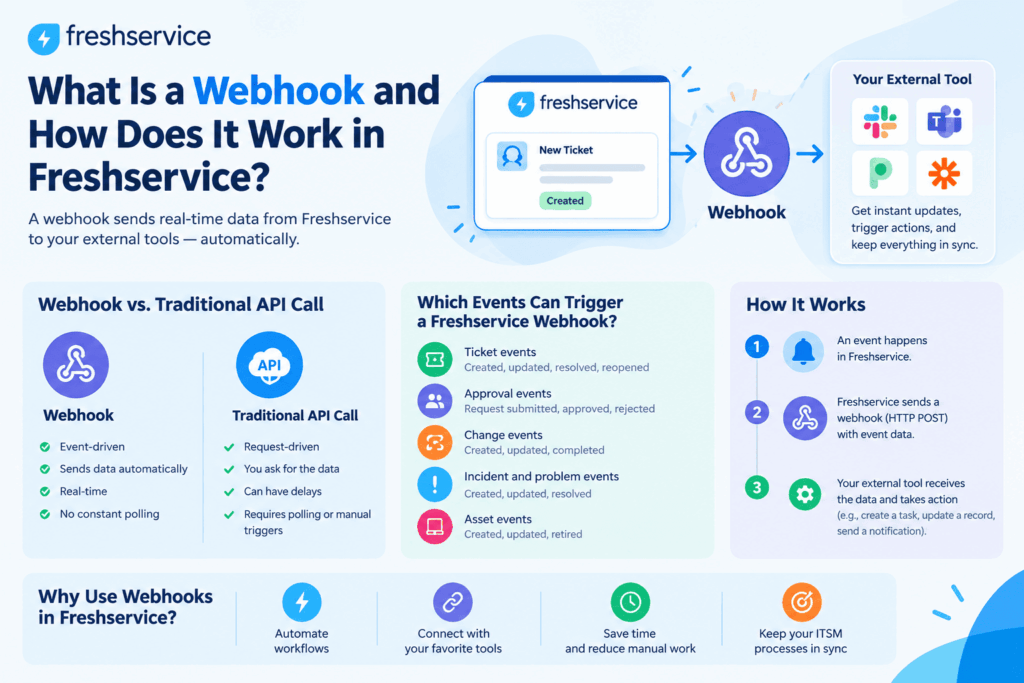
A webhook is an outbound callback that Freshservice sends to another application the moment a defined event occurs. Rather than waiting for an external system to check in for updates, Freshservice pushes the relevant data as soon as the triggering condition is met. This push-based model keeps other systems current in near real time, which matters most for time-sensitive actions like escalations, alerts, and provisioning steps.
How Does a Webhook Differ From a Traditional API Call?
A traditional API call is typically initiated by an external system that requests data from Freshservice on its own schedule, commonly known as polling. A webhook flips that relationship: Freshservice initiates the call the instant an event happens, so the receiving system does not need to ask repeatedly whether anything changed. Because of this difference, webhooks reduce unnecessary traffic and deliver information faster than most polling schedules can match.
Which Events Can Trigger a Freshservice Webhook?
The Workflow Automator can fire a webhook in response to a wide range of ticket, asset, and change events. Because conditions can narrow a trigger further, a workflow does not need to fire on every ticket update; instead, it can restrict itself to a specific ticket type, priority level, or department. Common triggers include the following:
- A new ticket is created or an existing ticket is updated
- An SLA is approaching or has breached its target
- A customer satisfaction rating is submitted
- A change request is created, approved, or rejected
- An asset field is added, updated, or removed
- A custom field value changes on a ticket or asset
How Do You Set Up a Webhook Using the Freshservice Workflow Automator?
Setting up a webhook does not require code. Instead, you configure it directly inside a workflow, following these steps:
- Create a new workflow in the Workflow Automator, then select the triggering event and any conditions that should narrow it.
- Under Actions, choose the “Trigger Webhook” option.
- Select the callback request type: GET to retrieve a resource, POST to create one, PUT or PATCH to update one, or DELETE to remove one.
- Enter the destination URL, using dynamic placeholders such as {{requestor.email}} where the receiving application expects specific values.
- Choose Simple content to send standard ticket properties automatically, or Advanced content to write a custom JSON, XML, or XML-encoded payload.
- Enable authentication if the destination requires it, then supply an API key or agent credentials.
- Test the webhook directly inside the Automator before activating the workflow, since a live activation is not the most efficient way to catch configuration errors.
How Do You Choose Between Simple and Advanced Webhook Content?
Simple content works well when the destination application only needs standard ticket properties, such as subject, status, or requester email, because Freshservice assembles the payload automatically. Advanced content, on the other hand, gives you full control over the request body, which becomes necessary when the receiving system expects a specific schema, nested objects, or fields that are not part of the default ticket structure. Teams generally start with Simple content and move to Advanced only once a specific integration demands it.
How Should You Configure Authentication for Outbound Webhooks?
Freshservice webhooks authenticate using Basic Access Authentication, which sends Base64-encoded credentials in the Authorization header. You can supply either a username and password combination or a Freshservice API key, and the receiving application decides which format it accepts. Because credentials travel with every call, it makes sense to rotate API keys periodically and to restrict which workflows can reference sensitive endpoints.
What Are the Freshservice Webhook Limits and Retry Rules?
Webhook reliability depends on understanding the platform’s built-in limits. Freshservice caps outbound webhook traffic and automatically retries failed calls according to a fixed schedule, summarized below.
| Limit | Detail |
| Hourly call cap | Up to 1,000 webhook requests are allowed per hour. |
| Success codes | HTTP status codes 200 to 299 count as success; 300 to 399 count as a redirect. |
| Response window | The destination must respond within 15 seconds. |
| Retry schedule | Failed calls retry up to four times, at 3, 5, 9, and 17-minute intervals. |
Because retries follow a fixed schedule rather than an immediate resend, a temporarily unavailable destination still has a reasonable chance of receiving the callback once it comes back online. However, teams should still monitor failed callbacks, since four retries will not compensate for a destination that stays down for an extended period.
How Does the Freshservice REST API Enable Deeper Automation?
While webhooks push data outward, the Freshservice REST API v2 allows external systems to pull data from Freshservice or push updates into it on demand. The API covers tickets, assets, requesters, agents, changes, problems, releases, departments, and groups, which means nearly every object a service desk manages is scriptable. This broader coverage is what allows teams to move beyond simple one-way alerts and build genuine two-way synchronization between Freshservice and the rest of their toolchain. Furthermore, because the API only accepts JSON over HTTPS, integrations built against it tend to be straightforward to maintain across different programming languages, whether a team scripts in Python, JavaScript, or another common language.
How Do You Authenticate API Requests in Freshservice?
API requests use the same Basic Auth pattern as webhooks. You generate an API key from your Freshservice profile settings, then pass it as the username in the Authorization header, using any placeholder string, conventionally the letter X, as the password. The credentials are Base64-encoded before they are sent, and every request must use HTTPS, since the API only accepts JSON over encrypted connections. Per-plan rate limits typically fall between 100 and 500 requests per minute, so high-volume integrations should include retry logic that respects HTTP 429 responses.
What Can You Automate Using the Ticket, Asset, and Change APIs?
Once authenticated, the API supports a wide range of automation tasks that go beyond what a single webhook callback can accomplish. Typical examples include:
- Bulk-creating or updating tickets from an external monitoring or alerting tool
- Synchronizing asset records with a CMDB, procurement system, or spreadsheet
- Advancing change requests through approval stages based on external sign-off
- Exporting ticket and SLA data for custom reporting dashboards
- Provisioning or deactivating requester accounts during onboarding and offboarding
How Do Webhooks and APIs Work Together in Real Automation Workflows?
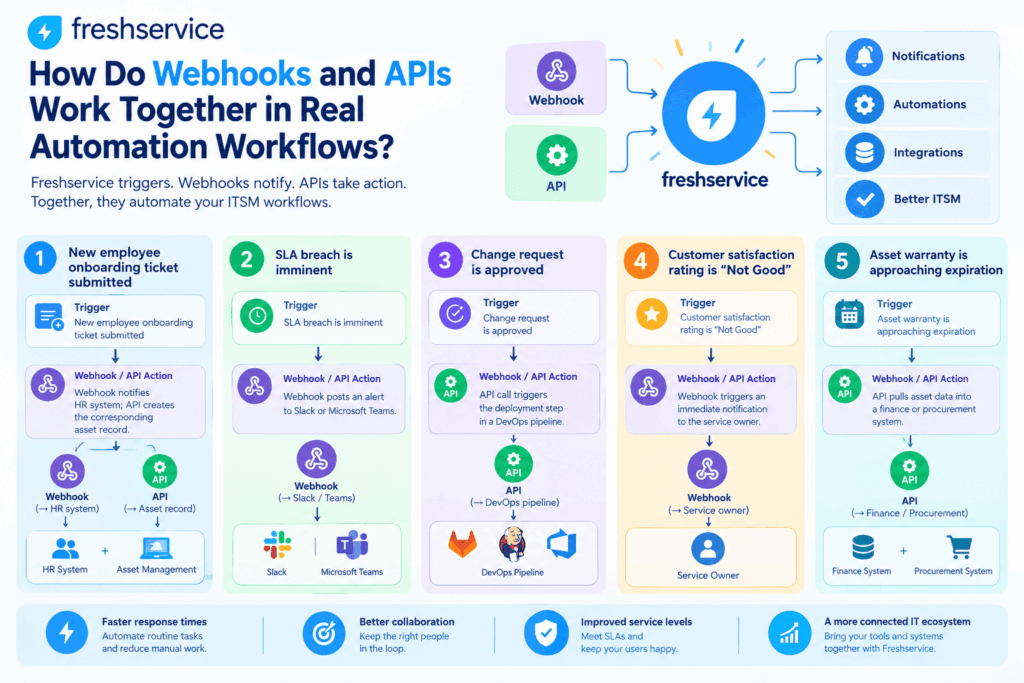
In practice, most mature Freshservice automations combine both tools rather than relying on one exclusively. A webhook typically handles the real-time trigger, while an API call handles the follow-up action that needs more detail or a two-way response. The table below illustrates a few representative workflows built this way.
| Trigger | Webhook / API Action | Business Outcome |
| New employee onboarding ticket submitted | Webhook notifies HR system; API creates the corresponding asset record | Faster, more consistent onboarding provisioning |
| SLA breach is imminent | Webhook posts an alert to Slack or Microsoft Teams | Faster escalation before the SLA is missed |
| Change request is approved | API call triggers the deployment step in a DevOps pipeline | Reduced manual handoff between ITSM and engineering |
| Customer satisfaction rating is “Not Good” | Webhook triggers an immediate notification to the service owner | Faster service recovery and follow-up |
| Asset warranty is approaching expiration | API pulls asset data into a finance or procurement system | Proactive replacement budgeting |
How Can You Automate Ticket Escalations With Webhooks?
Escalation is one of the most common webhook use cases because it depends entirely on speed. When an SLA condition is met, a webhook can post directly to a chat tool or paging system within seconds, well before a human agent would otherwise notice the ticket. Furthermore, because the webhook fires automatically, escalation no longer depends on an agent remembering to check dashboards during a busy shift.
How Can You Sync Freshservice Data With External Systems via API?
API-based synchronization suits situations that need more than a one-time alert, such as keeping an external CMDB aligned with Freshservice asset records. A scheduled script can call the API on a regular interval, compare records, and push only the fields that changed. This approach complements webhooks well: the webhook covers the moment something happens, while the API sync ensures nothing falls out of alignment between events.
How Do You Secure and Govern Freshservice Automation at Scale?
As the number of workflows grows, governance becomes just as important as the automations themselves. A handful of webhooks and scripts is easy to track informally, but dozens of workflows spread across multiple teams quickly become difficult to audit without a deliberate process. Establishing ownership, documentation, and credential hygiene early prevents automation sprawl from turning into a support burden later.
Who Should Own Freshservice Automation Long Term?
Most organizations assign a small group, often within IT operations, to own the Workflow Automator, Orchestration Center, and API integrations collectively, rather than letting individual agents build workflows independently. Centralized ownership makes it easier to review new automations before launch, identify overlapping or conflicting workflows, and maintain a single source of truth for active API keys and their usage.
How Should You Manage API Keys and Credentials?
Because both webhooks and API calls authenticate with the same API key or agent credentials, treating that key as a shared secret matters. Store keys in a secrets manager instead of embedding them in scripts, rotate them regularly, and revoke them immediately when you decommission an integration. Additionally, limiting which workflows or scripts reference a given key makes it far easier to trace the source of an issue if a call ever behaves unexpectedly.
What Are Common Mistakes to Avoid When Automating Freshservice Workflows?

Even well-designed automations run into trouble when a few common pitfalls go unaddressed. Watch for the following before rolling a workflow into production:
- Skipping the built-in Test Webhook step before activating a live workflow
- Ignoring the 15-second response window, which causes otherwise healthy destinations to fail
- Overloading a single workflow with too many conditions instead of splitting logic across smaller workflows
- Hardcoding API keys into scripts rather than rotating and storing them securely
- Failing to monitor retry failures, which can hide a broken integration for days
- Building duplicate workflows that fire the same webhook from multiple triggers, which wastes hourly call limits
- Leaving Advanced content payloads undocumented, which makes future troubleshooting far slower than it needs to be
None of these mistakes are difficult to avoid individually, but together they explain most of the automation failures that service desks encounter after go-live. Reviewing this list before activating any new workflow, and periodically afterward, catches most issues before they affect end users.
How Can You Test and Troubleshoot Freshservice Webhooks Effectively?
Freshservice includes a Test Webhook button directly inside the Workflow Automator, which sends a sample call and reports whether it succeeded, without needing to activate the entire workflow first. When a call fails, check the returned HTTP status code against Freshservice’s documented error table to identify whether the issue lies with authentication, payload formatting, or the destination itself. For more complex Advanced-content webhooks, tools such as Postman or a temporary request-capture endpoint make it easier to inspect the exact payload before pointing it at a production system. Beyond initial testing, it also helps to schedule periodic spot checks on production workflows, since a destination system can change its expected payload format or authentication requirements without warning.
Logging matters just as much as testing. Keeping a simple record of when a workflow was last modified, who modified it, and what outcome it should produce turns troubleshooting into a quick lookup rather than a guessing game. Teams that skip this step often spend far longer diagnosing a failed automation than they would have spent documenting it in the first place.
What Should You Take Away About Webhooks and Automation APIs in Freshservice?
Webhooks and the REST API give Freshservice teams two complementary ways to automate work: one pushes real-time alerts outward the moment something happens, and the other allows deeper, two-way synchronization with the rest of the toolchain. Used together, they turn Freshservice from a standalone ticketing system into the coordination point for onboarding, escalation, asset tracking, and change management across an entire IT environment. Ultimately, the teams that get the most value are the ones that start small, test thoroughly, and expand their automation footprint only as new use cases justify it, rather than trying to automate every process at once.
As automation footprints grow, the platform’s built-in limits, retry behavior, and governance practices become just as relevant as the initial setup steps. Treating Freshservice automation as an ongoing discipline, rather than a one-time configuration task, is what separates workflows that keep working reliably a year later from ones that quietly break the first time an external system changes.
What Do Teams Often Ask About Freshservice Webhooks and APIs?
Teams can usually configure and test a single webhook with Simple content within minutes because the process only requires selecting a trigger, an action, and a destination URL. Advanced content webhooks take longer, typically an hour or more, because they involve writing and testing a custom payload structure. Overall project timelines depend far more on the number of workflows a team plans to build and how thoroughly the team tests each one than on the mechanics of any single webhook.
No coding is required for Simple content webhooks, since the Workflow Automator assembles the payload automatically. Advanced content webhooks, however, do require writing a custom JSON, XML, or XML-encoded request body, so some technical familiarity helps once a workflow needs a non-standard payload.
Freshservice retries a failed call up to four times, at 3, 5, 9, and 17-minute intervals, after which it stops trying. If the destination remains unreachable after all retries, the callback is not delivered, so it is worth monitoring failed calls rather than assuming the retry schedule will eventually succeed on its own.
Yes, and in practice this combination is common. A webhook can handle the immediate, time-sensitive trigger, such as an alert or notification, while a scheduled or on-demand API call handles a broader synchronization task that needs more context than a single event payload provides.
Why Should You Partner With Solution for Guru for Freshservice Automation?

Designing and maintaining reliable webhooks and API integrations takes ongoing attention, which is where Solution for Guru comes in. As a CRM and software implementation consultancy, the team helps organizations plan, configure, and troubleshoot Freshservice automation so that internal IT staff are not left reverse-engineering payload formats or retry logic on their own.
| Common Implementation Gap | How Solution for Guru Addresses It |
| No clear mapping between Freshservice events and external systems | Documents trigger-to-action mappings before any workflow is built |
| Webhooks built without testing or retry monitoring | Implements test procedures and monitoring for every automation before go-live |
| API keys shared informally or hardcoded | Sets up secure credential management and rotation practices |
| Automation logic scattered across too many overlapping workflows | Consolidates and documents workflow logic for long-term maintainability |
Recommended:
- Using ManageEngine for IT Change Auditing and Governance
- How ITSM Platforms Support Digital Transformation Initiatives
- Building Advanced Incident Routing Logic in Freshservice
- Using Orchestration Center in Freshservice for IT Automation
- Common Freshservice Implementation Mistakes and How to Avoid Them
- Choosing and Implementing the Right ITSM Model for Your IT Team
- Best Practices for IT Asset Lifecycle Management Using ITSM Platforms
- How to Measure ITSM Success After Implementing Freshservice
- How Automation in Freshservice Helps Prevent IT Bottlenecks
- Multi-Tenant ITSM Architectures: What MSPs Should Know
- How Role-Based Access Control Improves ITSM Security
- How Self-Service Portals Improve Employee Experience in Freshservice
- ERP and ITSM Integration: Improving Operational Visibility Across Departments
- Integrating Endpoint Management Tools with Freshservice
- ManageEngine Asset Management (ITAM): Why Businesses Trust It to Control Their IT Assets
- Why Mid-Sized Companies Choose Freshservice Over Enterprise ITSM Platforms
- Best Reporting and Analytics Dashboards for IT Operations Teams in Freshservice
- How ITSM Platforms Support IT Compliance and Audit Readiness
- How ITSM Tools Support Internal IT Risk Management
- How AI Is Changing ITSM Workflows in Freshservice?
- How ITSM Platforms Like Freshservice Support Digital Transformation
- Freshservice CMDB Explained: Structure, Relationships, and Best Practices