Pipedrive MCP Explained: How AI Assistants Connect to Your CRM

AI assistants are turning into genuine coworkers, and sales teams want that shift to include their CRM. Pipedrive MCP is the bridge that makes this possible: a native connection that lets tools such as Claude or ChatGPT read and update live pipeline data without a developer team building a custom integration first.
Until recently, connecting an AI assistant to a CRM meant choosing between two imperfect options: a narrow, brittle custom script, or copying data back and forth by hand. Neither approach scales well once a team relies on AI throughout the day, which is exactly the gap Pipedrive MCP was built to close.
This article walks through what MCP actually is, how Pipedrive’s version works, what it can and cannot do, and how to set it up securely. Along the way, we will also show where a CRM implementation partner such as Solution for Guru fits into the picture.
Table of contents
What’s the Quick Summary?
MCP, or Model Context Protocol, is an open standard that connects AI assistants to external tools and data sources. Pipedrive launched a native MCP server in mid-2026, so assistants such as Claude and ChatGPT can read and act on live CRM data. Setup happens through a secure OAuth login, so users need no coding, APIs, or middleware. Connected assistants can search deals, update records, log activities, and surface pipeline insights using plain language. Every action still follows the user’s existing Pipedrive permissions, and the change log records it for full accountability. Solution for Guru configures Pipedrive and connects it safely to AI workflows so teams avoid trial-and-error setup mistakes.
What Is Pipedrive CRM, and Why Does It Matter Here?

Before diving into MCP itself, it helps to know the platform it connects to. Pipedrive CRM is a sales-focused CRM built around a visual pipeline: deals move through stages, the system schedules activities automatically, and reporting shows exactly where revenue is stuck or flowing. Because Pipedrive’s designers built it for salespeople rather than database administrators, an AI assistant can comparatively easily reason about its data structure once a protocol like MCP exposes it.
That combination, a clean data model plus a widely adopted AI standard, is exactly why Pipedrive MCP is worth understanding now. Consequently, the rest of this article treats Pipedrive as the working example throughout, though most of the underlying MCP concepts apply to other CRMs as well.
What Is the Model Context Protocol (MCP)?
The Model Context Protocol is an open standard that lets large language models and AI assistants securely interact with structured data and external services. Instead of an AI vendor building a one-off connector for every business tool, and instead of every business tool building a one-off connector for every AI vendor, MCP provides a single, consistent interface that both sides can implement once and reuse everywhere.
In practice, an MCP server acts as a translator. It sits in front of a system, such as a CRM, a calendar, or a support desk, and exposes a defined set of actions the AI assistant is allowed to take: searching records, creating entries, updating fields, and so on. The AI assistant never touches the underlying database directly; it only calls the actions the MCP server exposes, which keeps the connection predictable and auditable.
Why Did AI Assistants Need a Protocol Like This?
Before standards like MCP existed, connecting an AI assistant to business software meant custom API work for every pairing of tool and assistant. A company using both Claude and ChatGPT, for example, might have needed two separate integrations just to reach the same CRM data. That duplicated effort slowed adoption and made maintenance expensive, since any change to the underlying API could break several custom connectors at once.
MCP removes that duplication. Because the protocol is open and vendor-neutral, a business tool only needs one MCP server, and any MCP-compatible assistant can use it. This is the same logic that made USB more practical than proprietary cables: one interface, many devices.
There is also a trust dimension behind the standard’s rapid adoption. Because MCP defines exactly what an AI assistant can request and what data it can receive, businesses do not have to hand over broad, unrestricted access just to get useful functionality. That narrower, well-defined surface area is part of why CRMs and other business tools have been comfortable rolling out native MCP support so quickly.
What Is Pipedrive MCP and How Does It Work?
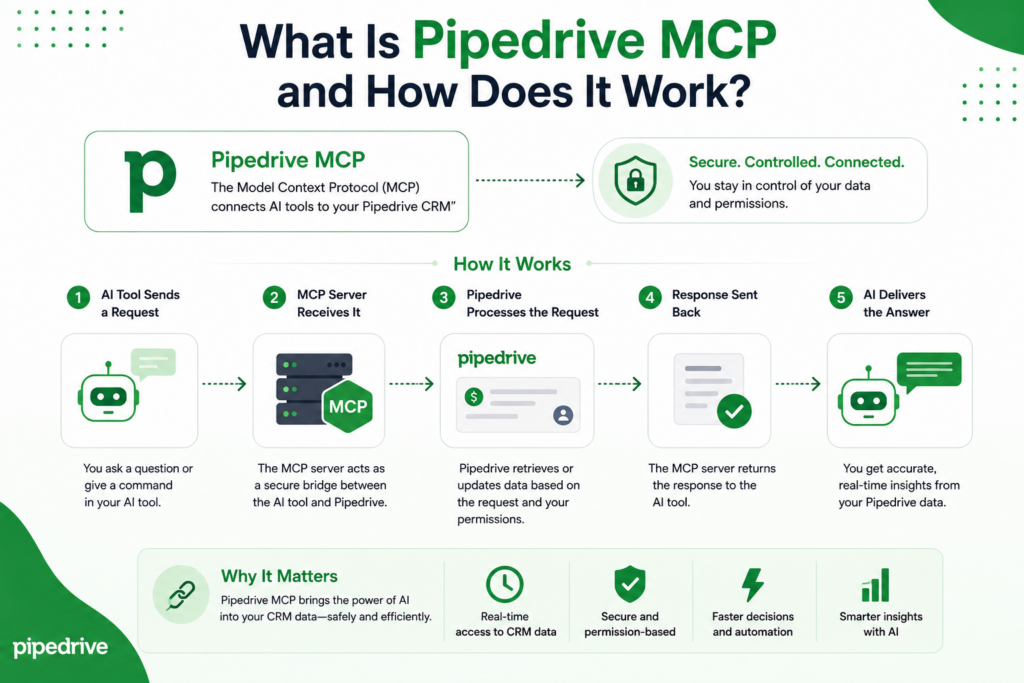
Pipedrive MCP is Pipedrive’s own, natively built MCP server. Announced on June 30, 2026, it lets customers securely connect their Pipedrive account to AI assistants such as ChatGPT, Claude, and other MCP-compatible tools, without writing code or standing up middleware. Once connected, an assistant can search deals, update contacts, schedule activities, analyze the pipeline, and trigger workflows directly from a chat conversation.
Because the server is native rather than a third-party wrapper around the public API, Pipedrive itself builds and maintains it. This matters for reliability: the MCP server automatically reflects updates to Pipedrive’s data model, so businesses do not have to wait on an unofficial connector to catch up after every product change.
One customer quoted in Pipedrive’s own launch materials described using the connection to hand manual work, such as data enrichment, lead discovery, and reminders, to AI without ever leaving Pipedrive. That framing captures the intended shift well: the goal is not a separate AI tool sitting beside the CRM, but AI woven into the workflow that already exists.
What Happens Behind the Scenes When You Ask an AI Assistant a Question?
When a salesperson types something like “which deals are most likely to close this month,” the AI assistant does not guess from memory. It sends a structured request through the MCP connection, the Pipedrive MCP server checks that the request fits within the user’s existing permissions, and it then queries live pipeline data before returning a real, current answer.
The assistant then formats that data into a natural-language response. If the request also involves an action, such as moving a deal to a new stage or logging a call, the same permission check applies before anything changes, and Pipedrive writes the change to its standard audit trail, exactly as if a person had made it by hand.
Which AI Assistants and Tools Can Connect?
Pipedrive MCP is designed to work with any MCP-compatible assistant, and Pipedrive specifically highlights direct connections with ChatGPT and Claude. Beyond those two, developer-oriented tools such as Cursor and custom large language model applications can also connect, since MCP is an open standard rather than a closed feature tied to one vendor.
Third-party hosted options exist too, including community and platform-hosted MCP servers built by partners such as Zapier, that wrap the Pipedrive API for teams who want automation across many connected apps at once. For most businesses, though, the native server is the simpler and more tightly integrated starting point.
How Do You Connect an AI Assistant to Pipedrive?
Setting up Pipedrive MCP is designed to be a business-user task rather than an engineering project. Still, a little preparation makes the first connection smoother, and knowing what to expect ahead of time avoids the confusion of clicking through settings menus looking for the right option.
What Do You Need Before You Start?
- An active Pipedrive account on any plan, since Pipedrive MCP is available across all pricing tiers
- Admin or appropriate user permissions in Pipedrive to approve a new connected application
- An MCP-compatible AI assistant, such as Claude or ChatGPT, with an active account
- A clear idea of which actions the assistant should be allowed to perform, since permissions can be scoped narrowly or broadly
What Are the Setup Steps?
- Open the MCP or connected-apps settings inside Pipedrive and locate the option to connect an AI assistant.
- Choose the assistant to connect, for example Claude or ChatGPT, and start the secure OAuth login flow.
- Log in and approve the requested permissions, confirming which data and actions the assistant may access.
- Return to the AI assistant and confirm the Pipedrive connection is active, usually shown as a linked data source or tool.
- Test the connection with a simple, low-risk request, such as asking the assistant to list open deals, before relying on it for updates.
- Review Pipedrive’s change log after the first few actions to confirm activity is being recorded as expected.
Because the entire flow runs through OAuth rather than shared API keys, revoking access later is just as simple: disconnecting the app inside Pipedrive immediately cuts off the AI assistant’s access. There is no lingering credential to rotate or forgotten script still quietly polling the API somewhere, which is a common cleanup headache with older, hand-built integrations.
What Can AI Assistants Actually Do With Pipedrive MCP?
The honest answer is: most of what a sales rep does inside Pipedrive during a normal day, minus the clicking. The table below groups common capabilities by category, though the exact list continues to grow as Pipedrive expands what its MCP server exposes.
| Category | What the AI Assistant Can Do |
| Finding information | Search deals, contacts, organizations, and leads by name, email, or phone, and pull up a full record instantly |
| Updating records | Edit contact details, add notes, apply labels, and update custom fields using natural language |
| Moving deals forward | Advance a deal to the next pipeline stage, flag it as won or lost, and log the reasoning behind the change |
| Scheduling work | Create and update activities such as calls, meetings, and follow-up tasks tied to a specific deal or contact |
| Surfacing insights | Answer questions like which deals are most likely to close this month, or which contacts have gone quiet |
| Automating busywork | Trigger existing workflows, add products to a deal, or attach a file to a record without opening Pipedrive |
Which Everyday Sales Tasks Does It Handle Best?
In practice, the tasks that benefit most are the repetitive, low-judgment ones: logging a call after it happens, pulling up a contact’s history before a meeting, or checking pipeline health across several deals at once. These are exactly the tasks that eat time without requiring much strategic thinking, so handing them to an assistant tends to free up meaningful hours each week.
Higher-judgment work, such as deciding how to handle a stalled enterprise deal, still benefits from AI assistance, but mainly as a research and summarization step. The assistant can gather the relevant history and surface patterns; the rep still makes the call.
Sales managers often see a second layer of value that individual reps do not: because the assistant can query across the whole pipeline rather than one rep’s view, it can answer team-wide questions, such as which reps have deals stalled at the same stage, in seconds rather than through a manually built spreadsheet.
How Does Pipedrive MCP Fit Into a Broader AI-Powered Sales Strategy?
Pipedrive MCP is best understood as one piece of a larger shift, not a standalone feature to switch on and forget. Many sales teams already use AI for writing outreach emails, summarizing calls, or researching prospects; MCP is what lets those separate AI habits draw on the same live CRM context instead of working from stale exports or manual copy-paste.
That context-sharing matters because disconnected AI tools tend to drift out of sync with reality. An assistant drafting a follow-up email without CRM access might reference a deal stage that changed yesterday. Once MCP is in place, the same assistant checks the live record first, so its output reflects where the deal actually stands.
Where Should a Team Start if It’s New to AI-Assisted Selling?
Teams new to this workflow generally do best starting narrow: connect MCP for a single, well-defined use case, such as pipeline summaries or activity logging, confirm it works reliably, and only then expand to record updates and automation. This staged rollout builds trust in the assistant’s output before it is given more responsibility, and it keeps the change manageable for reps who are still adjusting to a new way of working.
Is Pipedrive MCP Secure for Business Data?

Security is usually the first question businesses raise when AI assistants get access to CRM data, and it is a fair one. Pipedrive built its MCP server to interact with live data while respecting existing user permissions and maintaining a full audit trail of every action performed, rather than granting AI assistants a separate, looser layer of access.
This means an AI assistant connected through MCP cannot see or change more than the human user who authorized it could see or change. If a rep only has access to their own deals, the assistant working on their behalf is bound by the same restriction. That inherited-permission model is a meaningful safeguard, since it avoids the common integration pitfall of a connected app quietly having broader access than intended.
It is also important to separate two risks that often get lumped together: the AI assistant may see data it should not access, or it may act incorrectly on data it can access. Pipedrive’s permission model directly addresses the first risk. The second is more about how a team phrases requests and reviews output, which is a habit worth building deliberately during rollout rather than assuming it will happen on its own.
How Are Permissions and Audit Trails Enforced?
Every action taken through Pipedrive MCP, whether it is a search, an update, or a new record, follows the same permission checks Pipedrive already applies to that user, and it is recorded in Pipedrive’s standard change logs. That means administrators reviewing activity later see AI-assisted changes alongside manual ones, with no separate system to check.
For teams still cautious about full access, scoping the connection narrowly at setup, and testing with read-only requests first, is a reasonable way to build confidence before enabling record updates.
What Are the Benefits of Using Pipedrive MCP for Sales Teams?

Bringing the CRM into the AI assistant, rather than forcing reps to leave their workflow to check Pipedrive, changes daily habits in a few concrete ways. None of these benefits require reps to learn new software, either, since the interaction still happens through the assistant they already use.
- Less app-switching, since deal searches, updates, and scheduling happen inside the same conversation as everything else the assistant is helping with
- Faster meeting prep, because pulling a contact’s full history takes one natural-language request instead of several clicks
- More consistent activity logging, since it is quicker to log a call immediately after it happens
- Easier pipeline reviews, as an assistant can summarize which deals need attention without a manager building a report first
- Lower setup cost than a custom integration, since the native server requires no coding, APIs, or middleware
What Are the Limitations to Keep in Mind?
No integration is without trade-offs, and MCP is no exception. A few points are worth planning around before rolling it out broadly, so teams set realistic expectations from day one rather than discovering the gaps mid-rollout.
- Assistant behavior still depends on how clearly a request is phrased, so vague questions can produce vague or incomplete answers
- Because access mirrors the connecting user’s permissions, a poorly configured Pipedrive user role limits the assistant just as it would limit a person
- A human should still review bulk or highly sensitive changes before an assistant can make them without supervision.
- Third-party or community-hosted MCP servers, as opposed to the native Pipedrive server, may lag behind API changes or offer weaker safety guards
How Does Pipedrive MCP Compare to Traditional API Integrations?
Businesses that previously connected Pipedrive to other tools through the REST API or middleware platforms will notice several differences once MCP enters the picture.
| Factor | Traditional API Integration | Pipedrive MCP |
| Setup effort | Requires developer time to build and maintain | No-code OAuth connection, set up in minutes |
| Who can access it | Built for one specific tool or workflow | Any MCP-compatible AI assistant, once connected |
| Maintenance | Breaks when the API changes unless actively maintained | Maintained natively by Pipedrive alongside product updates |
| Interaction style | Structured, predefined workflows | Natural-language requests interpreted in context |
| Permission model | Depends entirely on how the integration was built | Inherits the connecting user’s existing Pipedrive permissions |
In short, MCP does not replace the API, since the API is still what powers the connection underneath. What changes is who can use that power, and how easily. For businesses that already invested in a custom integration, that older connection typically keeps working; MCP simply offers a faster, lower-maintenance path for new AI-assistant use cases going forward.
What’s the Bottom Line on Pipedrive MCP?
Pipedrive MCP brings a long-promised idea, AI assistants that actually work with live business data, into a form that is ready for everyday sales teams. Because Pipedrive builds it natively, requires no coding, and follows the same permissions and audit trail as a human user, it makes AI adoption easier while maintaining strong security standards.
For teams already using Pipedrive, connecting an assistant such as Claude or ChatGPT is a low-risk way to reduce app-switching and speed up routine work. Starting narrow, testing carefully, and expanding access gradually keeps the rollout smooth rather than overwhelming for reps who are used to doing everything by hand.
And for teams whose Pipedrive setup still needs attention before AI can add real value, that is exactly the gap a partner like Solution for Guru is built to close. Getting the CRM foundation right first is what turns Pipedrive MCP from a novelty into a workflow the whole sales team actually relies on.
Frequently Asked Questions
Pipedrive has stated that its native MCP server is available to customers on all Pipedrive plans, so there is no separate MCP-specific tier to purchase. Costs to plan for instead usually relate to the AI assistant itself, since tools like Claude or ChatGPT may have their own subscription requirements.
No. Every action performed through Pipedrive MCP follows the connecting user’s existing permissions and is recorded in Pipedrive’s standard change logs, the same place manual edits appear. Reviewing that log is the simplest way to confirm exactly what an assistant has done.
Not particularly. Because setup requires no coding and scales down to a single connected user, small teams and solo salespeople can benefit just as much, often by using an assistant to handle the CRM upkeep they would otherwise skip when busy. A solo founder managing their own pipeline, for instance, can ask an assistant to log a call the moment it ends instead of remembering to update Pipedrive later that evening.
Why Work With Solution for Guru on Your Pipedrive and AI Setup?
Turning on Pipedrive MCP is quick, but getting real value from it depends on how well the company sets up the CRM underneath in the first place. Messy pipelines, inconsistent custom fields, and unclear permission structures all carry over into how an AI assistant behaves, since the assistant can only work with the data it receives.

Solution for Guru specializes in CRM and software implementation, including Pipedrive configuration, data migration, and workflow automation. Rather than approaching AI connectivity as an afterthought, the team builds pipelines, custom fields, and user permissions with AI-assisted workflows in mind from the start.
- Clean, well-structured Pipedrive setup, so AI assistants return accurate answers instead of guessing around messy data
- Guided permission scoping, so connected assistants have exactly the access a team intends and nothing more
- Migration support for teams moving from another CRM, timed so MCP setup happens once the data is already reliable
- Ongoing support as Pipedrive and MCP-compatible tools continue to evolve, rather than a one-time setup and no follow-up
For businesses that want to move quickly on AI-assisted sales workflows without introducing avoidable risk, that combination of CRM expertise and implementation support is often the difference between a smooth rollout and a frustrating one. It also means a team only has to explain its sales process once, to a partner who then translates it into both a working Pipedrive setup and an AI-ready one.
Recommended:
- Sales Forecasting and Pipeline Management in Creatio CRM
- Pipedrive Sales Dashboard: How to Track Performance
- Pipedrive Automation Triggers and Actions Explained
- Pipedrive AI vs Traditional CRM Automation: What’s the Difference?
- ERP and ITSM Integration: Improving Operational Visibility Across Departments
- Integrating Endpoint Management Tools with Freshservice
- ManageEngine Asset Management (ITAM): Why Businesses Trust It to Control Their IT Assets
- Why Mid-Sized Companies Choose Freshservice Over Enterprise ITSM Platforms
- Best Reporting and Analytics Dashboards for IT Operations Teams in Freshservice
- How ITSM Platforms Support IT Compliance and Audit Readiness
- How ITSM Tools Support Internal IT Risk Management
- How AI Is Changing ITSM Workflows in Freshservice?
- How ITSM Platforms Like Freshservice Support Digital Transformation
- Freshservice CMDB Explained: Structure, Relationships, and Best Practices
- Freshservice for Remote and Hybrid Work Environments
- Automating Employee Onboarding and Offboarding with Freshservice
- ManageEngine ITSM: Standard vs Professional vs Enterprise — Which Edition Fits Your Team?
- ManageEngine SLA Management: How Does It Help IT Teams Meet Every Deadline?
- Freshservice for Growing Companies: When Is the Right Time to Upgrade ITSM?