How Automation in Freshservice Helps Prevent IT Bottlenecks
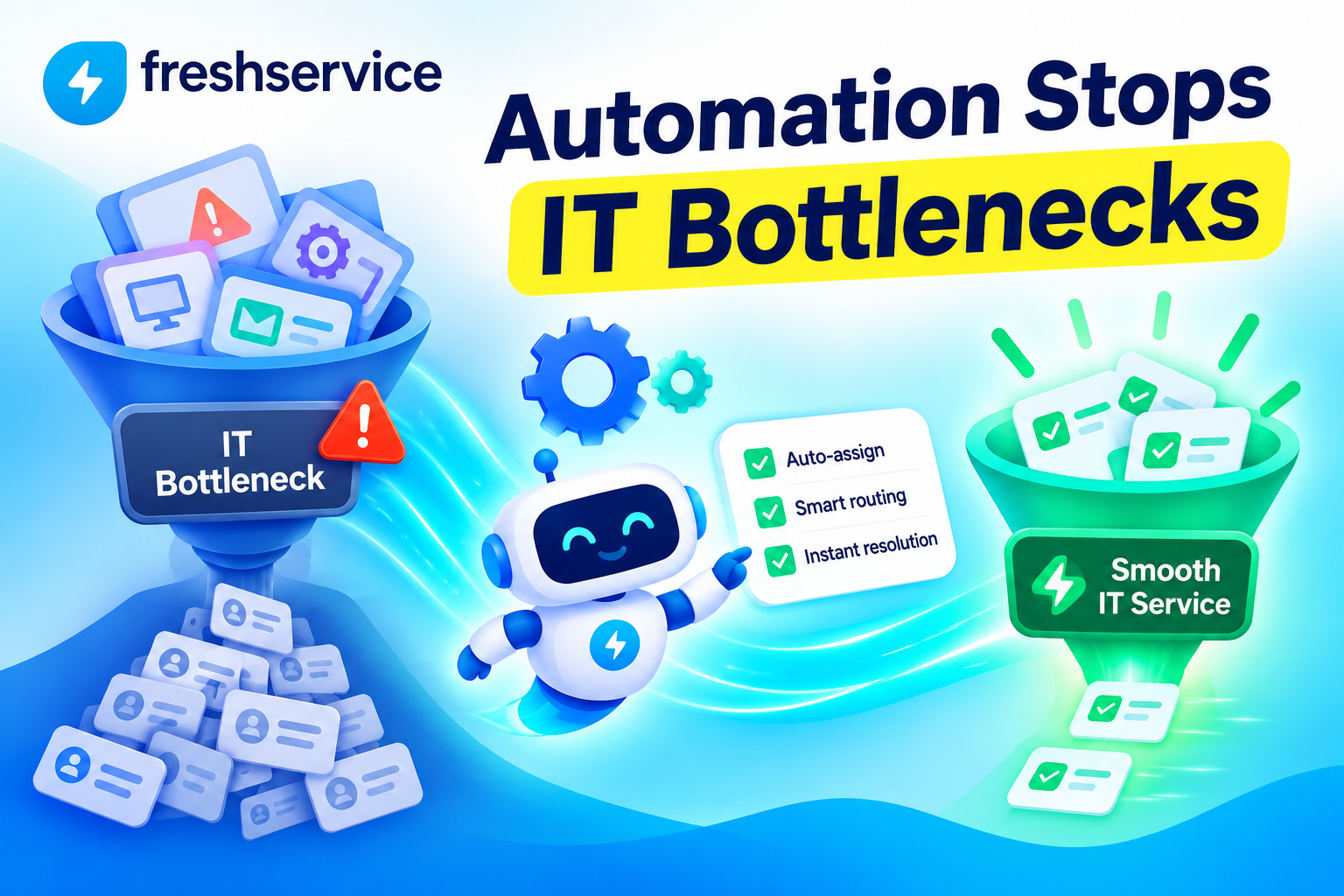
Bottlenecks rarely announce themselves. They build quietly — a ticket sits unassigned for a few extra hours, an approval waits in someone’s inbox, a routine onboarding task gets forgotten — until suddenly the whole service desk feels backed up and nobody can pinpoint exactly why. Manual processes are almost always at the root of this problem, since human attention simply doesn’t scale the way automated workflows do.
This article explains how automation inside Freshservice addresses these bottlenecks directly, which specific automation tools make the biggest difference, and how IT teams can put these capabilities to work before backlogs start affecting the business.
Table of contents
Quick Summary
- IT bottlenecks typically form at predictable points: ticket routing, prioritization, approvals, and repetitive task handling.
- Freshservice provides a Workflow Automator, SLA-based escalation rules, and AI-powered tools that intervene at each of these points automatically.
- Automated routing and prioritization prevent tickets from sitting unassigned or misclassified.
- Proactive SLA escalation catches at-risk tickets before they breach deadlines, rather than after.
- Standardized workflows for onboarding, offboarding, and approvals eliminate the missed steps that commonly stall service delivery.
- Solution For Guru helps organizations design and configure Freshservice automations that target their specific bottleneck points, rather than relying on generic default rules.
How Does Freshservice ITSM Relate to This Topic?

Freshservice ITSM is directly relevant here because bottleneck prevention is one of the platform’s core design goals, not an incidental feature. Freshservice combines ticket management, a service catalog, and asset visibility with a dedicated automation engine built specifically to remove the manual steps that typically slow service delivery down.
Why Is Freshservice Built Around Workflow Standardization?
According to an independent review of the platform, Freshservice allows organizations to standardize how requests, incidents, changes, and approvals are handled, which matters because inconsistency creates delays, confusion, and reporting gaps. When workflows follow a consistent, predictable structure, teams know what happens next, managers can see where bottlenecks appear, and employees get a more predictable support experience.
What Automation Capabilities Set Freshservice Apart?
Freshservice’s automation isn’t limited to simple routing rules. The platform includes a visual, no-code Workflow Automator that lets teams design workflows that automate incidents, requests, changes, assets, and HR or facilities tasks, so teams spend less time on tickets and more on strategic work. This breadth matters because IT bottlenecks rarely stem from just one process — they show up across ticket intake, prioritization, approvals, and cross-department handoffs alike.
Where Do IT Bottlenecks Typically Form in the First Place?
Before looking at how automation solves the problem, it helps to understand exactly where bottlenecks tend to originate. Most trace back to a small set of recurring failure points.
What Happens During Ticket Intake and Routing?
When tickets arrive faster than agents can manually sort and assign them, a queue starts to build. Even a short delay in routing compounds across dozens or hundreds of tickets per day, especially during high-volume periods like Monday mornings or after a system outage.
What Happens with Prioritization?
Manually deciding which tickets deserve urgent attention introduces inconsistency. Different agents may judge severity differently, and without a standardized method, high-priority issues can sit behind lower-priority ones simply because nobody flagged them correctly at intake.
What Happens with Approvals?
Multi-step approval processes — for software access requests, budget sign-offs, or change management — are especially prone to stalling. A single unavailable approver can hold up an entire request chain, and without automated reminders, these requests can sit forgotten for days.
What Happens with Repetitive, Multi-Step Tasks?
Processes like employee onboarding or offboarding involve numerous small steps across different systems and teams. When these steps rely on someone remembering to complete them manually, it’s easy for individual tasks to slip through the cracks, creating delays that ripple outward to other departments waiting on IT.
How Do These Bottleneck Points Compare in Terms of Impact?
| Bottleneck Point | Typical Cause | Business Impact |
|---|---|---|
| Ticket intake and routing | Manual sorting can’t keep pace with volume | Slower first response, growing backlog |
| Prioritization | Inconsistent judgment across agents | Urgent issues buried behind minor ones |
| Approvals | Single unavailable approver holds up requests | Stalled projects, frustrated requesters |
| Multi-step tasks | Steps forgotten without a tracked process | Incomplete onboarding, cross-department delays |
How Does Freshservice’s Workflow Automator Address These Bottlenecks?
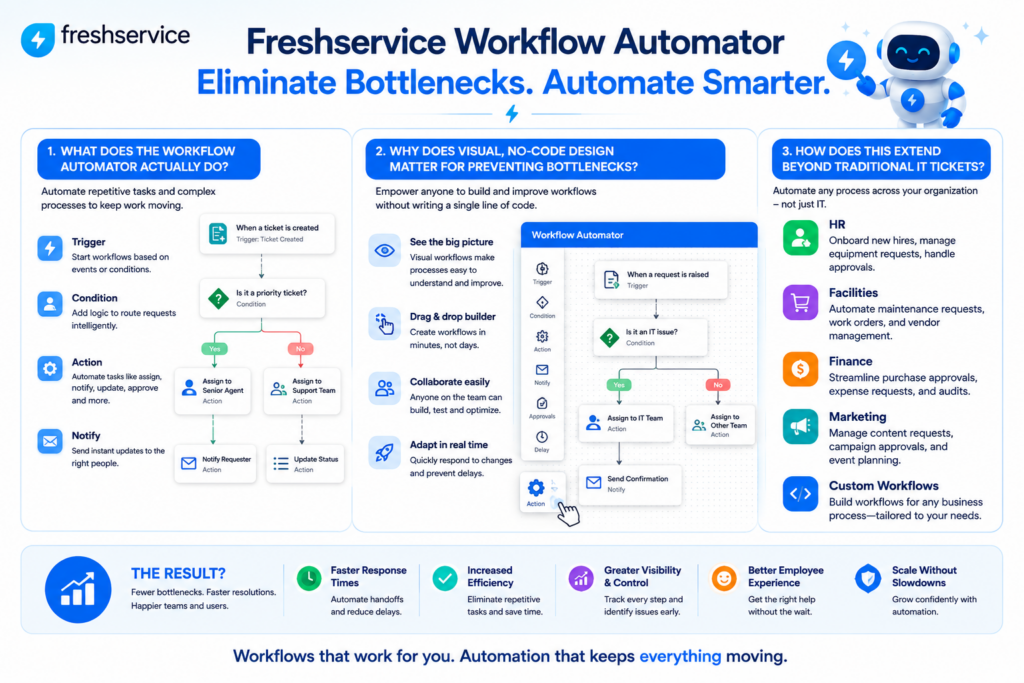
The Workflow Automator functions as Freshservice’s central tool for eliminating exactly the kinds of manual gaps described above.
What Does the Workflow Automator Actually Do?
Rather than relying on scattered, one-off ticket rules, the Workflow Automator gives teams a visual canvas for building complete processes. As one Freshservice-focused resource describes it, this tool is the visual automation engine inside Freshservice that turns IT and employee service processes into drag-and-drop workflows instead of scattered ticket rules.
Why Does Visual, No-Code Design Matter for Preventing Bottlenecks?
A no-code interface means IT teams don’t need to wait on developer resources to build or adjust a workflow. When a bottleneck emerges — say, tickets consistently stalling at a particular approval step — teams can identify the issue and modify the relevant workflow directly, without a lengthy development cycle standing between spotting the problem and fixing it.
How Does This Extend Beyond Traditional IT Tickets?
Bottlenecks don’t only affect incident and request tickets. The Workflow Automator’s reach into HR or facilities tasks means the same automation logic that prevents IT bottlenecks can be applied to adjacent service functions, which matters for organizations using Freshservice as a broader enterprise service management platform rather than a narrowly scoped IT tool.
How Does Automated Routing Prevent Tickets from Stalling?
Ticket routing is often the very first point where a bottleneck can form, making it one of the highest-value places to apply automation.
How Does Freshservice Handle Automatic Ticket Routing?
Freshservice allows teams to automate repetitive service desk work, such as routing tickets, setting priorities, triggering approvals, and sending notifications, removing the need for a human to manually review and assign every incoming request. This alone eliminates one of the most common sources of early-stage delay.
What Routing Logic Can Teams Configure?
| Routing Method | How It Works | Best Suited For |
|---|---|---|
| Category-based routing | Tickets route to specific teams based on issue type | Well-defined categories with dedicated specialists |
| Priority-based routing | Higher-priority tickets get routed or flagged first | Environments with clear urgency tiers |
| Workload-based routing | Tickets distribute based on current agent capacity | Teams with uneven ticket volume across agents |
| Round-robin routing | Tickets rotate evenly across available agents | Teams with broadly similar skill sets |
Why Does Consistent Routing Reduce Downstream Bottlenecks?
Once tickets reach the right team or agent immediately, every subsequent step in the resolution process starts sooner. This has a compounding effect: a ticket that reaches the correct agent an hour faster typically gets resolved faster too, since it doesn’t sit waiting to be manually reassigned or rediscovered in a general queue.
How Does SLA-Based Escalation Prevent Missed Deadlines?
SLA breaches are one of the clearest signs a bottleneck has already caused real damage. Freshservice’s automation targets this specific failure point directly, aiming to catch problems before they cross that threshold.
Why Do Manual SLA Monitoring Efforts Typically Fail?
Manually tracking dozens or hundreds of active tickets against their individual deadlines is simply not sustainable at scale. As one resource focused on Freshservice automation notes, manual monitoring often results in missed deadlines and dissatisfied users, since human attention naturally drifts toward whichever ticket feels most urgent in the moment, not necessarily the one closest to breaching its SLA.
How Does Freshservice Automate SLA Protection?
Freshservice flips this dynamic by monitoring deadlines continuously and intervening automatically. According to guidance on the platform’s automation capabilities, teams can proactively escalate tickets at risk of breaching SLAs, keeping resolution on track, rather than only reacting after a deadline has already passed.
What Specific Escalation Actions Can Be Automated?
- Trigger alerts or reassign tickets when they’re approaching, or have breached, SLA targets.
- Automatically escalate to managers for overdue or high-priority incidents.
- Send reminder notifications to agents as deadlines near.
How Do You Configure This Kind of Escalation Workflow?
Setting this up follows a clear, repeatable process. Teams typically go to Admin > Workflow Automator or Observer for ticket updates, set conditions based on SLA breach status, ticket priority, or elapsed time, and add actions to reassign tickets, set higher priorities, or notify stakeholders. Once configured, this workflow runs continuously in the background without requiring ongoing manual oversight.
How Does Automation Prevent Bottlenecks in Onboarding and Offboarding?
Multi-step processes like onboarding and offboarding are particularly vulnerable to bottlenecks, since they depend on multiple people completing tasks in the right order without anyone dropping the ball.
Why Are These Processes Especially Prone to Delays?
Onboarding typically spans IT provisioning, account creation, hardware assignment, and access permissions — often coordinated across several teams. Without a structured workflow, a single missed step, like forgetting to provision a specific software license, can leave a new employee unable to work on their first day, creating frustration that reflects poorly on IT even when the root cause was a simple oversight.
What Best Practices Does Freshservice Support Here?

Guidance on Freshservice automation workflows recommends teams maintain a standardized onboarding and offboarding template, ensuring every required step is captured and tracked, and automate notifications to task owners to eliminate bottlenecks. This combination — a consistent template plus automated reminders — closes the exact gap where manual processes typically fail.
How Does This Reduce Cross-Department Friction?
When IT, HR, and facilities all rely on the same automated workflow for onboarding tasks, each team gets visibility into what’s already been completed and what’s still pending. This transparency prevents the common scenario where one department assumes another has already handled a task, only to discover days later that nobody actually completed it.
How Do AI-Powered Tools Extend Freshservice’s Bottleneck Prevention?
Beyond rule-based automation, Freshservice layers in AI capabilities that address bottlenecks automation rules alone can’t fully solve, particularly around ticket volume itself.
How Does Freddy AI Reduce Ticket Volume at the Source?
One of the most effective ways to prevent bottlenecks is reducing how many tickets require human intervention in the first place. Guidance on Freshservice’s AI capabilities describes how Freddy AI can support ticket deflection, cutting the levers that actually reduce IT ticket volume by resolving common, repetitive requests before they ever require an agent.
How Does AI-Assisted Categorization Help?
Consistent, accurate ticket categorization directly affects how well automated routing rules perform. Native workflow tools combined with AI-powered classification help ensure tickets land in the correct category from the start, which matters because automating ticket categorization in Freshservice reduces the manual correction work that otherwise slows down triage.
How Does Proactive Monitoring Prevent Tickets from Ever Being Created?
Some of the most effective bottleneck prevention happens before a ticket exists at all. Integrations that monitor devices and systems can flag device issues before users log tickets, while AI insights highlight bottlenecks that can be fixed with better workflows. This shifts IT from a purely reactive posture to one that catches problems proactively, reducing overall ticket volume and the associated risk of backlog.
What Does a Practical Freshservice Automation Rollout Look Like?
Understanding the available tools is one thing; sequencing their implementation effectively is another. A structured rollout tends to produce better results than trying to automate everything simultaneously.
Where Should Teams Start?
Begin with the highest-volume, lowest-complexity processes: basic ticket routing and category-based assignment. These deliver immediate, measurable relief with minimal configuration risk, and they build organizational confidence in automation before tackling more complex workflows.
What Should Come Next?
Once routing is stable, layer in SLA-based escalation rules to catch at-risk tickets automatically. This second phase directly targets the bottlenecks that cause the most visible damage — missed deadlines and dissatisfied end users — building on the foundation the first phase established.
What Should Come Last?
Multi-step processes like onboarding, offboarding, and complex approval chains benefit from automation last, since they typically involve more stakeholders and require more careful mapping before converting them into an automated workflow. Rushing this stage risks encoding a broken process into automation rather than fixing it first.
What Ongoing Maintenance Keeps Automations Effective?
- Review automation performance regularly against actual bottleneck data, not assumptions.
- Update routing categories as team structures or service offerings change.
- Revisit SLA thresholds periodically to ensure they still reflect realistic expectations.
- Retrain or adjust AI-powered deflection tools as common ticket types shift over time.
How Does Automation Reduce Bottlenecks in Change Management?
Change management is another area where manual coordination frequently causes delays, and it carries higher stakes than routine ticket handling since a poorly managed change can disrupt production systems.
Why Do Change Requests Often Stall Without Automation?
Change requests typically require review, risk assessment, and approval from multiple stakeholders before implementation. Without a structured, automated path connecting these steps, a change can sit waiting on a single reviewer’s attention for days, even when the underlying work itself would take only a few hours to complete.
How Does Freshservice Structure Change Workflows?
Freshservice supports structured change management as part of its core ITSM functionality, standardizing how change requests move from submission through approval to implementation. This structure means every change follows a consistent, trackable path rather than depending on informal follow-up emails or verbal check-ins to keep the process moving.
How Does Automated Notification Prevent Approval Delays?
Automated reminders sent directly to approvers when a request is waiting on them address one of the most common causes of change-related delay: the request simply being forgotten in a busy inbox. Combining this with automatic escalation to a backup approver after a set period ensures a single unavailable stakeholder doesn’t stall an entire change indefinitely.
What Role Does Change Success Rate Play in This Process?
Tracking change success rate over time helps teams see whether faster, automated change workflows are also maintaining quality. A rising success rate alongside reduced approval times indicates that automation is genuinely improving the process, not just moving changes through faster while introducing new risk.
How Can IT Teams Measure Whether Automation Is Actually Reducing Bottlenecks?

Implementing automation is only valuable if it produces measurable improvement. Without tracking the right indicators, it’s difficult to confirm whether bottlenecks have genuinely eased or simply shifted somewhere less visible.
Which Metrics Show Whether Routing Automation Is Working?
Time-to-assignment is the most direct indicator here. If the average time between ticket creation and agent assignment drops significantly after implementing automated routing, that’s a clear sign the intended bottleneck has been addressed. A stagnant or worsening time-to-assignment metric, on the other hand, suggests the routing rules may need adjustment.
Which Metrics Show Whether SLA Escalation Is Working?
SLA breach rate is the natural metric to track here. A meaningful reduction in breaches after implementing proactive escalation confirms the automation is catching at-risk tickets early enough to matter. It’s also worth watching whether breaches cluster around specific times or ticket types even after automation, since that pattern can reveal a bottleneck automation alone hasn’t fully resolved.
Which Metrics Show Whether Onboarding Automation Is Working?
Time-to-productivity for new employees serves as a strong proxy metric. If new hires consistently have working accounts, hardware, and access permissions ready by their first day after implementing a standardized, automated onboarding workflow, that’s tangible evidence the process improvement is holding up in practice, not just on paper.
What Should You Do If Metrics Don’t Improve After Automating?
If a bottleneck persists despite automation, the underlying process itself likely needs re-evaluation rather than another automation layer. Automating a poorly designed process typically just makes the flaws move faster, rather than eliminating them. In these cases, it’s worth mapping the process manually first, identifying where the actual friction lives, and then rebuilding the automated workflow around that corrected process.
What Role Does Cross-Team Visibility Play in Preventing Bottlenecks?
Bottlenecks often form not because any single team is working slowly, but because different teams lack visibility into each other’s progress, leading to duplicated effort or dropped handoffs.
How Does Shared Visibility Prevent Duplicate Work?
When IT, HR, and facilities teams all work from the same automated workflow for a shared process like onboarding, each team can see exactly which steps have already been completed. This prevents the common scenario where two teams both assume the other has handled a task, and it also prevents unnecessary duplicate follow-up messages that add noise without adding progress.
How Does Freshservice Support This Kind of Visibility?
Because Freshservice’s Workflow Automator can span IT, HR, and facilities tasks within a single platform, cross-team dependencies become visible in one place rather than scattered across separate tools or email threads. This shared visibility is often what actually prevents a bottleneck from forming in the first place, since problems get caught by whichever team notices first, rather than only surfacing once a deadline has already passed.
Why Does This Matter More as Organizations Scale?
Smaller organizations can sometimes get away with informal cross-team coordination, since fewer people and processes are involved. As an organization grows, informal coordination breaks down quickly, and the teams that continue relying on it tend to experience bottlenecks disproportionately more than those that have already automated their shared workflows. Building this visibility early, before growth makes the gaps painfully obvious, tends to pay off significantly down the line.
Conclusion
IT bottlenecks almost always trace back to manual processes that can’t keep pace with ticket volume, complexity, or the number of people involved in a multi-step workflow. Freshservice addresses each of these failure points directly — automated routing gets tickets to the right team immediately, SLA-based escalation catches at-risk tickets before deadlines slip, standardized onboarding and offboarding workflows close the gaps where manual coordination typically breaks down, and AI-powered tools reduce overall ticket volume before bottlenecks can even form.
Getting the full benefit of these capabilities, however, requires more than simply enabling the features. It takes a thoughtful rollout sequence, workflows genuinely mapped to how a business actually operates, and ongoing maintenance as processes evolve. This is exactly where Solution For Guru adds real value. The team helps organizations identify their specific bottleneck points and configure Freshservice’s automation tools to target them directly, rather than relying on generic default rules that don’t reflect the organization’s real workflow. For IT teams that want Freshservice’s automation to genuinely prevent bottlenecks rather than just shift them elsewhere, partnering with Solution For Guru provides the structured, business-specific setup that makes the difference.

Frequently Asked Questions
No. Freshservice’s Workflow Automator uses a visual, drag-and-drop interface, allowing IT teams to build and adjust workflows without writing code. This makes it possible to respond quickly to emerging bottlenecks without waiting on developer availability.
Yes. Freshservice’s automation capabilities extend beyond incident and request tickets into areas like HR and facilities tasks, as well as multi-step processes such as onboarding and offboarding. This means the same bottleneck-prevention logic can apply across multiple service functions within an organization, not just the IT help desk.
Freshservice combines self-service tools, AI-powered ticket deflection through Freddy AI, and proactive monitoring integrations that flag issues before users need to submit a ticket. Reducing ticket volume at the source is one of the most effective ways Freshservice helps prevent bottlenecks from forming, since fewer tickets mean less pressure on routing, prioritization, and resolution processes downstream.
Recommended:
- Multi-Tenant ITSM Architectures: What MSPs Should Know
- How Role-Based Access Control Improves ITSM Security
- How Self-Service Portals Improve Employee Experience in Freshservice
- ERP and ITSM Integration: Improving Operational Visibility Across Departments
- Integrating Endpoint Management Tools with Freshservice
- ManageEngine Asset Management (ITAM): Why Businesses Trust It to Control Their IT Assets
- Why Mid-Sized Companies Choose Freshservice Over Enterprise ITSM Platforms
- Best Reporting and Analytics Dashboards for IT Operations Teams in Freshservice
- How ITSM Platforms Support IT Compliance and Audit Readiness
- How ITSM Tools Support Internal IT Risk Management
- How AI Is Changing ITSM Workflows in Freshservice?
- How ITSM Platforms Like Freshservice Support Digital Transformation
- Freshservice CMDB Explained: Structure, Relationships, and Best Practices
- Freshservice for Remote and Hybrid Work Environments
- Automating Employee Onboarding and Offboarding with Freshservice
- ManageEngine ServiceDesk Plus for Mid-Size Business: Is It the Right ITSM Fit?
- ManageEngine ITSM: Standard vs Professional vs Enterprise — Which Edition Fits Your Team?
- ManageEngine SLA Management: How Does It Help IT Teams Meet Every Deadline?